
Android 开发技术流程
1.网络连接通信
HttpClient 类通信(见《第一行代码》 郭霖2014.8月第一版P385)
Android Asynchronous Http Client (见 http://loopj.com/android-async-http/ )
更多见 https://github.com/itheima1/Android
2.网页浏览 webView
https://github.com/getlantern/FinestWebView-Android
3.日志工具(一个静态类)
public class LogUtil{

    public static final int VERBOSE =1;

    public static final int DEBUG =2;

    public static final int INFO=3;

    public static final int WARN=4;

    public static final int ERROR=5;

    public static final int NOTHING=6;

    public static final int LEVEL=VERBOSE;

    public static void v(String tag,String msg){

        if(VERBOSE>=LEVEL){

            Log.v(tag,msg);

        }

    }

    public static void d(String tag,String msg){

        if(DEBUG>=LEVEL)

        {

            Log.d(tag,msg);

        }

    }

    public static void i(String tag,String msg){

        if(INFO>=LEVEL){

            Log.i(tag,msg);

        }

    }

    public static void w(String tag,String msg){

        if(WARN>=LEVEL){

            Log.w(tag,msg);

        }

    }

    public static void e(String tag,String msg){

        if(ERROR>=LEVEL){

            Log.e(tag, msg);

        }

    }

}
4.Active切换
public class SecondActivity extends Activity{

        public static  void actionStart(Context context,String data1,String datta2){

            Intent intent = new Intent(context,SecondActivity.class);

            intent.putExtra("param1",data);

            intent.putExtra("param2",data2);

            context.startActivity(intent);

        }

    }
5.Intent 传递对象(例如Person对象)
一.Person 要继承 Serializable(即;public class Person implements Serializable{.....})
二.传递有intent.putExtra("person",person)
三.获取对象 Person person = (Person) getInstant().getSerializableExtra("person");
6.全局获取Context(and 全局变量存储)
7.左侧滑出菜单栏(使用布局:android.support.v4.widget.DrawerLayout)
<android.support.v4.widget.DrawerLayout

    xmlns:android="http://schemas.android.com/apk/res/android"

    android:id="@+id/drawer_layout"

    android:layout_width="match_parent"

    android:layout_height="match_parent">

    <!-- The main content view -->

    <FrameLayout

        android:id="@+id/content_frame"

        android:layout_width="match_parent"

        android:layout_height="match_parent" />

    <!-- The navigation drawer -->

    <ListView android:id="@+id/left_drawer"

        android:layout_width="240dp"

        android:layout_height="match_parent"

        android:layout_gravity="start"       <!--此处是关键语句-->

        android:choiceMode="singleChoice"

        android:divider="@android:color/transparent"

        android:dividerHeight="0dp"

        android:background="#111"/>

</android.support.v4.widget.DrawerLayout>
禁止滑动调出侧边栏:
参考资料:http://blog.csdn.net/very_caiing/article/details/41854569
https://developer.android.com/training/implementing-navigation/nav-drawer.html
8.Android开发需要新建的文件夹
Helpers:存放一些帮助类文件
Models:存放模型
Services:存放网络通信,或一些调用手机硬件接口的方法类
Adapters: ListView 的adapter
Controls:存放自定义控件
Fragments:存放定义的Fragents
9.知晓当前实在哪一个活动
在onCreate()方法中添加语句:
Log.d("BaseActivity",getClass().getSimpleName());
10.Android 图表控件
https://github.com/PhilJay/MPAndroidChart
https://github.com/PhilJay/MPAndroidChart/wiki
11.Android 开发必看
http://www.jdzhao.com/
http://a.codekk.com/
https://github.com/hehonghui/android-tech-frontier
http://www.simplecoder.cn/
http://www.open-open.com/lib/view/open1461395311690.html //完整项目mvp
http://blog.csdn.net/typename/article/details/39030091 //webview
http://www.devtf.cn/
12.Android网络HttpClient(像html中 ajax 调用服务)
和Ajax的功能相同(确保服务ajax可以正常使用)
1.“http://192.168.17.44:81/amtioth5.Wcf/AjaxGetData/DataService.asmx”是地址
2.hello是方法名
3.obj.put("name", "your name"); 传参数。
4.相关下载:链接:http://pan.baidu.com/s/1eSsftya 密码:pf52
 try {

            HttpClient httpclient = new DefaultHttpClient();

            String uri = "http://192.168.17.44:81/amtioth5.Wcf/AjaxGetData/DataService.asmx/hello";  //类似这样的地址也可以:http://192.168.17.44:81/amtioth5.Wcf/Service2.svc/DoWork2

            HttpPost httppost = new HttpPost(uri);

            //添加http头信息

            httppost.addHeader("Content-Type", "application/json");

            httppost.addHeader("User-Agent", "imgfornote");

            //http post的json数据格式:  {"name": "your name","parentId": "id_of_parent"}

            JSONObject obj = new JSONObject();

            obj.put("name", "your name");

            httppost.setEntity(new StringEntity(obj.toString()));

            HttpResponse response;

            response = httpclient.execute(httppost);

            int code = response.getStatusLine().getStatusCode();

            if (code == 200) {

                String rev = EntityUtils.toString(response.getEntity());

            }

        } catch (ClientProtocolException e) {

        } catch (IOException e) {

        } catch (JSONException e) {

        }
13.线程
一、新建一个类继承子Thread
class MyThread extends Thread{

    @Override

    public void run(){

        //TODO

    }

}
//启动线程

new MyThread().start();
二、实现Runnable 接口
class MyThread implements Runnable{

    @Override

    public void run(){

        //TODO

    }

}

//启动线程

MyThread myThread = new MyThread();

new Thread(myThread).start();
//UI interactive
private Handler handler = new Handler(){

    public void handlerMessage(Message msg){

        switch(msg.what){

            // case .... handle UI

            default:

                break;

        }

    }

}
三、使用AsyncTask /*recommend*/
class DownLoadTask extends AsyncTask<Void, Integer, Boolean>{

    @Override

    protected void onPreExecute(){}

    @Override

    protected Boolean doInBackground(void... params){return true;}

    @Override

    protected void onProgressUpdate(Integer... value){}

    @Override

    protected void onPostExecute(Boolean result){}

}

// 执行

new DownLoadTask().execute();
14.底部tab
http://www.jcodecraeer.com/a/anzhuokaifa/androidkaifa/2015/0731/3247.html
https://www.aswifter.com/2015/07/02/Material-Design-Example-5/
https://github.com/lwngreat/MaterialDesignExample
https://www.aswifter.com/2015/08/09/implements-bottom-tab-with-tablayout/
http://www.jianshu.com/p/c3f6d316ec5b
https://www.aswifter.com/android/ /*importent*/
15.Android Studio 使用 proguard
配置文件 proguard-rules.pro (Eclipse中的文件名为proguard.cfg)
#指定代码的压缩级别

-optimizationpasses 5

#是否使用大小写混合

-dontusemixedcaseclassnames

#优化/不优化输入的类文件

-dontoptimize

#是否混淆第三方jar包

-dontskipnonpubliclibraryclasses

#混淆时是否做预校验

-dontpreverify

#混淆时是否记录日志

-verbose

#混淆时所采用的算法

-optimizations !code/simplification/arithmetic,!field/*,!class/merging/*

#保护注解

-keepattributes *Annotation*

#保持JNI用到的native方法不被混淆

-keepclasseswithmembers class * {

    native <methods>;

}

#保持自定义控件的构造函数不被混淆,因为自定义控件很可能直接写在布局文件中

-keepclasseswithmembers class * {

    public <init>(android.content.Context, android.util.AttributeSet);

}

#保持自定义控件的构造函数不被混淆

-keepclasseswithmembers class * {

    public <init>(android.content.Context, android.util.AttributeSet, int);

}

#保持布局中onClick属性指定的方法不被混淆

-keepclassmembers class * extends android.app.Activity {

   public void *(android.view.View);

}

#保持枚举enum类不被混淆

-keepclassmembers enum * {

    public static **[] values();

    public static ** valueOf(java.lang.String);

}

#保持序列化的Parcelable不被混淆

-keep class * implements android.os.Parcelable {

  public static final android.os.Parcelable$Creator *;

}

#指定哪些第三方jar包需要混淆

#-libraryjars libs/bcprov-jdk16-1.46.jar

#保持哪些系统组件类不被混淆

-keep public class * extends android.app.Fragment

-keep public class * extends android.app.Activity

-keep public class * extends android.app.Application

-keep public class * extends android.app.Service

-keep public class * extends android.content.BroadcastReceiver

-keep public class * extends android.content.ContentProvider

-keep public class * extends android.app.backup.BackupAgentHelper

-keep public class * extends android.preference.Preference

-keep public class * extends android.support.v4.**

-keep public class com.android.vending.licensing.ILicensingService

#保持哪些第三方jar包不被混淆

-keep class com.baidu.** {*;}

-keep class vi.com.** {*;}

-dontwarn com.baidu.**

-dontwarn org.xmlpull.v1.XmlPullParser

-dontwarn org.xmlpull.v1.XmlSerializer
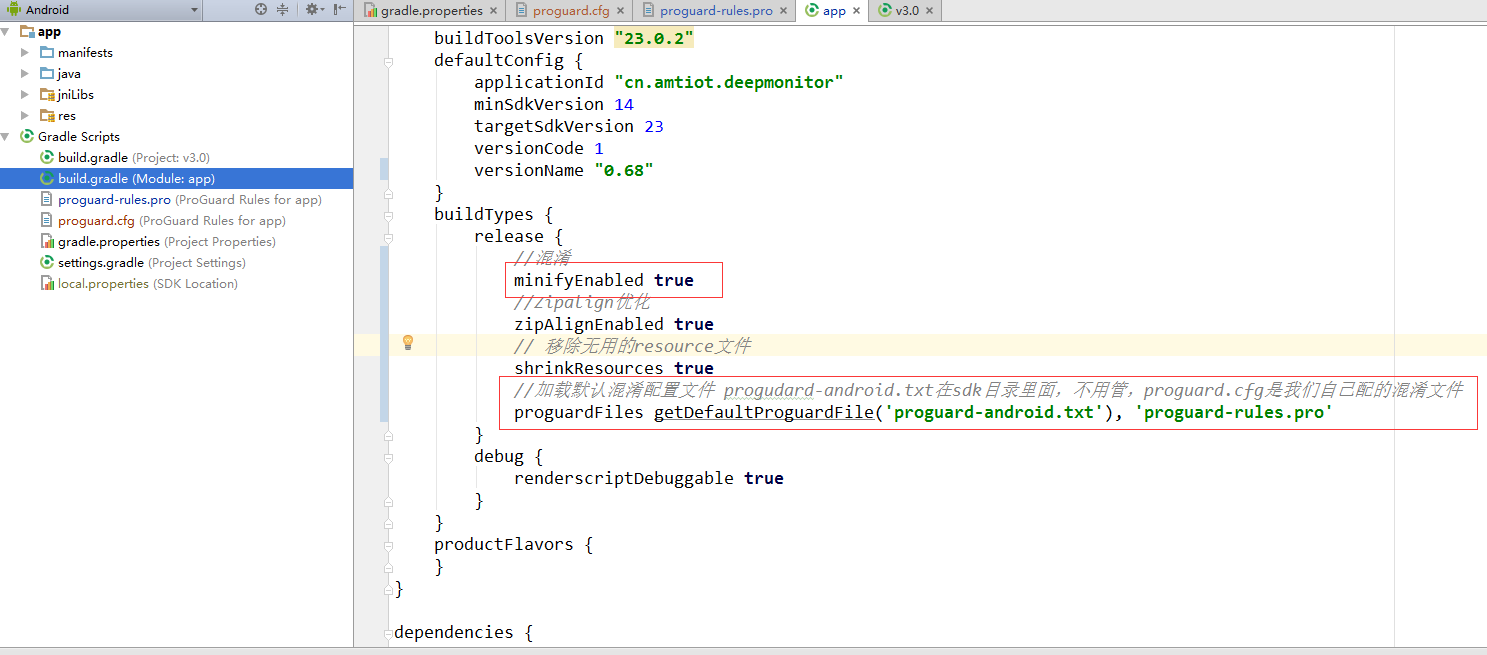
将配置添加的app项目中
17:40:18 Gradle build finished with 1 error(s) and 23 warning(s) in 2s 946ms
17:40:18 Generate Signed APK: Errors while building APK. You can find the errors in the 'Messages' view.
/*************-------------------*******************/
Warning:library class android.content.res.ColorStateList depends on program class org.xmlpull.v1.XmlPullParser
Warning:library class android.graphics.drawable.AnimationDrawable depends on program class org.xmlpull.v1.XmlPullParser
Warning:library class android.graphics.drawable.BitmapDrawable depends on program class org.xmlpull.v1.XmlPullParser
Warning:library class android.graphics.drawable.ClipDrawable depends on program class org.xmlpull.v1.XmlPullParser
Warning:library class android.graphics.drawable.ColorDrawable depends on program class org.xmlpull.v1.XmlPullParser
Warning:library class android.graphics.drawable.Drawable depends on program class org.xmlpull.v1.XmlPullParser
Warning:library class android.graphics.drawable.GradientDrawable depends on program class org.xmlpull.v1.XmlPullParser
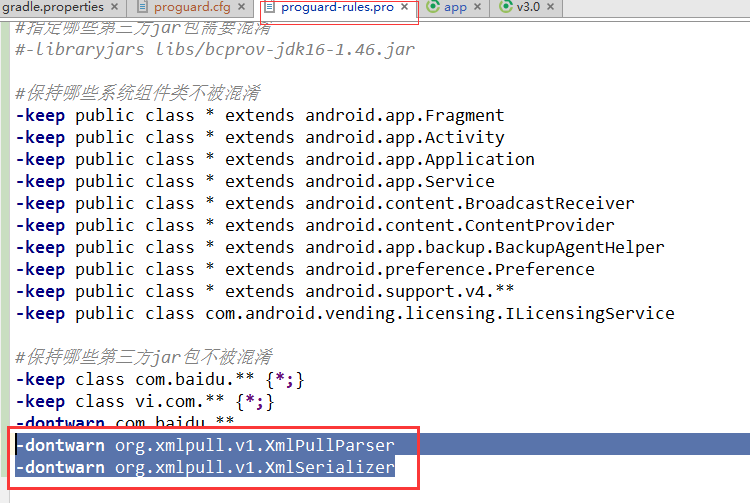
解决方法:在proguard-rules.pro 添加如下内容
-dontwarn org.xmlpull.v1.XmlPullParser
-dontwarn org.xmlpull.v1.XmlSerializer
16.App检测更新
http://blog.csdn.net/wwj_748/article/details/8195565
图书:
Android 源码设计模式解析与实战(何红辉,关爱民 著)
Android 开发技术流程的更多相关文章
- Android开发技术周报182学习记录
Android开发技术周报182学习记录 教程 App安全二三事 记录 为什么要安全 App的移动安全主要包括下面几种: 密钥破解,导致本地加密数据被盗取. 通信密钥破解,导致接口数据被盗取. 伪造接 ...
- Android开发技术周报176学习记录
Android开发技术周报176学习记录 教程 当 OkHttp 遇上 Http 2.0 http://fucknmb.com/2018/04/16/%E5%BD%93OkHttp%E9%81%87% ...
- Android开发技术周报
Android开发技术周报 原文 http://androidweekly.cn/android-dev-weekly-issue48/ 教程 深入理解Android之Gradle Gradle是当 ...
- Android开发技术周报183学习记录
Android开发技术周报183学习记录 教程 Android性能优化来龙去脉总结 记录 一.性能问题常见 内存泄漏.频繁GC.耗电问题.OOM问题. 二.导致性能问题的原因 1.人为在ui线程中做了 ...
- Android 开发技术周报 Issue#277
新闻 Android 11界面再调整:加入快速截屏.多任务向国产ROM看齐 最新版Android 11推送 谷歌Pixel 5被曝光:支持反向充电 4月Android系统版本分布:8.0 Oreo最主
- Android 开发 技术大纲
大家好, 下面 是 Android 开发 的 技术大纲, 觉得 画的很好, 所以 转载过来, 这个 技术大纲 出自 “享学课堂” .
- Android 开发技术选型(博客,新闻,阅读类)
前言 最开始学习写应用的时候,发现类聚合数据这个平台可以提供一些免费数据接口,于是写了个人的第一个应用-– JuheNews,当时的知识储备稍显粗糙,虽然现在的知识也不咋滴,但是相对之前而言还是有些进 ...
- Android开发技术重要参考资料
只言片语 有的时候看不懂别人的代码,觉得自己笨:其实,你想多了,看不懂不是因为你蠢而是别人的代码写得烂:所以,别那么宽容别人却苛责自己. 参考资料 郭霖 way 爱哥 有心 胡凯 robin trin ...
- Android 开发技术周报 Issue#278
新闻 Pixel 4a渲染图曝光:或能成新款iPhone SE有力竞争者 Google Play商店为预注册的游戏和应用提供自动安装功能 Android最强单摄Pixel 4a样张曝光:1200万像素 ...
随机推荐
- sqlite的事务
好久没用数据库,知识都忘了,之前用sqlite 逐行insert数据,发现这性能实在是太坑,10w条数据,插入大约花了100来分钟. 后来发现还有事务这么一个东西,可以大幅度降低对io的操作,测试插入 ...
- 新浪短链接API接口示例
<?php /** * URL地址长短切换,由sina新浪短链接API生成 * User: chenqt * Date: 2016/8/23 * Time: 18:45 */ class Url ...
- mac删除顽固图标
cd /Users/shelley/Library/Application\ Support/Dock cp 10CCA448-0975-41DE-B47A-8E89FD634227.db 10 ...
- 接入SDK
管理提醒: 本帖被 fm2010 设置为精华(2014-11-12) http://www.cocoachina.com/bbs/read.php?tid-239087.html 本帖属于Co ...
- Centos下配置Java运行环境
今天搞了个阿里云,Centos主机 先搞了Tomcat 然后配置Java环境 1.修改文件可执行 chmod 777 (u+x) 文件名 2.配置环境变量 vi /etc/profile 加入如下代码 ...
- scons构建自己的一个简单的程序
我在我的D盘下,新建一个文件夹,命名为try.在这个文件夹下新建两个文件,一个文件是test.c .里面的程序很简单: #include<stdio.h>#include<stdli ...
- 【转】sqlmap用户手册
http://192.168.136.131/sqlmap/mysql/get_int.php?id=1 当给sqlmap这么一个url的时候,它会: 1.判断可注入的参数2.判断可以用那种SQL注入 ...
- cf A. Jeff and Digits
http://codeforces.com/contest/352/problem/A #include <cstdio> #include <cstring> #includ ...
- rsync实现文件备份同步(比如服务器镜像)
[rsync实现网站的备份,文件的同步,不同系统的文件的同步,如果是windows的话,需要windows版本cwrsync] 一.什么是rsync rsync,remote synchronize顾 ...
- php-timeit估计php函数的执行时间
首先,前段时间利用手头的日本VPS搭建了一个google代理,访问速度还行,分享给大家: 谷歌 谷歌:guge119.com 谷歌学术:scholar.guge119.com 有时候我们在PHP性能优 ...