
Windows Server 2008 R2 ntoskrnl.exe 引起蓝屏故障,重新启动
前不久在HP ProLiant DL360 G6的服务器上面安装了Windows Server 2008 R2,系统一到晚上凌晨就出现蓝屏、重启现象,并且在 C:\Windows\Minidump 目录下面产生一些Dump文件,如下图所示:
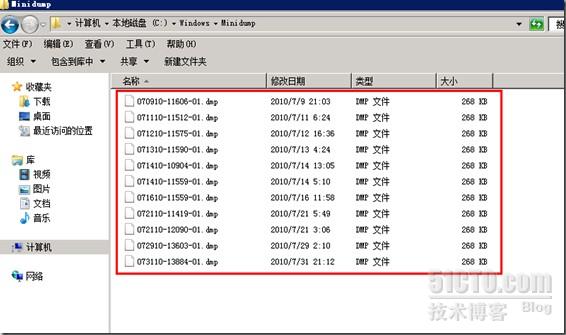
后面我用微软的Windbg程序查看了一下系统产生的Dump文件内容,分析一下文件日志,发现内容如下:
Microsoft (R) Windows Debugger Version 6.11.0001.404 X86
Copyright (c) Microsoft Corporation. All rights reserved.
Loading Dump File [C:\新建文件夹\DMP\073110-13884-01.dmp]
Mini Kernel Dump File: Only registers and stack trace are available
Symbol search path is: *** Invalid ***
****************************************************************************
* Symbol loading may be unreliable without a symbol search path. *
* Use .symfix to have the debugger choose a symbol path. *
* After setting your symbol path, use .reload to refresh symbol locations. *
****************************************************************************
Executable search path is:
*********************************************************************
* Symbols can not be loaded because symbol path is not initialized. *
* *
* The Symbol Path can be set by: *
* using the _NT_SYMBOL_PATH environment variable. *
* using the -y <symbol_path> argument when starting the debugger. *
* using .sympath and .sympath+ *
*********************************************************************
Unable to load p_w_picpath \SystemRoot\system32\ntoskrnl.exe, Win32 error 0n2
*** WARNING: Unable to verify timestamp for ntoskrnl.exe
*** ERROR: Module load completed but symbols could not be loaded for ntoskrnl.exe
Windows 7 Kernel Version 7600 MP (8 procs) Free x64
Product: Server, suite: Enterprise TerminalServer SingleUserTS
Built by: 7600.20655.amd64fre.win7_ldr.100226-1909
Machine Name:
Kernel base = 0xfffff800`0161c000 PsLoadedModuleList = 0xfffff800`01854e50
Debug session time: Sat Jul 31 21:02:49.632 2010 (GMT+8)
System Uptime: 2 days 10:42:35.740
*********************************************************************
* Symbols can not be loaded because symbol path is not initialized. *
* *
* The Symbol Path can be set by: *
* using the _NT_SYMBOL_PATH environment variable. *
* using the -y <symbol_path> argument when starting the debugger. *
* using .sympath and .sympath+ *
*********************************************************************
Unable to load p_w_picpath \SystemRoot\system32\ntoskrnl.exe, Win32 error 0n2
*** WARNING: Unable to verify timestamp for ntoskrnl.exe
*** ERROR: Module load completed but symbols could not be loaded for ntoskrnl.exe
Loading Kernel Symbols
...............................................................
................................................................
..................
Loading User Symbols
Loading unloaded module list
...........
*******************************************************************************
* *
* Bugcheck Analysis *
* *
*******************************************************************************
Use !analyze -v to get detailed debugging information.
BugCheck 101, {19, 0, fffff88001c5d180, 2}
***** Kernel symbols are WRONG. Please fix symbols to do analysis.
*************************************************************************
*** ***
*** ***
*** Your debugger is not using the correct symbols ***
*** ***
*** In order for this command to work properly, your symbol path ***
*** must point to .pdb files that have full type information. ***
*** ***
*** Certain .pdb files (such as the public OS symbols) do not ***
*** contain the required information. Contact the group that ***
*** provided you with these symbols if you need this command to ***
*** work. ***
*** ***
*** Type referenced: nt!_KPRCB ***
*** ***
*************************************************************************
*************************************************************************
*** ***
*** ***
*** Your debugger is not using the correct symbols ***
*** ***
*** In order for this command to work properly, your symbol path ***
*** must point to .pdb files that have full type information. ***
*** ***
*** Certain .pdb files (such as the public OS symbols) do not ***
*** contain the required information. Contact the group that ***
*** provided you with these symbols if you need this command to ***
*** work. ***
*** ***
*** Type referenced: nt!KPRCB ***
*** ***
*************************************************************************
*************************************************************************
*** ***
*** ***
*** Your debugger is not using the correct symbols ***
*** ***
*** In order for this command to work properly, your symbol path ***
*** must point to .pdb files that have full type information. ***
*** ***
*** Certain .pdb files (such as the public OS symbols) do not ***
*** contain the required information. Contact the group that ***
*** provided you with these symbols if you need this command to ***
*** work. ***
*** ***
*** Type referenced: nt!_KPRCB ***
*** ***
*************************************************************************
*************************************************************************
*** ***
*** ***
*** Your debugger is not using the correct symbols ***
*** ***
*** In order for this command to work properly, your symbol path ***
*** must point to .pdb files that have full type information. ***
*** ***
*** Certain .pdb files (such as the public OS symbols) do not ***
*** contain the required information. Contact the group that ***
*** provided you with these symbols if you need this command to ***
*** work. ***
*** ***
*** Type referenced: nt!KPRCB ***
*** ***
*************************************************************************
*************************************************************************
*** ***
*** ***
*** Your debugger is not using the correct symbols ***
*** ***
*** In order for this command to work properly, your symbol path ***
*** must point to .pdb files that have full type information. ***
*** ***
*** Certain .pdb files (such as the public OS symbols) do not ***
*** contain the required information. Contact the group that ***
*** provided you with these symbols if you need this command to ***
*** work. ***
*** ***
*** Type referenced: nt!_KPRCB ***
*** ***
*************************************************************************
*************************************************************************
*** ***
*** ***
*** Your debugger is not using the correct symbols ***
*** ***
*** In order for this command to work properly, your symbol path ***
*** must point to .pdb files that have full type information. ***
*** ***
*** Certain .pdb files (such as the public OS symbols) do not ***
*** contain the required information. Contact the group that ***
*** provided you with these symbols if you need this command to ***
*** work. ***
*** ***
*** Type referenced: nt!_KPRCB ***
*** ***
*************************************************************************
*************************************************************************
*** ***
*** ***
*** Your debugger is not using the correct symbols ***
*** ***
*** In order for this command to work properly, your symbol path ***
*** must point to .pdb files that have full type information. ***
*** ***
*** Certain .pdb files (such as the public OS symbols) do not ***
*** contain the required information. Contact the group that ***
*** provided you with these symbols if you need this command to ***
*** work. ***
*** ***
*** Type referenced: nt!_KPRCB ***
*** ***
*************************************************************************
*************************************************************************
*** ***
*** ***
*** Your debugger is not using the correct symbols ***
*** ***
*** In order for this command to work properly, your symbol path ***
*** must point to .pdb files that have full type information. ***
*** ***
*** Certain .pdb files (such as the public OS symbols) do not ***
*** contain the required information. Contact the group that ***
*** provided you with these symbols if you need this command to ***
*** work. ***
*** ***
*** Type referenced: nt!_KPRCB ***
*** ***
*************************************************************************
*********************************************************************
* Symbols can not be loaded because symbol path is not initialized. *
* *
* The Symbol Path can be set by: *
* using the _NT_SYMBOL_PATH environment variable. *
* using the -y <symbol_path> argument when starting the debugger. *
* using .sympath and .sympath+ *
*********************************************************************
*********************************************************************
* Symbols can not be loaded because symbol path is not initialized. *
* *
* The Symbol Path can be set by: *
* using the _NT_SYMBOL_PATH environment variable. *
* using the -y <symbol_path> argument when starting the debugger. *
* using .sympath and .sympath+ *
*********************************************************************
Probably caused by : ntoskrnl.exe
Followup: MachineOwner
---------
其中有一项Probably Caused by :ntoskrnl.exe,说明是ntoskrnl.exe造成的原因,后面在微软的网站上面,找了一下KB,在微软的Support站点上面找到了3个补丁:
http://support.microsoft.com/kb/975530
此KB:975530是修复:停止错误消息正在运行 Windows Server 2008 R2 和的一个英特尔至强 5500 系列处理器的计算机上已安装的 Hyper-V 角色:"0x00000101-CLOCK_WATCHDOG_TIMEOUT"
http://support.microsoft.com/kb/982927
此KB:982927修复:您会收到错误消息,指出文件系统已损坏或 Windows Server 2008 R2 中 Windows 7 的ntoskrnl.exe 。
http://support.microsoft.com/kb/979444
此KB:979444修复:正在运行 Windows 7 或 Windows Server 2008 R2 的计算机上的蓝色屏幕上的错误消息:"STOP: 0x0000000A"
下图是我的打的补丁截图:

之后也没有发生过蓝屏重启事件了!!!!!!!
Windows Server 2008 R2 ntoskrnl.exe 引起蓝屏故障,重新启动的更多相关文章
- Windows Server 2008 R2常规安全设置及基本安全策略
这篇文章主要介绍了Windows Web Server 2008 R2服务器简单安全设置,需要的朋友可以参考下 用的腾讯云最早选购的时候悲催的只有Windows Server 2008 R2的系统,原 ...
- 如何在Windows Server 2008 R2没有磁盘清理工具的情况下使用系统提供的磁盘清理工具
今天,刚好碰到服务器C盘空间满的情况,首先处理了临时文件和有关的日志文件后空间还是不够用,我知道清理C盘的方法有很多,但今天只分享一下如何在Windows Server 2008 R2没有磁盘清理工具 ...
- Windows Server 2008 R2 负载平衡入门篇
一.简单介绍负载均衡 负载均衡也称负载共享,它是指负载均衡是指通过对系统负载情况进行动态调整,把负荷分摊到多个操作节点上执行,以减少系统中因各个节点负载不均衡所造成的影响,从而提高系统的工作效率.在常 ...
- Windows Server 2008 R2中的ASP.NET环境架设
.NET Framework的部分功能在Windows Server 2008 R2得到支持,包括:.NET 2/3/3.5的子集和ASP.NET.另外,PowerShell也在Server Core ...
- Windows Server 2008 R2遗忘管理员密码后的解决方案
在日常的工作中,对于一个网络管理员来讲最悲哀的事情莫过于在没有备用管理员账户和密码恢复盘的情况下遗忘了本地管理员账户密码. 在早期的系统中,遇到这种事情可以使用目前国内的很多Windows PE光盘来 ...
- Windows Server 2008 R2 64bit兼容Chrome浏览器
近日更换系统Windows Server 2008 R2 64bit系统,发现谷歌浏览器插件无法正常运行,终于找到如下解决方案: 打开桌面谷歌浏览器属性,将target目标 C:\Users\Admi ...
- Windows Server 2008 R2 域控制器部署指南
一.域控制器安装步骤: 1.装 Windows Server 2008 R2并配置计算机名称和IP地址(见 附录一) 2.点击“开始”,在“搜索程序和文件”中输入Dcpromo.exe后按回车键: 3 ...
- Windows Server 2008 R2 SP1 下载地址
Windows Server 2008 R2 SP1 http://download.microsoft.com/download/0/A/F/0AFB5316-3062-494A-AB78-7FB0 ...
- 在 Windows Server 2008 R2 上安装 IIS 7.5
原文 在 Windows Server 2008 R2 上安装 IIS 7.5 默认情况下,Windows Server(R) 2008 R2 上不安装 IIS 7.5.可以使用服务器管理器中的“添加 ...
随机推荐
- Navicat连接mysql时候出现1251错误代码
出现1251错误代码 是因为mysql8.0的密码加密方式与之前5.0的不同 如果是字母式的密码 比如root 可能会出现这种情况 1.先通过命令行进入mysql的root账户 Enter passw ...
- 如何让tomcat加载项目变快
修改配置: VM options填写内容: -Xms128m -Xmx256m -XX:PermSize=128m -XX:MaxPermSize=256m` 图示: ##1: ##2:
- 使用C语言实现文件的操作
#include <stdio.h> int main(int argc, char* argv[]) { // 创建文件类型 FILE* file; char buf[1024] = { ...
- PHP常用的一些优化技巧
PHP常用的一些优化技巧 点击联系老杨 ecshop模板 php 优化技巧 老杨ecshop ecshop二次开发 2013-03-29 0 做为最流行的WEB语言, PHP他的突出优势就是其速度与效 ...
- c-指针的理解
c-指针的理解 最近在学习MFC,其中的代码有点看的不是很深刻,究其原因还是对c语言中的指针理解的不是很好,下面详细的给大家介绍一下指针,如有不当之处,欢迎各位读者指正. 一.指针的概念 C语言里,变 ...
- css 盒子模型简介
盒子模型 <!DOCTYPE html> <html> <head> <meta charset="utf-8" /> <ti ...
- 分享Burp Suite遇到的各种坑
1.性质问题 价格昂贵 专业版高达399美元/每年,免费版有功能限制:https://portswigger.net/buy/pro,构想中的工具应该是免费开源的. 破解版存在安全隐患 https:/ ...
- Golang基础之文件操作
目录 文件读取 os.open文件读取 os.open循环读取 bufio文件读取 bufio循环读取 ioutil读取整个文件 文件写入 os.OpenFile文件写入 bufio.NewWrite ...
- 用go语言实现磁力猫一样的磁力搜索网站
1.页面展示 演示站点 2.程序架构 名称 用途 server 收集torrent数据 worker 收集Hash信息 web 数据展示 Tool 工具 3.安装 在安装环境前您需要配置golang环 ...
- java web开发缓存方案,ehcache和redis哪个更好
Ehcache在java项目广泛的使用.它是一个开源的.设计于提高在数据从RDBMS中取出来的高花费.高延迟采取的一种缓存方案.正因为Ehcache具有健壮性(基于java开发).被认证(具有apac ...