
Spring boot Sample 009之spring-boot-web-thymeleaf
一、环境
1.1、Idea 2020.1
1.2、JDK 1.8
二、目的
三、步骤
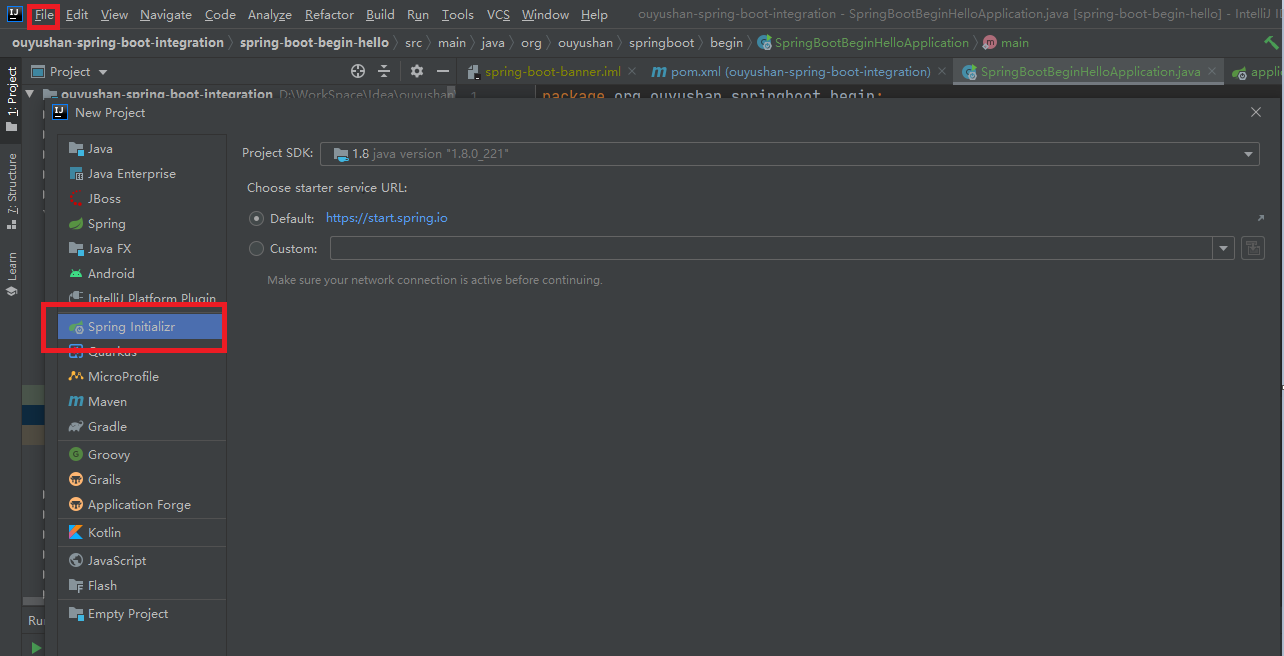
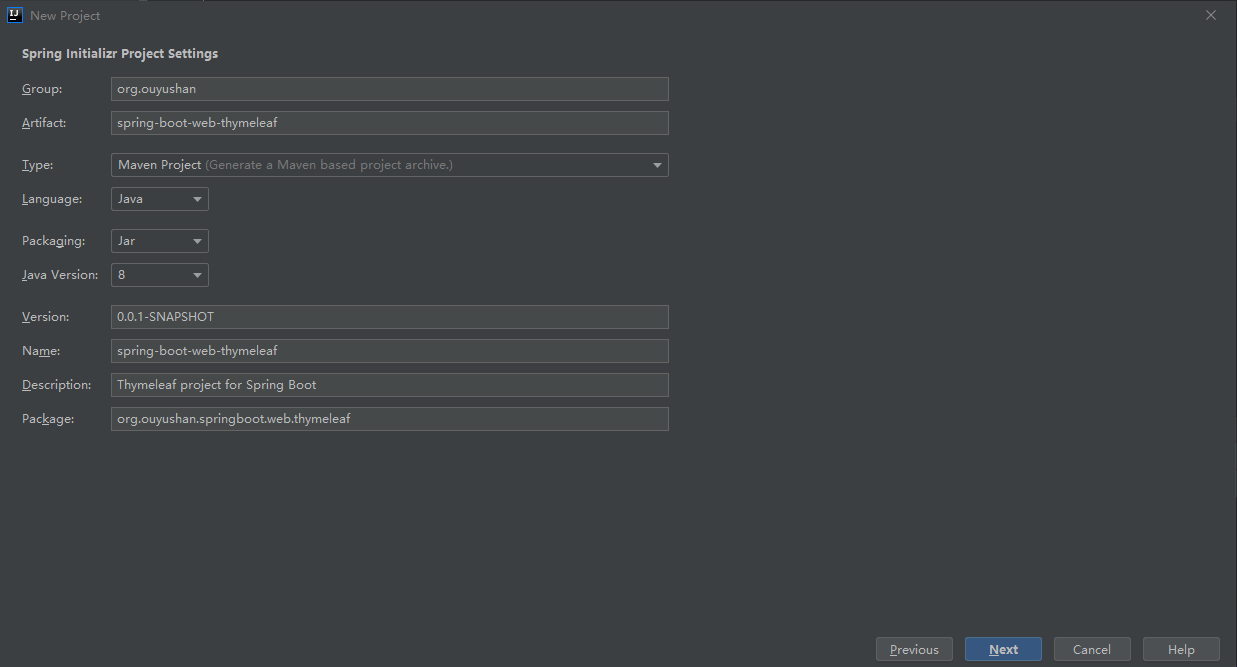
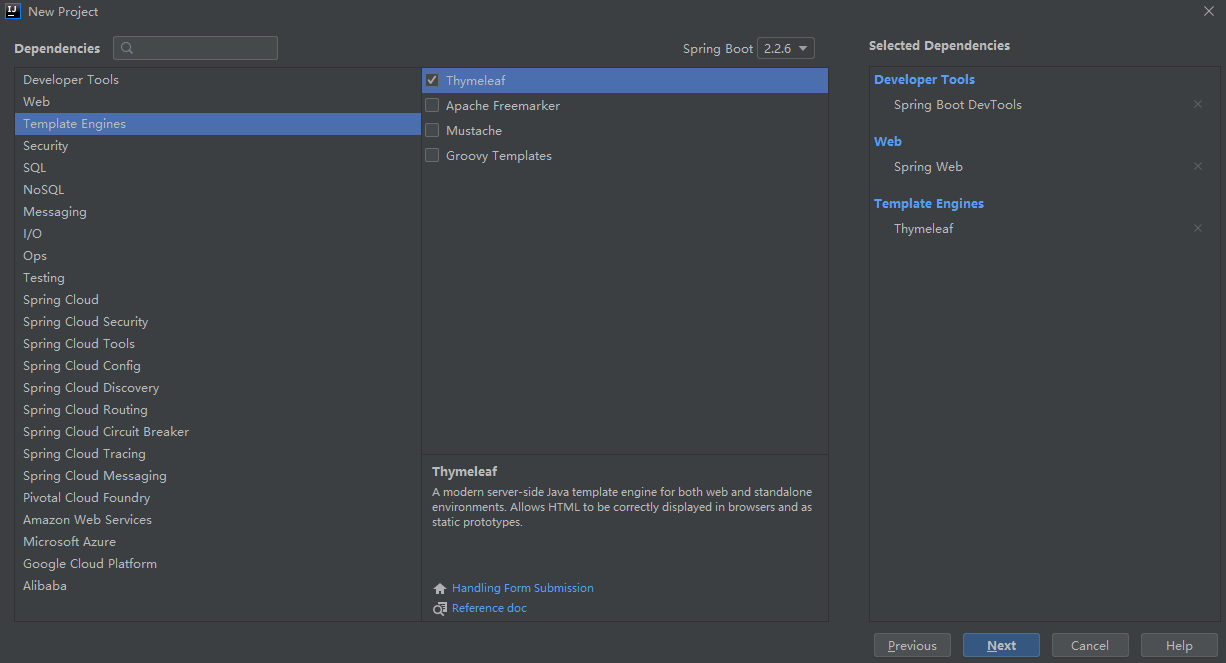
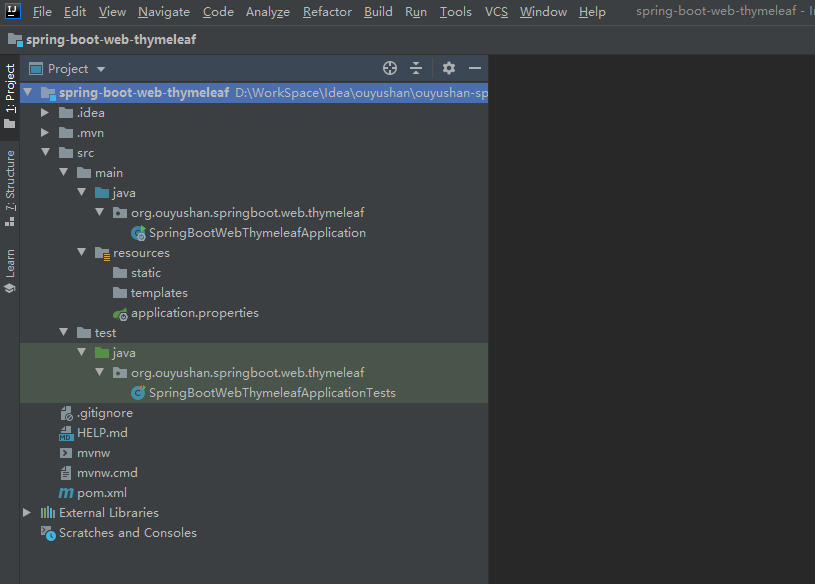
3.1、点击File -> New Project -> Spring Initializer,点击next
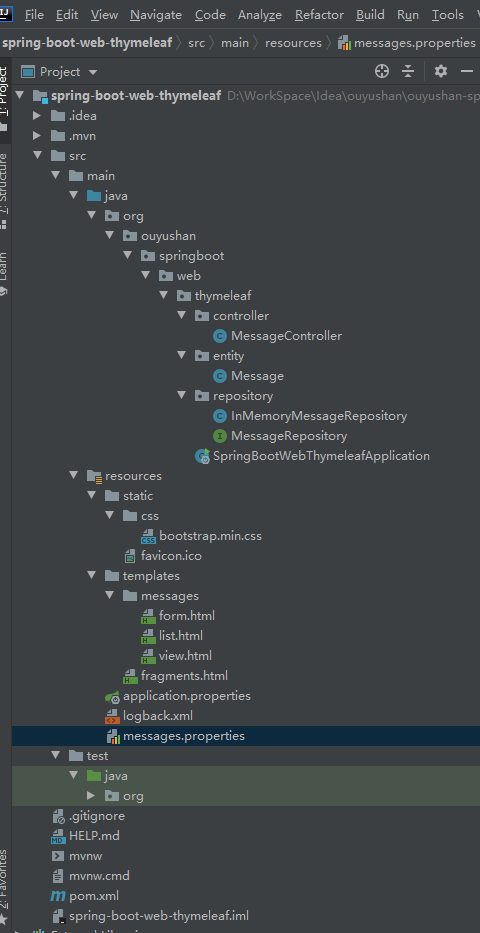
<?xml version="1.0" encoding="UTF-8"?>

<configuration>

    <include resource="org/springframework/boot/logging/logback/base.xml"/>

    <!-- logger name="org.springframework" level="DEBUG"/-->

</configuration>
# Allow Thymeleaf templates to be reloaded at dev time

spring.thymeleaf.cache: false

server.tomcat.access_log_enabled: true

server.tomcat.basedir: target/tomcat
form.message=Message

form.messages=Messages

form.submit=Submit

form.summary=Summary

form.title=Messages : Create

list.create=Create Message

list.table.created=Created

list.table.empty=No messages

list.table.id=Id

list.table.summary=Summary

list.title=Messages : View all

navbar.messages=Messages

navbar.thymeleaf=Thymeleaf

view.delete=delete

view.messages=Messages

view.modify=modify

view.success=Successfully created a new message

view.title=Messages : View
package org.ouyushan.springboot.web.thymeleaf.entity;

import javax.validation.constraints.NotEmpty;

import java.util.Calendar;

/**

 * @Description:

 * @Author: ouyushan

 * @Email: ouyushan@hotmail.com

 * @Date: 2020/4/29 14:33

 */

public class Message {

    private Long id;

    @NotEmpty(message = "Text is required.")

    private String text;

    @NotEmpty(message = "Summary is required.")

    private String summary;

    private Calendar created = Calendar.getInstance();

    public Long getId() {

        return this.id;

    }

    public void setId(Long id) {

        this.id = id;

    }

    public Calendar getCreated() {

        return this.created;

    }

    public void setCreated(Calendar created) {

        this.created = created;

    }

    public String getText() {

        return this.text;

    }

    public void setText(String text) {

        this.text = text;

    }

    public String getSummary() {

        return this.summary;

    }

    public void setSummary(String summary) {

        this.summary = summary;

    }

}
package org.ouyushan.springboot.web.thymeleaf.repository;

import org.ouyushan.springboot.web.thymeleaf.entity.Message;

/**

 * @Description:

 * @Author: ouyushan

 * @Email: ouyushan@hotmail.com

 * @Date: 2020/4/29 14:35

 */

public interface MessageRepository {

    Iterable<Message> findAll();

    Message save(Message message);

    Message findMessage(Long id);

    void deleteMessage(Long id);

}
package org.ouyushan.springboot.web.thymeleaf.repository;

import org.ouyushan.springboot.web.thymeleaf.entity.Message;

import java.util.concurrent.ConcurrentHashMap;

import java.util.concurrent.ConcurrentMap;

import java.util.concurrent.atomic.AtomicLong;

/**

 * @Description:

 * @Author: ouyushan

 * @Email: ouyushan@hotmail.com

 * @Date: 2020/4/29 14:38

 */

public class InMemoryMessageRepository implements MessageRepository{

    private static AtomicLong counter = new AtomicLong();

    private final ConcurrentMap<Long, Message> messages = new ConcurrentHashMap<>();

    @Override

    public Iterable<Message> findAll() {

        return this.messages.values();

    }

    @Override

    public Message save(Message message) {

        Long id = message.getId();

        if (id == null) {

            id = counter.incrementAndGet();

            message.setId(id);

        }

        this.messages.put(id, message);

        return message;

    }

    @Override

    public Message findMessage(Long id) {

        return this.messages.get(id);

    }

    @Override

    public void deleteMessage(Long id) {

        this.messages.remove(id);

    }

}
package org.ouyushan.springboot.web.thymeleaf.controller;

import org.ouyushan.springboot.web.thymeleaf.entity.Message;

import org.ouyushan.springboot.web.thymeleaf.repository.MessageRepository;

import org.springframework.stereotype.Controller;

import org.springframework.validation.BindingResult;

import org.springframework.web.bind.annotation.*;

import org.springframework.web.servlet.ModelAndView;

import org.springframework.web.servlet.mvc.support.RedirectAttributes;

import javax.validation.Valid;

/**

 * @Description:

 * @Author: ouyushan

 * @Email: ouyushan@hotmail.com

 * @Date: 2020/4/29 14:42

 */

@Controller

@RequestMapping("/")

public class MessageController {

    private final MessageRepository messageRepository;

    public MessageController(MessageRepository messageRepository) {

        this.messageRepository = messageRepository;

    }

    @GetMapping

    public ModelAndView list() {

        Iterable<Message> messages = this.messageRepository.findAll();

        return new ModelAndView("messages/list", "messages", messages);

    }

    @GetMapping("{id}")

    public ModelAndView view(@PathVariable("id") Message message) {

        return new ModelAndView("messages/view", "message", message);

    }

    @GetMapping(params = "form")

    public String createForm(@ModelAttribute Message message) {

        return "messages/form";

    }

    @PostMapping

    public ModelAndView create(@Valid Message message, BindingResult result, RedirectAttributes redirect) {

        if (result.hasErrors()) {

            return new ModelAndView("messages/form", "formErrors", result.getAllErrors());

        }

        message = this.messageRepository.save(message);

        redirect.addFlashAttribute("globalMessage", "view.success");

        return new ModelAndView("redirect:/{message.id}", "message.id", message.getId());

    }

    @RequestMapping("foo")

    public String foo() {

        throw new RuntimeException("Expected exception in controller");

    }

    @GetMapping("delete/{id}")

    public ModelAndView delete(@PathVariable("id") Long id) {

        this.messageRepository.deleteMessage(id);

        Iterable<Message> messages = this.messageRepository.findAll();

        return new ModelAndView("messages/list", "messages", messages);

    }

    @GetMapping("modify/{id}")

    public ModelAndView modifyForm(@PathVariable("id") Message message) {

        return new ModelAndView("messages/form", "message", message);

    }

}
package org.ouyushan.springboot.web.thymeleaf;

import org.ouyushan.springboot.web.thymeleaf.entity.Message;

import org.ouyushan.springboot.web.thymeleaf.repository.InMemoryMessageRepository;

import org.ouyushan.springboot.web.thymeleaf.repository.MessageRepository;

import org.springframework.boot.SpringApplication;

import org.springframework.boot.autoconfigure.SpringBootApplication;

import org.springframework.context.annotation.Bean;

import org.springframework.core.convert.converter.Converter;

@SpringBootApplication

public class SpringBootWebThymeleafApplication {

    @Bean

    public MessageRepository messageRepository() {

        return new InMemoryMessageRepository();

    }

    @Bean

    public Converter<String, Message> messageConverter() {

        return new Converter<String, Message>() {

            @Override

            public Message convert(String id) {

                return messageRepository().findMessage(Long.valueOf(id));

            }

        };

    }

    public static void main(String[] args) {

        SpringApplication.run(SpringBootWebThymeleafApplication.class, args);

    }

}
五、接口测试
访问:

http://localhost:8080/?form

### Controller

* 使用了@PathVariable 从路径中获取参数,注入参数中必须有一属性名称与PathVariable变量名称相同

* 使用params处理路径中请求参数

* 使用@Valid校验参数,BindingResult 存储校验错误,RedirectAttributes 缓存上级页面参数

### repository

* 利用ConcurrentHashMap模拟线程安全数据库

    private static AtomicLong counter = new AtomicLong();

    private final ConcurrentMap<Long,Message> messages = new ConcurrentHashMap<>();

### application启动配置类

* 定义了messageRepository bean以及messageConverter bean

* @SpringBootApplication same as @Configuration @EnableAutoConfiguration @ComponentScan

post方式 create

localhost:8080?id=1&text=text&summary=summary

get查询id=1

http://localhost:8080/1

@GetMapping(params = "form")

localhost:8080?form=&id=1

localhost:8080?form=&id=1&text=text&summary=summary

```

${}  变量表达式(美元表达式,哈哈),用于访问容器上下文环境中的变量,功能同jstl中${}。

*{}  选择表达式(星号表达式)。选择表达式与变量表达式有一个重要的区别:选择表达式计算的是选定的对象,而不是整个环境变量映射

#{}  消息表达式(井号表达式,properties资源表达式)。通常与th:text属性一起使用,指明声明了th:text的标签的文本是#{}中的key所对应的value,而标签内的文本将不会显示

@{}  超链接url表达式

#maps 工具对象表达式。常用于日期、集合、数组对象的访问

#dates

#calendars

#numbers

#strings

#objects

#bools

#arrays

#lists

#sets

```
Spring boot Sample 009之spring-boot-web-thymeleaf的更多相关文章
- Spring Boot——2分钟构建spring web mvc REST风格HelloWorld
之前有一篇<5分钟构建spring web mvc REST风格HelloWorld>介绍了普通方式开发spring web mvc web service.接下来看看使用spring b ...
- [转]Spring Boot——2分钟构建spring web mvc REST风格HelloWorld
Spring Boot——2分钟构建spring web mvc REST风格HelloWorld http://projects.spring.io/spring-boot/ http://spri ...
- [转]通过Spring Boot三分钟创建Spring Web项目
来源:https://www.tianmaying.com/tutorial/project-based-on-spring-boot Spring Boot简介 接下来我们所有的Spring代码实例 ...
- 跟我学Spring Boot(三)Spring Boot 的web开发
1.Web开发中至关重要的一部分,Web开发的核心内容主要包括内嵌Servlet容器和SpringMVC spring boot 提供了spring-boot-starter-web 为web开发提 ...
- spring boot:创建一个简单的web(maven web project)
1.新建一个maven web project; 2.在pom.xml文件中添加相应的依赖包: 3.新建一个HelloController请求控制类: 4.编写index.jsp页面: 5.编写启动类 ...
- 46. Spring Boot中使用AOP统一处理Web请求日志
在之前一系列的文章中都是提供了全部的代码,在之后的文章中就提供核心的代码进行讲解.有什么问题大家可以给我留言或者加我QQ,进行咨询. AOP为Aspect Oriented Programming的缩 ...
- Spring Boot (二):模版引擎 Thymeleaf 渲染 Web 页面
Spring Boot (二):模版引擎 Thymeleaf 渲染 Web 页面 在<Spring Boot(一):快速开始>中介绍了如何使用 Spring Boot 构建一个工程,并且提 ...
- Spring Boot-初学01 -使用Spring Initializer快速创建Spring Boot项目 -@RestController+spEL -实现简单SpringBoot的Web页面
1.IDEA:使用 Spring Initializer快速创建项目 IDE都支持使用Spring的项目创建向导快速创建一个Spring Boot项目: 选择我们需要的模块:向导会联网创建Spring ...
- Spring boot Sample 012之spring-boot-web-upload
一.环境 1.1.Idea 2020.1 1.2.JDK 1.8 二.目的 spring boot 整合web实现文件上传下载 三.步骤 3.1.点击File -> New Project -& ...
随机推荐
- Spring官网阅读(十)Spring中Bean的生命周期(下)
文章目录 生命周期概念补充 实例化 createBean流程分析 doCreateBean流程分析 第一步:factoryBeanInstanceCache什么时候不为空? 第二步:创建对象(crea ...
- 微信小程序下拉刷新时有部分区域不随着下拉移动
问题 区域元素使用(position: fixed),小程序页面下拉刷新时,这部分区域不会随页面下拉移动. 如何解决 删除设置的top属性
- Kafka的参数调优
这篇文章主要说一下在生产过程中的kafka常用的调优参数, 首先kafka的版本是0.9.0.1,针对以下几个方面来说, 针对kafka的堆内存: 针对kafka的集群调优: kafka的的消息机制有 ...
- crontab自动启动小任务例子(每一分钟将当前日期打入一个文件)
crontab -l #查看当前定时任务列表 显示没有,那么我们来安装一下(必须在root用户下) – yum install vixie-cron – yum install crontabs ...
- 绝对一个月精通vue
马上从vue-cli4练手,要不然,学几年,你也不懂组件式开发,不懂VUEX,不懂路由, 也许你会说你懂, 麻烦你花一个月学vue-cli4以一个完整购物商城来练手, 一个月后,如果还觉得我错,我 ...
- 【漫画】JAVA并发编程 如何解决原子性问题
原创声明:本文转载自公众号[胖滚猪学编程],转载务必注明出处! 在并发编程BUG源头文章中,我们初识了并发编程的三个bug源头:可见性.原子性.有序性.在如何解决可见性和原子性文章中我们大致了解了可见 ...
- 设计模式之GOF23迭代器模式
迭代器模式Iterator /** * 自定义迭代器接口 * @author 小帆敲代码 * */public interface MyIterator { void first();//游标置于第 ...
- [NBUT 1458 Teemo]区间第k大问题,划分树
裸的区间第k大问题,划分树搞起. #pragma comment(linker, "/STACK:10240000") #include <map> #include ...
- 【Docker】在本地打包maven程序为docker镜像报错: Connect to localhost:2375 [localhost/127.0.0.1, localhost/0:0:0:0:0:0:0:1]
错误信息: [ERROR] Failed to execute goal com.spotify:docker-maven-plugin:1.0.0:build (default-cli) on pr ...
- GIT代码版本管理
一.实验目的 1.了解分布式版本控制系统的核心机理: 2.熟练掌握git的基本指令和分支管理指令: 二.实验内容 1.安装git: 2.初始配置git,git init git status指令: 3 ...