
MySQL SSL配置(mysql5.7和mysql5.6)
专题一:mysql5.7上开启并配置ssl
[root@mysqlmaster01 bin]# ./mysql_ssl_rsa_setup --datadir=/data/mysql_data1/ --user=mysql
Generating a 2048 bit RSA private key
............................................................................+++
............+++
writing new private key to 'ca-key.pem'
-----
Generating a 2048 bit RSA private key
.......................+++
..........................+++
writing new private key to 'server-key.pem'
-----
Generating a 2048 bit RSA private key
...........+++
..........+++
writing new private key to 'client-key.pem'
-----
查看
mysql> show variables like '%ssl%';
+---------------+-----------------+
| Variable_name | Value |
+---------------+-----------------+
| have_openssl | DISABLED |
| have_ssl | DISABLED |
| ssl_ca | ca.pem |
| ssl_capath | |
| ssl_cert | server-cert.pem |
| ssl_cipher | |
| ssl_crl | |
| ssl_crlpath | |
| ssl_key | server-key.pem |
+---------------+-----------------+
9 rows in set (0.01 sec)
(SSL还是没有启用)
解决办法:把数据目录下.pem的文件,属主和属组改成mysql
[root@mysqlmaster01 mysql_data1]# chown -R mysql.mysql *.pem
然后重启服务
[root@mysqlmaster01 mysql_data1]# /etc/init.d/mysqld_multi stop 1
[root@mysqlmaster01 mysql_data1]# /etc/init.d/mysqld_multi start 1
[root@mysqlmaster01 mysql_data1]# /etc/init.d/mysqld_multi report
Reporting MySQL servers
MySQL server from group: mysqld1 is running
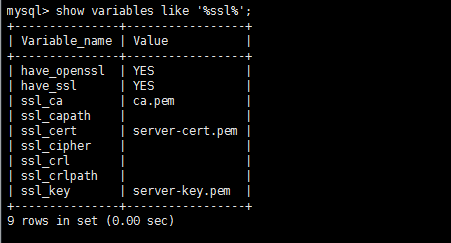
[root@mysqlmaster01 mysql_data1]# mysql --login-path=mysql1 -e "show variables like 'have%ssl%';"
+---------------+-------+
| Variable_name | Value |
+---------------+-------+
| have_openssl | YES |
| have_ssl | YES |
+---------------+-------+
(说明ssl已经启用咯)
[root@mysqlmaster01 mysql_data1]# ll *.pem
-rw-------. 1 mysql mysql 1679 Nov 24 11:14 ca-key.pem
-rw-r--r--. 1 mysql mysql 1107 Nov 24 11:14 ca.pem
-rw-r--r--. 1 mysql mysql 1107 Nov 24 11:14 client-cert.pem
-rw-------. 1 mysql mysql 1679 Nov 24 11:14 client-key.pem
-rw-------. 1 mysql mysql 1679 Nov 24 11:14 private_key.pem
-rw-r--r--. 1 mysql mysql 451 Nov 24 11:14 public_key.pem
-rw-r--r--. 1 mysql mysql 1107 Nov 24 11:14 server-cert.pem
-rw-------. 1 mysql mysql 1675 Nov 24 11:14 server-key.pem
如何通过ssl进行连接
[root@mysqlmaster01 mysql_data2]# mysql -u ssl -p -h 10.2.11.226 --ssl-cert=/data/mysql_data2/client-cert.pem --ssl-key=/data/mysql_data2/client-key.pem -P 3307
Enter password:
Welcome to the MySQL monitor. Commands end with ; or \g.
Your MySQL connection id is 15
Server version: 5.7.20-log MySQL Community Server (GPL)
Copyright (c) 2000, 2017, Oracle and/or its affiliates. All rights reserved.
Oracle is a registered trademark of Oracle Corporation and/or its
affiliates. Other names may be trademarks of their respective
owners.
Type 'help;' or '\h' for help. Type '\c' to clear the current input statement.
mysql> \q
(默认如果授权没有做任何限制,用户既可以通过秘钥登录,也可以通过用户名和密码登录)
用户授权规定只能通过ssl方式登录
mysql> create user 'tom'@'10.2.11.%' identified by 'Aa123456';
Query OK, 0 rows affected (0.00 sec)
mysql> grant all on *.* to 'tom'@'10.2.11.%' require ssl;
Query OK, 0 rows affected, 1 warning (0.00 sec)
测试
[root@mysqlmaster01 ~]# mysql -u tom -p -h 10.2.11.226 --ssl-mode 'REQUIRED' -P 3306
Enter password:
Welcome to the MySQL monitor. Commands end with ; or \g.
mysql>
mysql> \s
--------------
mysql Ver 14.14 Distrib 5.7.20, for linux-glibc2.12 (x86_64) using EditLine wrapper
Connection id: 25
Current database:
Current user: tom@10.2.11.226
SSL: Cipher in use is DHE-RSA-AES256-SHA
Current pager: stdout
Using outfile: ''
Using delimiter: ;
Server version: 5.7.20-log MySQL Community Server (GPL)
Protocol version: 10
Connection: 10.2.11.226 via TCP/IP
Server characterset: latin1
Db characterset: latin1
Client characterset: utf8
Conn. characterset: utf8
TCP port: 3306
Uptime: 1 hour 34 min 11 sec
Threads: 2 Questions: 56 Slow queries: 0 Opens: 124 Flush tables: 1 Open tables: 117 Queries per second avg: 0.009
--------------
如果不仅需要ssl还需要秘钥,那么怎么操作呢?
mysql> alter user 'tom'@'10.2.11.%' require x509;
Query OK, 0 rows affected (0.01 sec)
或者新建一个用户,要求ssl+秘钥登录
mysql> grant all on *.* to 'test'@'10.2.11.%' identified by 'Aa123456' require x509;
Query OK, 0 rows affected, 1 warning (0.01 sec)
mysql> grant all on *.* to 'test'@'10.2.18.%' identified by 'Aa123456' require x509;
Query OK, 0 rows affected, 1 warning (0.01 sec)
mysql> flush privileges;
Query OK, 0 rows affected (0.00 sec)
测试登录:
[root@mysqlmaster01 mysql_data1]# mysql -u test -p -h 10.2.11.226 -P 3306 --ssl
WARNING: --ssl is deprecated and will be removed in a future version. Use --ssl-mode instead.
Enter password:
ERROR 1045 (28000): Access denied for user 'test'@'10.2.11.226' (using password: YES)
(发现通过ssl登录不了)

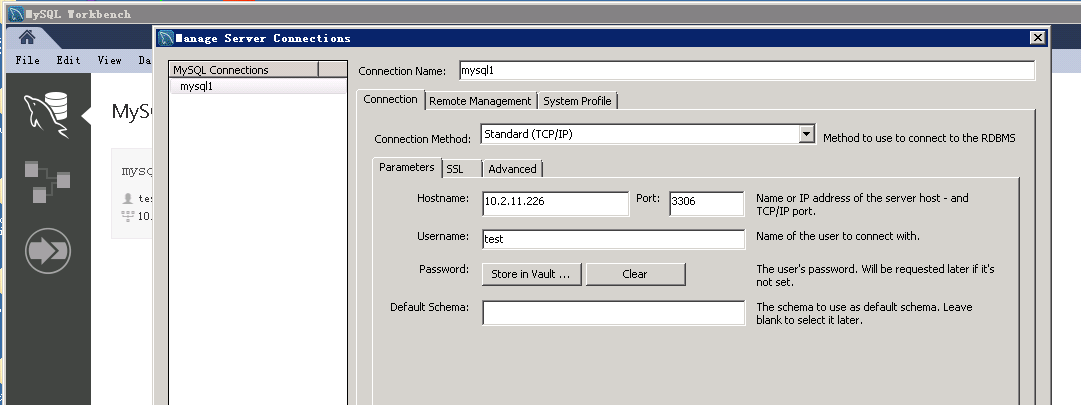
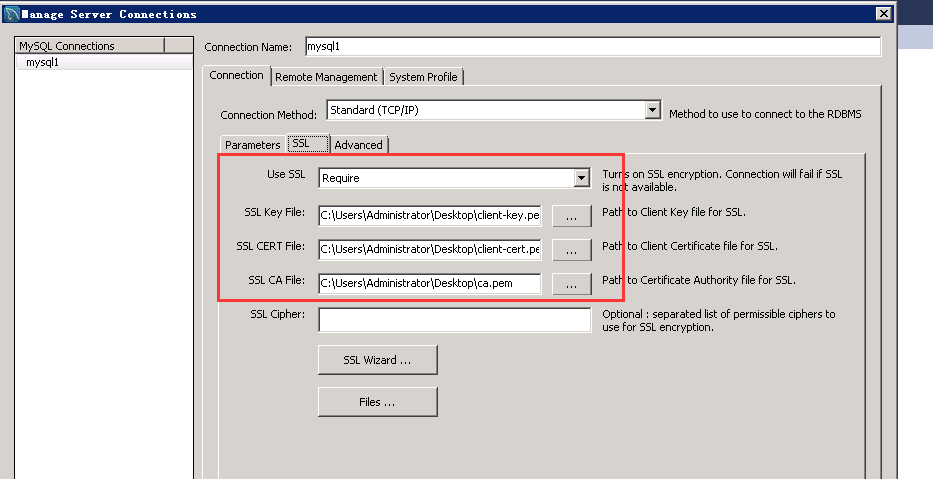
远程客户端连接测试(我以mysql workbench为例)

第二专题:mysql5.6上开启并配置ssl
https://dev.mysql.com/doc/refman/5.6/en/using-encrypted-connections.html
1、加密连接服务端配置
[mysqld]
ssl-ca=ca.pem
ssl-cert=server-cert.pem
ssl-key=server-key.pem
说明:
ss-ca:证书颁发机构(CA)证书文件的路径名
ssl-cert:服务器公钥证书文件的路径名。这可以发送到客户端,并通过CA证书进行身份验证。
ssl-key:服务器的私钥证书文件的路径名
2、客户端使用ssl
案例:
mysql --ssl-ca=ca.pem --ssl-cert=client-cert.pem --ssl-key=client-key.pem

通过openssl 制作生成 SSL 证书
[root@mysqlmaster01 CA]# touch index.txt
[root@mysqlmaster01 CA]# echo 01>serial
创建CA证书
[root@server mysql56]# openssl genrsa 2048 > ca-key.pem
Generating RSA private key, 2048 bit long modulus
...............................................+++
......................................................................................................................+++
e is 65537 (0x10001)
[root@server mysql56]# openssl req -new -x509 -nodes -days 3600 -key ca-key.pem -out ca.pem
You are about to be asked to enter information that will be incorporated
into your certificate request.
What you are about to enter is what is called a Distinguished Name or a DN.
There are quite a few fields but you can leave some blank
For some fields there will be a default value,
If you enter '.', the field will be left blank.
-----
Country Name (2 letter code) [XX]:CN
State or Province Name (full name) []:shanghai
Locality Name (eg, city) [Default City]:shanghai
Organization Name (eg, company) [Default Company Ltd]:als
Organizational Unit Name (eg, section) []:ops
Common Name (eg, your name or your server's hostname) []:ca.test.com
Email Address []:
[root@server mysql56]# ll *.pem
-rw-r--r--. 1 root root 1679 Nov 24 15:15 ca-key.pem
-rw-r--r--. 1 root root 1314 Nov 24 15:16 ca.pem
创建服务器证书
[root@server mysql56]# openssl req -newkey rsa:2048 -days 3600 -nodes -keyout server-key.pem -out server-req.pem
Generating a 2048 bit RSA private key
......................................................+++
.........................+++
writing new private key to 'server-key.pem'
-----
You are about to be asked to enter information that will be incorporated
into your certificate request.
What you are about to enter is what is called a Distinguished Name or a DN.
There are quite a few fields but you can leave some blank
For some fields there will be a default value,
If you enter '.', the field will be left blank.
-----
Country Name (2 letter code) [XX]:CN
State or Province Name (full name) []:shanghai
Locality Name (eg, city) [Default City]:shanghai
Organization Name (eg, company) [Default Company Ltd]:als
Organizational Unit Name (eg, section) []:ops
Common Name (eg, your name or your server's hostname) []:server.test.com
Email Address []:
Please enter the following 'extra' attributes
to be sent with your certificate request
A challenge password []:
An optional company name []:
[root@server mysql56]# openssl rsa -in server-key.pem -out server-key.pem
writing RSA key
[root@server mysql56]# openssl x509 -req -in server-req.pem -days 3600 -CA ca.pem -CAkey ca-key.pem -set_serial 01 -out server-cert.pem
Signature ok
subject=/C=CN/ST=shanghai/L=shanghai/O=als/OU=ops/CN=server.test.com
Getting CA Private Key
创建客户端证书
[root@server mysql56]# openssl req -newkey rsa:2048 -days 3600 -nodes -keyout client-key.pem -out client-req.pem
Generating a 2048 bit RSA private key
.+++
...............................................+++
writing new private key to 'client-key.pem'
-----
You are about to be asked to enter information that will be incorporated
into your certificate request.
What you are about to enter is what is called a Distinguished Name or a DN.
There are quite a few fields but you can leave some blank
For some fields there will be a default value,
If you enter '.', the field will be left blank.
-----
Country Name (2 letter code) [XX]:CN
State or Province Name (full name) []:shanghai
Locality Name (eg, city) [Default City]:shanghai
Organization Name (eg, company) [Default Company Ltd]:als
Organizational Unit Name (eg, section) []:ops
Common Name (eg, your name or your server's hostname) []:client.test.com
Email Address []:
Please enter the following 'extra' attributes
to be sent with your certificate request
A challenge password []:
An optional company name []:
[root@server mysql56]# openssl rsa -in client-key.pem -out client-key.pem
writing RSA key
[root@server mysql56]# openssl x509 -req -in client-req.pem -days 3600 -CA ca.pem -CAkey ca-key.pem -set_serial 02 -out client-cert.pem
Signature ok
subject=/C=CN/ST=shanghai/L=shanghai/O=als/OU=ops/CN=client.test.com
Getting CA Private Key
检测:
[root@mysqlmaster01 mysql56]# openssl verify -CAfile ca.pem server-cert.pem client-cert.pem
server-cert.pem: OK
client-cert.pem: OK
说明:
ca.pem: Use this as the argument to--ssl-caon the server and client sides. (The CA certificate, if used, must be the same on both sides.)server-cert.pem,server-key.pem: Use these as the arguments to--ssl-certand--ssl-keyon the server side.client-cert.pem,client-key.pem: Use these as the arguments to--ssl-certand--ssl-keyon the client side.
[root@mysqlmaster01 mysql56]# chown -R mysql.mysql *.pem (更改属主和属组)
编写my.cnf文件,在【mysqld】下填写
ssl-ca=/data/mysql56/ca.pem
ssl-cert=/data/mysql56/server-cert.pem
ssl-key=/data/mysql56/server-key.pem
测试

mysql> grant all on *.* to 'test'@'10.2.11.%' identified by 'Aa123456' require x509; (授权test用户通过ssl+秘钥登录)
Query OK, 0 rows affected (0.00 sec)
mysql> flush privileges;
Query OK, 0 rows affected (0.00 sec)
[root@mysqlmaster01 ~]# mysql -u test -h 10.2.11.226 -p -P 3308
Enter password:
ERROR 1045 (28000): Access denied for user 'test'@'10.2.11.226' (using password: YES)
(直接用密码登录错误)
[root@mysqlmaster01 ~]# mysql -u test -h 10.2.11.226 -p -P 3308 -ssl-cert=client-cert.pem --ssl-key=client-key.pem --ssl-ca=ca.pem
mysql: [ERROR] mysql: unknown option '-l'
[root@mysqlmaster01 ~]# mysql -u test -h 10.2.11.226 -p -P 3308 --ssl-cert=client-cert.pem --ssl-key=client-key.pem --ssl-ca=ca.pem
Enter password:
ERROR 2026 (HY000): SSL connection error: SSL_CTX_set_default_verify_paths failed
[root@mysqlmaster01 ~]# mysql -u test -h 10.2.11.226 -p -P 3308 --ssl-cert=/data/mysql56/client-cert.pem --ssl-key=/data/mysql56/client-key.pem
Enter password:
Welcome to the MySQL monitor. Commands end with ; or \g.
Your MySQL connection id is 5
Server version: 5.6.38-log MySQL Community Server (GPL)
Copyright (c) 2000, 2017, Oracle and/or its affiliates. All rights reserved.
Oracle is a registered trademark of Oracle Corporation and/or its
affiliates. Other names may be trademarks of their respective
owners.
Type 'help;' or '\h' for help. Type '\c' to clear the current input statement.
mysql>
(如果要在其他电脑上通过ssl登录该机器的数据库,必须要ca.pem,client-cert.pem,client-key.pem拷贝到其他电脑上,然后配置连接数据库的工具使用ssl)
MySQL SSL配置(mysql5.7和mysql5.6)的更多相关文章
- MySQL---5、可视化工具Navicat for MySQL安装配置
一.安装文件包下载 Navicat for MySQL 安装软件和破解补丁: 链接:https://pan.baidu.com/s/1oKcErok_Ijm0CY9UjNMrnA 密码:4xb1 ...
- mysql中配置ssl_key、ssl-cert、ssl-ca的路径及建立ssl连接
1.创建 CA 私钥和 CA 证书 (1)下载并安装openssl,将bin目录配置到环境变量: (2)设置openssl.cfg路径(若不设置会报错,找不到openssl配置文件) \bin\ope ...
- mysql中配置ssl_key、ssl-cert、ssl-ca的路径及建立ssl连接(适用于5.7以下版本,5.7及以上请看本文末尾的备注)
1.创建 CA 私钥和 CA 证书 (1)下载并安装openssl,将bin目录配置到环境变量: (2)设置openssl.cfg路径(若不设置会报错,找不到openssl配置文件) \bin\ope ...
- centos7使用MySQL的Yum存储库安装mysql5.7.27
下载yum源 官网地址:http://dev.mysql.com/downloads/repo/yum/ centos7系统: http://dev.mysql.com/get/mysql57-com ...
- 基于MySQL提供的Yum repository安装MySQL5.6
基于MySQL提供的Yum repository安装MySQL5.6 1:下载YUM包 1.1切换到root用户: 1)su - root 2)wget http://dev.mysql.com/ge ...
- dinner 后台 nodemon 部署 Koa (关闭everything 安装或排除node_modules) # mysql 没开192.168.x.x 需要设置一下 #Navicat Premium,mysql 数据库版本有要求:mysql-5.7.17.msi 对??的支持
tip1:新建数据库 记得选 字符集和排序规则 utf8 -- UTF-8 Unicode utf8_general_ci 后台链接部分 1. 全局管理员安装 nodemon,后台热部署(右键 管理员 ...
- 在Windows 8.1系统上配置免安装版mysql-5.6.21-winx64
1.到官网上下载MySQL 下载地址为:http://cdn.mysql.com/Downloads/MySQL-5.6/mysql-5.6.21-winx64.zip 2.解压文件到D盘 当然你可以 ...
- centos7使用MySQL的Yum存储库安装mysql5.6.45
注意:这个MySQL5.6.45版本有问题,修改配置文件不生效,推荐安装MySQL5.6.43 下载yum源 官网地址:http://dev.mysql.com/downloads/repo/yum/ ...
- Ubuntu18.10下配置PHP7.2 + Apache2 + Mysql5.7
方案1:集成解决方案 1.lnmphttps://lnmp.org/ 2.xampphttps://www.apachefriends.org/zh_cn/index.html 3.oneinstac ...
随机推荐
- 爬虫保存Cookie
import http.cookiejar as cookielib session.cookie = cookielib.LWPCookieJar() session.cookie.save(fil ...
- 服务器CPU架构演变过程
第一阶段: 单CPU,没啥好说的.和我们今天打游戏的台式机差不多. 第二阶段: 双CPU 或者 多CPU的SMP架构 或者 AMP架构.参考:http://www.lauterbach.com/smp ...
- IPC——管道
概述 管道通信分为无名管道.有名管道 管道通信的本质 不管是有名管道,还是无名管道,它们的本质其实都是一样的,它们都是内核所开辟的一段缓存空间.进程间通过管道通信时,本质上就是通过共享操作这段缓存来实 ...
- 1.Storm概述简介
主要目标: 1. 离线计算是什么? 2. 流式计算是什么? 3. 流式计算与离线计算的区别? 4. Storm是什么? 5. Storm与Hadoop的区别? 6. Storm的应用场景及行业案例 7 ...
- 【ZZNU-oj-2116:人间不值得】(1亿以内的货币拼音转数值求折扣价原价)--hash+String大法好+字符串处理+超大暴力模拟题
B : 人间不值得 概览问题列表状态排名编辑 Progress Bar 时间限制:1 Sec 内存限制:256 MiB提交:146 答案正确:12 提交 编辑 题目描述 家缠万贯来几时,我今停杯一问之 ...
- matlab安装MinG-w64 C/C++编译器
matlab 2018b之编译器的安装 安装MinGW C/C++ 编译器
- tkinter_战队数据查询系统
# 导入tkinter模块 import tkinter from tkinter import ttk # 导入库 import pymysql # 创建主窗口对象 root = tkinter.T ...
- CentOS7.x安装Wiki.js知识库
近期有个需求,搭建一个知识管理系统,所以就找了几个可作为知识管理的软件,最终定位到wiki.js,之所以选择这个,是看中了它的易部署性,该项目是在2016年12月推出了第一个版本,算是比较新的项目了, ...
- vue slot及用法,$slots访问具名slot
- 标准库heapq的使用
转载自: https://blog.csdn.net/y472360651/article/details/80725355 查找最大或最小的N个元素 怎么样从一个列表中取出最大或最小的N个元素的列表 ...