
Docker 镜像小结---操作指令介绍(七)
一、搜索镜像
很多情况下我们可能需要下载某一类别的镜像,这时候我们就会用到搜索功能,也可以去 docker hub 官网页面搜索。
使用语法如下。
Usage:  docker search [OPTIONS] TERM

Search the Docker Hub for images

Options:

  -f, --filter filter   Filter output based on conditions provided

      --format string   Pretty-print search using a Go template

      --help            Print usage

      --limit int       Max number of search results (default 25)

      --no-trunc        Don't truncate output
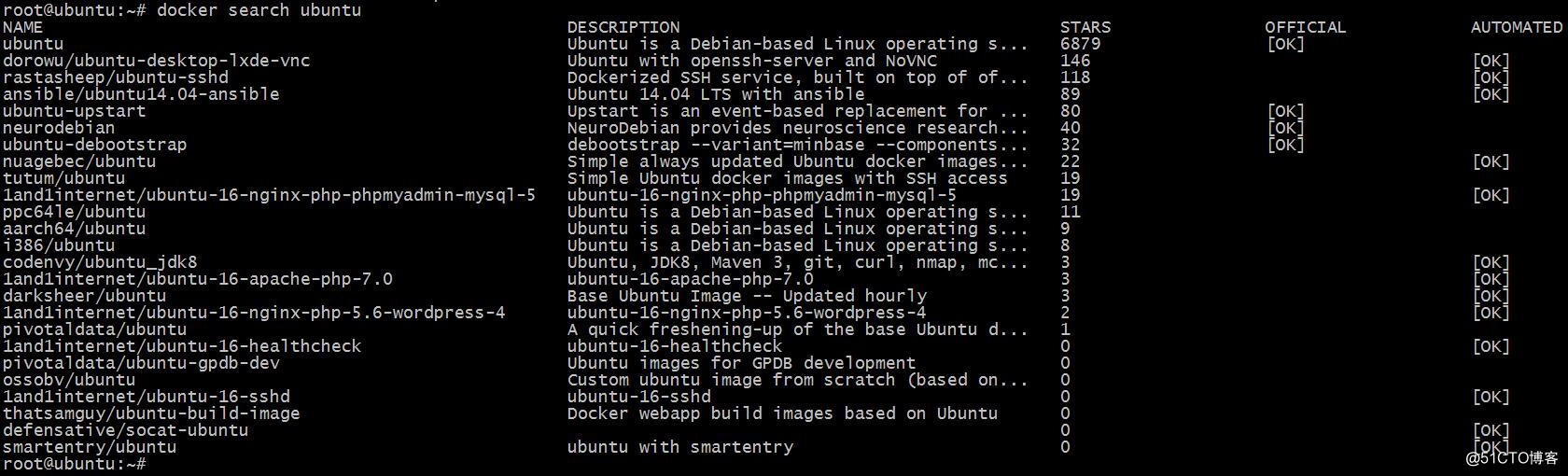
我们可以看到,第一个镜像是没有用户名的,并且 OFFICIAL 是 OK,这样的镜像是由 Docker 公司进行维护的。
二、下载镜像
使用方法如下。
Usage:  docker pull [OPTIONS] NAME[:TAG|@DIGEST]

Pull an image or a repository from a registry

Options:

  -a, --all-tags                Download all tagged images in the repository

      --disable-content-trust   Skip image verification (default true)

      --help                    Print usage
正常情况下,我们输入查到的镜像的全称即可。
三、查看本地镜像
Usage:  docker images [OPTIONS] [REPOSITORY[:TAG]]

List images

Options:

  -a, --all             Show all images (default hides intermediate images)

      --digests         Show digests

  -f, --filter filter   Filter output based on conditions provided

      --format string   Pretty-print images using a Go template

      --help            Print usage

      --no-trunc        Don't truncate output

  -q, --quiet           Only show numeric IDs

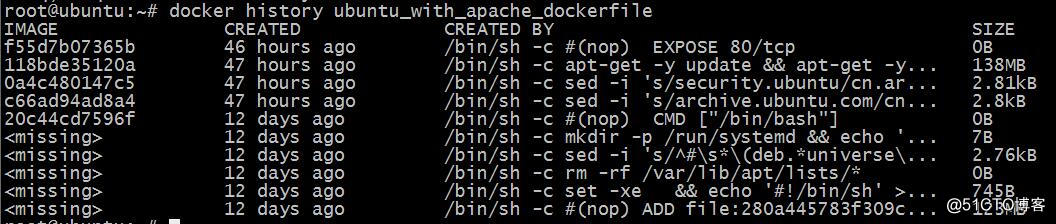
四、显示镜像构建历史
Usage:  docker history [OPTIONS] IMAGE

Show the history of an image

Options:

      --format string   Pretty-print images using a Go template

      --help            Print usage

  -H, --human           Print sizes and dates in human readable format (default true)

      --no-trunc        Don't truncate output

  -q, --quiet           Only show numeric IDs
五、删除镜像
Usage:  docker rmi [OPTIONS] IMAGE [IMAGE...]

Remove one or more images

Options:

  -f, --force      Force removal of the image

      --help       Print usage

      --no-prune   Do not delete untagged parents

六、镜像创建
Usage:  docker commit [OPTIONS] CONTAINER [REPOSITORY[:TAG]]

Create a new image from a container's changes

Options:

  -a, --author string    Author (e.g., "John Hannibal Smith <hannibal@a-team.com>")

  -c, --change list      Apply Dockerfile instruction to the created image

      --help             Print usage

  -m, --message string   Commit message

  -p, --pause            Pause container during commit (default true)
之前我们已经演示过了。
七、上传镜像
Usage:  docker push [OPTIONS] NAME[:TAG]

Push an image or a repository to a registry

Options:

      --disable-content-trust   Skip image signing (default true)

      --help                    Print usage
之前已经演示过。
八、给镜像打 tag
Usage:  docker tag SOURCE_IMAGE[:TAG] TARGET_IMAGE[:TAG]

Create a tag TARGET_IMAGE that refers to SOURCE_IMAGE

Options:

      --help   Print usage
之前已经演示过。
九、存出和载入镜像
Usage:  docker save [OPTIONS] IMAGE [IMAGE...]

Save one or more images to a tar archive (streamed to STDOUT by default)

Options:

      --help            Print usage

  -o, --output string   Write to a file, instead of STDOUT
Usage:  docker load [OPTIONS]

Load an image from a tar archive or STDIN

Options:

      --help           Print usage

  -i, --input string   Read from tar archive file, instead of STDIN

  -q, --quiet          Suppress the load output
Docker 镜像小结---操作指令介绍(七)的更多相关文章
- 关于 Docker 镜像的操作,看完这篇就够啦 !(下)
紧接着上篇<关于 Docker 镜像的操作,看完这篇就够啦 !(上)>,奉上下篇 !!! 镜像作为 Docker 三大核心概念中最重要的一个关键词,它有很多操作,是您想学习容器技术不得不掌 ...
- Docker 镜像小结 - 每天5分钟玩转 Docker 容器技术(21)
本节我们对 Docker 镜像做个小结. 这一部分我们首先讨论了镜像的分层结构,然后学习了如何构建镜像,最后实践使用 Docker Hub 和本地 registry. 下面是镜像的常用操作子命令: i ...
- Docker系列一:Docker基本概念及指令介绍
1. Docker是什么? Docker 是一个开源的应用容器引擎,让开发者可以打包他们的应用以及依赖包到一个可移植的容器中,然后发布到任何流行的 Linux 机器上,也可以实现虚拟化.容器是完全使用 ...
- 第 3 章 镜像 - 021 - Docker 镜像小结
镜像小结 镜像的常用操作子命令: images 显示镜像列表 history 显示镜像构建历史 commit 从容器创建新镜像 build 从 Dockerfile 构建镜像 ...
- docker镜像的操作
在主机上列出镜像 sudo docker images 每从Docker Hub下载一个镜像就会启动相对的创建一个容器 在镜像列表中看到三个重要的东西: 来自什么镜像源,例如ubuntu 每个镜像都有 ...
- Docker镜像文件操作
1什么是Docker镜像 Docker镜像是由文件系统叠加而成(是一种文件的存储形式).最底端是一个文件引导系统,即bootfs,这很像典型的Linux/Unix的引导文件系统.Docker用户几乎永 ...
- 【快学Docker】Docker镜像相关操作
前言 镜像是Docker的三大核心概念之一(另外两个分别是:容器和仓库). Docker运行容器前需要本地存在镜像,如果本地不存在镜像,Docker则会尝试从远端仓库拉去镜像.镜像是Docker一大核 ...
- Docker 镜像的操作
1. 从docker 镜像仓库获取镜像 docker pull [镜像名] 从 docker hub 中查看版本 获取 特定版本 docker pull centos 7.6.1801 2. ...
- docker 镜像管理操作
镜像特点 1. 分层存储的文件 2.一个软件运行环境 3.一个镜像可以创建多个容器 4.一种标准交付 5.不包含Linux内核而又精简的Linux操作系统 6.不是一个单一的文件而是由多层构成的,可以 ...
随机推荐
- jquery手机端产品列表响应式宽高检测宽度赋值给高度让宽高相同
在手机端浏览商品列表,开发人员懂得设计图片做正好的尺寸,那样浏览很好,但有人天生泛懒图片都是随手上传不管大小合适不合适,要求还是响应式的.今天就用jquery检测宽度,并赋值给高度来实现错位问题 &l ...
- BUG----spark
我也想说很尴尬, 搞到显现 发现 原来是个版本的bug spark 1.6.0 有个BUG 希望更多人看到 Traceback (most recent call last): File &quo ...
- 发布VS源码
发布VS源码步奏 先将Web.config设置修改一下 IP设置成点 文件名称设置成文件夹的名称,右键点击项目,点发布 勾选删除现有文件,点击发布 打开文件加 将文件解压成压缩包, 打 ...
- 洛谷 P2119 魔法阵 题解
Analysis 这道题也是考试题,我也依然打了个n三次方暴力.正解是先枚举差,再枚举c和d,a和b用乘法原理优化,这样就能大大减少时间. #include<iostream> #incl ...
- Oracle数据库限定特定用户 特定IP 登录
不允许test用户在 192.168.1.3 机器上访问数据库. 两种写法. 1 CREATE OR REPLACE TRIGGER DOPR AFTER LOGON ON test.schema B ...
- [HNOI2002]营业额统计 II
https://www.luogu.org/problemnew/show/2234 将权值离散化,以权值为下标建立权值线段树 #include <bits/stdc++.h> using ...
- Python中的各种排序问题
小书匠python排序 本章目录,快速浏览所需内容: 基本的排序 1.列表(list) 1.1按列表元素大小排序 1.2按列表元素的属性 2.字典(dictory) 3.元组(tuple)排序 3.1 ...
- manjaro 滚动更新后无法开机,Failed to start load kernel modules,nvidia驱动导致
今天滚动后无法开机,启动时显示Faild to start load kernel modules,卡在后面无法进入登录界面 systemctl status systemd-modules-load ...
- ROS与树莓派的结合
从零开始学树莓派和ROS 今天写下自己的第一篇博客,记录一下自己的学习历程和学习过程中碰到的各种小问题,供同道者参阅和自己以后回顾用 ,水平不高,我就放开手写吧,反正也不会有人看. 我现在在做毕业设计 ...
- [bzoj 4887] [Tjoi2017]可乐
传送门 Description 加里敦星球的人们特别喜欢喝可乐.因而,他们的敌对星球研发出了一个可乐机器人,并且 放在了加里敦星球的1号城市上.这个可乐机器人有三种行为:停在原地,去下一个相邻的 城市 ...