
apache CXF quickstart
1下载
官网: cxf.apache.org
下载 CXF 的开发包:
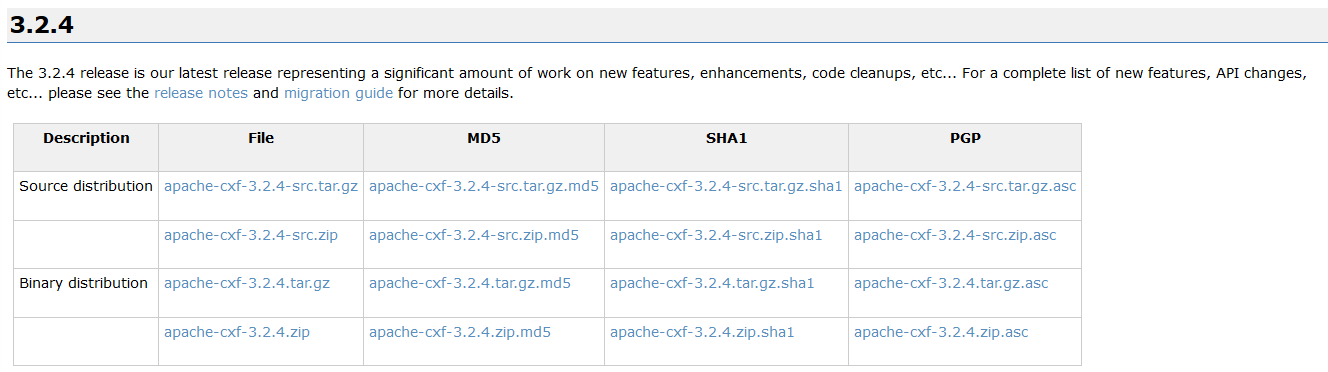

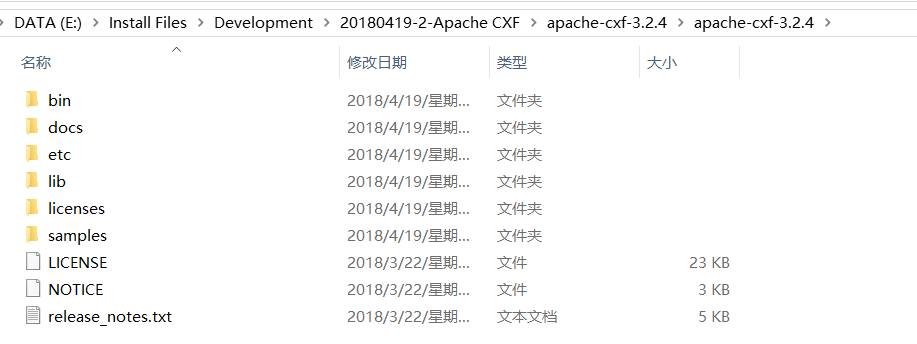
解压上面的 zip 文件 :
2介绍
1什么是cxf
Apache CXF™ is an open source services framework. CXF helps you build and develop services using frontend programming APIs, like JAX-WS and JAX-RS. These services can speak a variety of protocols such as SOAP, XML/HTTP, RESTful HTTP, or CORBA and work over a variety of transports such as HTTP, JMS or JBI.

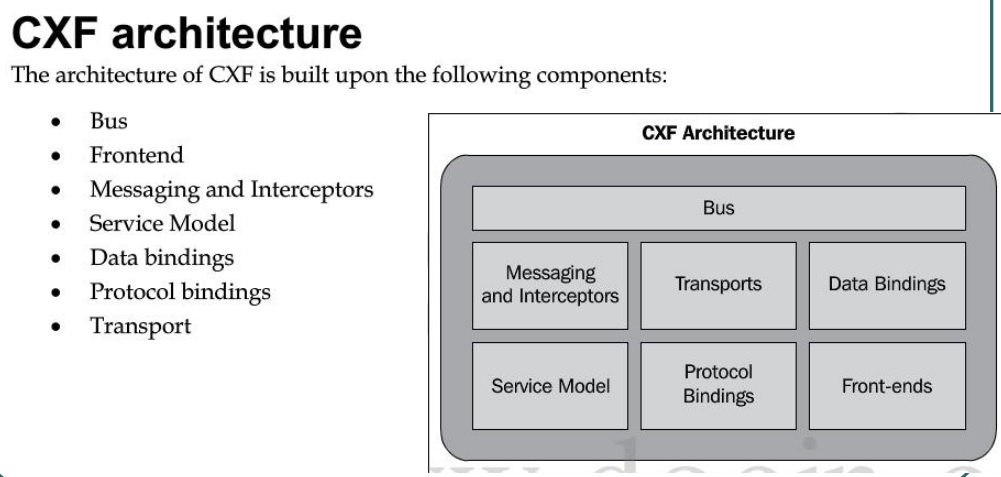
2cxf 结构
3 入门案例(服务端开发)
第一步: 创建动态 web 项目
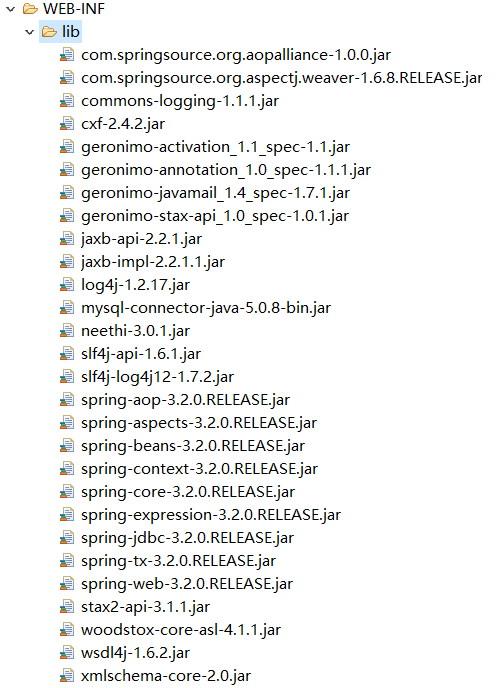
第二步: 导入 CXF 相关 jar 包
第三步: 在 web.xml 中配置 CXF 框架
配置cxf框架提供的一个servlet
<?xml version="1.0" encoding="UTF-8"?>

<web-app xmlns:xsi="http://www.w3.org/2001/XMLSchema-instance" xmlns="http://java.sun.com/xml/ns/javaee" xsi:schemaLocation="http://java.sun.com/xml/ns/javaee http://java.sun.com/xml/ns/javaee/web-app_2_5.xsd" id="WebApp_ID" version="2.5">

  <display-name>webservice_cxf_service</display-name>

  <!--配置 CXF 框架提供的 Servlet  -->

  <servlet>

      <servlet-name>cxf</servlet-name>

      <servlet-class>org.apache.cxf.transport.servlet.CXFServlet</servlet-class>

      <!-- 通过初始化参数指定 CXF 框架的配置文件位置 -->

      <init-param>

          <param-name>config-location</param-name>

          <param-value>classpath:cxf.xml</param-value>

      </init-param>

  </servlet>

  <servlet-mapping>

      <servlet-name>cxf</servlet-name>

      <url-pattern>/service/*</url-pattern>

  </servlet-mapping>

  <welcome-file-list>

    <welcome-file>index.html</welcome-file>

    <welcome-file>index.htm</welcome-file>

    <welcome-file>index.jsp</welcome-file>

    <welcome-file>default.html</welcome-file>

    <welcome-file>default.htm</welcome-file>

    <welcome-file>default.jsp</welcome-file>

  </welcome-file-list>

</web-app>
第四步: 在类路径下提供 cxf.xml
(其实就是一个 spring 配置文件)
<?xml version="1.0" encoding="UTF-8"?>

<beans xmlns="http://www.springframework.org/schema/beans"

xmlns:xsi="http://www.w3.org/2001/XMLSchema-instance"

xmlns:jaxws="http://cxf.apache.org/jaxws"

xmlns:soap="http://cxf.apache.org/bindings/soap"

xsi:schemaLocation="http://www.springframework.org/schema/beans

                    http://www.springframework.org/schema/beans/spring-beans.xsd

                    http://cxf.apache.org/bindings/soap

                    http://cxf.apache.org/schemas/configuration/soap.xsd

                    http://cxf.apache.org/jaxws

                    http://cxf.apache.org/schemas/jaxws.xsd">

    <!-- 引入CXF Bean定义如下,早期的版本中使用 -->

    <import resource="classpath:META-INF/cxf/cxf.xml" />

    <import resource="classpath:META-INF/cxf/cxf-extension-soap.xml" />

    <import resource="classpath:META-INF/cxf/cxf-servlet.xml" />

</beans>
第五步: 开发一个接口和实现类
注解必须放到接口上
package com.test.cxf;

import javax.jws.WebService;

@WebService

public interface IHelloService {

    public String sayHello(String name);

}
package com.test.cxf;

public class HelloServiceImpl implements IHelloService {

    @Override

    public String sayHello(String name) {

        System.out.println("基于CXF开发的服务端sayHello方法被调用了");

        return "hello:"+name;

    }

}
第六步: 在 cxf.xml 中注册服务
【最关键的一步】
<?xml version="1.0" encoding="UTF-8"?>

<beans xmlns="http://www.springframework.org/schema/beans"

xmlns:xsi="http://www.w3.org/2001/XMLSchema-instance"

xmlns:jaxws="http://cxf.apache.org/jaxws"

xmlns:soap="http://cxf.apache.org/bindings/soap"

xsi:schemaLocation="http://www.springframework.org/schema/beans

                    http://www.springframework.org/schema/beans/spring-beans.xsd

                    http://cxf.apache.org/bindings/soap

                    http://cxf.apache.org/schemas/configuration/soap.xsd

                    http://cxf.apache.org/jaxws

                    http://cxf.apache.org/schemas/jaxws.xsd">

    <!-- 引入CXF Bean定义如下,早期的版本中使用 -->

    <import resource="classpath:META-INF/cxf/cxf.xml" />

    <import resource="classpath:META-INF/cxf/cxf-extension-soap.xml" />

    <import resource="classpath:META-INF/cxf/cxf-servlet.xml" />

    <bean name="helloService" class="com.test.cxf.HelloServiceImpl"></bean>

    <!-- 注册服务 -->

    <jaxws:server id="myService" address="/cxfService">

        <jaxws:serviceBean>

            <ref bean="helloService"/>

        </jaxws:serviceBean>

    </jaxws:server>

</beans>
http://ip:port/projectName/service/address;上面配置的 address 只是这个路径的最后一部
分。
如果发布到 tomcat 上, 那访问地址就是:
http://localhost:8080/webservice_cxf_service/service/cxfService?wsdl;
第七步:发布项目到tomcat,查看效果
浏览器输入http://localhost:8080/webservice_cxf_service/service/cxfService?wsdl

4 入门案例(客户端开发)
方式一: 使用 jdk 提供的 wsimport 命令生成本地代码完成调用
方式二: 使用 CXF 提供的方式(重点)
第一步:创建项目导jar包
创建 Java 项目并导入 CXF 相关 jar 包
第二步:生成本地代码
使用 wsimport 或者 CXF 提供 wsdl2java 生成本地代码, 只需要生成接口文件
wsdl2java -d . -p com.test.cxf http://localhost:8080/webservice_cxf_service/service/cxfService?wsdl


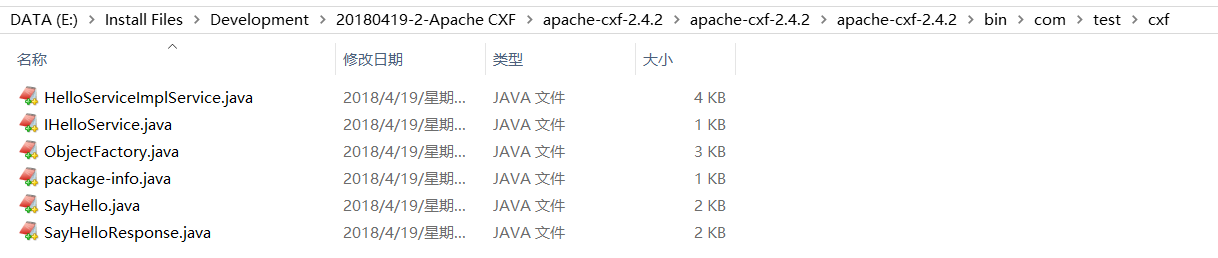
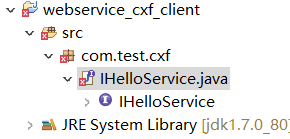
第三步: 将接口文件复制到项目中
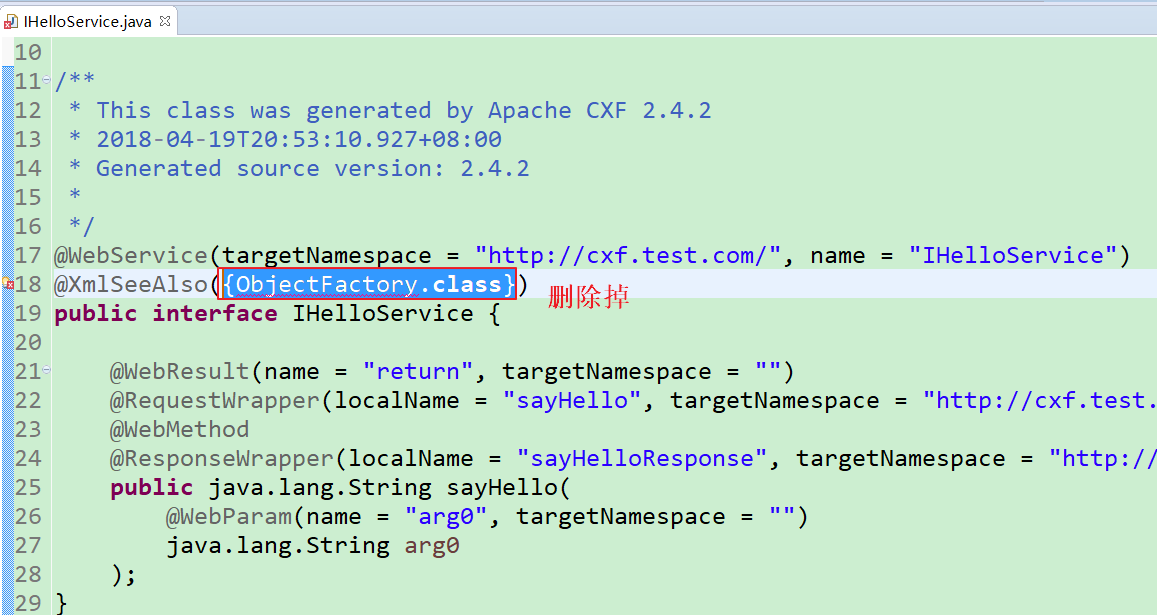
会报错,需要删除ObjectFactory.class

第四步:编写配置文件
提供 spring 配置文件, 注册客户端代理对象
xmlns:jaxws="http://cxf.apache.org/jaxws"

xmlns:soap="http://cxf.apache.org/bindings/soap"

xsi:schemaLocation="http://www.springframework.org/schema/beans

                    http://www.springframework.org/schema/beans/spring-beans.xsd

                    http://cxf.apache.org/bindings/soap

                    http://cxf.apache.org/schemas/configuration/soap.xsd

                    http://cxf.apache.org/jaxws

                    http://cxf.apache.org/schemas/jaxws.xsd">

    <!-- 引入CXF Bean定义如下,早期的版本中使用 -->

    <import resource="classpath:META-INF/cxf/cxf.xml" />

    <import resource="classpath:META-INF/cxf/cxf-extension-soap.xml" />

    <import resource="classpath:META-INF/cxf/cxf-servlet.xml" />

    <!-- 注册cxf客户端对象,通过spring框架创建这个代理对象,使用代理对象实现远程调用 -->

    <jaxws:client id="myClient"

            address="http://192.168.31.247:8080/webservice_cxf_service/service/cxfService"

            serviceClass="com.test.cxf.IHelloService">

    </jaxws:client>

</beans>
第五步:书写测试类
读取 spring 配置文件, 创建 spring 工厂, 从工厂中获取代理对象, 实现远程调用
package com.test.cxf;

import org.springframework.context.ApplicationContext;

import org.springframework.context.support.ClassPathXmlApplicationContext;

public class App {

    public static void main(String[] args) {

        ApplicationContext ac = new ClassPathXmlApplicationContext("cxf.xml");

        IHelloService proxy = (IHelloService) ac.getBean("myClient");

        String s = proxy.sayHello("cury");

        System.out.println(s);

    }

}
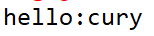
第六步:运行查看结果
客户端:
tomcat端:

apache CXF quickstart的更多相关文章
- Spring 4 集成Apache CXF开发JAX-RS Web Service
什么是JAX-RS 在JSR-311规范中定义,即Java API for RESTful Web Services,一套Java API,用于开发 RESTful风格的Webservice. 工程概 ...
- Apache CXF实现WebService发布和调用
第一种方法:不用导入cxf jars 服务端: 1. 新建Web工程 2.新建接口和实现类.测试类 目录结构图如下: 接口代码: package com.cxf.spring.service; imp ...
- Apache CXF实现WebService入门教程(附完整源码)
Apache CXF实现WebService非常简单实用,只需要几步就可以实现一个简单的web service. 首先我们需要新建一个maven项目,在pom中添加依赖和jetty作为测试的web s ...
- Apache CXF Webservice入门
1.步骤一览 关于CXF的介绍请移步官网.百科,这里仅供初次使用者入门. 2.步骤详情 2.1.环境准备 apache-cxf-3.0.0.zip下载 jdk1.7.0_51 Eclipse4.3.0 ...
- Apache CXF自定义拦截器
为什么设计拦截器?1.为了在webservice请求过程中,能动态操作请求和响应数据,CXF设计了拦截器 拦截器分类: 1.按所处的位置分:服务器端拦截器,客户端拦截器. 2.按消息的方向分:入拦截器 ...
- apache CXF wsdl2java工具的使用
cxf的wsdl2java命令和JDK的wsimport命令的区别和使用 JDK提供了一个wsimport.exe的命令,主要是用于将WebService生成客户端代码,然后好调用WebService ...
- 解决Apache CXF 不支持传递java.sql.Timestamp和java.util.HashMap类型问题
在项目中使用Apache开源的Services Framework CXF来发布WebService,CXF能够很简洁与Spring Framework 集成在一起,在发布WebService的过程中 ...
- org.apache.cxf.transport.servlet.CXFServlet cannot be cast to javax.servlet.Servlet
java.lang.ClassCastException: org.apache.cxf.transport.servlet.CXFServlet cannot be cast to javax.se ...
- Apache CXF 103 CXF Basics - partial
本Spike记录中内容,如无特别指出,均引用[1]. 0 引言 0.1 基本的Web服务术语 XML 业界的结构化交换信息表示的事实上的标准. XML namespace是在XML文档中提供唯一的命名 ...
随机推荐
- Android 动态改变图片的颜色值
public void onViewClicked(View view) { switch (view.getId()) { case R.id.bt1: img1.setColorFilter(ge ...
- oracle 中 创建序列sequence
drop sequence SEQ_YCXWP_CGD; create sequence SEQ_YCXWP_CGD increment start nomaxvalue;
- C# DataGridView控件动态添加新行
C# DataGridView控件动态添加新行 DataGridView控件在实际应用中非常实用,特别需要表格显示数据时.可以静态绑定数据源,这样就自动为DataGridView控件添加相应的行.假如 ...
- angular component元素
- Flask写web时cookie的处理
本文来自网易云社区 作者:孙圣翔 flask是一个微型web开发框架,别看他微型,在github上排名还是挺高的. A microframework based on Werkzeug, Jinja2 ...
- 关于MultiDataTrigger和MultiTrigger的一些注意事项
他俩有着相同的语法. 都是在conditions中编写触发条件. 因为都是同一个触发类. 在conditions中有Property和Binding这两个属性.那么这两个可以同时使用吗?当然是不可以的 ...
- jmete察看结果树和body data乱码问题的解决办法
jmeter察看结果树乱码问题的解决办法: (1)在jmeter的bin目录下找到jmeter.properties这个文件添加sampleresult.default.encoding=utf-8 ...
- django-redis 使用规范
django-redis 基于 BSD 许可, 是一个使 Django 支持 Redis cache/session 后端的全功能组件. 1,安装 django-redis 最简单的方法就是用 pip ...
- Scanner类的用法
Scanner类,一个可以使用正则表达式来解析基本类型和字符串的简单文本扫描器. 用于扫描输入文本的实用程序.位于java.util包中. 使用Scanner接收键盘输入的字符,步骤: 1.导入Sca ...
- eclipse创建Java项目时提示Open Associated Perspective?
在eclipse中,原先使用python进行编程,需要新建java项目时,会提示如下信息: 消息框内翻译如下: Open Associated Perspective? --开放关联视角? This ...