
iOS开发——UI进阶篇(一)UITableView,索引条,汽车数据展示案例
一、什么是UITableView
在iOS中,要实现展示列表数据,最常用的做法就是使用UITableView
UITableView继承自UIScrollView,因此支持垂直滚动,而且性能极佳
UITableView的两种样式
UITableViewStylePlain
UITableViewStyleGrouped
二、如何展示数据

UITableView需要一个数据源(dataSource)来显示数据
UITableView会向数据源查询一共有多少行数据以及每一行显示什么数据等
没有设置数据源的UITableView只是个空壳
凡是遵守UITableViewDataSource协议的OC对象,都可以是UITableView的数据源
tableView展示数据的过程
调用数据源的下面方法得知一共有多少组数据
- (NSInteger)numberOfSectionsInTableView:(UITableView *)tableView;
调用数据源的下面方法得知每一组有多少行数据
- (NSInteger)tableView:(UITableView *)tableView numberOfRowsInSection:(NSInteger)section;
调用数据源的下面方法得知每一行显示什么内容
- (UITableViewCell *)tableView:(UITableView *)tableView cellForRowAtIndexPath:(NSIndexPath *)indexPath;
三、Cell简介
UITableView的每一行都是一个UITableViewCell,通过dataSource的tableView:cellForRowAtIndexPath:方法来初始化每一行
UITableViewCell内部有个默认的子视图:contentView,contentView是UITableViewCell所显示内容的父视图,可显示一些辅助指示视图
辅助指示视图的作用是显示一个表示动作的图标,可以通过设置UITableViewCell的accessoryType来显示,默认是UITableViewCellAccessoryNone(不显示辅助指示视图),其他值如下:
UITableViewCellAccessoryDisclosureIndicator
UITableViewCellAccessoryDetailButton
UITableViewCellAccessoryDetailDisclosureButton
UITableViewCellAccessoryCheckmark
还可以通过cell的accessoryView属性来自定义辅助指示视图(比如往右边放一个开关)
四、UITableViewCell的contentView
contentView下默认有3个子视图
其中2个是UILabel(通过UITableViewCell的textLabel和detailTextLabel属性访问)
第3个是UIImageView(通过UITableViewCell的imageView属性访问)
UITableViewCell还有一个UITableViewCellStyle属性,用于决定使用contentView的哪些子视图,以及这些子视图在contentView中的位置
UITableViewCellStyleDefault
UITableViewCellStyleSubtitle
UITableViewCellStyleValue1
UITableViewCellStyleValue2
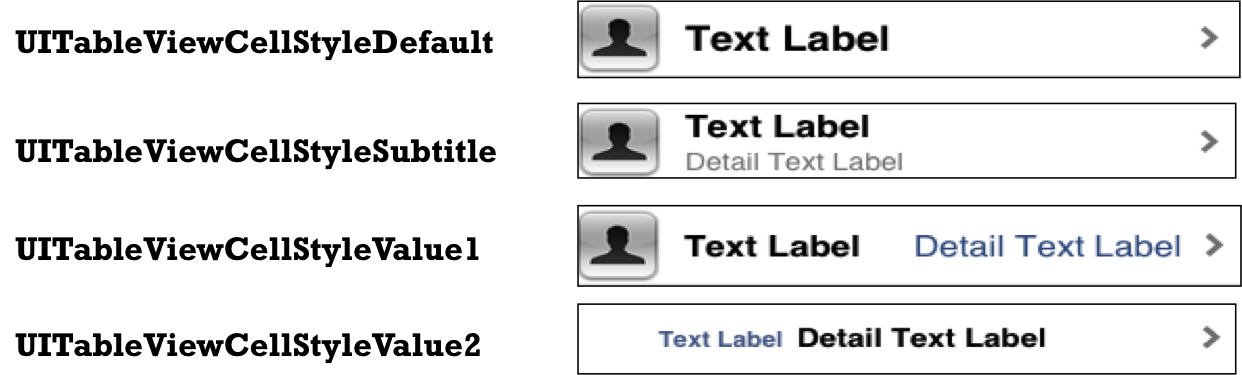

五、Cell的重用原理
iOS设备的内存有限,如果用UITableView显示成千上万条数据,就需要成千上万个UITableViewCell对象的话,那将会耗尽iOS设备的内存。要解决该问题,需要重用UITableViewCell对象
重用原理:当滚动列表时,部分UITableViewCell会移出窗口,UITableView会将窗口外的UITableViewCell放入一个对象池中,等待重用。当UITableView要求dataSource返回UITableViewCell时,dataSource会先查看这个对象池,如果池中有未使用的UITableViewCell,dataSource会用新的数据配置这个UITableViewCell,然后返回给UITableView,重新显示到窗口中,从而避免创建新对象
还有一个非常重要的问题:有时候需要自定义UITableViewCell(用一个子类继承UITableViewCell),而且每一行用的不一定是同一种UITableViewCell,所以一个UITableView可能拥有不同类型的UITableViewCell,对象池中也会有很多不同类型的UITableViewCell,那么UITableView在重用UITableViewCell时可能会得到错误类型的UITableViewCell
解决方案:UITableViewCell有个NSString *reuseIdentifier属性,可以在初始化UITableViewCell的时候传入一个特定的字符串标识来设置reuseIdentifier(一般用UITableViewCell的类名)。当UITableView要求dataSource返回UITableViewCell时,先通过一个字符串标识到对象池中查找对应类型的UITableViewCell对象,如果有,就重用,如果没有,就传入这个字符串标识来初始化一个UITableViewCell对象
Cell的重用代码
- (UITableViewCell *)tableView:(UITableView *)tableView cellForRowAtIndexPath:(NSIndexPath *)indexPath
{
// 1.定义一个cell的标识
static NSString *ID = @”czcell";
// 2.从缓存池中取出cell
UITableViewCell *cell = [tableView dequeueReusableCellWithIdentifier:ID];
// 3.如果缓存池中没有cell
if (cell == nil) {
cell = [[UITableViewCell alloc] initWithStyle:UITableViewCellStyleSubtitle reuseIdentifier:ID];
}
六、通过代码自定义cell(cell的高度不一致)
1.新建一个继承自UITableViewCell的类
2.重写initWithStyle:reuseIdentifier:方法
添加所有需要显示的子控件(不需要设置子控件的数据和frame, 子控件要添加到contentView中)
进行子控件一次性的属性设置(有些属性只需要设置一次, 比如字体\固定的图片)
3.提供2个模型
数据模型: 存放文字数据\图片数据
frame模型: 存放数据模型\所有子控件的frame\cell的高度
4.cell拥有一个frame模型(不要直接拥有数据模型)
5.重写frame模型属性的setter方法: 在这个方法中设置子控件的显示数据和frame
6.frame模型数据的初始化已经采取懒加载的方式(每一个cell对应的frame模型数据只加载一次)
七、利用UITableView展示汽车数据案例


 #import <UIKit/UIKit.h>

 @interface ViewController : UITableViewController

 @end

 /*************** ViewController**********************/

 #import "ViewController.h"

 #import "CarGroup.h"

 #import "Car.h"

 #define chgID @"chgCell"

 @interface ViewController ()

 @property (nonatomic, copy) NSArray *cargroups;

 @end

 @implementation ViewController

 - (void)viewDidLoad {

     [super viewDidLoad];

     // 设置右边索引文字的颜色

     self.tableView.sectionIndexColor = [UIColor redColor];

     // 设置右边索引文字的背景色

     self.tableView.sectionIndexBackgroundColor = [UIColor blackColor];

     // 注册带有“chgCell”标识的cell

     [self.tableView registerClass:[UITableViewCell class] forCellReuseIdentifier:chgID];

 }

 // 重写cargroups的get方法

 - (NSArray *)cargroups

 {

     if (nil == _cargroups) {

         // 加载cars.plist文件

         NSString *path = [[NSBundle mainBundle] pathForResource:@"cars" ofType:@"plist"];

         NSArray *carGroupsdictArray = [NSArray arrayWithContentsOfFile:path];

         // 创建模型数组

         NSMutableArray *carGroupsM = [NSMutableArray array];

         // 字典转模型 将模型装入数组_cargroups中

         for (NSDictionary *cardict in carGroupsdictArray) {

             CarGroup *carg = [CarGroup carGroupWithdict:cardict];

             [carGroupsM addObject:carg];

         }

         _cargroups = carGroupsM;

     }

     return _cargroups;

 }

 // 总共多少组

 - (NSInteger)numberOfSectionsInTableView:(nonnull UITableView *)tableView

 {

     return self.cargroups.count;

 }

 // 每组多少行

 - (NSInteger)tableView:(nonnull UITableView *)tableView numberOfRowsInSection:(NSInteger)section

 {

     return [self.cargroups[section] cars].count;

 }

  // 加载每一行的cell(cell要显示的内容)

 - (UITableViewCell *)tableView:(nonnull UITableView *)tableView cellForRowAtIndexPath:(nonnull NSIndexPath *)indexPath

 {

     // 1、从缓存池获取cell

     UITableViewCell *cell = [tableView dequeueReusableCellWithIdentifier:chgID];

     cell.backgroundColor = [UIColor yellowColor];

     // 2、如果没找到就创建一个新的cell

 //    if (nil == cell) {

 //        cell = [[UITableViewCell alloc] initWithStyle:UITableViewCellStyleDefault reuseIdentifier:ID];

 //    }

     CarGroup *carGroups = self.cargroups[indexPath.section];

     Car *car = carGroups.cars[indexPath.row];

     // 3、给cell赋值

     cell.textLabel.text = car.name;

     cell.imageView.image = [UIImage imageNamed:car.icon];

     return cell;

 }

 // 设置头部内容

 - (NSString *)tableView:(nonnull UITableView *)tableView titleForHeaderInSection:(NSInteger)section

 {

     CarGroup *carGroups = self.cargroups[section];

     return carGroups.title;

 }

 // 设置索引条

 - (nullable NSArray<NSString *> *)sectionIndexTitlesForTableView:(nonnull UITableView *)tableView

 {

     return [self.cargroups valueForKeyPath:@"title"];

 }

 - (BOOL)prefersStatusBarHidden

 {

     return YES;

 }

 @end

 /*************** CarGroup**********************/

 #import <UIKit/UIKit.h>

 @interface CarGroup : UIView

 @property (nonatomic, copy) NSString *title;

 @property (nonatomic, strong) NSArray *cars;

 + (instancetype)carGroupWithdict:(NSDictionary *)dict;

 @end

 #import "CarGroup.h"

 #import "Car.h"

 @implementation CarGroup

 + (instancetype)carGroupWithdict:(NSDictionary *)dict

 {

     CarGroup *carg = [[CarGroup alloc] init];

     carg.title = dict[@"title"];

     NSMutableArray *arrM = [NSMutableArray array];

     for (NSDictionary *cardic in dict[@"cars"]) {

         Car *car = [Car carWithDict:cardic];

         [arrM addObject:car];

     }

     carg.cars = arrM;

     return carg;

 }

 @end

 /*************** Car**********************/

 #import <UIKit/UIKit.h>

 @interface Car : UIView

 @property (nonatomic, copy) NSString *name;

 @property (nonatomic, copy) NSString *icon;

 + (instancetype)carWithDict:(NSDictionary *)dict;

 @end

 #import "Car.h"

 @implementation Car

 + (instancetype)carWithDict:(NSDictionary *)dict

 {

     Car *car = [[Car alloc] init];

     [car setValuesForKeysWithDictionary:dict];

     return car;

 }

 @end
总结:待更新。。。。
iOS开发——UI进阶篇(一)UITableView,索引条,汽车数据展示案例的更多相关文章
- iOS开发——UI进阶篇(十五)Quartz2D介绍
一.Quartz2D简介 1.什么是Quartz2DQuartz 2D是一个二维绘图引擎,同时支持iOS和Mac系统 Quartz 2D能完成的工作绘制图形 : 线条\三角形\矩形\圆\弧等绘制文字绘 ...
- iOS开发——UI进阶篇(三)自定义不等高cell,如何拿到cell的行高,自动计算cell高度,(有配图,无配图)微博案例
一.纯代码自定义不等高cell 废话不多说,直接来看下面这个例子先来看下微博的最终效果 首先创建一个继承UITableViewController的控制器@interface ViewControll ...
- iOS开发——UI进阶篇(二)自定义等高cell,xib自定义等高的cell,Autolayout布局子控件,团购案例
一.纯代码自定义等高cell 首先创建一个继承UITableViewCell的类@interface XMGTgCell : UITableViewCell在该类中依次做一下操作1.添加子控件 - ( ...
- iOS开发——UI进阶篇(十七)CALayer,核心动画基本使用
一.CALayer简介 1.CALayer在iOS中,文本输入框.一个图标等等,这些都是UIView你能看得见摸得着的东西基本上都是UIView,比如一个按钮.一个文本标签.一个其实UIView之所以 ...
- iOS开发——UI进阶篇(十二)事件处理,触摸事件,UITouch,UIEvent,响应者链条,手势识别
触摸事件 在用户使用app过程中,会产生各种各样的事件 一.iOS中的事件可以分为3大类型 触摸事件加速计事件远程控制事件 响应者对象在iOS中不是任何对象都能处理事件,只有继承了UIResponde ...
- iOS开发——UI进阶篇(七)程序启动原理、打电话、发短信
一.Info.plist常见的设置 1.建立一个工程后,会在Supporting files文件夹下看到一个“工程名-Info.plist”的文件,该文件对工程做一些运行期的配置,非常重要,不能删除 ...
- iOS开发——UI进阶篇(十九)UISearchBar控件简介
最近用到搜索功能.总结一下 搜索,无疑可以使用UISearchBar控件! 那就先了解一下UISearchBar控件吧! UISearchBar控件就是要为你完成搜索功能的一个专用控件.它集成了很多你 ...
- iOS开发——UI进阶篇(十六)Quartz2D实战小例子
一.画线 只有在drawRect中才能获取到跟view相关联的上下文 - (void)drawRect:(CGRect)rect {} 一条线 // 1.获取跟当前View相关联的layer上下文(画 ...
- iOS开发——UI进阶篇(十一)应用沙盒,归档,解档,偏好设置,plist存储,NSData,自定义对象归档解档
1.iOS应用数据存储的常用方式XML属性列表(plist)归档Preference(偏好设置)NSKeyedArchiver归档(NSCoding)SQLite3 Core Data 2.应用沙盒每 ...
随机推荐
- 提取hdfs文件名的方法
#!/bin/bash #------------------------------------------------------------- # 把目录中的所有文件getmerge到本地 # ...
- phpspidercookie
<?php /** * Created by PhpStorm. * User: brady * Date: 2016/12/9 * Time: 17:32 */ ini_set("m ...
- 自然语言16.1_Python自然语言处理学习笔记之信息提取步骤&分块(chunking)
QQ:231469242 欢迎喜欢nltk朋友交流 http://www.cnblogs.com/undercurrent/p/4754944.html 一.信息提取模型 信息提取的步骤共分为五步,原 ...
- angularjs笔记(三)
AngularJS API 7.其他一些常用指令,布尔类型的指令也可以用表达式 (1).数组索引$index <!DOCTYPE html> <html> <head&g ...
- eclipse下遇到 无法解析类型 javax.servlet.http.HttpServletRequest
参考:http://bbs.csdn.net/topics/370187655?page=1 java.lang.Error: 无法解析的编译问题: 无法解析类型 javax.servlet.ht ...
- LOD
[教程] 三分钟了解LOD在游戏里面的运用 http://www.narkii.com/club/thread-321290-1.html Unity3d 游戏场景优化 - LOD(Level-of- ...
- Effective Objective-C 2.0 — 第三条:多用字面量语法,少用与之等价的方法
第三条:多用字面量语法,少用与之等价的方法 几个类:NSString NSNumber NSArray NSDictionary 字面量语法是一种语法糖(syntactic sugar) NSS ...
- VS中修改站点运行方式(集成 Or 经典)
以前写过一篇博客使用HttpHander截取用户请求. 写进Web.Config时..运行会报 在集成环境下不能使用站点配置 就想改成经典..但是不会改..还修改过Framework配置什么的.. 那 ...
- [转]12款最佳Linux命令行终端工具
摘要 “工欲善其事必先利其器”,作为菜鸟,也是从别人那里偷学来的一些东东.今天看到同事用到一个终端命令行工具,觉得自己弱爆了.然后在网上搜了下该工具.发现类似的工具还是挺多的,只是自己不知道罢了. 原 ...
- linux下google chrome浏览器字体修改
今天安装了最新的chrome,我是下载的.deb包直接安装的. 安装完后,用chrome浏览页面时,发现字体有的大,有的小,还不清楚. 于是在网上搜索了一下如何设置字体. 1.打开Chrome浏览器. ...