
Unreal Engine4 学习笔记1 状态机 动画蓝图
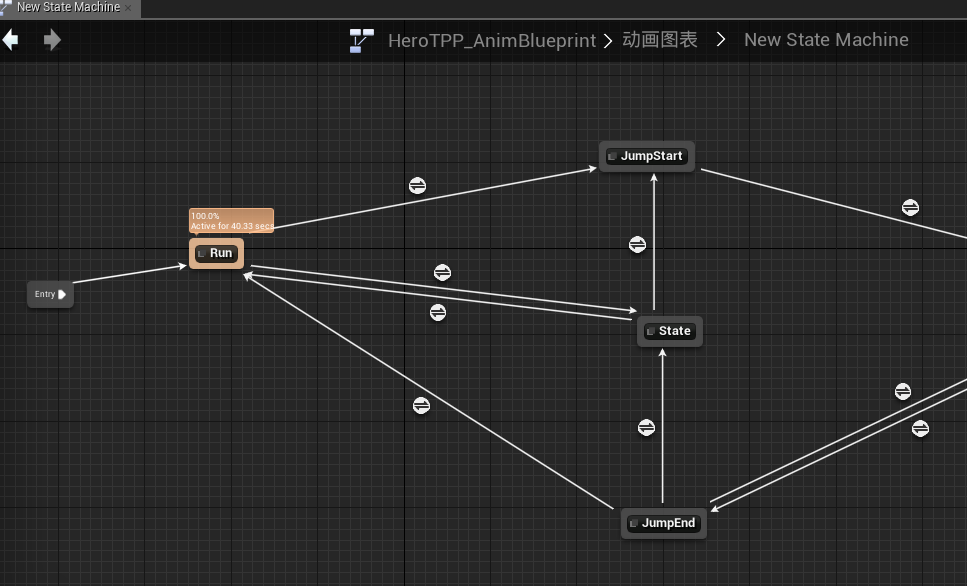
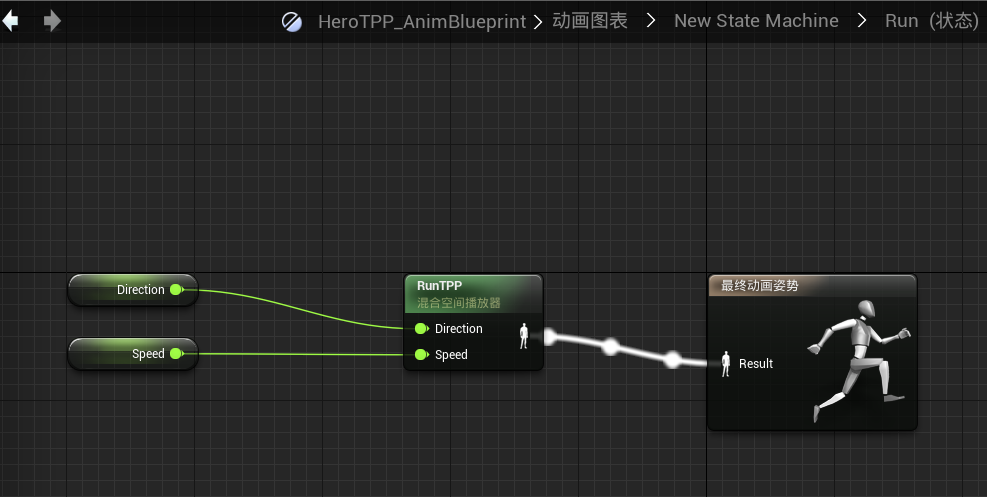
1.动画蓝图 包含 状态机 包含 混合空间BlendSpace,即状态机包含在动画蓝图的"动画图表中",而混合空间可用于在状态机中向某(没)一个状态输出最终POSE:
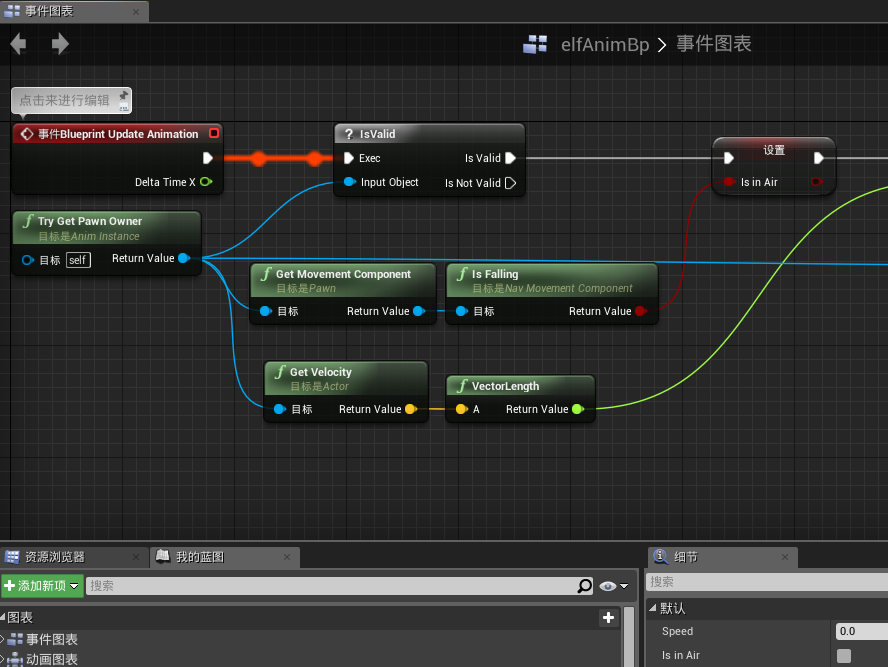
动画蓝图一共包含两个东西,除了上面提到的动画图表,还包括了一个事件图表。动画图表中,状态机内肯定有一些变量来决定状态的转换,比如"isInAir","speed"等。而这些都可以在"事件图表"中得到并设置:
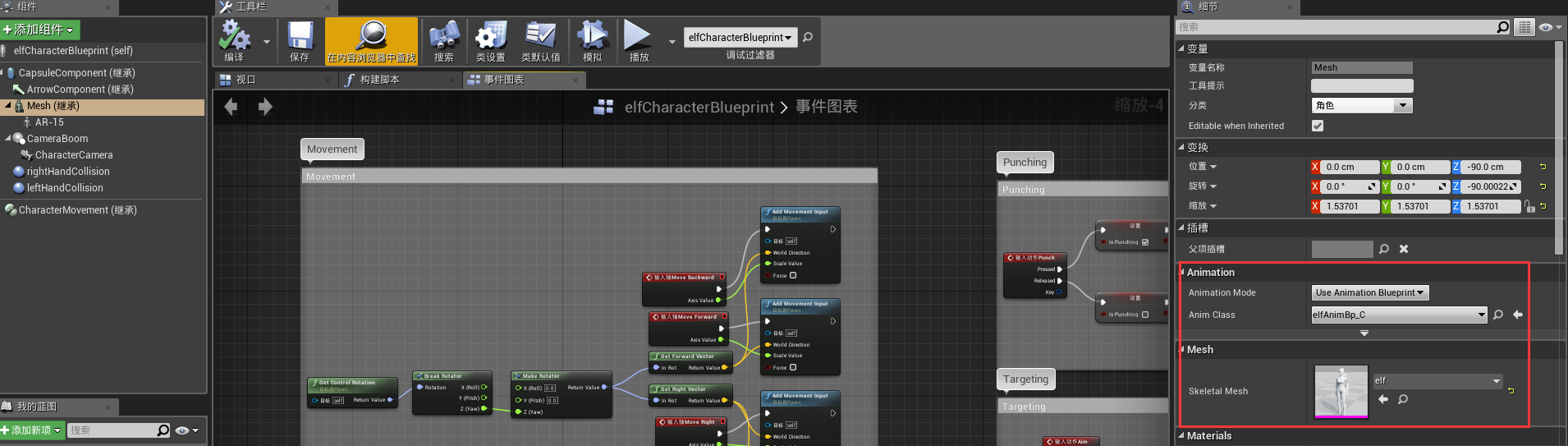
动画又是怎么和我们控制的角色关联起来的呢?
第一种方式是通过Character蓝图,然后如图有相关选项进行关联,下图的例子关联了动画和Mesh
2.新建的c++项目,是不包含Character类的, 但包含一个parent class 为 GameMode的类
关于出生点,最好是在GameMode类的基础上新建一个GameMode蓝图,然后在蓝图中设置Default Pawn Class:
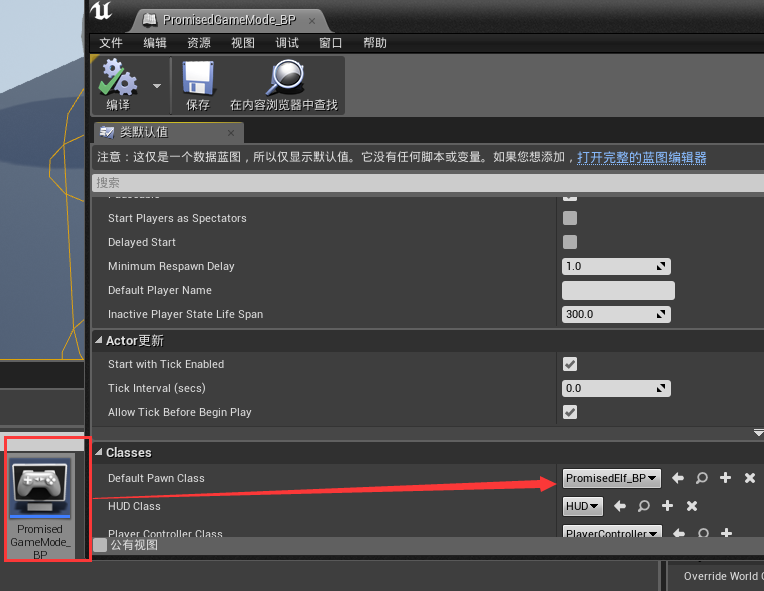
然后还要在设置->世界设置中进行设置:
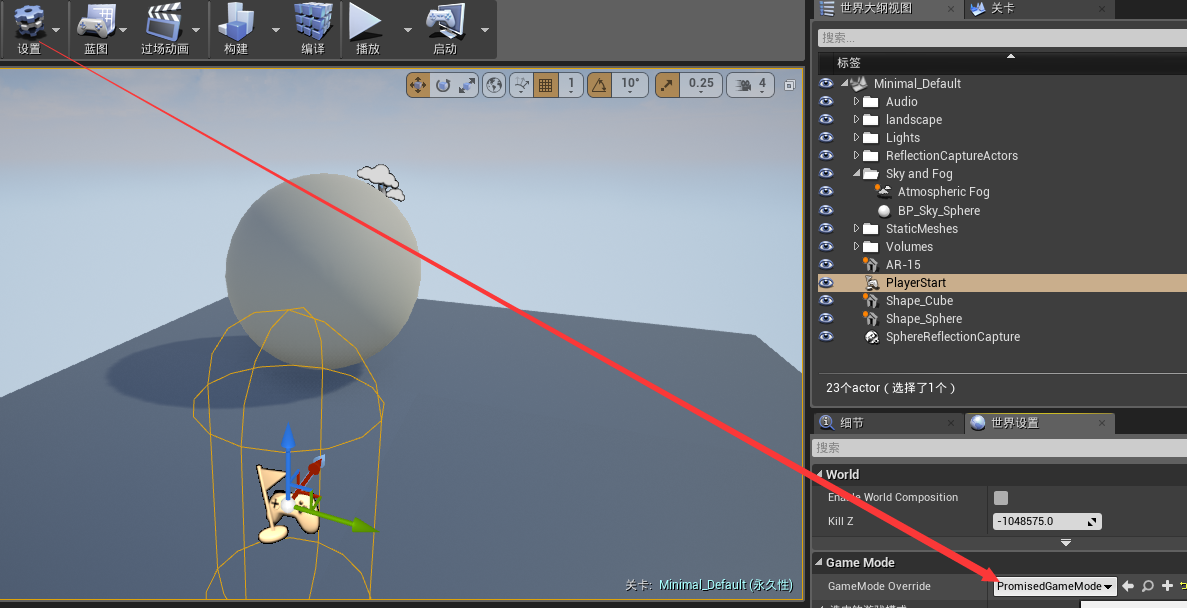
关于输入,这样的代码出现在Character类中:
void ABatteryCollectorCharacter::SetupPlayerInputComponent(class UInputComponent* InputComponent)

{

    // Set up gameplay key bindings

    check(InputComponent);

    InputComponent->BindAction("Jump", IE_Pressed, this, &ACharacter::Jump);

    InputComponent->BindAction("Jump", IE_Released, this, &ACharacter::StopJumping);

    InputComponent->BindAction("Collect", IE_Pressed, this, &ABatteryCollectorCharacter::CollectPickups);

    InputComponent->BindAxis("MoveForward", this, &ABatteryCollectorCharacter::MoveForward);

    InputComponent->BindAxis("MoveRight", this, &ABatteryCollectorCharacter::MoveRight);

    // We have 2 versions of the rotation bindings to handle different kinds of devices differently

    // "turn" handles devices that provide an absolute delta, such as a mouse.

    // "turnrate" is for devices that we choose to treat as a rate of change, such as an analog joystick

    InputComponent->BindAxis("Turn", this, &APawn::AddControllerYawInput);

    InputComponent->BindAxis("TurnRate", this, &ABatteryCollectorCharacter::TurnAtRate);

    InputComponent->BindAxis("LookUp", this, &APawn::AddControllerPitchInput);

    InputComponent->BindAxis("LookUpRate", this, &ABatteryCollectorCharacter::LookUpAtRate);

    // handle touch devices

    InputComponent->BindTouch(IE_Pressed, this, &ABatteryCollectorCharacter::TouchStarted);

    InputComponent->BindTouch(IE_Released, this, &ABatteryCollectorCharacter::TouchStopped);

}
Unreal Engine4 学习笔记1 状态机 动画蓝图的更多相关文章
- Unreal Engine4 学习笔记2 动画蒙太奇
动画蒙太奇出现的位置是在动画蓝图的动画图表和事件图表中,如下图 事件图表,可以看出在主线执行的结尾,如果is Punching 为true,则会执行一个我们自定义的Punch Event,用来播放动画 ...
- iOS学习笔记-自定义过渡动画
代码地址如下:http://www.demodashi.com/demo/11678.html 这篇笔记翻译自raywenderlick网站的过渡动画的一篇文章,原文用的swift,由于考虑到swif ...
- jquery学习笔记(四):动画
内容来自[汇智网]jquery学习课程 4.1 显示和隐藏 在jQuery中使用 hide() 和 show() 方法来隐藏和显示 HTML 元素: hide()的语法形式:$(selector).h ...
- jquery学习笔记-----事件和动画
一.ready机制 $(document).ready( function(){} ) $().ready( function(){} ) $( function(){} ) jquery的read ...
- !!学习笔记:CSS3动画
一句话就有css3动画: 2016-6-29 <style type="text/css"> h1{background:#999;} h1:hover{border- ...
- iOS学习笔记09-核心动画CoreAnimation
http://www.cnblogs.com/liutingIOS/p/5368536.html 一.CALayer CALayer包含在QuartzCore框架中,具有跨平台性,在iOS中使用Cor ...
- Unity Shader学习笔记 - 用UV动画实现沙滩上的泡沫
这个泡沫效果来自远古时代的Unity官方海岛Demo, 原效果直接复制3个材质球在js脚本中做UV动画偏移,这里尝试在shader中做动画并且一个pass中完成: // Upgrade NOTE: r ...
- CSS3学习笔记之loading动画
效果截图: HTML代码: <div class="divBox"> <div class="loader"> <div clas ...
- IOS开发学习笔记022-imageView实现动画
这里要播放的动画是很多张连续的动画,连续播放就会显示出动画效果. 大概过程是: 新建一个single view application ,然后添加一个image View控件到视图.给image vi ...
随机推荐
- phpcms模块开发简易教程
简介: 在phpcms中,各个功能是以模块为单位定义的(对应modules目录),如果需要新增功能最好的办法就是开发一个模块,然后复制到phpcms目录下,然后进入后台安装即可. 官方说明: phpc ...
- CentOS完美搭建Redis3.0集群并附测试
线上的统一聊天和推送项目使用的是redis主从,redis版本2.8.6 redis主从和mysql主从目的差不多,但redis主从配置很简单,主要在从节点配置文件指定主节点ip和端口:slaveof ...
- JavaScript Window对象属性
window 代表浏览器中一个打开的窗口. Window的属性 属性 描述 closed 获取引用窗口是否已关闭. defaultStatus 设置或获取要在窗口底部的状态栏上显示的缺省信息. dia ...
- 数据库Error:The ScriptCollection in ScriptName not find
System.InvalidOperationException: The ScriptCollection in ScriptName not find 在 WMI.SQL.HELPER.CONFI ...
- DIV UL LI
<style type="text/css"> .productDetailTabNav{ width:960px;} .productDetailTabNav ul{ ...
- Shell 读取文本内容
在Linux中有很多方法逐行读取一个文件的方法,其中最常用的就是下面的脚本里的方法,而且是效率最高,使用最多的方法.为了给大家一个直观的感受,我们将通过生成一个大的文件的方式来检验各种方法的执行效率. ...
- 在VS中MFC、ATL与WIN32有什么联系或区别?
有时候遇到一些初学者问我这个问题:在VS中使用MFC和ATL与使用WIN32有什么联系或区别?通俗来说,win32是通过调用windows api去实现需要的功能.而MFC和ATL是封装好的类库,包含 ...
- 迷宫问题_BFS_挑战程序设计竞赛p34
给定一个N*M的迷宫,求从起点到终点的最小步数. N,M<100: 输入: 10 10#S######.#......#..#.#.##.##.#.#........##.##.####.... ...
- HTML超链接
打开网页在 想要查看的位置右键单击 审查元素 则可以查看代码 点击图片右键单独打开 则可以查看图片位置 一.超链接 a标签 <a href="地址"> ...
- 【linux】学习1
郁闷啊 好多东西要学 下面大概就是鸟哥那本书的第五章内容吧 linux命令: Ctrl + Alt + F1 ~ F6 : 切换终端 ls -al ~ :显示主文件夹下的所有隐藏文件 date: ...