
004 爬虫(最初的爬虫方式,以及urllib2)
一:最初的爬取方式
1.代码示例
   # coding=utf-8

   import urllib2

   request=urllib2.Request("http://www.baidu.com")

   response=urllib2.urlopen(request)

   print response.read()
2.request对象概念
python中的request其实就是python向服务器发出请求,得到其返回的信息。
3.urllib与urllib2
是功能强大的网络编程函数库,通过他们在网络上访问文件就像访问本地电脑上的文件一样。
与re模块结合,可以下载web页面,提取信息,这时最开始的抓取方式。
4.常见的请求方式
get
post
put
delete
二:Post方式的爬取
1.程序(post方式)
 #coding=utf-8

   import urllib

   import urllib2

   values={"wd":"python爬虫"}

   data=urllib.urlencode(values)

   url="http://www.baidu.com/s"

   request=urllib2.Request(url,data)

   response=urllib2.urlopen(request)

   print response.read()
三:Get方式的爬
1.是?链接的情况
2.程序
 #encoding=utf-8

   import urllib

   import urllib2

   values={}

   values['wd']="python爬虫"

   data=urllib.urlencode(values)

   url="http://www.baidu.com/s"

   getUrl=url+"?"+data

   request=urllib2.Request(getUrl)

   response=urllib2.urlopen(request)

   print response.read()
四:Header设置
1.原有
有些网站不会同意直接访问,如果有识别问题,站点不会响应
因此,为了完全模拟浏览器上的工作,需要设置一些Header的属性。
2.设置
user agent='Mozilla/4.0(compatible;MSIE 5.5;Windows NT)'
headers={'User-Agent':user agent}
request=urllib2.Request(url,data,headers)
五:使用代理访问
1.缘由
多次访问,目标网站会禁止你的访问,所以需要更换IP
2.免费的代理ip网站
http://www.xicidaili.com/

六:对上面知识点程序演示
1.爬虫
 #encoding=utf-8

 import urllib

 import urllib2

 import random

 ##获取html的功能函数

 def get_html(url,headers,proxies,num_retries=2):

     print 'Download:',url

     req=urllib2.Request(url)

     ##设置请求头

     req.add_header('User-Agent',random.choice(headers['User-Agent']))

     ##设置代理

     proxy_support=urllib2.ProxyHandler({'http':random.choice(proxies)})

     opener=urllib2.build_opener(proxy_support);

     urllib2.install_opener(opener)

     html=urllib2.urlopen(req).read()

     return html

 ##主流程代码

 headers={

     "User-Agent":["Mozilla/5.0(Windows NT 10.0;WOW64;rv:50.0) Gecko/20100101 Firefox/50.0"]

 }

 proxies=["61.135.217.7:80","114.247.209.130:8080"]

 html=get_html("https://www.tmall.com",headers,proxies)

 print html
七:异常处理
1.URLError
产生的原因如下:
网络无连接,链接不到指定的服务器,服务器不存在。
2.解决方式
使用try except
程序示例如下:
 import urllib2

 request=urllib2.Request("www.12334rer.com")

 try:

     response=urllib2.urlopen(request)

 except urllib2.URLError,e:

     print e.reason

 print 1
3.HttpError
是URLError的子类,在利用urlopen方法发出一个请求后,服务器都会对应一个应答对象response,其中它包含一个数字“状态吗”,表示Http协议所返回的响应的状态。
注意点:except的顺序。
程序示例如下:
 #-*- coding: UTF-8 -*-

 import urllib2

 req = urllib2.Request('http://blog.csdn.net/cqcre1')

 try:

     urllib2.urlopen(req)

 except urllib2.HTTPError,e:

     print e.code

 except urllib2.URLError, e:

     print e.reason

 else:

     print "OK"
显示403,表示禁止访问。
八:正则表达式
1.Re模块
自带的re模块,提供正则表达式的支持。
主要用到的方法:
#返回pattern对象
re.compile(string,[,flag])
#匹配所用的函数
re.match(pattern,string[,flag])
re.search(pattern,string[,flag])
re.split(pattern,string[,maxsplit])
re.findall(pattern,string[,flag])
2.pattern的创建
pattern=re,compile(r'hello')
3.flag参数
flag是匹配模式
可以使用‘|’进行同时生效。
re.I:表示忽略大小写
re.M:多行模式
4.程序示例
 #-*- coding: UTF-8 -*-

 # 导入re模块

 import re

 # 将正则表达式编译成Pattern对象,注意hello前面的r的意思是“原生字符串”

 pattern = re.compile(r'hello')

 # 使用re.match匹配文本,获得匹配结果,无法匹配时将返回None

 result1 = re.match(pattern, 'a12')

 result2 = re.match(pattern, 'helloo CQC!')

 result3 = re.match(pattern, 'helo123 CQC!')

 result4 = re.match(pattern, 'hello CQC!')

 # 如果1匹配成功

 if result1:

     # 使用Match获得分组信息

     print result1.group()

 else:

     print '1匹配失败!'

 # 如果2匹配成功

 if result2:

     # 使用Match获得分组信息

     print result2.group()

 else:

     print '2匹配失败!'

 # 如果3匹配成功

 if result3:

     # 使用Match获得分组信息

     print result3.group()

 else:

     print '3匹配失败!'

 # 如果4匹配成功

 if result4:

     # 使用Match获得分组信息

     print result4.group()

 else:

     print '4匹配失败!'
5.正则表达式的语法
主要是那些模糊查找。
6.程序示例代码
 #-*- coding: UTF-8 -*-

 import urllib

 import urllib2

 import random

 import re

 import sys

 ##设置编码

 reload(sys)

 sys.setdefaultencoding('utf-8')

 def get_html(url,headers,proxies,num_retries=2):

     print 'Downloading:',url

     #设置请求头,模拟浏览器访问

     req=urllib2.Request(url)

     req.add_header("User-Agent",random.choice(headers['User-Agent']))

     #设置代理

     proxy_support=urllib2.ProxyHandler({'http':random.choice(proxies)})

     opener=urllib2.build_opener(proxy_support)

     urllib2.install_opener(opener)

     html=urllib2.urlopen(req).read()

     return html

 headers={

     "User-Agent":["Mozilla/5.0(Windows NT 10.0;WOW64;rv:50.0) Gecko/20100101 Firefox/50.0"]

 }

 proxies=["121.31.101.107:8123","113.58.235.60:808"]

 html=get_html("https://www.tmall.com",headers,proxies)

 # print html

 links=re.findall("<a href=\"(.+?)\">(.+?)</a>",html)

 for link in links:

     print link[0]

     print link[1].encode("utf-8")
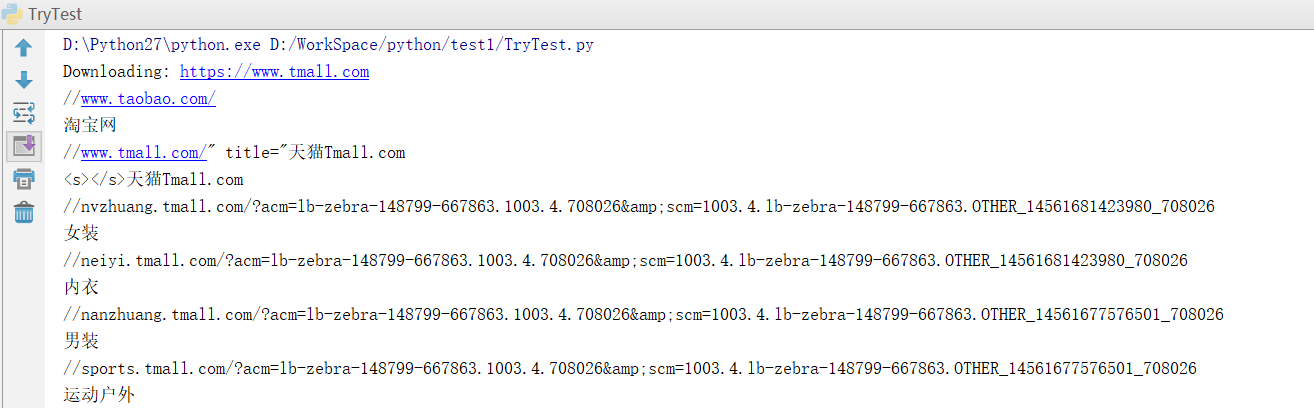
7.效果
8.将数据存储到Excel表格
前提:

9.程序示例
 #-*- coding: UTF-8 -*-

 import urllib

 import urllib2

 import random

 import re

 import sys

 import xlwt

 reload(sys)

 sys.setdefaultencoding('utf-8')

 def get_html(url,headers,proxies,num_retries=2):

     print 'Downloading:',url

     #设置请求头,模拟浏览器访问

     req=urllib2.Request(url)

     req.add_header("User-Agent",random.choice(headers['User-Agent']))

     #设置代理

     proxy_support=urllib2.ProxyHandler({'http':random.choice(proxies)})

     opener=urllib2.build_opener(proxy_support)

     urllib2.install_opener(opener)

     html=urllib2.urlopen(req).read()

     return html

 def saveData(datalist, savepath):

     book = xlwt.Workbook(encoding='utf-8', style_compression=0)

     sheet = book.add_sheet('天猫首页链接信息', cell_overwrite_ok=True)

     col = (u'编号', u'内容', u'链接')

     for i in range(0, 3):

         sheet.write(0, i, col[i])  # 列名 第一个参数表示第几行  第二个参数表示第几列   第三个参数表示内容

     i=0

     print  len(datalist)

     for link in datalist:

         i=i+1

         sheet.write(i, 0, i)  # 数据  写编号

         for j in range(1,3):

             sheet.write(i,j, link[j-1].encode("utf-8"))  # 数据

     book.save(savepath)  # 保存

 headers={

     "User-Agent":["Mozilla/5.0(Windows NT 10.0;WOW64;rv:50.0) Gecko/20100101 Firefox/50.0"]

 }

 proxies=["121.31.101.107:8123","113.58.235.60:808"]

 html=get_html("https://www.tmall.com",headers,proxies)

 # print html

 links=re.findall("<a href=\"(.+?)\">(.+?"

                  ")</a>",html)

 for link in links:

     print link[0],link[1].encode("utf-8")

 saveData(links,'TmallLink.xls')
10.效果展示

004 爬虫(最初的爬虫方式,以及urllib2)的更多相关文章
- 爬虫框架存储pymysql方式
爬虫框架存储pymysql方式# -*- coding: utf-8 -*-import pymysql# Define your item pipelines here## Don't forget ...
- Python爬虫与反爬虫(7)
[Python基础知识]Python爬虫与反爬虫(7) 很久没有补爬虫了,相信在白蚁二周年庆的活动大厅比赛中遇到了关于反爬虫的问题吧 这节我会做个基本分享. 从功能上来讲,爬虫一般分为数据采集,处理, ...
- python-day2爬虫基础之爬虫基本架构
今天主要学习了爬虫的基本架构,下边做一下总结: 1.首先要有一个爬虫调度端,来启动爬虫.停止爬虫或者是监视爬虫的运行情况,在爬虫程序中有三个模块,首先是URL管理器来对将要爬取的URL以及爬取过的UR ...
- 【Python网络爬虫一】爬虫原理和URL基本构成
1.爬虫定义 网络爬虫,即Web Spider,是一个很形象的名字.把互联网比喻成一个蜘蛛网,那么Spider就是在网上爬来爬去的蜘蛛.网络蜘蛛是通过网页的链接地址来寻找网页的.从网站某一个页面(通常 ...
- crawler_爬虫_反爬虫策略
关于反爬虫和恶意攻击的一些策略和思路 有时网站经常受到恶意spider攻击,疯狂抓取网站内容,对网站性能有较大影响. 下面我说说一些反恶意spider和spam的策略和思路. 1. 通过日志分析来 ...
- Python爬虫-01:爬虫的概念及分类
目录 # 1. 为什么要爬虫? 2. 什么是爬虫? 3. 爬虫如何抓取网页数据? # 4. Python爬虫的优势? 5. 学习路线 6. 爬虫的分类 6.1 通用爬虫: 6.2 聚焦爬虫: # 1. ...
- python爬虫之反爬虫(随机user-agent,获取代理ip,检测代理ip可用性)
python爬虫之反爬虫(随机user-agent,获取代理ip,检测代理ip可用性) 目录 随机User-Agent 获取代理ip 检测代理ip可用性 随机User-Agent fake_usera ...
- C#爬虫与反爬虫--字体加密篇
爬虫和反爬虫是一条很长的路,遇到过js加密,flash加密.重点信息生成图片.css图片定位.请求头.....等手段:今天我们来聊一聊字体: 那是一个偶然我遇到了这个网站,把价格信息全加密了:浏览器展 ...
- Java 多线程爬虫及分布式爬虫架构探索
这是 Java 爬虫系列博文的第五篇,在上一篇 Java 爬虫服务器被屏蔽,不要慌,咱们换一台服务器 中,我们简单的聊反爬虫策略和反反爬虫方法,主要针对的是 IP 被封及其对应办法.前面几篇文章我们把 ...
随机推荐
- R5—字符串处理/正则表达式
R通常被用来进行数值计算比较多,字符串处理相对较少,而且关于字符串的函数也不多,用得多的就是substr.strsplit.paste.regexpr这几个了.实际上R关于字符串处理的功能是非常强大的 ...
- session使用
Session的声明与使用 Session的设置不同于Cookie,必须先启动,在PHP中必须调用session_start().session_start()函数的语法格式如下: Bool sess ...
- POJ 3783 Balls --扔鸡蛋问题 经典DP
题目链接 这个问题是谷歌面试题的加强版,面试题问的是100层楼2个鸡蛋最坏扔多少次:传送门. 下面我们来研究下这个题,B个鸡蛋M层楼扔多少次. 题意:给定B (B <= 50) 个一样的球,从 ...
- HDU 1535 Invitation Cards (最短路)
题目链接 Problem Description In the age of television, not many people attend theater performances. Anti ...
- jQuery基础之二(操作标签)
一:样式操作 addClass();// 添加指定的CSS类名. removeClass();// 移除指定的CSS类名. hasClass();// 判断样式存不存在 toggleClass();/ ...
- AutoCAD DevTV-AUTOCAD二次开发资源合集
Webcast Language Date AutoCAD .Net - Session 2 English 13-Sep-12 AutoCAD .Net - Session 1 English 6- ...
- [转]google gflags 库完全使用
简单介绍 gflags 是 google 开源的用于处理命令行参数的项目. 安装编译 项目主页:gflags ➜ ~ git clone https://github.com/gflags/gflag ...
- 图文解说视频直播原理-zz
本文主要介绍rtmp&hls视频直播原理,文章最早发表在我们的微信公众号上,详见这里,欢迎关注微信公众号blackerteam,更多详见www.blackerteam.com 现在视频直播很火 ...
- python使用twisted搭建的一个socket服务
服务端 # -*- coding: utf-8 -*- # @Time : 2018/9/19 21:41 # @Author : cxa # @File : tsTservTW.py # @Soft ...
- kettle简单插入与更新
Kettle简介:Kettle是一款国外开源的ETL工具,纯java编写,可以在Window.Linux.Unix上运行,数据抽取高效稳定.Kettle 中文名称叫水壶,该项目的主程序员MATT 希望 ...