
Android中Fragment的简单介绍
Android是在Android 3.0 (API level 11)引入了Fragment的,中文翻译是片段或者成为碎片(个人理解),可以把Fragment当成Activity中的模块,这个模块有自己的布局,有自己的生命周期,单独处理自己的输入,在Activity运行的时候可以加载或者移除Fragment模块。
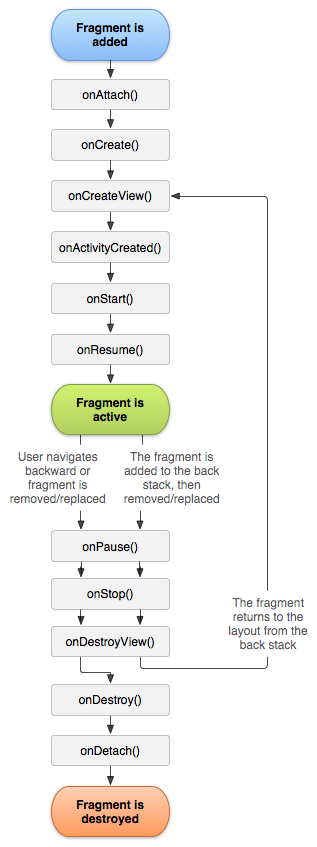
其中有个经典图,大家就字面上理解下就行:
可以把Fragment设计成可以在多个Activity中复用的模块,为了在Android上创建动态的、多窗口的用户交互体验,你需要将UI组件和Activity操作封装成模块进行使用,在activity中你可以对这些模块进行切入切出操作。可以使用Fragment来创建这些模块,如果一个fragment定义了自己的布局,那么在activity中它可以与其他的fragments生成不同的组合,从而为不同的屏幕尺寸生成不同的布局(一个小的屏幕一次只放一个fragment,大的屏幕则可以两个或以上的fragment),比如说下图:
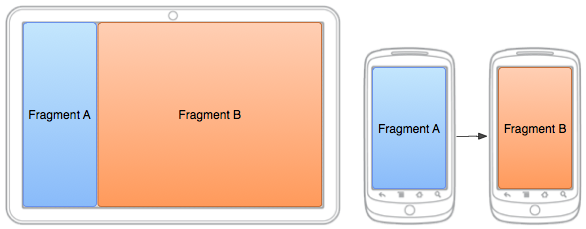
Fragment的两种显示方式
首先,新建一个布局文件fragmentcontent.xml
<?xml version="1.0" encoding="utf-8"?>

<FrameLayout xmlns:android="http://schemas.android.com/apk/res/android"

    android:id="@+id/content_container"

    android:layout_width="match_parent"

    android:layout_height="match_parent" >

    <ImageView

        android:src="@drawable/content"

        android:layout_width="wrap_content"

        android:layout_height="wrap_content" />

</FrameLayout>
这时候与对应的是建立一个显示布局文件的ContentFragment类:
public class ContentFragment extends Fragment {

	@Override

	public View onCreateView(LayoutInflater inflater, ViewGroup container,

			Bundle savedInstanceState) {

		// TODO Auto-generated method stub

		return inflater.inflate(R.layout.fragmentcontent, container, false);

	}

}
inflate()方法的三个参数:
第一个是resource ID,指明了当前的Fragment对应的资源文件;
第二个参数是父容器控件;
第三个布尔值参数表明是否连接该布局和其父容器控件,在这里的情况设置为false,因为系统已经插入了这个布局到父控件,设置为true将会产生多余的一个View Group。
如果需要在Mainactivity中显示的话:
    <fragment

        android:id="@+id/fragment1"

        android:name="com.example.fragmenttest.ContentFragment"

        android:layout_width="match_parent"

        android:layout_height="wrap_content" />
activity_main.xml中的代码为:
<LinearLayout xmlns:android="http://schemas.android.com/apk/res/android"

    xmlns:tools="http://schemas.android.com/tools"

    android:layout_width="match_parent"

    android:layout_height="match_parent"

    android:orientation="vertical"

    tools:context="com.example.fragmenttest.MainActivity" >

    <TextView

        android:layout_width="wrap_content"

        android:layout_height="wrap_content"

        android:text="中共十八大四中全会召开" />

    <fragment

        android:id="@+id/fragment1"

        android:name="com.example.fragmenttest.ContentFragment"

        android:layout_width="match_parent"

        android:layout_height="wrap_content" />

    <TextView

        android:layout_width="match_parent"

        android:layout_height="wrap_content"

        android:text="依法治国,以人为本" />

    <LinearLayout

        android:id="@+id/parentTest"

        android:layout_width="wrap_content"

        android:orientation="vertical"

        android:layout_height="wrap_content" >

    </LinearLayout>

</LinearLayout>
显示的结果为:
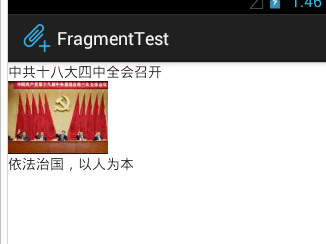
这个时候可以在Mainactivity中加一段代码:
		FragmentTransaction fragmentTransaction = getFragmentManager()

				.beginTransaction();

		ContentFragment fragment = new ContentFragment();

		fragmentTransaction.add(R.id.parentTest, fragment);

		fragmentTransaction.commit();
结果如下:

FragmentManager操作Fragment
基本操作的就是添加,替换,删除(如果是定义在xml文件中的是不可以删除的)
自定义的添加:
		FragmentTransaction fragmentTransaction = getFragmentManager()

				.beginTransaction();

		ContentFragment fragment = new ContentFragment();

		fragmentTransaction.add(R.id.parentTest, fragment);

		fragmentTransaction.commit();
替换:
		FragmentTransaction fragmentTransaction = getFragmentManager()

				.beginTransaction();

		TitleFragment fragment = new TitleFragment();

		fragmentTransaction.replace(R.id.fragment1, fragment);

		fragmentTransaction.commit();
如果仔细看一下,上面应该还是可以看出来基本上操作就是获取Manager,然后就行添加,删除操作,关于内部Fragments之间的交互还在研究中,希望有机会可以补发~
Android中Fragment的简单介绍的更多相关文章
- Android中Fragment和ViewPager那点事儿(仿微信APP)
在之前的博文<Android中使用ViewPager实现屏幕页面切换和引导页效果实现>和<Android中Fragment的两种创建方式>以及<Android中Fragm ...
- Android开发——Fragment的简单使用总结
前言: 之前搞项目的时候,就使用了这个Fragment,中间遇到了许多坑,把坑都解决了,现在写一篇较为简单的Fragment使用总结 Fragment的简单介绍: 简单来说,Fragment其实可以理 ...
- Android中Fragment与Activity之间的交互(两种实现方式)
(未给Fragment的布局设置BackGound) 之前关于Android中Fragment的概念以及创建方式,我专门写了一篇博文<Android中Fragment的两种创建方式>,就如 ...
- Android 中Fragment使用
Android 中Fragment使用 public class MainActivity extends Activity { public static String[] array = { &q ...
- [原创]Android中LocationManager的简单使用,获取当前位置
Android中LocationManager的提供了一系列方法来地理位置相关的问题,包括查询上一个已知位置:注册/注销来自某个 LocationProvider的周期性的位置更新:以及注册/注销接近 ...
- Android中Fragment的两种创建方式
fragment是Activity中用户界面的一个行为或者是一部分.你可以在一个单独的Activity上把多个Fragment组合成为一个多区域的UI,并且可以在多个Activity中再使用.你可以认 ...
- Android中ProgressDialog的简单示例
网上一般对进度条的示例都是如何显示,没有在任务结束如何关闭的文章,参考其他文章经过试验之后把整套进度条显示的简单示例如下: 建立android工程等工作都略去,Google一下就可以了. 下面来介绍主 ...
- Android中View和ViewGroup介绍
1. 概念Android中的View与我们以前理解的“视图”不同.在Android中,View比视图具有更广的含义,它包含了用户交互和显示,更像Windows操作系统中的window. ViewGro ...
- Android中fragment之间和Activity的传值、切换
功能介绍:通过一个activity下方的三个按钮,分别是发送消息(sendButton).聊天记录(chatButton).常用语(commonButton).当单击按钮是,来切换上方的fragmen ...
随机推荐
- Python之路【第九篇】:面向对象进阶
阅读目录 一. isinstance(obj,cls)和issubclass(sub,super)二. 反射三. __setattr__,__delattr__,__getattr__四. 二次加工标 ...
- 百道CTF刷题记录(一)
简介 最近在刷CTF题,主攻Web,兼职Misc Shiyanbar 0x01 简单的登陆题 简单概括: 考点: %00截断正则 CBC字节翻转攻击 难度: 难 WP:https://blog.csd ...
- eclipse文本编码格式修改为UTF-8
1.windows->Preferences...打开"首选项"对话框,左侧导航树,导航到general->Workspace,右 侧Text file encodin ...
- Javascript和JQuery之间的联系
一.Js对象和Jquery对象之间的相互转化1.Js对象转化为Jquery对象 var p = document.getElementById('p'); var $obj = $(p); 2.Jqu ...
- cloudstack模板
玩cloudstack的人都应该玩过模板这个功能,这里还是比较有意思的,我们底层连接vcenter 创建vm采用模板 实际这里的磁盘方案,并不是给系统重新分配的磁盘大小而是又新挂上了一块磁盘,新磁盘的 ...
- 机器学习之路: python 实践 word2vec 词向量技术
git: https://github.com/linyi0604/MachineLearning 词向量技术 Word2Vec 每个连续词汇片段都会对后面有一定制约 称为上下文context 找到句 ...
- 联系表单 1_copy
你的名字 (必填) [text* your-name] 你的邮箱 (必填) [email* your-email] 主题 [text your-subject] 你的留言 [textarea your ...
- 为了增强团队的协作和高效开发,提升代码质量,TGideas团队一起制订的代码规范。主要包括五部分内容:PC规范、移动端规范、性能优化、CP规范、其他项目规范
http://tguide.qq.com/main/index.htm
- hdu 2819 记录路径的二分匹配
题目大意就是给出一个矩阵,每个格子里面要么是0, 要么是1:是否能够经过交换(交换行或者列)使得主对角线上都是1. 其实就行和列的匹配,左边是行,右边是列,然后如果行列交点是1,那么就可以匹配,看是否 ...
- 【10.5校内测试】【DP】【概率】
转移都很明显的一道DP题.按照不优化的思路,定义状态$dp[i][j][0/1]$表示吃到第$i$天,当前胃容量为$j$,前一天吃(1)或不吃(0)时能够得到的最大价值. 因为有一个两天不吃可以复原容 ...