
ASP.NET Core 2 学习笔记(四)依赖注入
ASP.NET Core使用了大量的依赖注入(Dependency Injection, DI),把控制反转(Inversion Of Control, IoC)运用的相当巧妙。DI可算是ASP.NET Core最精华的一部分,有用过Autofac或类似的DI Framework对此应该不陌生。
本篇将介绍ASP.NET Core的依赖注入(Dependency Injection)。
DI 容器介绍
在没有使用DI Framework 的情况下,假设在UserController 要调用UserLogic,会直接在UserController 实例化UserLogic,如下:
public class UserLogic {

    public void Create(User user) {

        // ...

    }

}

public class UserController : Controller {

    public void Register(User user){

        var logic = new UserLogic();

        logic.Create(user);

        // ...

    }

}
以上程序基本没什么问题,但是依赖关系差了点。UserController 必须要依赖UserLogic才可以运行,拆出接口改成:
public interface IUserLogic {

    void Create(User user);

}

public class UserLogic : IUserLogic {

    public void Create(User user) {

        // ...

    }

}

public class UserController : Controller {

    private readonly IUserLogic _userLogic;

    public UserController() {

        _userLogic = new UserLogic();

    }

    public void Register(User user){

        _userLogic.Create(user);

        // ...

    }

}
UserController 与UserLogic 的依赖关系只是从Action 移到构造方法中,依然还是很强的依赖关系。
ASP.NET Core透过DI容器,切断这些依赖关系,实例的产生不在使用方(指上例UserController构造方法中的new),而是在DI容器。
DI容器的注册方式也很简单,在Startup.ConfigureServices注册。如下:
Startup.cs
// ...

public class Startup

{

    public void ConfigureServices(IServiceCollection services)

    {

        services.AddMvc();

    }

}
services就是一个DI容器。
此例把MVC的服务注册到DI容器,等到需要用到MVC服务时,才从DI容器取得对象实例。
基本上要注入到Service的类没什么限制,除了静态类。
以下示例就只是一般的Class继承Interface:
public interface ISample

{

    int Id { get; }

}

public class Sample : ISample

{

    private static int _counter;

    private int _id;

    public Sample()

    {

        _id = ++_counter;

    }

    public int Id => _id;

}
要注入的Service需要在Startup.ConfigureServices中注册实例类型。如下:
Startup.cs
// ...

public class Startup

{

    public void ConfigureServices(IServiceCollection services)

    {

        // ...

        services.AddScoped<ISample, Sample>();

    }

}
- 第一个泛型为注入的类型
建议用Interface来包装,这样在才能把依赖关系拆除。 - 第二个泛型为实例的类型
DI 运行方式
ASP.NET Core的DI是采用Constructor Injection,也就是说会把实例化的物件从建构子传入。
如果要取用DI容器内的物件,只要在建构子加入相对的Interface即可。例如:
Controllers\HomeController.cs
using Microsoft.AspNetCore.Mvc;

using MyWebsite.Models;

namespace MyWebsite.Controllers

{

    public class HomeController : Controller

    {

        private readonly ISample _sample;

        public HomeController(ISample sample)

        {

            _sample = sample;

        }

        public string Index()

        {

            return $"[ISample]\r\n"

                 + $"Id: {_sample.Id}\r\n"

                 + $"HashCode: {_sample.GetHashCode()}\r\n"

                 + $"Tpye: {_sample.GetType()}";

        }

    }

}
输出内容如下:
[ISample]

Id: 1

HashCode: 52582687

Tpye: MyWebsite.Models.Sample
ASP.NET Core 实例化Controller 时,发现构造方法中有ISample 这个类型的参数,就把Sample 的实例注入给该Controller。
每个Request 都会把Controller 实例化,所以DI 容器会从构造方法注入ISample 的实例,把sample 存到变量_sample 中,就能确保Action 能够使用到被注入进来的ISample 实例。
注入实例过程,情境如下:

Service 生命周期
注册在DI 容器的Service 分三种生命周期:
- Transient
每次注入时,都重新new一个新的实例。 - Scoped
每个Request都重新new一个新的实例,同一个Request不管经过多少个Pipeline都是用同一个实例。上例所使用的就是Scoped。 - Singleton
被实例化后就不会消失,程式运行期间只会有一个实例。
小改一下Sample 类的代码:
namespace MyWebsite.Models

{

    public interface ISample

    {

        int Id { get; }

    }

    public interface ISampleTransient : ISample

    {

    }

    public interface ISampleScoped : ISample

    {

    }

    public interface ISampleSingleton : ISample

    {

    }

    public class Sample : ISampleTransient, ISampleScoped, ISampleSingleton

    {

        private static int _counter;

        private int _id;

        public Sample()

        {

            _id = ++_counter;

        }

        public int Id => _id;

    }

}
在Startup.ConfigureServices中注册三种不同生命周期的服务。如下:
public class Startup

{

    public void ConfigureServices(IServiceCollection services)

    {

        services.AddTransient<ISampleTransient, Sample>();

        services.AddScoped<ISampleScoped, Sample>();

        services.AddSingleton<ISampleSingleton, Sample>();

        // Singleton 也可以用以下方法注册

        // services.AddSingleton<ISampleSingleton>(new Sample());

    }

}
Service Injection
只要是透过WebHost产生实例的类型,都可以在构造方法注入。
所以Controller、View、Filter、Middleware或自定义的Service等都可以被注入。
此篇我只用Controller、View、Service做为范例。
Controller
在TestController 中注入上例的三个Services:
Controllers\TestController.cs
using Microsoft.AspNetCore.Mvc;

using MyWebsite.Models;

namespace MyWebsite.Controllers

{

    public class TestController : Controller

    {

        private readonly ISample _transient;

        private readonly ISample _scoped;

        private readonly ISample _singleton;

        public TestController(

            ISampleTransient transient,

            ISampleScoped scoped,

            ISampleSingleton singleton)

        {

            _transient = transient;

            _scoped = scoped;

            _singleton = singleton;

        }

        public IActionResult Index()

        {

            ViewBag.TransientId = _transient.Id;

            ViewBag.TransientHashCode = _transient.GetHashCode();

            ViewBag.ScopedId = _scoped.Id;

            ViewBag.ScopedHashCode = _scoped.GetHashCode();

            ViewBag.SingletonId = _singleton.Id;

            ViewBag.SingletonHashCode = _singleton.GetHashCode();

            return View();

        }

    }

}
Views\Test\Index.cshtml
<table border="1">

    <tr><td colspan="3">Cotroller</td></tr>

    <tr><td>Lifetimes</td><td>Id</td><td>Hash Code</td></tr>

    <tr><td>Transient</td><td>@ViewBag.TransientId</td><td>@ViewBag.TransientHashCode</td></tr>

    <tr><td>Scoped</td><td>@ViewBag.ScopedId</td><td>@ViewBag.ScopedHashCode</td></tr>

    <tr><td>Singleton</td><td>@ViewBag.SingletonId</td><td>@ViewBag.SingletonHashCode</td></tr>

</table>
输出内容如下:
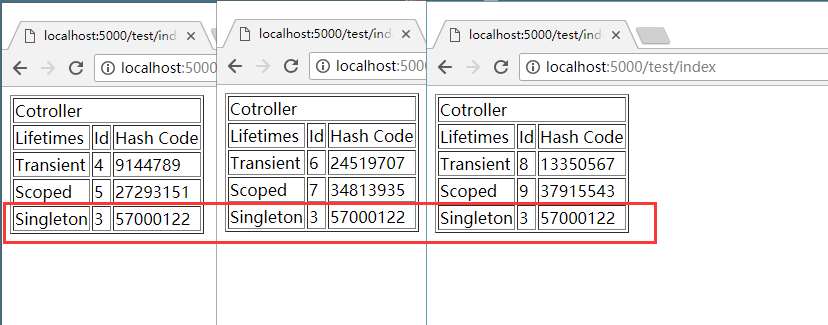
从左到又打开页面三次,可以发现Singleton的Id及HashCode都是一样的,现在还看不太能看出来Transient及Scoped的差异。
Service 实例产生方式:
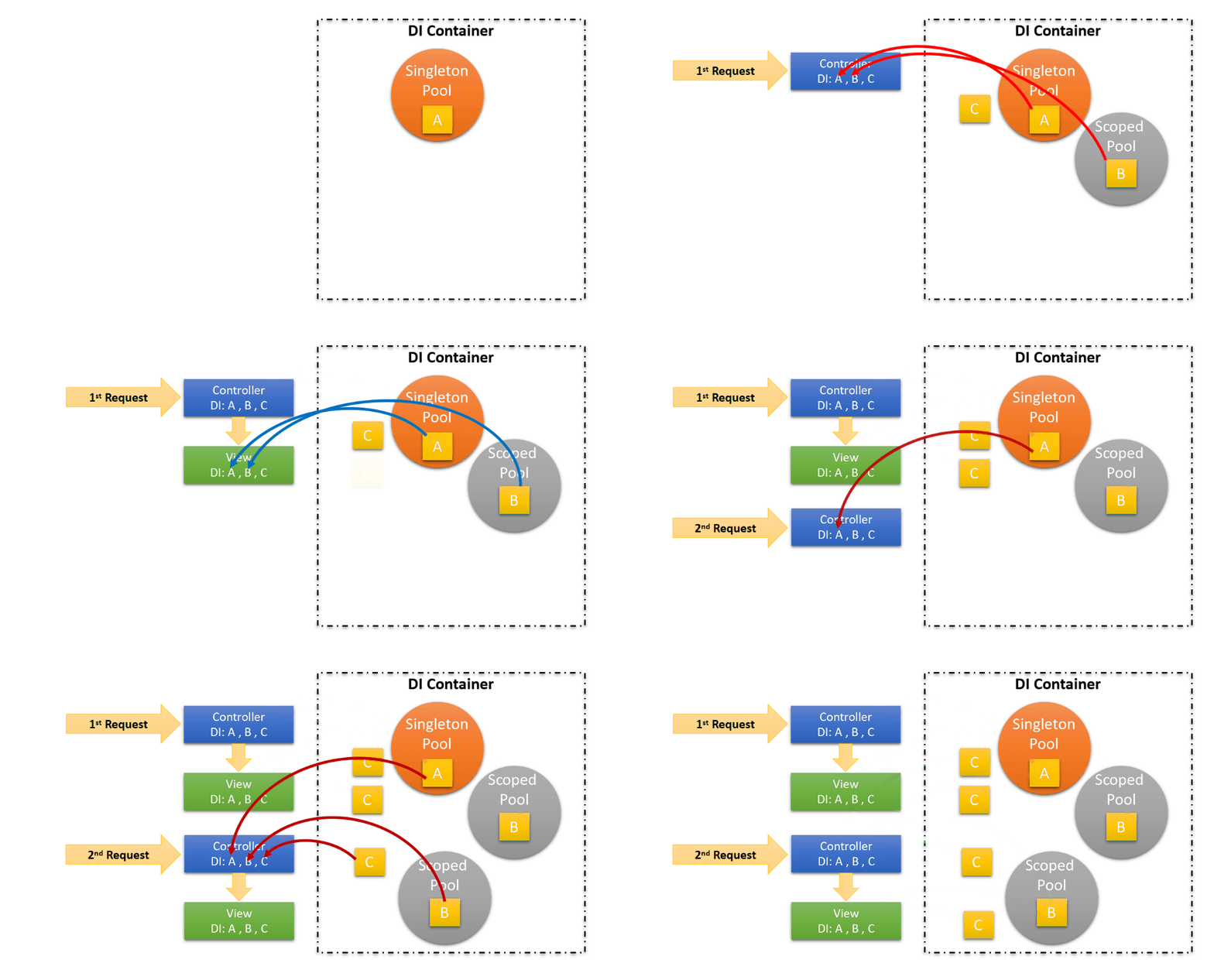
图例说明:
- A为Singleton对象实例
一但实例化,就会一直存在于DI容器中。 - B为Scoped对象实例
每次Request就会产生新的实例在DI容器中,让同Request周期的使用方,拿到同一个实例。 - C为Transient对象实例
只要跟DI容器请求这个类型,就会取得新的实例。
View
View注入Service的方式,直接在*.cshtml使用@inject:
Views\Test\Index.cshtml
@using MyWebsite.Models

@inject ISampleTransient transient

@inject ISampleScoped scoped

@inject ISampleSingleton singleton

<table border="1">

    <tr><td colspan="3">Cotroller</td></tr>

    <tr><td>Lifetimes</td><td>Id</td><td>Hash Code</td></tr>

    <tr><td>Transient</td><td>@ViewBag.TransientId</td><td>@ViewBag.TransientHashCode</td></tr>

    <tr><td>Scoped</td><td>@ViewBag.ScopedId</td><td>@ViewBag.ScopedHashCode</td></tr>

    <tr><td>Singleton</td><td>@ViewBag.SingletonId</td><td>@ViewBag.SingletonHashCode</td></tr>

</table>

<hr />

<table border="1">

    <tr><td colspan="3">View</td></tr>

    <tr><td>Lifetimes</td><td>Id</td><td>Hash Code</td></tr>

    <tr><td>Transient</td><td>@transient.Id</td><td>@transient.GetHashCode()</td></tr>

    <tr><td>Scoped</td><td>@scoped.Id</td><td>@scoped.GetHashCode()</td></tr>

    <tr><td>Singleton</td><td>@singleton.Id</td><td>@singleton.GetHashCode()</td></tr>

</table>
输出内容如下:
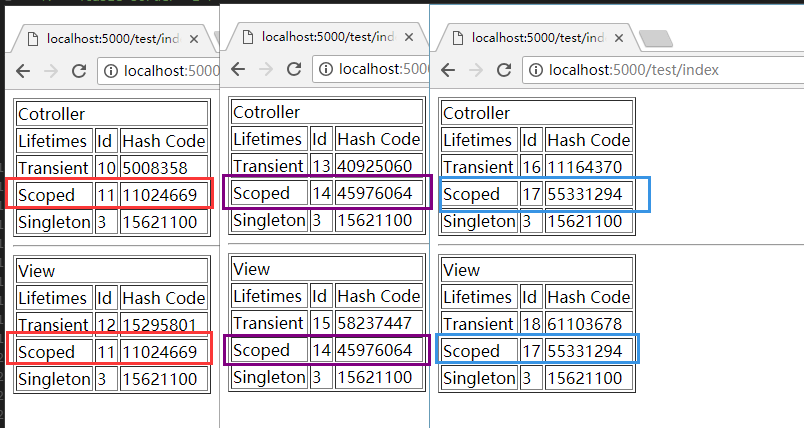
从左到又打开页面三次,Singleton的Id及HashCode如前例是一样的。
Transient及Scoped的差异在这次就有明显差异,Scoped在同一次Request的Id及HashCode都是一样的,如红紫篮框。
Service
简单建立一个CustomService,注入上例三个Service,代码类似TestController。如下:
Services\CustomService.cs
using MyWebsite.Models;

namespace MyWebsite.Services

{

    public class CustomService

    {

        public ISample Transient { get; private set; }

        public ISample Scoped { get; private set; }

        public ISample Singleton { get; private set; }

        public CustomService(ISampleTransient transient,

            ISampleScoped scoped,

            ISampleSingleton singleton)

        {

            Transient = transient;

            Scoped = scoped;

            Singleton = singleton;

        }

    }

}
注册CustomService
Startup.cs
public class Startup

{

    public void ConfigureServices(IServiceCollection services)

    {

        // ...

        services.AddScoped<CustomService, CustomService>();

    }

}
第一个泛型也可以是类,不一定要是接口。
缺点是使用方以Class作为依赖关系,变成强关联的依赖。
在View 注入CustomService:
Views\Home\Index.cshtml
@using MyWebsite

@using MyWebsite.Models

@using MyWebsite.Services

@inject ISampleTransient transient

@inject ISampleScoped scoped

@inject ISampleSingleton singleton

@inject CustomService customService

<table border="1">

    <tr><td colspan="3">Cotroller</td></tr>

    <tr><td>Lifetimes</td><td>Id</td><td>Hash Code</td></tr>

    <tr><td>Transient</td><td>@ViewBag.TransientId</td><td>@ViewBag.TransientHashCode</td></tr>

    <tr><td>Scoped</td><td>@ViewBag.ScopedId</td><td>@ViewBag.ScopedHashCode</td></tr>

    <tr><td>Singleton</td><td>@ViewBag.SingletonId</td><td>@ViewBag.SingletonHashCode</td></tr>

</table>

<hr />

<table border="1">

    <tr><td colspan="3">View</td></tr>

    <tr><td>Lifetimes</td><td>Id</td><td>Hash Code</td></tr>

    <tr><td>Transient</td><td>@transient.Id</td><td>@transient.GetHashCode()</td></tr>

    <tr><td>Scoped</td><td>@scoped.Id</td><td>@scoped.GetHashCode()</td></tr>

    <tr><td>Singleton</td><td>@singleton.Id</td><td>@singleton.GetHashCode()</td></tr>

</table>

<hr />

<table border="1">

    <tr><td colspan="3">Custom Service</td></tr>

    <tr><td>Lifetimes</td><td>Id</td><td>Hash Code</td></tr>

    <tr><td>Transient</td><td>@customService.Transient.Id</td><td>@customService.Transient.GetHashCode()</td></tr>

    <tr><td>Scoped</td><td>@customService.Scoped.Id</td><td>@customService.Scoped.GetHashCode()</td></tr>

    <tr><td>Singleton</td><td>@customService.Singleton.Id</td><td>@customService.Singleton.GetHashCode()</td></tr>

</table>
输出内容如下:
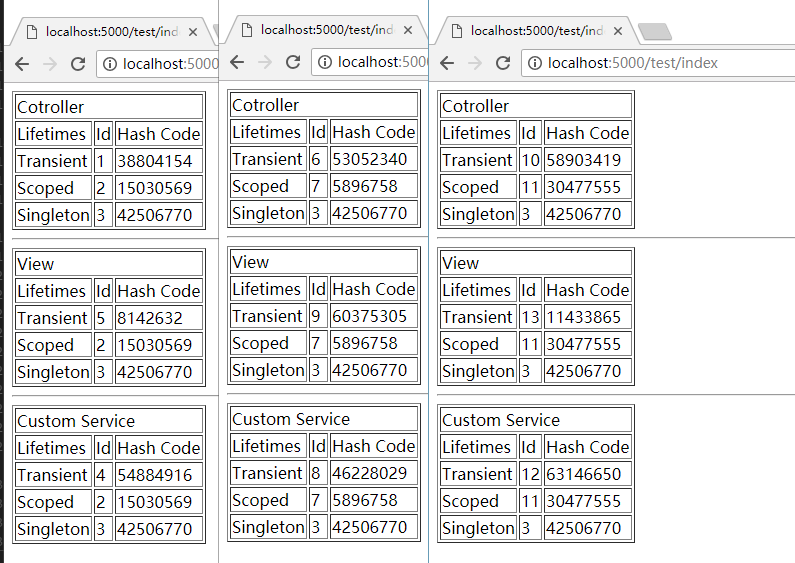
从左到又打开页面三次:
- Transient
如预期,每次注入都是不一样的实例。 - Scoped
在同一个Requset中,不论是在哪边被注入,都是同样的实例。 - Singleton
不管Requset多少次,都会是同一个实例。
参考
Introduction to Dependency Injection in ASP.NET Core
ASP.NET Core Dependency Injection Deep Dive
老司机发车啦:https://github.com/SnailDev/SnailDev.NETCore2Learning
ASP.NET Core 2 学习笔记(四)依赖注入的更多相关文章
- Asp.Net Core WebApi学习笔记(四)-- Middleware
Asp.Net Core WebApi学习笔记(四)-- Middleware 本文记录了Asp.Net管道模型和Asp.Net Core的Middleware模型的对比,并在上一篇的基础上增加Mid ...
- ASP.NET Core 2 学习笔记(十)视图
ASP.NET Core MVC中的Views是负责网页显示,将数据一并渲染至UI包含HTML.CSS等.并能痛过Razor语法在*.cshtml中写渲染画面的程序逻辑.本篇将介绍ASP.NET Co ...
- sql server 关于表中只增标识问题 C# 实现自动化打开和关闭可执行文件(或 关闭停止与系统交互的可执行文件) ajaxfileupload插件上传图片功能,用MVC和aspx做后台各写了一个案例 将小写阿拉伯数字转换成大写的汉字, C# WinForm 中英文实现, 国际化实现的简单方法 ASP.NET Core 2 学习笔记(六)ASP.NET Core 2 学习笔记(三)
sql server 关于表中只增标识问题 由于我们系统时间用的过长,数据量大,设计是采用自增ID 我们插入数据的时候把ID也写进去,我们可以采用 关闭和开启自增标识 没有关闭的时候 ,提示一下错 ...
- ASP.NET Core 2 学习笔记(十二)REST-Like API
Restful几乎已算是API设计的标准,通过HTTP Method区分新增(Create).查询(Read).修改(Update)和删除(Delete),简称CRUD四种数据存取方式,简约又直接的风 ...
- ASP.NET Core 2 学习笔记(七)路由
ASP.NET Core通过路由(Routing)设定,将定义的URL规则找到相对应行为:当使用者Request的URL满足特定规则条件时,则自动对应到相符合的行为处理.从ASP.NET就已经存在的架 ...
- ASP.NET Core 2 学习笔记(十三)Swagger
Swagger也算是行之有年的API文件生成器,只要在API上使用C#的<summary />文件注解标签,就可以产生精美的线上文件,并且对RESTful API有良好的支持.不仅支持生成 ...
- ASP.NET Core 2 学习笔记(一)开始
原文:ASP.NET Core 2 学习笔记(一)开始 来势汹汹的.NET Core似乎要取代.NET Framework,ASP.NET也随之发布.NET Core版本.虽然名称沿用ASP.NET, ...
- SpringMVC:学习笔记(11)——依赖注入与@Autowired
SpringMVC:学习笔记(11)——依赖注入与@Autowired 使用@Autowired 从Spring2.5开始,它引入了一种全新的依赖注入方式,即通过@Autowired注解.这个注解允许 ...
- ASP.NET Core - 在ActionFilter中使用依赖注入
上次ActionFilter引发的一个EF异常,本质上是对Core版本的ActionFilter的知识掌握不够牢固造成的,所以花了点时间仔细阅读了微软的官方文档.发现除了IActionFilter.I ...
随机推荐
- SqlServer把日期转换成不同格式的字符串的函数大全
SQL语句 结果SELECT CONVERT(varchar(100), GETDATE(), 0)-- 05 03 20 ...
- 条款2:尽量以const, enum, inline替换#define
原因: 1. 追踪困难,由于在编译期已经替换,在记号表中没有. 2. 由于编译期多处替换,可能导致目标代码体积稍大. 3. define没有作用域,如在类中定义一个常量不行. 做法: 可以用const ...
- Python错误:close failed in file object destructor
我遇到的情况: 二进制程序调shell再调Python后,shell退出,Python进程挂到init上(不是僵尸进程),但 此时二进制程序未退出,这时候中断而二进制程序出现此提示. 经查询: 应该是 ...
- TZOJ 4813 机器翻译(模拟数组头和尾)
描述 小晨的电脑上安装了一个机器翻译软件,他经常用这个软件来翻译英语文章. 这个翻译软件的原理很简单,它只是从头到尾,依次将每个英文单词用对应的中文含义来替换.对于每个英文单词,软件会先在内存中查找这 ...
- .net core webapi 部署windows server 2008 r2 笔记
WebAPI部署文档 安装dotnet-dev-win-x64.1.0.4 安装DotNetCore.1.1.0-WindowsHosting 安装vc_redist.x64 安装Windows6.1 ...
- 编译器C1001问题
https://ask.csdn.net/questions/184495 http://blog.sina.com.cn/s/blog_7822ce750100szed.html
- sys.argv和getopt.getopt()的用法
1.sys.argv Python中sys.argv是命令行参数从程序外部传值的的一种途径,它是一个列表,列表元素是我们想传进去的的新参数,所以可以用索引sys.argv[]来获得想要的值.因为一个写 ...
- String [] args是干什么的
我相信应该有不少人都疑惑,main后面的这个String [] args是干什么的呢?今天,巩固就为你们解密. 这是干什么的呢?先给大家一个简单定义(本人比较讨厌上来就举例子,因为 ...
- 2018.10.12 bzoj4712: 洪水(树链剖分)
传送门 树链剖分好题. 考虑分开维护重儿子和轻儿子的信息. 令f[i]f[i]f[i]表示iii为根子树的最优值,h[i]h[i]h[i]表示iii重儿子的最优值,g[i]g[i]g[i]表示iii所 ...
- 2018.09.28 牛客网contest/197/B面积并(二分+简单计算几何)
传送门 比赛的时候把题目看成求面积交了,一直没调出来. 下来发现是面积并气的吐血. 码了一波发现要开long double. 然而直接用现成的三角函数会挂. 因此需要自己手写二分求角度. 大致思路就是 ...