
[转帖学习]Howto Shrink a Thin Provisioned Virtual Disk (VMDK)
Howto Shrink a Thin Provisioned Virtual Disk (VMDK)
Thin provisioned disks are a great feature to save capacity as you virtual machines filesystem will never use the full capacity. I do not know a single system where you do not have at least 10GB of free space for OS disks. I am not considering databases, applications or fileservers which will grow constantly. Having thin provisioned disk is usually no longer a performance problem so it is a valid design choice even in production.
A common issue with thin disks is that the size will grow when required, but never shrink. When you require the capacity only once you might want to get it back from the virtual machine. This post describes how to reclaim unused space from the virtual machine.
Virtual Machine Preparation (Windows)
Windows does not automatically zero deleted blocks. Microsoft provides a tool that can zero blocks after while deleting a file or zero out the entire free space. This is required to reclaim space back from the virtual disk.
- Download SDelete
- run sdelete.exe -z [Drive]
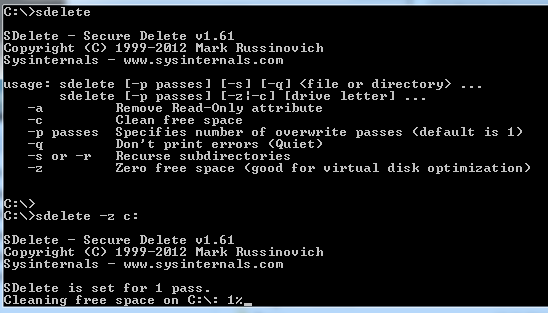
Wait a couple of minutes until the process is finished. Please note that you virtual disk file (VMDK) will grow to the full size during the process.
Virtual Machine Preparation (Linux)
Linux does not zero deleted blocks too. There are various tools available to create zeroed blocks. The best known tool is dd which should be available on all systems.
- Identify free space with df
- Fill the free space with dd
vma:/mnt/data # df -h
vma:/mnt/data # dd bs=1M count=8192 if=/dev/zero of=zero
This will zero 8GB of the available 8.2GB (1MB Blocksize * 8192 = 8GB). Please note that you virtual disk file (VMDK) will grow to the full size during the process.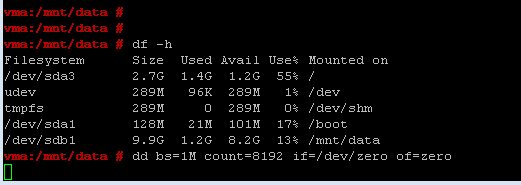
Shrink VMDK File
- Power off the Virtual Machine, or disconnect the virtual Disk you want to shrink
- Connect to the ESXi Host with SSH
- Navigate to the Virtual Machine Folder
- Verify disk usage with du
- Run vmkfstools -K [disk]
- Verify disk usage with du
root@esx3:/vmfs/volumes/ds1/vma $ du -h vma_1-flat.vmdk
7.9G vma_1-flat.vmdk

root@esx3:/vmfs/volumes/ds1/vma $ vmkfstools -K vma_1.vmdk
vmfsDisk: 1, rdmDisk: 0, blockSize: 1048576
Hole Punching: 25% done.

root@esx3:/vmfs/volumes/ds1/vma $ du -h vma_1-flat.vmdk
1.9G vma_1-flat.vmdk
[转帖学习]Howto Shrink a Thin Provisioned Virtual Disk (VMDK)的更多相关文章
- Java Interface 是常量存放的最佳地点吗?(转帖学习,非原创)
Java Interface 是常量存放的最佳地点吗?(转帖学习,非原创) 由于java interface中声明的字段在编译时会自动加上static final的修饰符,即声明为常量.因而inter ...
- [转帖]学习关于TTL
自己简单试了一下在家里与在公司里面服务器的连接: C:\Users\Administrator>tracert oms.inspur.com 通过最多 个跃点跟踪 到 oms.inspur.co ...
- [转帖]学习一下centos7 新地方
总结的挺好 copy一下 慢慢学习: http://blog.itpub.net/312079/viewspace-2214440/ Centos7 单用户模式 centos7里不再有0-6启动级别 ...
- [转帖学习]Oracle的 SYS_CONTEXT 函数简介
Oracle的 SYS_CONTEXT 函数简介 https://blog.csdn.net/IndexMan/article/details/48606369 1.什么是SYS_CONTEXT? S ...
- [转帖] 学习 Linux 大页的内存知识
一.在解释什么情况下需要开启大页和为啥需要开启大页前先了解下Linux下页的相关的知识:以下的内容是基于32位的系统,4K的内存页大小做出的计算1)目录表,用来存放页表的位置,共包含1024个目录en ...
- [转帖] 学习一下 apache bench 的总结简介 ( LAMP的没用过..)
PS:网站性能压力测试是性能调优过程中必不可少的一环.只有让服务器处在高压情况下才能真正体现出各种设置所暴露的问题.Apache中有个自带的,名为ab的程序,可以对Apache或其它类型的服务器进行网 ...
- 算法学习 howto
入门: The Most Important Algorithms http://www.risc.jku.at/people/ckoutsch/stuff/e_algorithms.html Alg ...
- 【2016-10-13】【坚持学习】【Day4】【virtual 虚函数】
定义一个基类,有一个虚函数 定义三个子类,分别继承,重写,New,这个虚函数 abstract class Test { public virtual void Prinf() { Console ...
- VMware虚拟机磁盘文件vmdk单文件转多文件相互转换
设置环境变量 set PATH=%PATH%;D:\Program Files (x86)\VMware\VMware Workstation echo %PATH% C:\Users\Admi ...
随机推荐
- 4-[多进程]-互斥锁、Queue队列、生产者消费者
1.互斥锁 (1)为什么需要互斥锁 进程之间数据不共享,但是共享同一套文件系统,所以访问同一个文件,或同一个打印终端,是没有问题的, 而共享带来的是竞争,竞争带来的结果就是错乱,如下 #并发运行,效率 ...
- BZOJ2439【中山市选2011】序列
题面 题解 设$f[i]$表示将$[1,i]$修改为递增的最小代价, $g[i]$表示将$[i,n]$修改为递减的最小代价. $L[i]$表示将$[1,i]$修改为倒$\text V$的代价 $$ \ ...
- 洛咕 P2467 [SDOI2010]地精部落
同波浪,简单dp. 高度从1到n插入山脉,设f[i][j][k]表示插入了i个山脉,组成了j段,边界上有k个山脉的方案数. 那么新插入的山脉只会:插入在边界上且自己是一段.插入在边界上且与最左边的段相 ...
- P4774 [NOI2018]屠龙勇士
P4774 [NOI2018]屠龙勇士 先平衡树跑出打每条龙的atk t[] 然后每条龙有\(xt \equiv a[i](\text{mod }p[i])\) 就是\(xt+kp[i]=a[i]\) ...
- idea 误删out目录中的文件导致开启服务器后无法访问页面的问题
只需要把out目录整个删除掉,然后再重新开启服务器,服务器就会自动生成新的out目录 同理,target目录也是整个删除掉就能重新生成
- restful_framework之APIView
一.安装djangorestframework 方式一:pip3 install djangorestframework 方式二:pycharm图形化界面安装 方式三:pycharm命令行下安装(装在 ...
- 十二、基于Django实现RBAC权限管理
一.RBAC概述 RBAC(Role-Based Access Control,基于角色的访问控制),通过角色绑定权限,然后给用户划分角色. 从企业的角度来说,基本上是按照角色来划分职能.比如,CEO ...
- cocos creator踩坑日记
踩坑一 问题:项目在构建成Web Mobile后运行在浏览器和微信中,点击页面任何地方都会导致自动全屏 解决:在构建之后的main.js中,去掉 cc.view.enableAutoFullScree ...
- 封装的一套简单轻量级JS 类库(RapidDevelopmentFramework.JS)
1.最近好久没有更新自己的博客了,一直在考虑自己应该写一些什么.4.2日从苏州回到南京的路上感觉自己的内心些崩溃和失落,我就不多说了? 猛然之间我认为自己需要找一下内心的平衡.决定开发属于自己一套快速 ...
- 关于big-endian和little-endian
详解大端模式和小端模式 一.大端模式和小端模式的起源 关于大端小端名词的由来,有一个有趣的故事,来自于Jonathan Swift的<格利佛游记>:Lilliput和Blefuscu这两个 ...