
1、redis之安装与配置
下载安装:
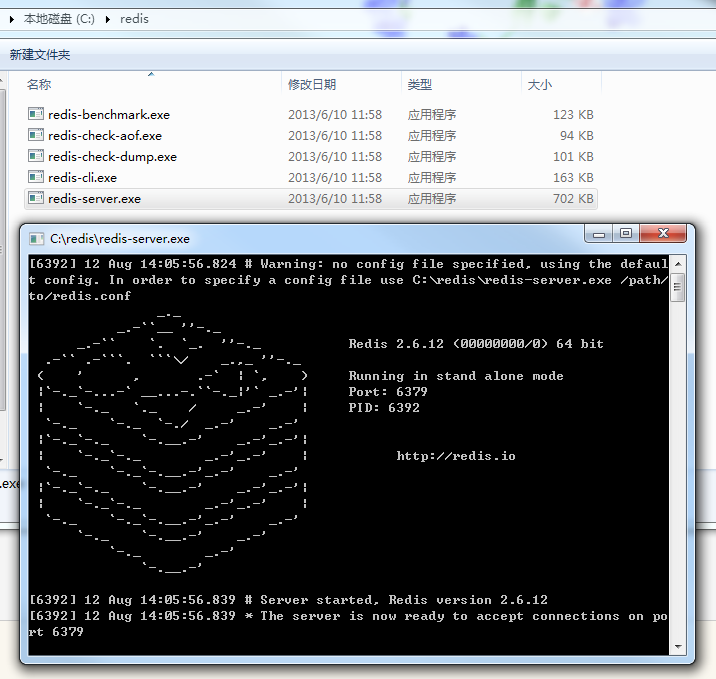
redis-server.exe redis服务器的daemon启动程序

redis.conf redis配置文件

redis-cli.exe redis命令行操作工具。当然,也可以用telnet根据其纯文本协议来操作

redis-check-dump.exe 本地数据库检查

redis-check-aof.exe 更新日志检查

redis-benchmark.exe 性能测试,用以模拟同时由N个客户端发送M个 SETs/GETs 查询 (类似于 Apache的 ab 工具)
上面是使用默认的config来启动redis,如果需要修改默认配置可以在redis的根目录下建立redis.conf文件,内容参考:
# Redis configuration file example

# By default Redis does not run as a daemon. Use 'yes' if you need it.

# Note that Redis will write a pid file in /var/run/redis.pid when daemonized.

daemonize no

# When run as a daemon, Redis write a pid file in /var/run/redis.pid by default.

# You can specify a custom pid file location here.

pidfile /var/run/redis.pid

# Accept connections on the specified port, default is

port

# If you want you can bind a single interface, if the bind option is not

# specified all the interfaces will listen for connections.

#

# bind 127.0.0.1

# Close the connection after a client is idle for N seconds ( to disable)

timeout

# Set server verbosity to 'debug'

# it can be one of:

# debug (a lot of information, useful for development/testing)

# notice (moderately verbose, what you want in production probably)

# warning (only very important / critical messages are logged)

loglevel debug

# Specify the log file name. Also 'stdout' can be used to force

# the demon to log on the standard output. Note that if you use standard

# output for logging but daemonize, logs will be sent to /dev/null

logfile stdout

# Set the number of databases. The default database is DB , you can select

# a different one on a per-connection basis using SELECT <dbid> where

# dbid is a number between  and 'databases'-

databases

################################ SNAPSHOTTING #################################

#

# Save the DB on disk:

#

# save <seconds> <changes>

#

# Will save the DB if both the given number of seconds and the given

# number of write operations against the DB occurred.

#

# In the example below the behaviour will be to save:

# after  sec ( min) if at least  key changed

# after  sec ( min) if at least  keys changed

# after  sec if at least  keys changed

save

save

save

# Compress string objects using LZF when dump .rdb databases?

# For default that's set to 'yes' as it's almost always a win.

# If you want to save some CPU in the saving child set it to 'no' but

# the dataset will likely be bigger if you have compressible values or keys.

rdbcompression yes

# The filename where to dump the DB

dbfilename dump.rdb

# For default save/load DB in/from the working directory

# Note that you must specify a directory not a file name.

dir ./

################################# REPLICATION #################################

# Master-Slave replication. Use slaveof to make a Redis instance a copy of

# another Redis server. Note that the configuration is local to the slave

# so for example it is possible to configure the slave to save the DB with a

# different interval, or to listen to another port, and so on.

#

# slaveof <masterip> <masterport>

# If the master is password protected (using the "requirepass" configuration

# directive below) it is possible to tell the slave to authenticate before

# starting the replication synchronization process, otherwise the master will

# refuse the slave request.

#

# masterauth <master-password>

################################## SECURITY ###################################

# Require clients to issue AUTH <PASSWORD> before processing any other

# commands. This might be useful in environments in which you do not trust

# others with access to the host running redis-server.

#

# This should stay commented out for backward compatibility and because most

# people do not need auth (e.g. they run their own servers).

#

# requirepass foobared

################################### LIMITS ####################################

# Set the max number of connected clients at the same time. By default there

# is no limit, and it's up to the number of file descriptors the Redis process

# is able to open. The special value '' means no limts.

# Once the limit is reached Redis will close all the new connections sending

# an error 'max number of clients reached'.

#

# maxclients 128

# Don't use more memory than the specified amount of bytes.

# When the memory limit is reached Redis will try to remove keys with an

# EXPIRE set. It will try to start freeing keys that are going to expire

# in little time and preserve keys with a longer time to live.

# Redis will also try to remove objects from free lists if possible.

#

# If all this fails, Redis will start to reply with errors to commands

# that will use more memory, like SET, LPUSH, and so on, and will continue

# to reply to most read-only commands like GET.

#

# WARNING: maxmemory can be a good idea mainly if you want to use Redis as a

# 'state' server or cache, not as a real DB. When Redis is used as a real

# database the memory usage will grow over the weeks, it will be obvious if

# it is going to use too much memory in the long run, and you'll have the time

# to upgrade. With maxmemory after the limit is reached you'll start to get

# errors for write operations, and this may even lead to DB inconsistency.

#

# maxmemory <bytes>

############################## APPEND ONLY MODE ###############################

# By default Redis asynchronously dumps the dataset on disk. If you can live

# with the idea that the latest records will be lost if something like a crash

# happens this is the preferred way to run Redis. If instead you care a lot

# about your data and don't want to that a single record can get lost you should

# enable the append only mode: when this mode is enabled Redis will append

# every write operation received in the file appendonly.log. This file will

# be read on startup in order to rebuild the full dataset in memory.

#

# Note that you can have both the async dumps and the append only file if you

# like (you have to comment the "save" statements above to disable the dumps).

# Still if append only mode is enabled Redis will load the data from the

# log file at startup ignoring the dump.rdb file.

#

# The name of the append only file is "appendonly.log"

#

# IMPORTANT: Check the BGREWRITEAOF to check how to rewrite the append

# log file in background when it gets too big.

appendonly no

# The fsync() call tells the Operating System to actually write data on disk

# instead to wait for more data in the output buffer. Some OS will really flush

# data on disk, some other OS will just try to do it ASAP.

#

# Redis supports three different modes:

#

# no: don't fsync, just let the OS flush the data when it wants. Faster.

# always: fsync after every write to the append only log . Slow, Safest.

# everysec: fsync only if one second passed since the last fsync. Compromise.

#

# The default is "always" that's the safer of the options. It's up to you to

# understand if you can relax this to "everysec" that will fsync every second

# or to "no" that will let the operating system flush the output buffer when

# it want, for better performances (but if you can live with the idea of

# some data loss consider the default persistence mode that's snapshotting).

appendfsync always

# appendfsync everysec

# appendfsync no

############################### ADVANCED CONFIG ###############################

# Glue small output buffers together in order to send small replies in a

# single TCP packet. Uses a bit more CPU but most of the times it is a win

# in terms of number of queries per second. Use 'yes' if unsure.

# glueoutputbuf yes

# Use object sharing. Can save a lot of memory if you have many common

# string in your dataset, but performs lookups against the shared objects

# pool so it uses more CPU and can be a bit slower. Usually it's a good

# idea.

#

# When object sharing is enabled (shareobjects yes) you can use

# shareobjectspoolsize to control the size of the pool used in order to try

# object sharing. A bigger pool size will lead to better sharing capabilities.

# In general you want this value to be at least the double of the number of

# very common strings you have in your dataset.

#

# WARNING: object sharing is experimental, don't enable this feature

# in production before of Redis 1.0-stable. Still please try this feature in

# your development environment so that we can test it better.

# shareobjects no

# shareobjectspoolsize 1024
然后使用redis.conf启动redis:
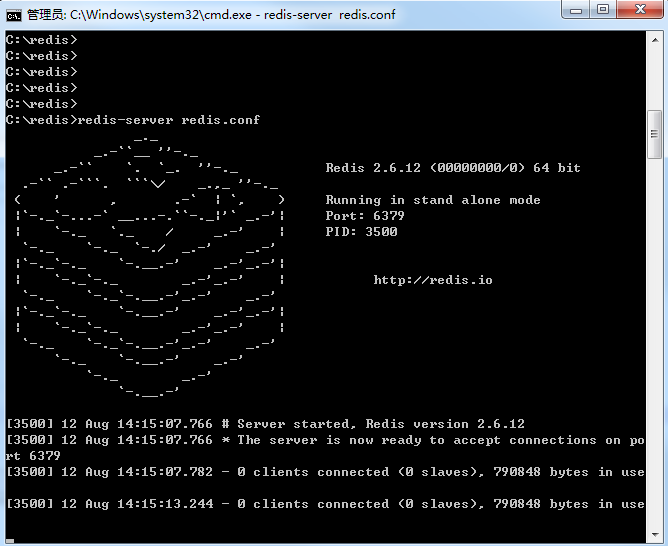
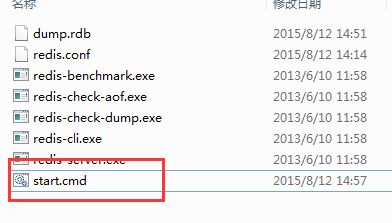
为了方便起见,建议建立一个start.cmd文件,里面输入如下内容:
redis-server redis.conf
1、redis之安装与配置的更多相关文章
- [Linux]Linux下redis的安装及配置.
在上一篇[Linux] linux下安装配置 zookeeper/redis/solr/tomcat/IK分词器 详细实例. 我们已经将redis所需tar包拷贝到了linux下的root 根目录下, ...
- Redis的安装、配置 --转载
原文地址:http://blog.sina.com.cn/s/blog_505bf9af0101ehhp.html redis的安装.配置 安装步骤如下:下载redis安装包:$ cd /opt/ap ...
- Redis:安装、配置、操作和简单代码实例(C语言Client端)
Redis:安装.配置.操作和简单代码实例(C语言Client端) - hj19870806的专栏 - 博客频道 - CSDN.NET Redis:安装.配置.操作和简单代码实例(C语言Client端 ...
- mac与centos下redis的安装与配置
前言 最近在用redis,下面简单写一下mac和centos下redis的安装与配置方法. 安装 mac下面 安装命令:brew intall redis 运行命令:brew services sta ...
- 最新版redis的安装及配置 linux系统
1.redis下载 官网地址:https://redis.io/download 百度云地址:链接:http://pan.baidu.com/s/1c1Hu2gK 密码:h17z 2.解压 [root ...
- c#连接Redis Redis的安装与配置
Redis是一个不错的缓存数据库,读取数据速度效率都很不错.今天大家共同研究下redis的用法.结合网上的资料和自己的摸索,先来看下安装与配置把. 咱们主要看在WINDOWS上怎样使用REDIS数据库 ...
- centos6.8下redis的安装和配置
centos6.8下redis的安装和配置 下载.安装 在redis官网可以获取到最新版本的redis 进入/usr/local/目录,执行如下命令 wget http://download.redi ...
- linux下redis的安装及配置启动
linux下redis的安装及配置启动 标签: redisnosql 2014-10-24 14:04 19732人阅读 评论(0) 收藏 举报 分类: 数据与性能(41) wget http:/ ...
- windows上redis的安装和配置
windows上redis的安装和配置 进入到Redis的根目录D:\Programming\Redis\Redis6379\Redis-x64-3.2.100底下操作: 配置文件启动 redis-s ...
- 莫小安 Linux下Redis的安装与配置
转载自--Linux下Redis的安装与配置 redis是当前比较热门的NOSQL系统之一,它是一个key-value存储系统.和Memcached类似,但很大程度补偿了 memcached的不足,它 ...
随机推荐
- andriod 错误:Only the original thread that created a view hierarchy can touch its views——Handler的使用
package com.example.yanlei.myapplication; import android.media.MediaMetadataRetriever; import androi ...
- NGUI 3.5教程(一)安装NGUI 3.5.8
写在前面: 网上找的NGUI教程,都是基于2.x版本号的.为了能配合教程学着做,我也是下载了各种NGUI 2.x版本号.可是在导入的时候,或多或少都报错(我用的Unity 的版本号是4.3.2).无奈 ...
- visio 画类图时 方法里如何加参数
鼠标双击类(打开属性对话框)-->(类别)操作-->属性-->(类别)参数-->(添加参数)
- GNU GRUB
Introduction GNU GRUB is a Multiboot boot loader. It was derived from GRUB, the GRand Unified Bootlo ...
- react random key generator;react如何产生随机不重复的key
1.<div key={+new Date() + Math.random()}> 2.使用数组的索引 3.使用uuid:https://www.npmjs.com/package/uui ...
- 线程池的corePoolSize、maximumPoolSize和poolSize
什么是线程池: 为了避免系统频繁的创建和销毁线程,我们可以将创建的线程进行复用.在线程池中总有那么几个活跃的线程,也有一定的最大值限制,一个业务使用完线程之后,不是立即销毁而是将其放入到线程池中,从而 ...
- 第四章 四种List实现类的对比总结
1.ArrayList 非线程安全 基于对象数组 get(int index)不需要遍历数组,速度快: iterator()方法中调用了get(int index),所以速度也快 set(int in ...
- IOS中键盘隐藏几种方式
在ios开发中,经常需要输入信息.输入信息有两种方式: UITextField和UITextView.信息输入完成后,需要隐藏键盘,下面为大家介绍几种隐藏键盘的方式. <一> 点击键盘上的 ...
- HDU 1247 Hat’s Words (字典树 && map)
分析:一開始是用递归做的,没做出来.于是就换了如今的数组.即,把每个输入的字符串都存入二维数组中,然后创建字典树.输入和创建完成后,開始查找. 事实上一開始就读错题目了,题目要求字符串是由其它两个输入 ...
- [android错误] Installation error: INSTALL_FAILED_VERSION_DOWNGRA
错误表现: [2014-06-27 18:19:51 - XXX] Installing XXXX.apk... [2014-06-27 18:20:00 - XXX] Installation er ...