
[UI] Pull menu interaction concept - 下拉菜单交互
Pull menu interaction concept - 下拉菜单交互
http://freebiesbug.com/code-stuff/pull-menu-interaction-concept/
效果图:
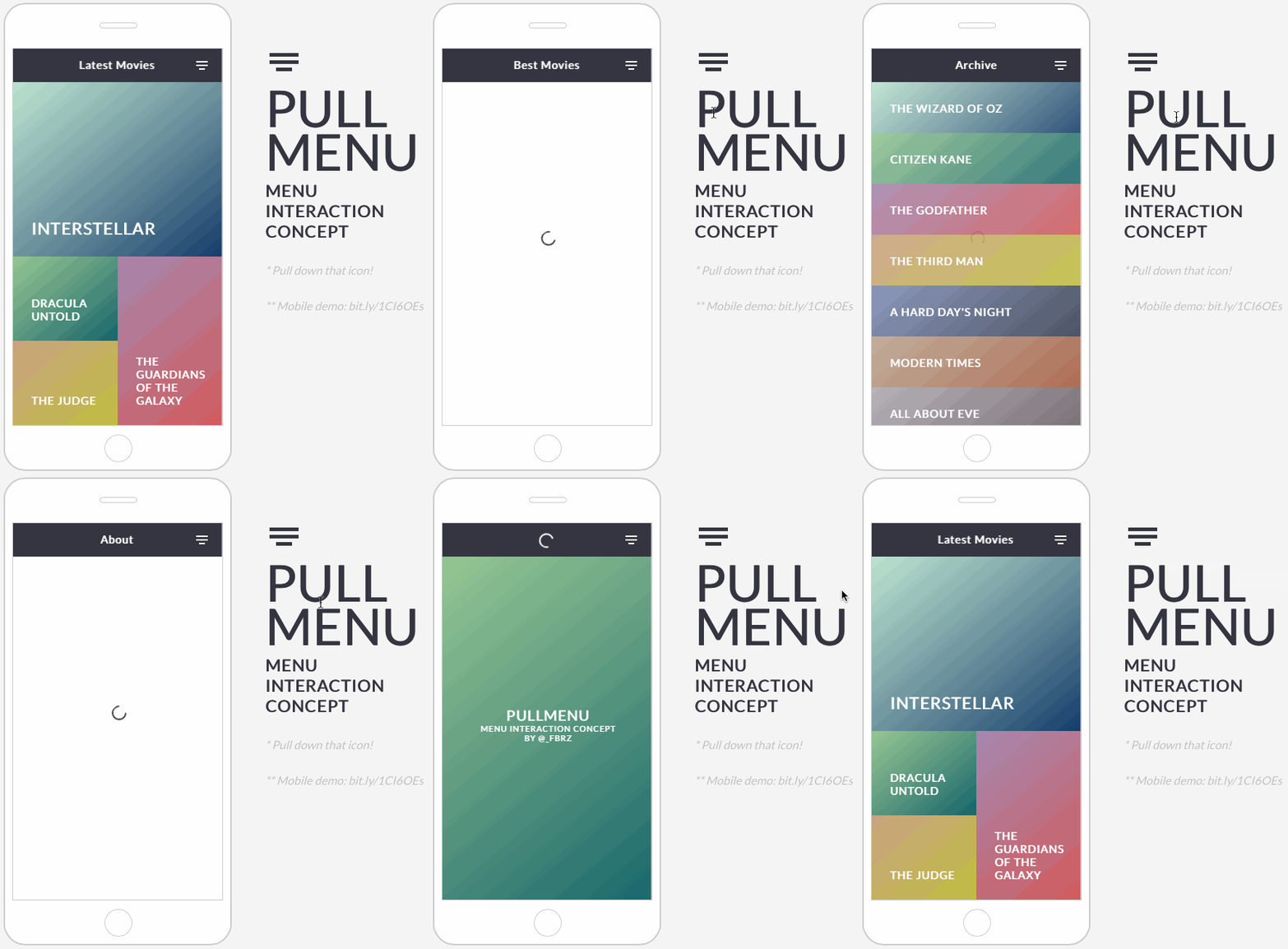
源码:
-html-
<div id="phone">

  <div id="screen">

    <div id="header">

      <ul id="menu">

        <li>Latest Movies</uli>

        <li>Best Movies</uli>

        <li>Archive</uli>

        <li>About</li>

        <li class="reload"><i class="loader-icon"></i></li>

      </ul>

      <div class="pullmenu-icon"></div>

    </div>

    <div id="loader"><i class="loader-icon anim"></i></div>

<div class="pages">

    <div class="page back2" id="about">

      <div>

        <span>Pullmenu</span><br/>Menu interaction concept<br/>by @_fbrz

      </div>

    </div>

    <div class="page" id="latest">

      <div class="box hero back11">

        <span>Interstellar</span>

      </div>

      <div class="box back2">

        <span>Dracula untold</span>

      </div>

      <div class="box back9 right tall">

        <span>The guardians of the galaxy</span>

      </div>

      <div class="box back4">

        <span>The judge</span>

      </div>

      <div class="box back3">

        <span>Frank</span>

      </div>

      <div class="box back6 right">

        <span>Big Hero 6</span>

      </div>

      <div class="box back8 wide">

        <span>Hunger Games</span>

      </div>

    </div>

    <div class="page" id="best">

      <div class="box wide back11">

        <span>Boyhood</span>

      </div>

      <div class="box wide back2">

        <span>The lego movie</span>

      </div>

      <div class="box wide back9">

        <span>The Grand Budapest Hotel</span>

      </div>

      <div class="box wide back4">

        <span>Dawn Of The Planet Of The Apes</span>

      </div>

      <div class="box wide back3">

        <span>Nightcrawler</span>

      </div>

      <div class="box wide back6">

        <span>Big Hero 6</span>

      </div>

      <div class="box wide back8">

        <span>Hunger Games</span>

      </div>

    </div>

    <div class="page" id="archive">

      <div class="box small back11">

        <span>The Wizard of Oz</span>

      </div>

      <div class="box small back2">

        <span>Citizen Kane</span>

      </div>

      <div class="box small back9">

        <span>The Godfather</span>

      </div>

      <div class="box small back4">

        <span>The Third Man</span>

      </div>

      <div class="box small back3">

        <span>A Hard Day's Night</span>

      </div>

      <div class="box small back6">

        <span>Modern Times</span>

      </div>

      <div class="box small back8">

        <span>All About Eve</span>

      </div>

      <div class="box small back7">

        <span>Metropolis</span>

      </div>

      <div class="box small back5">

        <span>Singin' in the Rain</span>

      </div>

      <div class="box small back10">

        <span>King Kong</span>

      </div>

      <div class="box small back1">

        <span>Sunset Boulevard</span>

      </div>

    </div>

</div>

  </div>

  <div id="home"></div>

  <div id="speaker"></div>

</div>

<div id="text">

  <div id="pullmenu-icon"></div>

  <h1>pull<br/>menu</h1>

  <h2>Menu<br/>interaction<br/>concept</h2>

  <h3>* Pull down that icon!</h3>

  <h3>** Mobile demo: bit.ly/1CI6OEs</h3>

</div>

<a href="http://coolors.co" target="_blank" id="coolors">Coolors ></a>
-CSS-
@import url(http://fonts.googleapis.com/css?family=Lato);

body {

  font-family: Lato;

  -webkit-font-smoothing: antialiased;

  margin:;

  background: #f5f5f5;

}

/* phone */

#phone {

  width: 310px;

  height: 640px;

  border: 2px solid #ccc;

  border-radius: 30px;

  position: absolute;

  left: 50%;

  top: 50px;

  margin: 0 -285px;

  background: #fff;

}

#screen {

  width: 290px;

  height: 520px;

  border: 1px solid #ccc;

  position: absolute;

  left: 50%;

  top: 50%;

  margin: -260px -145px;

  box-sizing: border-box;

  overflow: hidden;

}

#home {

  width: 36px;

  height: 36px;

  border: 1px solid #ccc;

  position: absolute;

  bottom: 10px;

  left: 50%;

  margin: 0 -18px;

  border-radius: 50%;

}

#speaker {

  width: 50px;

  height: 6px;

  border: 1px solid #ccc;

  border-radius: 6px;

  position: absolute;

  left: 50%;

  top: 25px;

  margin: 0 -25px;

}

#header {

  height: 46px;

  background: #353541;

  position: relative;

  z-index:;

  cursor: grab;

  &:active {

    cursor: grabbing;

  }

}

.pullmenu-icon {

  width: 16px;

  height: 2px;

  background: #FFF;

  position: absolute;

  right: 20px;

  bottom: 27px;

  transition: opacity .2s ease-in-out;

  &:after {

    content: '';

    width: 8px;

    height: 2px;

    background: #FFF;

    position: absolute;

    top: 10px;

    left: 4px;

  }

  &:before {

    content: '';

    width: 16px;

    height: 2px;

    background: #FFF;

    position: absolute;

    top: 5px;

    left:;

  }

  &.hide {

    opacity:;

  }

}

#title {

  height: 46px;

}

#menu {

  list-style: none;

  margin:;

  padding:;

  width: 3000px;

  position: absolute;

  top: 50%;

  margin: -15px 0px;

  transition: transform .2s ease-out;

  li {

    color: #FFF;

    font-size: 15px;

    font-weight:;

    display: inline-block;

    padding: 0 20px;

    opacity:;

    transition: opacity .2s ease-out;

    &.show {

      opacity: 1!important;

    }

    &.reload {

      margin-left: 200px;

      position: relative;

      top: 6px;

      transition: opacity 0s ease-out;

    }

  }

  &.show li {

    opacity: .2;

  }

  &.notrans {

    transition: none;

  }

}

.loader-icon {

  box-sizing: border-box;

  width: 20px;

  height: 20px;

  border-radius: 10px;

  border: 2px solid #fff;

  border-bottom-color: transparent;

  display: block;

  &.anim {

    animation: loader 1s infinite linear;

  }

}

#loader .loader-icon {

  border: 2px solid #353541;

  border-bottom-color: transparent;

  position: absolute;

  top: 50%;

  left: 50%;

  z-index:;

  margin: -8px;

}

@keyframes loader {

  0% { transform: rotate(0); }

  100% { transform: rotate(359deg); }

}

.pages {

  transform: translate3d(0,0,0);

  transition: opacity .2s linear;

  z-index:;

  position: absolute;

  width: 318px;

  height: 100%;

  &.hide {

    transition: opacity .1s linear;

    opacity:;

  }

}

.page {

  overflow-y: auto;

  overflow-x: hidden;

  height: 472px;

  display: none;

  padding-right: 15px;

}

#latest {

  display: block;

}

.back1 { background: -webkit-linear-gradient(-50deg, rgb(174, 147, 187), rgb(166, 61, 113)); }

.back2 { background: -webkit-linear-gradient(-50deg, rgb(151, 199, 148), rgb(18, 101, 108)); }

.back3 { background: -webkit-linear-gradient(-50deg, rgb(128, 143, 182), rgb(55, 63, 82)); }

.back4 { background: -webkit-linear-gradient(-50deg, rgb(202, 162, 133), rgb(192, 191, 60)); }

.back5 { background: -webkit-linear-gradient(-50deg, rgb(147, 176, 187), rgb(61, 122, 166)); }

.back6 { background: -webkit-linear-gradient(-50deg, rgb(187, 167, 147), rgb(166, 93, 61)); }

.back7 { background: -webkit-linear-gradient(-50deg, rgb(157, 147, 187), rgb(102, 89, 161)); }

.back8 { background: -webkit-linear-gradient(-50deg, rgb(175, 171, 178), rgb(105, 95, 100)); }

.back9 { background: -webkit-linear-gradient(-50deg, rgb(165, 137, 176), rgb(211, 92, 92)); }

.back10 { background: -webkit-linear-gradient(-50deg, rgb(147, 187, 149), rgb(90, 119, 78)); }

.back11 { background: -webkit-linear-gradient(-50deg, rgb(189, 229, 208), rgb(18, 60, 108)); }

.box {

  height: 116px;

  position: relative;

  width: 50%;

  float: left;

  &.right {

    float: right;

  }

  &.tall {

    height: 232px;

  }

  &.wide {

    width: 100%;

  }

  &.small {

    width: 100%;

    height: 70px;

  }

  &.hero {

    height: 240px;

    width: 100%;

    span {

      font-size: 23px;

    }

  }

  span {

    position: absolute;

    color: #fff;

    font-size: 15px;

    bottom:;

    left:;

    text-transform: uppercase;

    padding: 25px 25px;

    font-weight:;

  }

}

#about {

  color: #fff;

  text-transform: uppercase;

  text-align: center;

  font-weight:;

  font-size: 11px;

  div {

    position: relative;

    left: -6px;

    top: 50%;

    margin-top: -30px;

  }

  span {

    font-size: 20px;

  }

}

#text {

  position: absolute;

  height: 640px;

  left: 50%;

  top: 50px;

  margin: 0px 75px;

  color: #353541;

  h1 {

    margin:;

  font-size: 70px;

  line-height: 60px;

    text-transform: uppercase;

  }

  h2 {

    font-size: 23px;

    margin:;

    text-transform: uppercase;

    margin-top: 10px;

  }

  h3 {

    opacity: 0.3;

    font-style: italic;

    font-weight:;

    font-size: 16px;

    margin-top: 30px;

  }

}

#pullmenu-icon {

  width: 40px;

  height: 5px;

  background: #353541;

  margin-top: 69px;

  position: relative;

  margin-bottom: 40px;

  left: 6px;

  &:before {

    width: 40px;

    height: 5px;

    background: #353541;

    content: '';

    position: absolute;

    top: 10px;

  }

  &:after {

    width: 22px;

    height: 5px;

    background: #353541;

    content: '';

    position: absolute;

    top: 20px;

    left: 9px;

  }

}

#coolors {

  position: fixed;

  bottom: 20px;

  right: 30px;

  text-decoration: none;

  color: #353541;

  font-size: 11px;

  text-transform: uppercase;

}
-JS-
//sorry for the mess

var current_index = 0,

    index,

    menu,

    menu_items_count,

    mouse_down,

    mouse_start_y,

    pull_step,

    total_pull = 80,

    release = 40,

    pull_release = total_pull + release;

$(document).on('selectstart', false);

$(document).ready(function(){

    $("#menu li").each(function(i,e){

       $(this).attr("data-index",i)

    });

    //

    menu = $("#menu").html();

    menu_items_count = $("#menu li").length;

    pull_step = total_pull/(menu_items_count-1);

    //

  $("#menu").css("transform","translate3d("+getItemX(0)+"px,0,0)");

  $("#menu li").removeClass("show");

  $("#menu li").eq(0).addClass("show");

});

$("#header").mousedown(function(e){

    //

    mouse_down = true;

    mouse_start_y = e.pageY;

    //

    if(index == menu_items_count-1) {

        index = 0;

    } else {

        var $item = $("#menu li").eq(index);

        $("#menu").html(menu);

        $("#menu li").eq($item.attr("data-index")).remove();

        $item.prependTo($("#menu"));

        $("#menu li").eq(0).addClass("show");

        $("#menu").addClass("notrans");

        $("#menu").css("transform","translate3d("+getItemX(0)+"px,0,0)");

    }

});

$(document).mouseup(function(e){

    if(mouse_down) {

    //

    mouse_down = false;

    $("#header").animate({height: 46},300);

    $("#menu").removeClass("show");

    $(".pullmenu-icon").removeClass("hide");

    //

    if(index>0) {

        if(index==menu_items_count-1) {

          $(".reload i").addClass("anim");

          setTimeout(function(){

                $("#menu li").removeClass("show");

                $("#menu").css("transform","translate3d("+getItemX(0)+"px,0,0)");

                $(".reload i").removeClass("anim");

                setTimeout(function(){

                    $("#menu li").eq(0).addClass("show");

                },500);

            },1000);

      } else {

        current_index = index;

        $(".pages").addClass("hide");

        setTimeout(function(){

          $(".pages").removeClass("hide");

          $(".page").hide();

          switch($("#menu li").eq(index).attr("data-index")) {

            case '0': $("#latest").show(); break;

            case '1': $("#best").show(); break;

            case '2': $("#archive").show(); break;

            case '3': $("#about").show(); break;

            }

        },1000);

        }

    }

  }

});

$(document).mousemove(function(e){

    $("#menu").removeClass("notrans");

    if(mouse_down) {

        var diff = Math.max(0, e.pageY - mouse_start_y);

        if(diff>pull_release) diff = pull_release + (diff-pull_release)/(diff*0.01);

        $("#header").height(46+diff);

        index = Math.max(0,Math.min(menu_items_count-2, Math.floor((diff-release)/pull_step)));

        if(diff>pull_release+pull_step*2) index = menu_items_count-1;

        if(diff>release) {

            $("#menu").addClass("show");

            $(".pullmenu-icon").addClass("hide");

        } else {

          $("#menu").removeClass("show");

            $(".pullmenu-icon").removeClass("hide");

        }

        $("#menu").css("transform","translate3d("+getItemX(index)+"px,0,0)");

        $("#menu li").removeClass("show");

        $("#menu li").eq(index).addClass("show");

        $(".loader-icon").css("transform", "rotate("+(diff*20)+"deg)");

    }

});

var getItemX = function(index){

    var $item = $("#menu li").eq(index);

    var item_offset = $item.offset().left;

    var item_width = $item.outerWidth();

    var menu_offset = $("#menu").offset().left;

    var screen_width = $("#screen").width();

    return (menu_offset-item_offset)+(screen_width-item_width)/2;

};
[UI] Pull menu interaction concept - 下拉菜单交互的更多相关文章
- Unity3D UGUI下拉菜单/Dropdown组件用法、总结
Unity3D中UGUI实现下拉菜单 本文提供全流程,中文翻译. Chinar 坚持将简单的生活方式,带给世人!(拥有更好的阅读体验 -- 高分辨率用户请根据需求调整网页缩放比例) Chinar -- ...
- Atitit.ui控件---下拉菜单选择控件的实现select html
Atitit.ui控件---下拉菜单选择控件的实现select html 1. 调用& model的实现 1 2. -----select.jsp------ 1 1. 调用& m ...
- swift 第九课 用tableview 做一个下拉菜单Menu
写到这里的时候,自己这个项目已经完成了一半左右,项目进度自己还是挺满意.今天又有一个新的布局,要实现个下拉菜单,刚开始写的时候,觉得会很容易,后来发现也是小错不断, 我想自己限制的自己属于写博客的初期 ...
- matlab学习下拉菜单Pop-Up Menu的基本用法
创建下拉菜单,修改string的属性,tag改为kj1,value值如果是1就显示第一行的sin(x),是几就显示第几行 %可以更改value值var=get(handles.kj1,'value') ...
- 24个 HTML5 & CSS3 下拉菜单效果及制作教程
下拉菜单是一个很常见的效果,在网站设计中被广泛使用.通过使用下拉菜单,设计者不仅可以在网站设计中营造出色的视觉吸引力,但也可以为网站提供了一个有效的导航方案.使用 HTML5 和 CSS3 可以更容易 ...
- 10个优秀的 HTML5 & CSS3 下拉菜单制作教程
下拉菜单是一个很常见的效果,在网站设计中被广泛使用.通过使用下拉菜单,设计者不仅可以在网站设计中营造出色的视觉吸引力,但也可以为网站提供了一个有效的导航方案.使用 HTML5 和 CSS3 可以更容易 ...
- EasyDropDown – 很棒的下拉菜单,含精美主题
EasyDropDown 是一个 jQuery 插件,你可以毫不费力地将简陋的 Select 元素设置为可定制风格的下拉菜单,用于表单或者一般的导航.和著名的下拉插件 Chosen 很像,但是具有自己 ...
- 创建基于Bootstrap的下拉菜单的DropDownList的JQuery插件
Bootstrap是当下流行的前端UI组件库之一.利用Bootstrap,可以很方便的构造美观.统一的页面.把设计师从具体的UI编码中解放出来. Bootstrap提供了不少的前端UI组件.带下拉 ...
- EasyDropDown – 很棒的下拉菜单 含精美主题
EasyDropDown 是一个 jQuery 插件,你可以毫不费力地将简陋的 Select 元素设置为可定制风格的下拉菜单,用于表单或者一般的导航.和著名的下拉插件 Chosen 很像,但是具有自己 ...
随机推荐
- 解决iptables nat sctp协议无效的问题
环境组网如下: A----->B-----C IP如下: A:1.1.1.1 B:1.1.1.2; 2.2.2.1 C:2.2.2.2 需求为,A 需要使用sctp连通C 在B机器上添加ipta ...
- Nginx的几个常用配置和技巧
文章列举了几个Nginx常见的,实用的,有趣的配置,希望看过之后能说一句:学到了! 一个站点配置多个域名 server { listen 80; server_name ops-coffee.cn b ...
- 数据库--oracle图形化管理工具和新增自定义用户
oracle数据库图形化管理工具: 1 navicat工具很小,操作mySQL和SQLServer非常好用,但对于oracle体验性就有点差,要自己下载编码和替换oci文件.下面是解决的方法教程链接 ...
- kibana加访问控制时报错--Kibana did not load properly.Check the server output for more information.
错误 在使用kibana的时候,我们需要对可以进行日志访问进行控制,x-pack插件是最好的选择,但是kibana的x-pack插件是收费的,我们本着节约资源的理念(公司的钱也是钱啊,哈哈),我决定使 ...
- HihoCoder - 1478 水陆距离
水陆距离 描述 给定一个N x M的01矩阵,其中1表示陆地,0表示水域.对于每一个位置,求出它距离最近的水域的距离是多少. 矩阵中每个位置与它上下左右相邻的格子距离为1. 输入 第一行包含两个整数, ...
- Spring的@Scheduled任务调度
一. 定时任务实现方式 定时任务实现方式: Java自带的java.util.Timer类,这个类允许你调度一个java.util.TimerTask任务.使用这种方式可以让你的程序按照某一个频度执行 ...
- Shell脚本编写2------有关变量
shell脚本中变量定义方式十分简单,直接将值赋值给变量较好例如 :name="tuanzhang"注意,变量名和等号之间不能有空格,这可能和你熟悉的所有编程语言都不一样.变量命名 ...
- @Html.Raw()用法和Html.ActionLink的用法总结
@Html.Raw() 方法输出带有html标签的字符串, 如:@Html.Raw("<div style='color:red'>输出字符串</div>" ...
- C学习笔记(1)-结构体、预处理与多文件结构程序设计
一.结构体的定义与使用 #include <stdio.h> //定义结构体(类似模板) typedef struct { char name[50]; int age; char add ...
- Es创建索引、设置和修改Mapping
Http接口操作示例如下: 1.创建索引: 2.删除索引: 3.创建mapping: 4.查看mapping: