
Spring Boot一些基础配置
1.定制banner,Spring Boot项目在启动的时候会有一个默认的启动图案:
  .   ____          _            __ _ _

 /\\ / ___'_ __ _ _(_)_ __  __ _ \ \ \ \

( ( )\___ | '_ | '_| | '_ \/ _` | \ \ \ \

 \\/  ___)| |_)| | | | | || (_| |  ) ) ) )

  '  |____| .__|_| |_|_| |_\__, | / / / /

 =========|_|==============|___/=/_/_/_/

 :: Spring Boot ::        (v1.5.9.RELEASE)
我们可以把这个图案修改为自己想要的。在src/main/resources目录下新建banner.txt文件,然后将自己的图案黏贴进去即可。ASCII图案可通过网站http://www.network-science.de/ascii/一键生成,比如输入mrbird生成图案后复制到banner.txt,启动项目,eclipse控制台输出如下:
 _   _   _   _   _   _

 / \ / \ / \ / \ / \ / \

( m | r | b | i | r | d )

 \_/ \_/ \_/ \_/ \_/ \_/

...

2017-08-12 10:11:25.952  INFO 7160 --- [main] o.s.j.e.a.AnnotationMBeanExporter : Registering beans for JMX exposure on startup

2017-08-12 10:11:26.057  INFO 7160 --- [main] s.b.c.e.t.TomcatEmbeddedServletContainer : Tomcat started on port(s): 8080 (http)

2017-08-12 10:11:26.064  INFO 7160 --- [main] com.springboot.demo.DemoApplication : Started DemoApplication in 3.933 seconds (JVM running for 4.241)
banner也可以关闭,在main方法中:
public static void main(String[] args) {

    SpringApplication app = new SpringApplication(DemoApplication.class);

    app.setBannerMode(Mode.OFF);

    app.run(args);

}
2.全局配置文件
在src/main/resources目录下,Spring Boot提供了一个名为application.properties的全局配置文件,可对一些默认配置的配置值进行修改。
官方文档 : https://docs.spring.io/spring-boot/docs/current/reference/html/appendix-application-properties.html
Spring Boot允许我们在application.properties下自定义一些属性,比如:
test.h1=haha
定义一个BlogProperties Bean,通过@Value("${属性名}")来加载配置文件中的属性值:
@Component

public class BlogProperties {

    @Value("${mrbird.blog.name}")

    private String name;

    @Value("${mrbird.blog.title}")

    private String title;

    // get,set略

}
编写IndexController,注入该Bean:
@RestController

public class IndexController {

    @Autowired

    private BlogProperties blogProperties;

    @RequestMapping("/")

    String index() {

        return blogProperties.getName()+"——"+blogProperties.getTitle();

    }

}
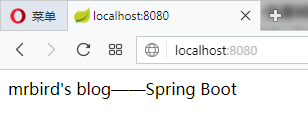
启动项目,访问http://localhost:8080,页面显示如下:
在属性非常多的情况下,也可以定义一个和配置文件对应的Bean:
@ConfigurationProperties(prefix="guanbin")

public class ConfigBean {

    private String name;

    private String title;

    // get,set略

}
通过注解@ConfigurationProperties(prefix="guanbin")指明了属性的通用前缀,通用前缀加属性名和配置文件的属性名一一对应。
除此之外还需在Spring Boot入口类加上注解@EnableConfigurationProperties({ConfigBean.class})来启用该配置:
@SpringBootApplication

@EnableConfigurationProperties({ConfigBean.class})

public class Application {

    public static void main(String[] args) {

        SpringApplication.run(Application.class, args);

    }

}
之后便可在IndexController中注入该Bean,并使用了:
@RestController

public class IndexController {

    @Autowired

    private ConfigBean configBean;

    @RequestMapping("/")

    String index() {

        return configBean.getName()+"——"+configBean.getTitle();

    }

}
属性间的引用
在application.properties配置文件中,各个属性可以相互引用,如下:
blog.name=mrbird's blog

blog.title=Spring Boot

blog.wholeTitle=${blog.name}--${blog.title}
自定义配置文件
除了可以在application.properties里配置属性,我们还可以自定义一个配置文件。在src/main/resources目录下新建一个test.properties:
test.name=KangKang

test.age=25
定义一个对应该配置文件的Bean:
@Configuration

@ConfigurationProperties(prefix="test")

@PropertySource("classpath:test.properties")

@Component

public class TestConfigBean {

    private String name;

    private int age;

    // get,set略

}
注解@PropertySource("classpath:test.properties")指明了使用哪个配置文件。要使用该配置Bean,同样也需要在入口类里使用注解@EnableConfigurationProperties({TestConfigBean.class})来启用该配置。
通过命令行设置属性值
在运行Spring Boot jar文件时,可以使用命令java -jar xxx.jar --server.port=8081来改变端口的值。这条命令等价于我们手动到application.properties中修改(如果没有这条属性的话就添加)server.port属性的值为8081。
如果不想项目的配置被命令行修改,可以在入口文件的main方法中进行如下设置:
public static void main(String[] args) {

    SpringApplication app = new SpringApplication(Application.class);

    app.setAddCommandLineProperties(false);

    app.run(args);

}
使用xml配置
虽然Spring Boot并不推荐我们继续使用xml配置,但如果出现不得不使用xml配置的情况,Spring Boot允许我们在入口类里通过注解@ImportResource({"classpath:some-application.xml"})来引入xml配置文件。
Profile配置
Profile用来针对不同的环境下使用不同的配置文件,多环境配置文件必须以application-{profile}.properties的格式命,其中{profile}为环境标识。比如定义两个配置文件:
application-dev.properties:开发环境
server.port=8080
application-prod.properties:生产环境
server.port=8081
至于哪个具体的配置文件会被加载,需要在application.properties文件中通过spring.profiles.active属性来设置,其值对应{profile}值。
如:spring.profiles.active=dev就会加载application-dev.properties配置文件内容。可以在运行jar文件的时候使用命令java -jar xxx.jar --spring.profiles.active={profile}切换不同的环境配置。
原文地址及链接:https://mrbird.cc/Spring-Boot%20basic%20config.html
Spring Boot一些基础配置的更多相关文章
- Spring Boot实践——基础和常用配置
借鉴:https://blog.csdn.net/j903829182/article/details/74906948 一.Spring Boot 启动注解说明 @SpringBootApplica ...
- Spring Boot 2.0 配置图文教程
摘要: 原创出处 https://www.bysocket.com 「公众号:泥瓦匠BYSocket 」欢迎关注和转载,保留摘要,谢谢! 本章内容 自定义属性快速入门 外化配置 自动配置 自定义创建 ...
- Spring Boot SSL [https]配置例子
前言 本文主要介绍Spring Boot HTTPS相关配置,基于自签证书实现: 通过本例子,同样可以了解创建SSL数字证书的过程: 本文概述 Spring boot HTTPS 配置 server. ...
- spring boot日志管理配置
spring Boot在所有内部日志中使用Commons Logging,但是默认配置也提供了对常用日志的支持,如:Java Util Logging,Log4J,Log4J2和Logback.每种L ...
- Spring Boot 外部化配置(一)- Environment、ConfigFileApplicationListener
目录 前言 1.起源 2.外部化配置的资源类型 3.外部化配置的核心 3.1 Environment 3.1.1.ConfigFileApplicationListener 3.1.2.关联 Spri ...
- 了解Spring Boot的自动配置
摘自:https://www.jianshu.com/p/ddb6e32e3faf Spring Boot的自动配置给开发者带来了很大的便利,当开发人员在pom文件中添加starter依赖后,mave ...
- spring boot web相关配置
spring boot集成了servlet容器,当我们在pom文件中增加spring-boot-starter-web的maven依赖时,不做任何web相关的配置便能提供web服务,这还得归于spri ...
- 初识Spring Boot框架(二)之DIY一个Spring Boot的自动配置
在上篇博客初识Spring Boot框架中我们初步见识了SpringBoot的方便之处,很多小伙伴可能也会好奇这个Spring Boot是怎么实现自动配置的,那么今天我就带小伙伴我们自己来实现一个简单 ...
- Spring boot 的自动配置
Xml 配置文件 日志 Spring Boot对各种日志框架都做了支持,我们可以通过配置来修改默认的日志的配置: #设置日志级别 logging.level.org.springframework=D ...
随机推荐
- 使用 IE 或Chrome等浏览器,通过网络抓包的形式,查看发送请求时的网络
要求: 使用 IE 或Chrome等浏览器,通过网络抓包的形式,查看发送请求时的网络 实现步骤: 1.打开 IE 浏览器,选择"开发者工具",切换到"网络"标签 ...
- 《MYSQL高级查询与编程》综合机试试卷 - 云南农职美和易思
题目:银行mysql数据库系统管理 目录 题目:银行mysql数据库系统管理 一.语言和环境 二.题目(100分): 功能需求: 要求: 三.提交方式 四.评分标准: 五.实现代码: 创建表结构: 插 ...
- 【HTML响应式项目】成人教育官网前端页面(HTML+CSS+JS实现三端适应)
这个页面是在校参赛的小组项目,除首页和所有课程页面以外由组内成员编写,发博客纯属记录. 项目源码已上传至码云仓库:https://gitee.com/ynavc/sss 项目演示地址:http://y ...
- C#中的值传递与引用传递(in、out、ref)
在C#中,方法.构造函数可以拥有参数,当调用方法或者构造函数时,需要提供参数,而参数的传递方式有两种(以方法为例): 值传递 值类型对象传递给方法时,传递的是值类型对象的副本而不是值类型对象本身.常用 ...
- 来自MyBatis不一样收获结果的探索之旅-v3.5.9
概述 定义 MyBatis官网 https://mybatis.org/mybatis-3/ 最新版本为3.5.9 MyBatis是一个的ORM框架,支持自定义SQL.存储过程和高级映射.MyBati ...
- JUC之Callable接口回顾和JUC辅助类
Callable接口和JUC辅助类 Callable接口: 回顾: 创建线程的四种方式: 继承Thread 实现runnable接口 实现callable接口 使用线程池 之前的文章:多线程编程1-定 ...
- 初识python: random 模块
random 顾名思义,就是取 随机数,需要导入random模块. import random 1.随机获取一个0到1之间的小数(不含首尾) print(random.random()) 2.随机获取 ...
- 初识python: 集合
集合是一个无序的,不重复的数据组合.主要作用如下:1.去重,把一个列表变成集合,会自动去重:2.关系测试,测试两组数据之前的交集.差集.并集等关系 #!/user/bin env python # a ...
- react中引入图片路劲正确但是页面上不显示或者打包后不能正常显示的问题
一.react中图片引入方式 以前我们用img引入图片只需要如下即可,在react中这样写会报错: <img src="../assets/zzsc1.png" /> ...
- YC-Framework版本更新:V1.0.5
分布式微服务框架:YC-Framework版本更新V1.0.5!!! 本次版本V1.0.5更新 所有模块依赖调整: 部分问题修复: Nacos模块化: Eureka模块化: 支持SOA(即WebSer ...