
python编写脚本,登录Github通过指定仓库指定敏感关键字搜索自动化截图生成文件【完美截图】
前言:为了避免开发人员将敏感信息写入文件传到github,所以测试人员需要检查每个仓库是否有写入,人工搜索审核比较繁琐,所以写一个脚本通过配置 配置文件,指定需要搜索的仓库和每个仓库需要搜索的关键字,生成文件
版本声明
python2.7.8
selenium 2.48.0
火狐浏览器30版本
github.ini
#登录github用户名密码
[login]

usr=111

pwd=222

#定义需要搜索的组织下哪个仓库

[Warehouse]

Warehouse_list=[test1/projectA,test2/projectB]

#定义敏感关键字

[SensitiveKey]

keyWord_list=[smtp,password,host]

[email]

from_email=[]

to_email=[]
上脚本
[RunScripts.py]
# coding:utf-8

from selenium import webdriver

import time

import os

import datetime

import smtplib

from email.mime.text import MIMEText

import ConfigParser

import zipfile

from email.mime.application import MIMEApplication

import email.mime.multipart

import email.mime.text

class conf_git():

    def ini_list(self,value):

        w_len = len(value)

        str_o = w_len - 1

        value_str = value.replace(value[0], '')

        value = value_str.replace(value[str_o], '')

        value_list = value.split(',')

        return value_list

    def _take_dict(self):

        cf = ConfigParser.ConfigParser()

        cf.read('github.ini')

        save_body={

            "name":None,

            "pwd":None,

            "Warehouse":None,

            "SensitiveKey":None,

            "from_email":None,

            "to_email":None

             }

        try:

            login_usr=cf.get("login","usr")

            login_pwd = cf.get("login", "pwd")

            from_email = cf.get("email", "from_email")

            from_email_list=self.ini_list(from_email)

            to_email = cf.get("email", "to_email")

            to_email_list = self.ini_list(to_email)

            # 读需要搜索的仓库转换list

            Warehouse = cf.get("Warehouse", "Warehouse_list")

            Warehouse_list=self.ini_list(Warehouse)

            # 需要搜索的敏感关键字

            SensitiveKey = cf.get("SensitiveKey", "keyWord_list")

            SensitiveKey_list = self.ini_list(SensitiveKey)

            save_body['name']=login_usr

            save_body['pwd'] = login_pwd

            save_body['Warehouse'] = Warehouse_list

            save_body['SensitiveKey'] = SensitiveKey_list

            save_body['from_email']=from_email_list

            save_body['to_email'] = to_email_list

            conf_dic=save_body

        except Exception as errorLog:

            print("读写错误,文件配置没有找到或没有匹配项")

            return False

        else:

                return conf_dic

        finally:

            pass

class _serch_git(conf_git):

    def __init__(self):

        conf_dic=self._take_dict()

        self.Warehouse_list=conf_dic['Warehouse']

        self.SensitiveKey_list = conf_dic['SensitiveKey']

        self.name=conf_dic['name']

        self.pwd = conf_dic['pwd']

        self.from_email=conf_dic['from_email']

        self.to_email = conf_dic['to_email']

    def get_time(self):

        nowTime = datetime.datetime.now().strftime('%Y-%m-%d %H:%M:%S')  # 现在

        nowTime = str(nowTime)

        nowTime_str = nowTime.replace(' ', '')

        nowTime = nowTime_str.replace(':', '-')

        yymm = nowTime[0:10]

        hhmm = nowTime[10:]

        file_time=yymm + '-' + hhmm

        nowTime='reportIMG'+yymm + '-' + hhmm

        return nowTime,file_time

    def mkdir_file(self):

        nowTime = self.get_time()[0]

        for dir_f in self.Warehouse_list:

            for dir_key in self.SensitiveKey_list:

                if '/' in dir_f:

                    dir_f=dir_f.replace('/','$')

                else:

                    pass

                pr_files = nowTime + '/' + dir_f + '/' + dir_key

                os.makedirs(pr_files)

        return nowTime

    def _login_git_serch(self):

        file_master=self.mkdir_file()

        self.Warehouse_lists=self.Warehouse_list

        self.SensitiveKey_lists=self.SensitiveKey_list

        driver = webdriver.Firefox()

        driver.get('https://github.com/login')

        driver.maximize_window()

        driver.find_element_by_id('login_field').send_keys(self.name)

        driver.find_element_by_id('password').send_keys(self.pwd)

        driver.find_element_by_name('commit').click()

        time.sleep(3)

        _current_file=os.path.split(os.path.realpath(__file__))[0]

        file = self.get_time()[1]

        for Warehouse in self.Warehouse_lists:

            git_url = 'https://github.com/' + Warehouse

            for SensitiveKey in self.SensitiveKey_lists:

                git_urls = git_url+ '/search?q=' + SensitiveKey + '&unscoped_q=' + SensitiveKey

                driver.get(git_urls)

                # time.sleep(1)

                if '/' in Warehouse:

                    Warehouse_file=Warehouse.replace('/','$')

                else:

                    Warehouse_file=Warehouse

                try:

                    all_page_ele = driver.find_element_by_xpath('//*[@id="code_search_results"]/div[2]/div/em')

                    all_page = all_page_ele.get_attribute('data-total-pages')

                    # print(all_page)

                except:

                    # print (unicode('只有一页数据:', 'utf-8'))

                    # driver.save_screenshot(_current_file + '\\' +file_master+ '\\'+Warehouse_file + '\\'+SensitiveKey +'\\'+ file + '.png')

                    driver.save_screenshot(_current_file + '\\' + file_master + '\\' + Warehouse_file + '\\' + SensitiveKey + '\\' + Warehouse_file+ SensitiveKey+ '1.png')

                    # print (unicode('截图完成:', 'utf-8'))

                else:

                    true_ele = str(all_page)

                    # print(true_ele)

                    true_ele_int = int(true_ele)

                    # print(true_ele_int)

                    for pages in range(1,true_ele_int+1):

                        file = self.get_time()[1]

                        driver.get('https://github.com/' + Warehouse + '/search?p=' + str(pages) + '&q=' + SensitiveKey + '&type=&utf8=%E2%9C%93')

                        # driver.save_screenshot(_current_file + '\\' +file_master+ '\\'+Warehouse_file + '\\'+SensitiveKey +'\\'+ file + '.png')

                        driver.save_screenshot(

                            _current_file + '\\' + file_master + '\\' + Warehouse_file + '\\' + SensitiveKey + '\\' + Warehouse_file + SensitiveKey +str(pages)+ '.png')

                        # print(_current_file + '\\' +file_master+ Warehouse_file + '\\'+SensitiveKey +'\\'+ file + '.png')

                        # print a

                finally:

                    pass

        driver.quit()

        print (unicode('指定仓库根据指定的关键字已截图完成', 'utf-8'))

        return file_master

class sendEmail(_serch_git):

        def send_forUsr(self):

            file_name=self._login_git_serch()

            if ""  in self.to_email:

                print (unicode('脚本执行完成:', 'utf-8'))

            else:

                print (unicode('正在打包发送邮件:', 'utf-8'))

                f = zipfile.ZipFile(file_name + '.zip', 'w', zipfile.ZIP_DEFLATED)

                startdir = file_name

                for dirpath, dirnames, filenames in os.walk(startdir):

                    for filename in filenames:

                        f.write(os.path.join(dirpath, filename))

                time.sleep(3)

                # 发送邮件

                self.mailserver = 'smtp.mxhichina.com'

                self.username_send = self.from_email[0]

                self.password = self.from_email[1]

                self.user_list = self.to_email

                # 主题

                subject = 'Github敏感关键字自动化搜索测试报告[附件]'

                # 内容

                content = '具体截图请查收附件'

                for usr in self.user_list:

                    msg = email.mime.multipart.MIMEMultipart()

                    msg['from'] = self.username_send

                    msg['to'] = usr

                    msg['subject'] = subject

                    content = content

                    txt = email.mime.text.MIMEText(content, 'plain', 'utf-8')

                    msg.attach(txt)

                    # 添加附件

                    part = MIMEApplication(open(file_name+'.zip', 'rb').read())

                    part.add_header('Content-Disposition', 'attachment', filename=file_name+'.zip')

                    msg.attach(part)

                    time.sleep(3)

                    smtp = smtplib.SMTP()

                    smtp.connect(self.mailserver, '25')

                    smtp.login(self.username_send, self.password)

                    try:

                         smtp.sendmail(self.username_send, usr, str(msg))

                    except:

                        print (unicode('邮件未发送', 'utf-8'))

                    else:

                        print (unicode('邮件发送成功', 'utf-8'))

                    finally:

                        smtp.quit()

if __name__ =="__main__":

    sendEmail().send_forUsr()

else:

    pass
有个问题,邮件发送后,附件经常破损,后面有时间解决
自动化生成的文件如下:
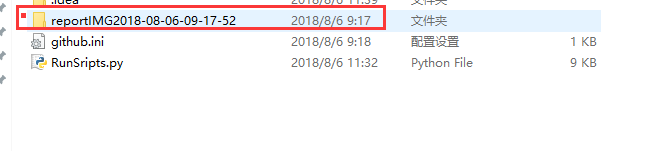
指定的仓库
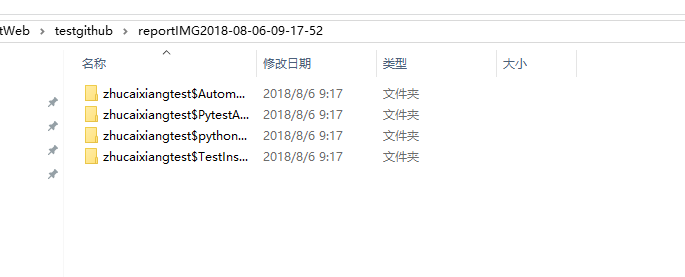
指定仓库搜索的关键字
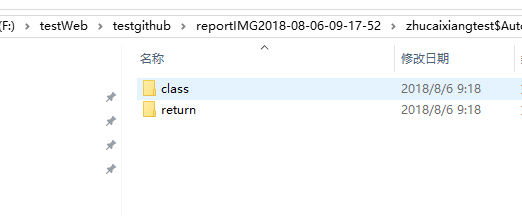
自动截图

python编写脚本,登录Github通过指定仓库指定敏感关键字搜索自动化截图生成文件【完美截图】的更多相关文章
- 使用 Python 编写脚本并发布
使用 Python 编写脚本并发布 P1: 脚本 通常在 Linux 服务器上会遇到在命令行中输入命令的操作,而有些操作包含的命令数目较多或者其中的命令包含的参数较多,如果一个一个的敲命令的话就太麻烦 ...
- 【MonkeyRunner】[技术博客]用python编写脚本查看设备信息
[MonkeyRunner]用python编写脚本查看设备信息 原以为是个简单的操作,在实践的时候发现了一些问题. python脚本 test.py: from com.android.monkeyr ...
- python编写脚本应用实例
这里主要记录工作中应用python编写脚本的实例.由于shell脚本操作数据库(增.删.改.查)并不是十分直观方便,故这里采用python监控mysql状态,然后将状态保存到数据库中,供前台页面进行调 ...
- Python 通过脚本获取Android的apk的部分属性,再通过加密算法生成秘钥。
Python 通过脚本获取Android的apk的部分属性,再通过加密算法生成秘钥. #!/usr/bin/env python # -*- coding: utf- -*- import os im ...
- 使用python编写量子线路打印的简单项目,并使用Sphinx自动化生成API文档
技术背景 该文章一方面从量子线路的打印着手,介绍了一个简单的python量子线路工程.同时基于这个简单的小工程,我们顺带的介绍了python的API文档自动化生成工具Sphinx的基本使用方法. 量子 ...
- Python爬虫之用脚本登录Github并查看信息
前言分析目标网站的登录方式 目标地址:https://github.com/login 登录方式做出分析: 第一,用form表单方式提交信息, 第二,有csrf_token, 第三 ,是以po ...
- python编写脚本,删除固定用户下的所有表
脚本如下: [oracle@ycr python]$ more t_del.py #/usr/bin/python#coding:utf8 import sysimport cx_Oracle i=0 ...
- 用python编写简易登录接口
需求: 让用户输入用户名密码 认证成功后显示欢迎信息 输错三次后退出程序 可以支持多个用户登录 用户3次认证失败后,退出程序,再次启动程序尝试登陆时,还是锁定状态 下面是我写的代码,如果有BUG或者不 ...
- Zabbix调用外部脚本发送邮件:python编写脚本
Zabbix调用外部脚本发送邮件的时候,会在命令行传入两个参数,第一个参数就是要发送给哪个邮箱地址,第二个参数就是邮件信息,为了保证可以传入多个参数,所以假设有多个参数传入 #!/usr/bin/en ...
随机推荐
- django 各项配置基本设置
setting中一些设置例子 mysql数据库连接设置 DATABASES = { 'default': { 'ENGINE': 'django.db.backends.mysql', 'NAME': ...
- 鸿蒙内核源码分析(进程镜像篇)|ELF是如何被加载运行的? | 百篇博客分析OpenHarmony源码 | v56.01
百篇博客系列篇.本篇为: v56.xx 鸿蒙内核源码分析(进程映像篇) | ELF是如何被加载运行的? | 51.c.h.o 加载运行相关篇为: v51.xx 鸿蒙内核源码分析(ELF格式篇) | 应 ...
- CF587F-Duff is Mad【AC自动机,根号分治】
正题 题目链接:https://www.luogu.com.cn/problem/CF587F 题目大意 给出\(n\)个字符串\(s\).\(q\)次询问给出\(l,r,k\)要求输出\(s_{l. ...
- disruptor笔记之五:事件消费实战
欢迎访问我的GitHub https://github.com/zq2599/blog_demos 内容:所有原创文章分类汇总及配套源码,涉及Java.Docker.Kubernetes.DevOPS ...
- windows下将Anaconda移位置(C盘转移至D盘)
1.首先说明一下我的安装情况: (1)Window10系统 (2)Anaconda安装在C盘 2.由于Anaconda安装在C盘经常会涉及权限问题,在安装torch的时候让我萌发了转移磁盘的想法(拒绝 ...
- Stream之高级函数
上回文说到了有关Stream一些数学函数的用法.今天来说下Stream一些高级的函数用法,这些函数在日常工作中也是必不可少的,测试数据还是引用上一篇的数据. Map 这个方法我个人称之为转换函数,把一 ...
- xLua自定义加载器
xLua入门基础 环境配置 github下载xLua文件: xLua是腾讯开发,据说比较先进: 下载下来后将Plugins和XLua文件夹考进项目: Plugins多平台权限:XLua和C#交互: t ...
- C语言日记① 初识C
概念 c语言是一种计算机语言 也就是人与计算机打交道的语言 在早期,因为计算机使用的二进制 所以早期写代码都是科学家来写的使用对应的功能二进制代码 需要用到手册,所以开发不方便 在后来,人们发明了汇编 ...
- 洛谷3317 SDOI2014重建(高斯消元+期望)
qwq 一开始想了个错的做法. 哎 直接开始说比较正确的做法吧. 首先我们考虑题目的\(ans\)该怎么去求 我们令\(x\)表示原图中的某一条边 \[ans = \sum \prod_{x\in t ...
- JavaScript中的函数、参数、变量
高中大学数学很差,学JavaScript,发现根本不理解其中的函数.参数.变量等概念. 李永乐老师教学视频:<高三数学复习100讲>函数 bilibili.com/video/av5087 ...