
WPF 中的DataTemplate 的嵌套
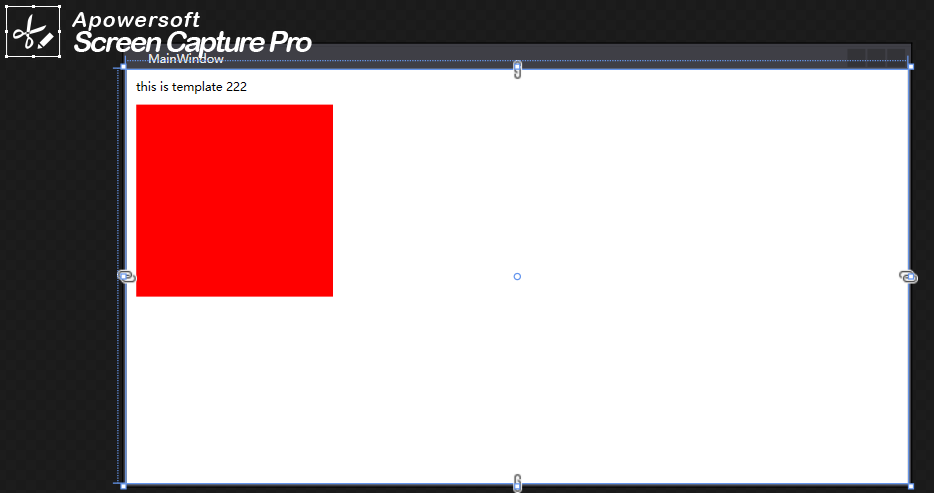
<Window x:Class="WPF.MainWindow"
xmlns="http://schemas.microsoft.com/winfx/2006/xaml/presentation"
xmlns:x="http://schemas.microsoft.com/winfx/2006/xaml"
xmlns:d="http://schemas.microsoft.com/expression/blend/2008"
xmlns:mc="http://schemas.openxmlformats.org/markup-compatibility/2006"
xmlns:local="clr-namespace:WPF"
mc:Ignorable="d"
Title="MainWindow" Height="450" Width="800">
<Window.Resources>
<DataTemplate x:Key="kk">
<Grid>
<Grid.RowDefinitions>
<RowDefinition></RowDefinition>
<RowDefinition></RowDefinition>
</Grid.RowDefinitions>
<Button>222222222</Button>
<Ellipse Grid.Row="1" Height="50" Width="50" Fill="Red">
</Ellipse>
</Grid>
</DataTemplate>
<DataTemplate x:Key="studentItemTemplate">
<Grid>
<Rectangle Fill="Red" Width="200" Height="200"></Rectangle>
</Grid>
</DataTemplate>
<DataTemplate x:Key="studentJudgeTemplate">
<Grid>
<Grid.RowDefinitions>
<RowDefinition></RowDefinition>
<RowDefinition></RowDefinition>
</Grid.RowDefinitions>
<Label >this is template 222</Label>
<Label Grid.Row="1" ContentTemplate="{StaticResource studentItemTemplate}">
</Label>
</Grid>
</DataTemplate>
</Window.Resources>
<Grid>
<Label ContentTemplate="{StaticResource studentJudgeTemplate}">
</Label>
</Grid>
</Window>
content presentor 的使用
------------------------------------------------------------
<UserControl x:Class="WPF.Login"
xmlns="http://schemas.microsoft.com/winfx/2006/xaml/presentation"
xmlns:x="http://schemas.microsoft.com/winfx/2006/xaml"
xmlns:mc="http://schemas.openxmlformats.org/markup-compatibility/2006"
xmlns:d="http://schemas.microsoft.com/expression/blend/2008"
xmlns:local="clr-namespace:WPF"
mc:Ignorable="d"
d:DesignHeight="450" d:DesignWidth="800" x:Name="uc">
<UserControl.Resources>
<Style x:Key="kk" TargetType="Label">
<Setter Property="Template">
<Setter.Value>
<ControlTemplate TargetType="Label">
<Grid>
<Ellipse Margin="34,45,44,117" Fill="{TemplateBinding Background}"/>
</Grid>
</ControlTemplate>
</Setter.Value>
</Setter>
</Style>
</UserControl.Resources>
<Grid>
<Grid.RowDefinitions>
<RowDefinition></RowDefinition>
<RowDefinition></RowDefinition>
</Grid.RowDefinitions>
<Button Grid.Row="0">111111111111</Button>
<ContentPresenter Grid.Row="1" x:Name="lab" Content="{Binding MM}">
<!--<Ellipse Width="100" Height="100" Fill="Red">
</Ellipse>-->
</ContentPresenter>
</Grid>
</UserControl>
C# code
-------------------------
public partial class Login : UserControl
{
public Login()
{
InitializeComponent();
this.Loaded += Login_Loaded;
this.DataContext = this;
}
private void Login_Loaded(object sender, RoutedEventArgs e)
{
}
public static readonly DependencyProperty MMProperty = DependencyProperty.Register("MM", typeof(object), typeof(Login));
public object MM
{
get { return (object)GetValue(MMProperty); }
set { SetValue(MMProperty, value); }
}
private static bool setV(Object obj)
{
// lab.Content = obj;
return true;
}
}
WPF 中的DataTemplate 的嵌套的更多相关文章
- WPF中的DataTemplate
<Window x:Class="DateTemplate应用.MainWindow" xmlns="http://schemas.microsoft.com/wi ...
- wpf 中的DataTemplate 绑定控件
<ResourceDictionary xmlns="http://schemas.microsoft.com/winfx/2006/xaml/presentation" x ...
- WPF中UserControl和DataTemplate
最新更新: http://denghejun.github.io 前言 前言总是留给我说一些无关主题的言论,WPF作为全新Microsoft桌面或web应用程序显示技术框架, 从08年开始,一直到现在 ...
- WPF中的数据模板(DataTemplate)(转)
原文地址 http://www.cnblogs.com/zhouyinhui/archive/2007/03/30/694388.html WPF中的数据模板(DataTemplate) ...
- WPF中的数据模板(DataTemplate)
原文:WPF中的数据模板(DataTemplate) WPF中的数据模板(DataTemplate) ...
- WPF中自定义的DataTemplate中的控件,在Window_Loaded事件中加载机制初探
原文:WPF中自定义的DataTemplate中的控件,在Window_Loaded事件中加载机制初探 最近因为项目需要,开始学习如何使用WPF开发桌面程序.使用WPF一段时间之后,感 ...
- wpf中在style的template寻找ControlTemplate和DataTemplate的控件
一.WPF中的两棵树 WPF中每个控件的Template都是由ControlTemplate构成,ControlTemplate包含了构成该控件的各种子控件,这些子控件就构成了VisualTree:而 ...
- WPF入门教程系列十八——WPF中的数据绑定(四)
六.排序 如果想以特定的方式对数据进行排序,可以绑定到 CollectionViewSource,而不是直接绑定到 ObjectDataProvider.CollectionViewSource 则会 ...
- WPF中的数据绑定!!!
引用自:https://msdn.microsoft.com/zh-cn/magazine/cc163299.aspx 数据点: WPF 中的数据绑定 数据点 WPF 中的数据绑定 John Pap ...
随机推荐
- Html模板引擎Handlerbars使用demo
1.自定义demo <html> <head> <script src="./handlebars-v4.0.12.js"></scrip ...
- 本地图片转base64编码
通常获取图片的base64编码都是通过input的上传file属性获取转化,但是有时候需要的是本地图片不经过上传操作,直接拿本地图片转成base64编码就不行了,input上传操作需要人为操作一下,没 ...
- css :nth-of-type选择器为什么不起作用!!!
问题 今天工作才发现的,原来我一直就理解错了!! MDN官网对这个选择器的的定义是: :nth-of-type() 这个 CSS 伪类是针对具有一组兄弟节点的标签, 用 n 来筛选出在一组兄弟节点的位 ...
- MySQL Shell import_table数据导入
目录 1. import_table介绍 2. Load Data 与 import table功能示例 2.1 用Load Data方式导入数据 2.2 用import_table方式导入数据 3. ...
- SpringBoot数据访问之Druid数据源的使用
数据访问之Druid数据源的使用 说明:该数据源Druid,使用自定义方式实现,后面文章使用start启动器实现,学习思路为主. 为什么要使用数据源: 数据源是提高数据库连接性能的常规手段,数据源 ...
- Sci Adv | 上科大水雯箐/胡霁/钟桂生脑蛋白质组学研究揭示抑郁行为的新调控因子
大脑是生物体内结构和功能最复杂的组织.近年来蓬勃发展的脑蛋白组学研究是绘制大脑功能分子图谱.全面理解大脑生理病理机制的必经途径.跨膜蛋白家族在突触信号传递和神经可塑性调节中扮演重要角色,许多跨膜蛋白与 ...
- MSF+Nmap TCP空闲扫描
MSF+Nmap TCP空闲扫描 前言 TCP空闲扫描是一种高级的扫描技术,可以冒充内网中另一台IP地址来对内网中的目标进行隐秘的扫描. 正文 在进行扫描之前,我们需要了解一个概念,即递增IP帧标识, ...
- Wireshark基础
Wireshark基础 wireshark简介: wireshark是一款用于追踪网络流量的辅助工具,帮助捕获.分析网络封包,并进行分析. 主要功能: 1.网络分析任务 查看网 ...
- Docker部署Sql Server 2019实践
1. 拉取SqlServer2019镜像 sudo docker pull mcr.microsoft.com/mssql/server:2019-latest 2. 创建容器+挂载: sudo do ...
- Configure Hosts with Puppet
According to "Pro Puppet" 2nd edition, Chapter 2, "Creating a Module to Manage SSH&qu ...