
JAAS authentication in Tomcat example--reference
Introduction
Tomcat provides a default JAAS Realm implementation so developers may implement JAAS Login Modules and easily integrate them with the container. In this tutorial we will implement all the required components to put JAAS up and running in Tomcat web container.
This tutorial considers the following software and environment:
- Ubuntu 12.04
- JDK 1.7.0.09
- Tomcat 7.0.35
The Principals
One of the core concepts of JAAS is the existence of users and roles (roles are similar to groups in UNIX systems). Authorization may be issued to specific users or to roles. In JAAS this is concept is translated to Principals: Principals may represent users orroles independently. Let's define User and Role Principals to be used in this example:
package com.byteslounge.jaas;

import java.security.Principal;

public class UserPrincipal implements Principal {

  private String name;

  public UserPrincipal(String name) {

    super();

    this.name = name;

  }

  public void setName(String name) {

    this.name = name;

  }

  @Override

  public String getName() {

    return name;

  }

}
package com.byteslounge.jaas;

import java.security.Principal;

public class RolePrincipal implements Principal {

  private String name;

  public RolePrincipal(String name) {

    super();

    this.name = name;

  }

  public void setName(String name) {

    this.name = name;

  }

  @Override

  public String getName() {

    return name;

  }

}
Basically we are defining two simple Principals, each one of them requiring just a name so they may be promptly identified (a username or a role name). Remember that our principals must implement the java.security.Principal interface.
The Login Module
Now we need to define a Login Module that will actually implement the authentication process. The Login module must implement the javax.security.auth.spi.LoginModule interface:
package com.byteslounge.jaas;

import java.io.IOException;

import java.util.ArrayList;

import java.util.List;

import java.util.Map;

import javax.security.auth.Subject;

import javax.security.auth.callback.Callback;

import javax.security.auth.callback.CallbackHandler;

import javax.security.auth.callback.NameCallback;

import javax.security.auth.callback.PasswordCallback;

import javax.security.auth.callback.UnsupportedCallbackException;

import javax.security.auth.login.LoginException;

import javax.security.auth.spi.LoginModule;

public class BytesLoungeLoginModule implements LoginModule {

  private CallbackHandler handler;

  private Subject subject;

  private UserPrincipal userPrincipal;

  private RolePrincipal rolePrincipal;

  private String login;

  private List<String> userGroups;

  @Override

  public void initialize(Subject subject,

      CallbackHandler callbackHandler,

      Map<String, ?> sharedState,

      Map<String, ?> options) {

    handler = callbackHandler;

    this.subject = subject;

  }

  @Override

  public boolean login() throws LoginException {

    Callback[] callbacks = new Callback[2];

    callbacks[0] = new NameCallback("login");

    callbacks[1] = new PasswordCallback("password", true);

    try {

      handler.handle(callbacks);

      String name = ((NameCallback) callbacks[0]).getName();

      String password = String.valueOf(((PasswordCallback) callbacks[1])

          .getPassword());

      // Here we validate the credentials against some

      // authentication/authorization provider.

      // It can be a Database, an external LDAP,

      // a Web Service, etc.

      // For this tutorial we are just checking if

      // user is "user123" and password is "pass123"

      if (name != null &&

          name.equals("user123") &&

          password != null &&

          password.equals("pass123")) {

        // We store the username and roles

        // fetched from the credentials provider

        // to be used later in commit() method.

        // For this tutorial we hard coded the

        // "admin" role

        login = name;

        userGroups = new ArrayList<String>();

        userGroups.add("admin");

        return true;

      }

      // If credentials are NOT OK we throw a LoginException

      throw new LoginException("Authentication failed");

    } catch (IOException e) {

      throw new LoginException(e.getMessage());

    } catch (UnsupportedCallbackException e) {

      throw new LoginException(e.getMessage());

    }

  }

  @Override

  public boolean commit() throws LoginException {

    userPrincipal = new UserPrincipal(login);

    subject.getPrincipals().add(userPrincipal);

    if (userGroups != null && userGroups.size()>0){for(String groupName : userGroups){

        rolePrincipal =newRolePrincipal(groupName);

        subject.getPrincipals().add(rolePrincipal);}}returntrue;}@Overridepublicboolean abort()throwsLoginException{returnfalse;}@Overridepublicboolean logout()throwsLoginException{

    subject.getPrincipals().remove(userPrincipal);

    subject.getPrincipals().remove(rolePrincipal);returntrue;}}
All the implemented methods are inherited from javax.security.auth.spi.LoginModule interface and will be called by Tomcat at specific moments during the authentication process.
The login method is responsible for checking if the credentials provided by the end user are valid. This check is made against any kind of authorization entity: It may be a database, a web service, a LDAP, etc. The developer may implement this credentials check in the way required by some specific use case.
Note: The login method must throw a LoginException in case of authentication failure.
In the presence of a successful authentication it should fetch the roles associated with the authenticating user. In this case we simulated and hard coded the admin role as a fetched role from the credentials provider for the current user.
The commit method is called after a successful login method execution and is responsible to store the user and roles obtained by the login method in the respective Subject and in the form of Principals. As you can see in the above module implementation, during the login method execution the credentials are obtained by the means of a callback. This callback is initialized in the initialize method together with Subject initialization.
The logout method is called when the user logs out of the system (and the application implements a logout mechanism). Finally the abort method is called when the login method fails to authenticate the user (throws a LoginException).
The web application
In this example we will secure a specific folder of a Java web application. The application will be very simple and its structure is the following:
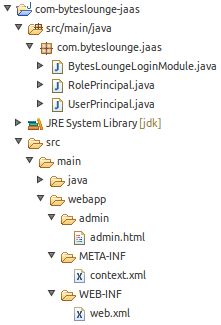
We will be securing the admin folder.
To accomplish this task we must define some configuration elements in web.xml file. These entries go directly under the web-app element:
<security-constraint>

  <web-resource-collection>

    <web-resource-name>Admin</web-resource-name>

    <url-pattern>/admin/*</url-pattern>

  </web-resource-collection>

  <auth-constraint>

    <role-name>admin</role-name>

  </auth-constraint>

</security-constraint>

<security-role>

  <role-name>admin</role-name>

</security-role>

<login-config>

  <auth-method>BASIC</auth-method>

  <realm-name>Admin</realm-name>

</login-config>
In security-constraint element we are defining that all resources under /admin folder are protected and only the admin role is granted to access the resources. All existing roles must be also defined in the security-role element. The login-configelement defines how the credentials will be asked to the end user. In this example we will use the Basic authentication scheme (you may have different mechanisms like presenting a web form or page to the end user, but that will be covered in other tutorial).
Now we must define a new file named context.xml and place it under:
/META-INF/context.xml
<?xml version="1.0" encoding="UTF-8"?>

<Context>

  <Realm className="org.apache.catalina.realm.JAASRealm"

    appName="BytesLoungeLogin"

    userClassNames="com.byteslounge.jaas.UserPrincipal"

    roleClassNames="com.byteslounge.jaas.RolePrincipal" />

</Context>
Here we define the class that will implement the JAAS realm. We are using Tomcat default implementation:org.apache.catalina.realm.JAASRealm. We also define which classes will implement the user and roles Principals and we set them to be the ones we defined earlier in this tutorial (UserPrincipal and RolePrincipal). The attribute appName defines how the application will be globally identified by Tomcat in what matters to security configuration.
Finally we must define a JAAS configuration file. We will name it jaas.config and we will place it in Tomcat conf folder:
$CATALINA_BASE/conf/jaas.config
The file looks like the following:
BytesLoungeLogin {

    com.byteslounge.jaas.BytesLoungeLoginModule required debug=true;

};
This file defines the authentication configuration for BytesLoungeLogin application. Note that it's the same name we used inappName inside context.xml file just above.
Launching Tomcat and testing
Now lets launch Tomcat. We must set a JVM argument that tells Tomcat where the application configuration security file is located, the jaas.config file:
You may set this in the startup catalina.sh file.
When the server is up and running and we access the secure resource:
We will see the Basic authentication dialog asking for credentials:
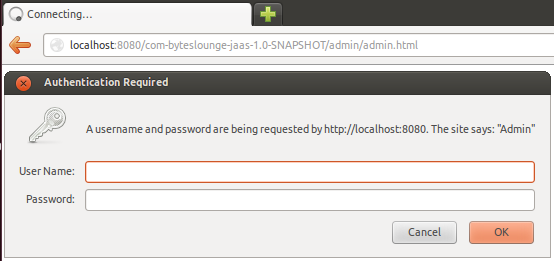
Now we insert the credentials we hard coded in our Login Module. Username: user123 and Password: pass123
We will be presented the secure resource. Access was granted.
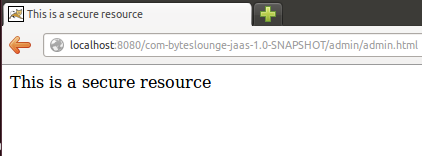
The tutorial full source code is available for download at the end of this page.
Logout process
For more information about the user logout process please refer to the following article:
Keep in mind that this tutorial covered BASIC authentication so your browser will store the user credentials until it's closed.
This means that even if you logout the user, as soon a new request is made against a protected resource the browser will send the credentials again and automatically authenticate the user.
reference from:
JAAS authentication in Tomcat example--reference的更多相关文章
- Using JAAS Authentication in Java Clients---weblogic document
The following topics are covered in this section: JAAS and WebLogic Server JAAS Authentication Devel ...
- ActiveMQ(5.10.0) - Configuring the JAAS Authentication Plug-in
JAAS provides pluggable authentication, which means ActiveMQ will use the same authentication API re ...
- JAAS - Document
JAAS 参考文档: JAAS Reference Guide JAAS Authentication Tutorial JAAS Authorization Tutorial LoginModule ...
- http://wiki.apache.org/tomcat/HowTo
http://wiki.apache.org/tomcat/HowTo Contents Meta How do I add a question to this page? How do I con ...
- Tomcat创建HTTPS访问,java访问https
一 https和ssL HTTPS(全称:Hyper Text Transfer Protocol over Secure Socket Layer),是以安全为目标的HTTP通道,简单讲是HTTP的 ...
- Tomcat应用中post方式传参数长度限制
Tomcat应用中post方式传参数长度限制 jsp页面上是没有限制的,但是在tomcat服务器上有限制,Tomcat 默认的post参数的最大大小为2M, 当超过时将会出错,可以配置maxPostS ...
- Tomcat web.xml配置参数详解
Apache Tomcat Configuration Reference - The Context Containerhttps://tomcat.apache.org/tomcat-5.5-do ...
- 使用JAAS登录kerberos服务器
java代码: package com.snsprj.jaas0822; import javax.security.auth.*; import javax.security.auth.callba ...
- Tomcat:基础安装和使用教程
背景 此文记录了 Tomcat 的基本使用方法,主要为了强化记忆. 安装步骤 第一步:下载和安装 Java 下载地址:http://www.oracle.com/technetwork/java/ja ...
随机推荐
- sql server 查询表某个字段不重复数据
SELECT TOP (500) ID, Personname, Personcode, Telphone, Fraction into temp3 FROM Records AS a WHERE ( ...
- iOS 必备技术点
IOS面试问题总结 分类: IOS开发2013-11-20 17:26 5873人阅读 评论(1) 收藏 举报 目录(?)[+] 通过网络搜寻和自己总结经历找了一些IOS面试经常被问道的问题: ...
- 小记,取GB2312汉字的首字母【转】
/// <summary> /// PY 的摘要说明. /// </summary> public class PY { // Fields private string m_ ...
- 【Java】servlet和servlet 容器
servlet不是线程安全的,它通过多线程方式运行其service方法,一个实例可以服务于多个请求,并且其实例一般不会销毁,所以你的项目中如果只有一个servlet,那么web容器就只会创建一个实例 ...
- Choose the best route
hdu 2680:http://acm.hdu.edu.cn/showproblem.php?pid=2680 这道题值得一提的两点:在图论中注意重边问题是必须的,有向无向也是同等重要的,如这道题 f ...
- 翻译qmake文档 目录(四篇)
http://www.cnblogs.com/li-peng/p/4026133.html
- [cocos2d]关于CCSprite的若干问题与误区
文章 [cocos2d] 利用texture atlases生成动画 中介绍了如何生成动画并绑定在CCSprite实例上. 使用该代码遇到了几个问题,值得mark下 问题1.多实例 问题描述: 新建一 ...
- 内存管理(memory allocation内存分配)
Memory management is the act of managing computer memory. The essential requirement of memory manage ...
- bzoj3208: 花神的秒题计划Ⅰ
3208: 花神的秒题计划Ⅰ Time Limit: 16 Sec Memory Limit: 128 MBSubmit: 323 Solved: 211[Submit][Status] Desc ...
- (转载)javascript实现弹出对话框
(转载)http://xiezezhun.iteye.com/blog/335898 简单对话框 一般常用的是 alert prompt confirm三种对话框 JavaScript代码: < ...