
OC - 28.模拟时钟
效果图
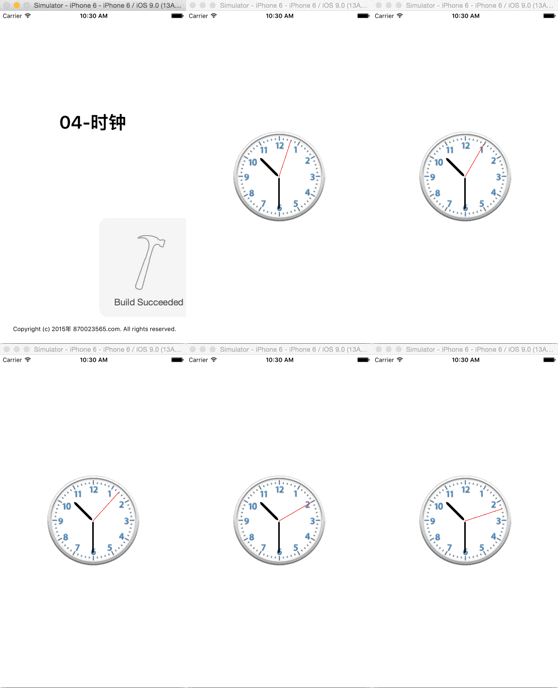
实现思路
- 该示例通过隐式动画实现
- 表盘通过显示在imageView中的一张图片来实现
在表盘上绘制(时分秒)三条直线,分别位于不同的图层,且时针位于最下层,秒针位于最上层
- 设置直线为圆角
- 直线的一段位于表盘的圆心
- 通过NSTimer定时器,使不同的图层定时执行对应的动画
实现步骤
通过storyboard创建表盘,并拥有它
@property (weak, nonatomic) IBOutlet UIImageView *clockView;使用三个成员变量来保存时分秒三根表针位于的不同图层
@property (nonatomic, weak) CALayer *secondLayer;

@property (nonatomic, weak) CALayer *minuteLayer;

@property (nonatomic, weak) CALayer *hourLayer;
初始化所用到的常量
//将旋转角度转换为弧度制

#define angleToRadion(angle) ((angle) / 180.0 * M_PI)

//秒针每秒钟转过的角度

#define perSecondAngle 6

//分针每分钟转过的角度

#define perMinuteAngle 6

//时针每小时转过的角度

#define perHourAngle 30

//时针每分钟转过的角度

#define perMuniteHourAngle 0.5
设置时分秒三根表针
设置时针
- (void)setUpHourLayer

{

	//创建图层

	CALayer *layer = [CALayer layer];

	layer.backgroundColor = [UIColor blackColor].CGColor;

	layer.cornerRadius = 8;

	设置图层的锚点

	layer.anchorPoint = CGPointMake(0.5, 1);

	//设置图层的位置和尺寸

	layer.position = CGPointMake(kClockWith * 0.5, kClockWith * 0.5);

	layer.bounds = CGRectMake(0, 0, 5, kClockWith * 0.5 - 44);

	//将图层添加到父图层中

	[self.clockView.layer addSublayer:layer];

	self.hourLayer = layer;

}
设置分针
- (void)setUpMinuteLayer

{

    CALayer *layer = [CALayer layer];

    layer.backgroundColor = [UIColor blackColor].CGColor;

    layer.cornerRadius = 4;

    //设置锚点

    layer.anchorPoint = CGPointMake(0.5, 1);

    //设置位置和尺寸

    layer.position = CGPointMake(kClockWith * 0.5, kClockWith * 0.5);

    layer.bounds = CGRectMake(0, 0, 3, kClockWith * 0.5 - 34);

    //将图层添加到父图层中

    [self.clockView.layer addSublayer:layer];

    self.minuteLayer = layer;

}
设置秒针
- (void)setUpSecondLayer

{

    CALayer *layer = [CALayer layer];

    layer.backgroundColor = [UIColor redColor].CGColor;

    //设置锚点

    layer.anchorPoint = CGPointMake(0.5, 1);

    //设置位置和尺寸

    layer.position = CGPointMake(kClockWith * 0.5, kClockWith * 0.5);

    layer.bounds = CGRectMake(0, 0, 1, kClockWith * 0.5 - 24);

    //将图层添加到父图层中

    [self.clockView.layer addSublayer:layer];

    self.secondLayer = layer;

}
设置定时器,定时执行动画
[NSTimer scheduledTimerWithTimeInterval:1.0 target:self selector:@selector(timeChange) userInfo:nil repeats:YES];设置定时器触发时调用的方式,添加动画代码
- (void)timeChange

{

    //获取日历对象

    NSCalendar *calendar = [NSCalendar currentCalendar];

    //获取日期组件

    NSDateComponents *components = [calendar components:NSCalendarUnitSecond | NSCalendarUnitMinute | NSCalendarUnitHour fromDate:[NSDate date]];

    //获取当前的时分秒值

    NSInteger second = components.second;

    NSInteger munite = components.minute;

    NSInteger hour = components.hour;

    //计算当前时分秒表针转过的角度(弧度制)

    CGFloat secondAngle = angleToRadion(second * perSecondAngle);

    CGFloat muniteAngle = angleToRadion(munite * perMinuteAngle);

    CGFloat hourAngle = angleToRadion(hour *perHourAngle + munite * perMuniteHourAngle);

    //修改时分秒表针位于的图层的transform属性,执行隐式动画

    self.secondLayer.transform = CATransform3DMakeRotation(secondAngle, 0, 0, 1);

    self.minuteLayer.transform = CATransform3DMakeRotation(muniteAngle, 0, 0, 1);

    self.hourLayer.transform = CATransform3DMakeRotation(hourAngle, 0, 0, 1);

}
OC - 28.模拟时钟的更多相关文章
- 模拟时钟(AnalogClock)和数字时钟(DigitalClock)
Demo2\clock_demo\src\main\res\layout\activity_main.xml <LinearLayout xmlns:android="http://s ...
- 一个模拟时钟的时间选择器 ClockPicker
最近开发的一个模拟时钟的时间选择器 ClockPicker,用于 Bootstrap,或者单独作为一个 jQuery 插件. 源代码托管在 GitHub 上: ClockPicker 最近项目中需要用 ...
- android脚步---数字时钟和模拟时钟
时钟UI组件是两个非常简单的组件,分为Digitalclock 和Analogclock, main.xml文件,书中程序有问题,加了两个组件,一个Button和一个<Chronometer ...
- Java多线程之sleep方法阻塞线程-模拟时钟
package org.study2.javabase.ThreadsDemo.status; import java.text.SimpleDateFormat; import java.util. ...
- css模拟时钟
css模拟时钟 思路: 画时钟数字(x,y)坐标 x = x0 + r*cos(deg) y = y0 + r*sin(deg) 知识点: 创建元素: createElement 添加元素: appe ...
- 【CSS3】纯CSS代码实现模拟时钟,+js对时功能。
使用CSS3纯代码来实现模拟时钟,及指针动画功能. 在这里主要使用到css3一些基本元素: border-radius:圆角边框,画圆形:表盘 Transform:变换,旋转,扭曲:刻度盘,指针形状 ...
- 模拟时钟(AnalogClock)
模拟时钟(AnalogClock) 显示一个带时钟和分针的表面 会随着时间的推移变化 常用属性: android:dial 可以为表面提供一个自定义的图片 下面我们直接看代码: 1.Activity ...
- Windows下编程--模拟时钟的实现
windows下编程--模拟时钟的实现: 主要可以分为几个步骤: (1) 编写按键事件处理(启动和停止时钟) (2) 编写时钟事件处理,调用显示时钟函数 (3) 编写显示时钟函数,要调用显 ...
- 变换CALayer锚点实现模拟时钟的动画
变换CALayer锚点实现模拟时钟的动画 变换锚点得需要一点理论知识,看下图就能明白:). https://developer.apple.com/library/ios/documentation/ ...
随机推荐
- poj3294
首先后缀数组预处理然后二分答案len很显然,然后考虑怎么判定我们用左右指针顺着名次扫描一下,初始左右指针为1根据LCP(i,j)=min(height[rank[i]+1]~height[rank[j ...
- Traffic Manager:Azure中国版 正式发布
我们很高兴地宣布Azure Traffic Manager 现已面向中国版Azure正式发布.此版本现已投入生产,由企业 SLA支持,随时可用于生产场景中. 借助Azure Traffic Ma ...
- org.springframework.web.servlet.view
view包下面的类和接口 description:提供view和viewResolver的标准实现,也提供一些抽象基类.Spring MVC已经提供了 JSPs, Velocity, XSLT等视图的 ...
- Windows 8 关闭无线后无法打开WIFI的解决办法
转:http://blog.sina.com.cn/s/blog_49d02ed101016b4n.html 在使用 Windows 8 的过程中,遇到过几次使用键盘上的功能键(笔者笔记本上的快捷键是 ...
- (转载)不能启动虚拟机 Unable to open kernel device "\\.\Global\vmx86
(转载)http://blog.csdn.net/shenghuiping2001/article/details/7083153 今天系统加了内存条,设置变了一下: 就启动不起虚拟机了,报错: Un ...
- Asp.net 字体样式
在页面中使用到字体样式 “微软雅黑“,在静态页面中显示正常,但在asp.net页面中字体无效,此时只需把字体修改为“Microsoft YaHei";
- OpenStack Havana 部署在Ubuntu 12.04 Server 【OVS+GRE】(二)——网络节点的安装
序:OpenStack Havana 部署在Ubuntu 12.04 Server [OVS+GRE] 网络节点: 1.安装前更新系统 安装好ubuntu 12.04 Server 64bits后,进 ...
- [Git] Github客户端上publish后一直转圈,web上未上传成功
连续试了几次,publish后一直处于publish状态,点击其它repositories再点回来就没动静了,也看不到Sys按钮...最后发现,是要等很久才会成功,天朝的网络伤不起
- Ubuntu14.04 安装配置Hadoop2.6.0
目前关于Hadoop的安装配置教程书上.官方教程.博客都有很多,但由于对Linux环境的不熟悉以及各种教程或多或少有这样那样的坑,很容易导致折腾许久都安装不成功(本人就是受害人之一).经过几天不断尝试 ...
- cf 702B
You are given n integers a1, a2, ..., an. Find the number of pairs of indexes i, j (i < j) that a ...