
Android 布局之DrawLayout
在刚开始学android的时候肯定会知道,android的主要的布局就是LinearLayout、RelativeLayout、FramLayout、AbsoluteLayout、以及TableLayout,这是谁都知道的。其他的一些UI就交给了众多的三方库。其实,随着android的发展壮大,开发者不用再辛苦的去找三方类库了,android已经拥有了很强大的功能。比如我们不再用pullToRefresh而是用SwipeRefreshLayout,不再用ViewPagerTabStrip而是用TabLayoutd等等。我们会发现越来越多的布局可以随心所欲的加入到主布局中了。
因为项目的需要,添加了新功能,侧滑菜单,以前我们自然会去网上找一大堆的资料,看一大堆demo,其实原生的android就已经有了这个功能。就是DrawLayout。
下面先看看效果图:

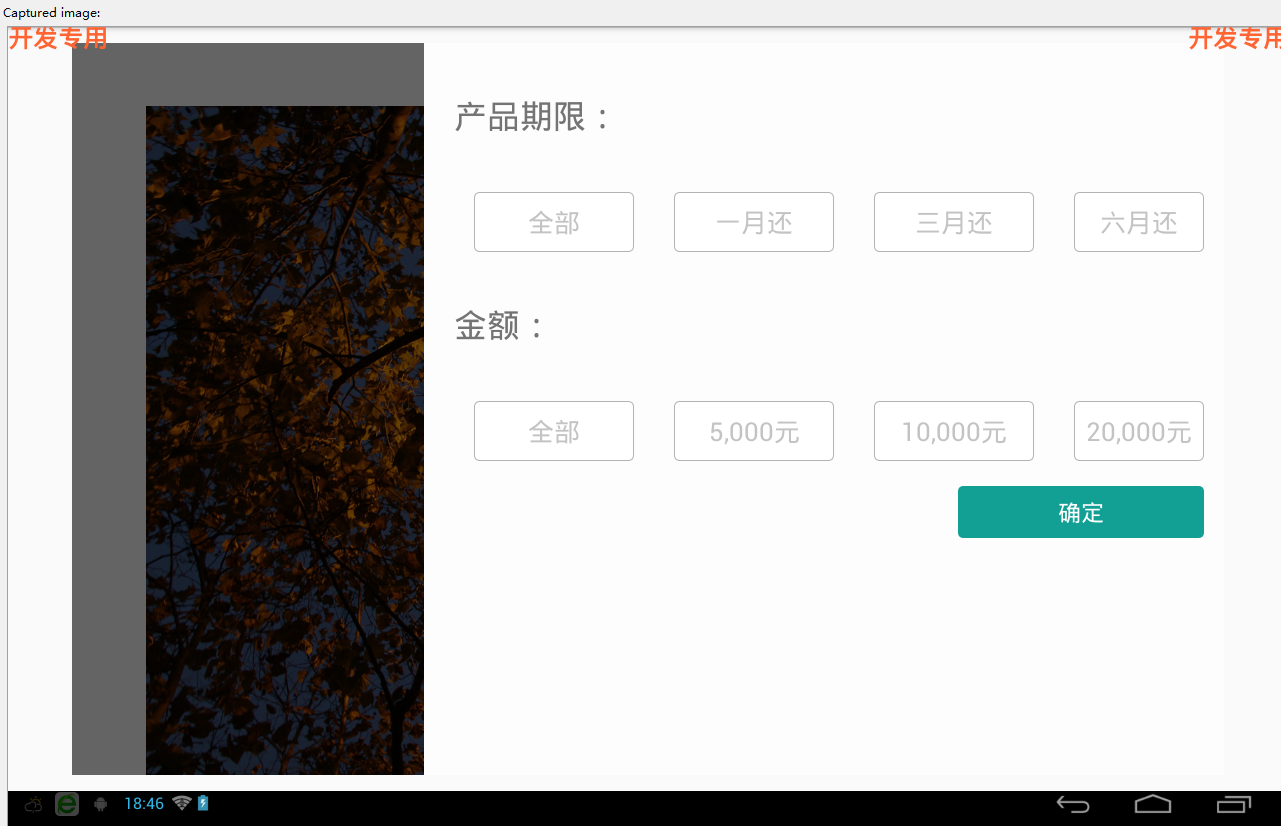

可以点击左侧的查询产品按钮将侧滑栏弹出来,然后在右侧进行相应的操作之后点击确定将右侧滑栏收回去。因为只是做的一个比较简单的demo所以在主界面只放了一张图。
下面上代码:
activity_mainactivity.xml:这个文件是来盛放下面的侧滑布局(content_main.xml)的
<?xml version="1.0" encoding="utf-8"?>

<LinearLayout xmlns:android="http://schemas.android.com/apk/res/android"

    xmlns:app="http://schemas.android.com/apk/res-auto"

    xmlns:tools="http://schemas.android.com/tools"

    android:layout_width="match_parent"

    android:layout_height="match_parent"

    android:fitsSystemWindows="true"

    tools:context=".MainActivity">

    <include layout="@layout/content_main" />

</LinearLayout>
content_main.xml 这个xml文件是整个主布局以及侧滑页的布局:
<RelativeLayout xmlns:android="http://schemas.android.com/apk/res/android"

    xmlns:tools="http://schemas.android.com/tools"

    android:layout_width="match_parent"

    android:layout_height="match_parent"

    android:paddingBottom="@dimen/activity_vertical_margin"

    android:paddingLeft="@dimen/activity_horizontal_margin"

    android:paddingRight="@dimen/activity_horizontal_margin"

    android:paddingTop="@dimen/activity_vertical_margin"

    tools:context=".DrawerActivity">

    <android.support.v4.widget.DrawerLayout

        android:id="@+id/drawer_layout"

        android:layout_width="match_parent"

        android:layout_height="match_parent">

        <!-- The main content view -->

        <LinearLayout

            android:id="@+id/content_frame"

            android:layout_width="match_parent"

            android:layout_height="match_parent"

            android:orientation="vertical"

            >

            <Button

                android:id="@+id/btn"

                android:layout_width="wrap_content"

                android:layout_height="wrap_content"

                android:text="查询产品"

                android:layout_gravity="right"/>

           <ImageView

                android:layout_marginTop="15dp"

                android:layout_width="match_parent"

                android:layout_height="wrap_content"

                android:src="@drawable/back"/>

            <TextView

                android:layout_marginTop="55dp"

                android:layout_width="match_parent"

                android:layout_height="wrap_content"

                android:text="showSomethingHere"

                />

            <Button

                android:layout_width="wrap_content"

                android:layout_height="wrap_content"

                android:text="somethingElse"

                android:layout_gravity="center_vertical"/>

        </LinearLayout>

        <!-- The navigation drawer -->

        <LinearLayout

            android:layout_width="800dp"

            android:layout_height="match_parent"

            android:layout_gravity="right"

            android:background="#FDFDFD"

            android:orientation="vertical">

            <TextView

                android:layout_width="wrap_content"

                android:layout_height="wrap_content"

                android:layout_marginLeft="30dp"

                android:layout_marginTop="50dp"

                android:text="产品期限:"

                android:textSize="25sp" />

            <include layout="@layout/layout_period"></include>

            <TextView

                android:layout_width="wrap_content"

                android:layout_height="wrap_content"

                android:layout_marginLeft="30dp"

                android:layout_marginTop="50dp"

                android:text="金额:"

                android:textSize="25sp" />

            <include layout="@layout/layout_amount"></include>

            <Button

                android:id="@+id/btn_check"

                style="@style/button_style"

                android:layout_width="wrap_content"

                android:layout_height="wrap_content"

                android:layout_gravity="right"

                android:layout_marginBottom="10dp"

                android:layout_marginRight="20dp"

                android:layout_marginTop="25dp"

                android:paddingBottom="10dp"

                android:paddingLeft="100dp"

                android:paddingRight="100dp"

                android:paddingTop="10dp"

                android:text="确定" />

        </LinearLayout>

    </android.support.v4.widget.DrawerLayout>

</RelativeLayout>
另外两个不怎么重要的布局就不贴上来了,还有一大堆的样式。。。我们注意到,这个布局要用到 android.support.v4包。
下面是主要的activity类:
package hao.zerosoft.com.testdrawlayout;

import android.app.Activity;

import android.os.Bundle;

import android.support.v4.widget.DrawerLayout;

import android.view.Gravity;

import android.view.View;

import android.widget.Button;

public class MainActivity extends Activity implements View.OnClickListener {

    private DrawerLayout mDrawerLayout = null;

    private Button btnCheck;

    @Override

    protected void onCreate(Bundle savedInstanceState)

    {

        super.onCreate(savedInstanceState);

        setContentView(R.layout.activity_main);

        mDrawerLayout = (DrawerLayout) findViewById(R.id.drawer_layout);

        btnCheck=(Button)findViewById(R.id.btn_check);

        Button button = (Button) findViewById(R.id.btn);

        button.setOnClickListener(this);

        btnCheck.setOnClickListener(this);

    }

    @Override

    public void onClick(View v) {

        switch (v.getId()){

            case R.id.btn://主页面的查询产品按钮

                mDrawerLayout.openDrawer(Gravity.RIGHT);

                break;

            case R.id.btn_check://确定按钮,可以将侧滑页面的一些操作写在这里。我们一般都是用消息回调的方式去执行

                mDrawerLayout.closeDrawer(Gravity.RIGHT);

                break;

            default:

                break;

        }

    }

}
项目的源码在我的文件夹里面可以去查看 ,由于图片文件比较大,不能上传,删除了一些文件。http://i.cnblogs.com/Files.aspx
Android 布局之DrawLayout的更多相关文章
- 【转】在Android布局中使用include和merge标签
内容转自:http://fengweipeng1208.blog.163.com/blog/static/21277318020138229754135/ 在我们开发android布局时,经常会有很多 ...
- Android成长日记-Android布局优化
Android常用布局 1. LinearLayout(线性布局) 2. RelativeLayout(相对布局) 3. TableLayout(表格布局) 4. AbsoluteLayou(绝对布局 ...
- 【转】Android布局优化之ViewStub
ViewStub是Android布局优化中一个很不错的标签/控件,直接继承自View.虽然Android开发人员基本上都听说过,但是真正用的可能不多. ViewStub可以理解成一个非常轻量级的Vie ...
- Android 布局之LinearLayout
Android 布局之LinearLayout 1 LinearLayout简介 LinearLayout是线程布局.它包括2个方向(android:orientation):“水平”(horizon ...
- Android 布局之RelativeLayout
Android 布局之RelativeLayout 1 RelativeLayout简介 RelativeLayout是相对布局. RelativeLayout布局属性 1.1 与parent相对的属 ...
- Android 布局之TableLayout
Android 布局之TableLayout 1 TableLayout简介 TableLayout是表格布局.TableLayout 可设置的属性包括全局属性及单元格属性. 1.1 全局属性 有以下 ...
- Android 布局之FrameLayout
Android 布局之FrameLayout 1 FrameLayout简介 对于FrameLayout,官方介绍是:FrameLayout is designed to block out an a ...
- Android 布局之GridLayout
Android 布局之GridLayout 1 GridLayout简介 GridLayout是Android4.0新提供的网格矩阵形式的布局控件. GridLayout的继承关系如下:java.la ...
- Xamarin Android布局文件没有智能提示
Xamarin Android布局文件没有智能提示 在Visual Studio 2015中,Android项目的Main.axml文件没有智能提示,不便于布局文件的编写.解决办法:(1)从Xamar ...
随机推荐
- DataDictionaryTool 一款生成数据库字典工具支持mysql和oracle
因为常常查看mysql数据结构,频繁操作.很不爽,于是想把数据表制作成数据字典,于是网上搜的一款工具 DataDictionaryTool ,最终制作成功,分享给大家! 1,此工具需要安装jre ,简 ...
- List和ArrayList,LinkList的区别
接口 List<E> 是一个接口: ArrayList<E> 是一个类:是一个实现了List接口的类,因此可以List里面定义的所有的方法都实现了. 1.ArrayList是实 ...
- Asp.net: WebForm基础上构建Mvc的方法
添加引用: System.Web.Routing System.Web.Abstractions System.Web.Mvc 添加文件夹: Controllers, Views, Views / ...
- SQL Server备份还原数据库中的小把戏
备份数据库时出现一个不太了解的错误 ,错误信息“is formatted to support 1 media families, but 2 media families are expected ...
- PHP 内存不足
今天编写数据库备份类时,在运行的过程中,出现了内存不足的问题,提示:Fatal error: Allowed memory size of 25165824 bytes exhausted (trie ...
- [学习笔记]设计模式之Proxy
为方便读者,本文已添加至索引: 设计模式 学习笔记索引 写在前面 “魔镜啊魔镜,谁是这个世界上最美丽的人?” 每到晚上,女王都会问魔镜相同的问题(见Decorator模式).这是她还曾身为女巫时留下的 ...
- 站点下的GridView的RowCommand事件的设置,与站点应用不一样
<ItemTemplate> <%--<a ...
- jquery ajax 后台响应成功,返回正确json但不执行success方法,执行error的问题
昨天被这问题卡了好几个小时.查看http状态码:是200.而且返回了预想的json字符串.但执行的是error方法,不执行success方法.在网上查了一下,才发现是后台页面返回的json字符串格式不 ...
- print,print_r,echo,var_dump,var_export比较
print string 1个参数 返回1 语言结构echo 多个string 无返回 语言结构 print_r array 如果想捕捉 print_r() 的输出,可使用 return 参数.若此参 ...
- Linux下的echo服务器
epoll模式下的echo服务器,忘记从哪个网页上粘贴过来的了,学习一下 /* * main.cc * * Created on: 2009-11-30 * Author: liheyuan * De ...