
跟我学ASP.NET MVC之十:SportsStrore安全
摘要:
在之前的文章中,我给SportsStore应用程序添加了产品管理功能,这样一旦我发布了网站,任何人都可能修改产品信息,而这是你必须考虑的。他们只需要知道你的网站有这个功能,以及功能的访问路径是/Admin/Index。我将向你介绍如何通过对Admin控制器实现密码保护来防止任意的人员使用管理功能。
创建基本安全策略
我将从配置表单身份验证开始,它是用户在ASP.NET应用程序身份验证的一种方式。修改Web.config文件的System.Web节,添加authentication子节点。
   <system.web>

     <compilation debug="true" targetFramework="4.5.1" />

     <httpRuntime targetFramework="4.5.1" />

     <authentication mode="Forms">

       <forms loginUrl="~/Account/Login" timeout="2880" >

       </forms>

     </authentication>

   </system.web>
该配置表示,使用表单验证。如果表单验证失败,则网页定向到/Account/Login页面,验证有效期时间是2880分钟(48小时)。
还有其他的身份验证方式,另一个常用的是Windows方式验证。它使用User Group或者Active Directory验证。这里不打算介绍它。读者可以在网上搜索这方面的知识。
还可以给该表单验证配置添加credential。
   <system.web>

     <compilation debug="true" targetFramework="4.5.1" />

     <httpRuntime targetFramework="4.5.1" />

     <authentication mode="Forms">

       <forms loginUrl="~/Account/Login" timeout="2880" >

         <credentials passwordFormat="Clear">

           <user name="user" password="123"/>

         </credentials>

       </forms>

     </authentication>

   </system.web>
该credentials配置表示,在配置文件中使用密码明文(不推荐),登录用户名是user,密码是123。
使用过滤器应用表单验证
MVC框架有一个强大的名叫过滤器的功能。他们是你可以运用在Action方法或者控制器类上的.NET特性,当一个请求发送过来将改变MVC框架行为的时候,引入额外的业务逻辑。
这里我将把它修饰AdminController控制器类,它将给该控制器内的所有Action方法添加这个过滤器。
     [Authorize]

     public class AdminController : Controller

     {

         private IProductRepository repository;

         public AdminController(IProductRepository productRepository)

         {

             repository = productRepository;

         }
如果将该过滤器应用到Action方法里,则只对这个Action起作用。
创建表单验证方法
有了表单验证配置和表单验证过滤器之后,还需要定义表单验证的逻辑方法。
首先定义一个接口IAuthProvider。
 namespace SportsStore.Infrastructure.Abstract

 {

     public interface IAuthProvider

     {

         bool Authenticate(string userName, string password);

     }

 }
该接口只定义了一个接口方法Authenticate,根据传入的用户名和密码,返回验证是否成功的布尔值。
然后,实现接口IAuthProvider的类FormsAuthProvider 。
 using SportsStore.Infrastructure.Abstract;

 using System.Web.Security;

 namespace SportsStore.WebUI.Infrastructure.Concrete

 {

     public class FormsAuthProvider : IAuthProvider

     {

         public bool Authenticate(string userName, string password)

         {

             bool result = FormsAuthentication.Authenticate(userName, password);

             if (result)

             {

                 FormsAuthentication.SetAuthCookie(userName, false);

             }

             return result;

         }

     }

 }
这里将调用静态函数FormsAuthentication.Authenticate进行表单验证。如果Web.config文件中定义了credentials配置,则使用配置文件中定义的用户名和密码进行验证。
如果验证成功,则调用另一个静态函数FormsAuthentication.SetAuthCookie向客户端写入用户名userName字符串的cookie。
还需要将实现类FormsAuthProvider绑定到接口IAuthProvider。
修改类NinjectDependencyResolver的方法AddBindings,添加Ninject绑定。
         private void AddBindings()

         {

             kernel.Bind<IProductRepository>().To<EFProductRepository>();

             EmailSettings emailSettings = new EmailSettings

             {

                 WriteAsFile = bool.Parse(System.Configuration.ConfigurationManager.AppSettings["Email.WriteAsFile"] ?? "false")

             };

             kernel.Bind<IOrderProcessor>().To<EmailOrderProcessor>().WithConstructorArgument("settings", emailSettings);

             kernel.Bind<IAuthProvider>().To<FormsAuthProvider>();

         }
定义LoginViewModel
 using System.ComponentModel.DataAnnotations;

 namespace SportsStore.WebUI.Models

 {

     public class LoginViewModel

     {

         [Display(Name = "User Name")]

         [Required(ErrorMessage = "Please enter a user name")]

         public string UserName { get; set; }

         [Required(ErrorMessage = "Please enter a password")]

         [DataType(DataType.Password)]

         public string Password { get; set; }

     }

 }
这个视图模型类只有用户名和密码属性。它们都加了Required验证特性。Password属性加了DataType特性,这样自动生成的表单password输入框元素将是一个password输入框(输入的文本内容不可见)。
创建Account控制器
 using SportsStore.Infrastructure.Abstract;

 using SportsStore.WebUI.Models;

 using System.Web.Mvc;

 namespace SportsStore.Controllers

 {

     public class AccountController : Controller

     {

         IAuthProvider authProvider;

         public AccountController(IAuthProvider authProvidor)

         {

             authProvider = authProvidor;

         }

         public ActionResult Login()

         {

             return View();

         }

         [HttpPost]

         public ActionResult Login(LoginViewModel model, string returnUrl)

         {

             if (ModelState.IsValid)

             {

                 if (authProvider.Authenticate(model.UserName, model.Password))

                 {

                     return Redirect(returnUrl ?? Url.Action("Index", "Admin"));

                 }

                 else

                 {

                     ModelState.AddModelError("", "Incorrect username or password");

                     return View();

                 }

             }

             else

             {

                 return View();

             }

         }

     }

 }
这个控制器代码很简单。定义了两个Login的Action方法,一个用于接收Get请求,一个用于接收Post请求。
Post请求的Login方法,还接收了一个returnUrl字符串参数。他是过滤器拦截的页面URL。
调用authProvider.Authenticate返回表单验证结果。如果验证成功,则调用Redirect方法,将页面定向到刚才要访问的页面。
创建登录视图
 @model SportsStore.WebUI.Models.LoginViewModel

 @{

     ViewBag.Title = "Admin: Login";

     Layout = "~/Views/Shared/_AdminLayout.cshtml";

 }

 <div class="panel">

     <div class="panel-heading">

         <h3>Log In</h3>

         <p class="lead">

             Please log in to access the administration area:

         </p>

     </div>

     <div class="panel-body">

         @using (Html.BeginForm())

         {

             <div class="panel-body">

                 @Html.ValidationSummary()

                 <div class="form-group">

                     <label>User Name</label>

                     @Html.TextBoxFor(m => m.UserName, new { @class = "form-control" })

                 </div>

                 <div class="form-group">

                     <label>Password</label>

                     @Html.PasswordFor(m => m.Password, new { @class = "form-control" })

                 </div>

                 <input type="submit" value="Log in" class="btn btn-primary" />

             </div>

         }

     </div>

 </div>
它是一个简单的用户名密码登录视图。调用Html帮助方法PasswordFor生成密码输入框。
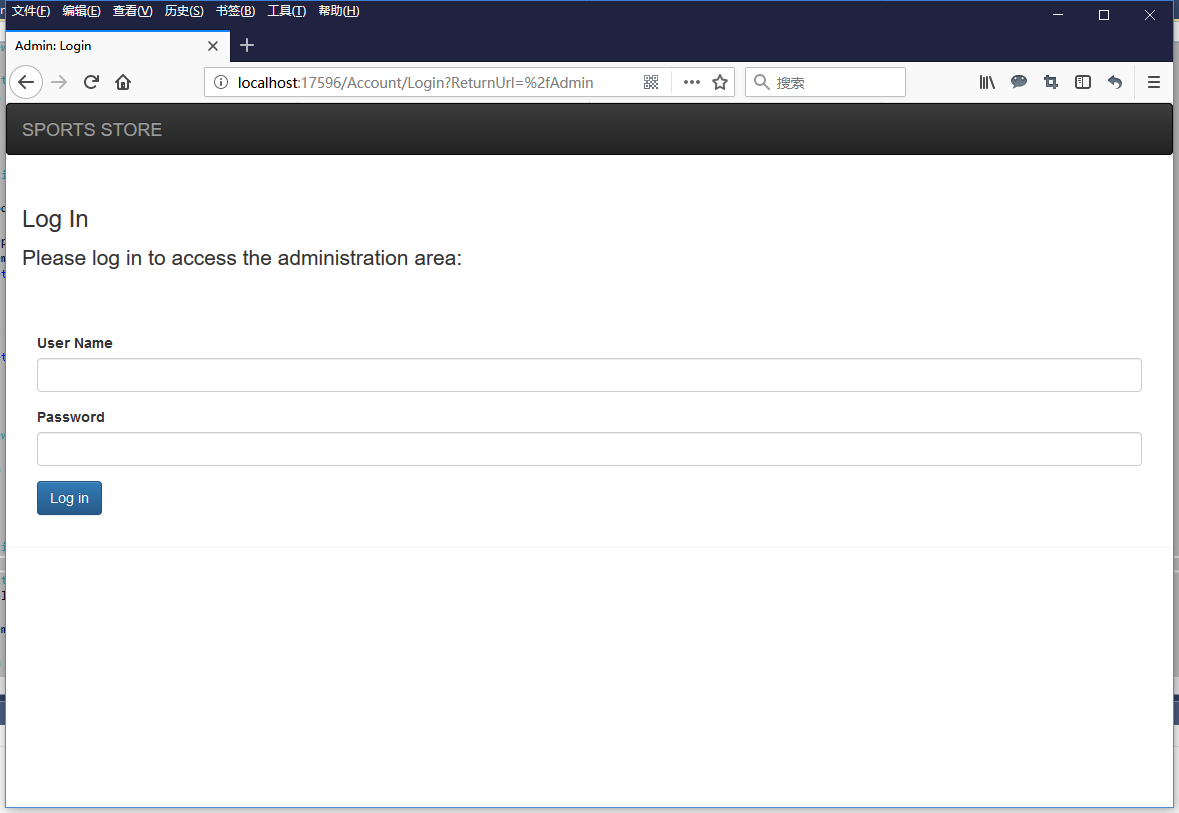
运行程序,当访问/Admin页面的时候,页面将自动跳转到/Account/Login页面,并在URL上添加?ReturnUrl=%2fAdmin后缀。
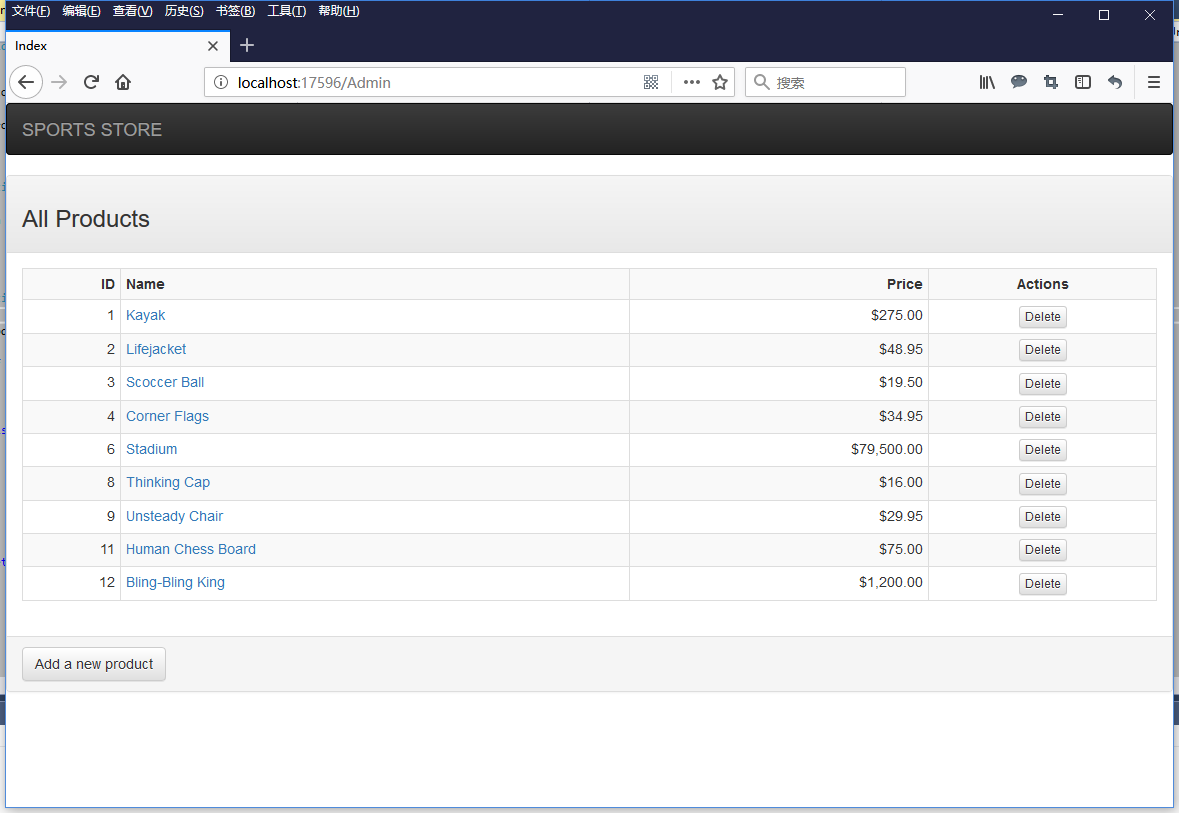
如果输入用户名user,密码123,点击Log in按钮后,跳转到Admin页面。
自定义表单验证逻辑
上面的表单验证逻辑在非常简单的网站上是可以使用的。但是在真实的应用系统中,往往需要将用户名和密码记录在数据库表里,通过查询数据库验证用户名和密码是否正确。有时候,还需要在操作的时候,记录执行该操作的当前登录者。在首页上,有时候要显示当前登录者信息。下面将简单介绍这些功能怎样实现。
首先定义数据库实体类User。
 namespace SportsStore.Domain.Entities

 {

     public class User

     {

         public int UserID { get; set; }

         public string UserName { get; set; }

         public string Password { get; set; }

     }

 }
定义继承IIdentity接口的用户类UserIdentity。
 using SportsStore.Domain.Entities;

 using System.Security.Principal;

 namespace SportsStore.Infrastructure.Security

 {

     public class UserIdentity : IIdentity

     {

         public string AuthenticationType

         {

             get

             {

                 return "Form";

             }

         }

         public bool IsAuthenticated

         {

             get;

             //extend property

             set;

         }

         public string Name

         {

             get

             {

                 return User.UserName;

             }

         }

         public User User

         {

             get;set;

         }

     }

 }
接口IIdentity的定义如下:
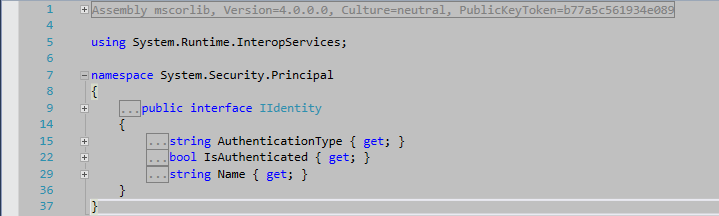
继承的AutenticationType属性返回Form字符串。继承的IsAuthenticated属性,扩展了set访问器,增加了可写访问,让外部程序可以设置它的值。在实现类UserIdentity里增加了实体User类的属性。继承的Name属性返回User属性的属性Name。
定义继承IPrincipal接口的用户类UserProfile。
 using System.Security.Principal;

 using System.Web;

 namespace SportsStore.Infrastructure.Security

 {

     public class UserProfile : IPrincipal

     {

         public const string SessionKey = "User";


         private UserIdentity _user;

         public IIdentity Identity

         {

             get

             {

                 return _user;

             }

             set //extended property

             {

                 _user = (UserIdentity)value;

             }

         }

         public bool IsInRole(string role)

         {

             return true;

         }

         public static UserProfile CurrentLogonUser

         {

             get

             {

                 if (HttpContext.Current.Session == null)

                 {

                     return null;

                 }

                 if (HttpContext.Current.Session[SessionKey] == null)

                 {

                     return null;

                 }

                 return HttpContext.Current.Session[SessionKey] as UserProfile;

             }

         }

     }

 }
接口IPrincipal的定义如下:
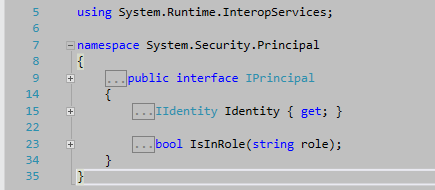
继承类UserProfile,定义了一个私有的UserIdentity类型的_user字段,通过继承的属性Identity返回它的值。继承的属性Identity扩展了它的可写访问器,让外部程序可以设置它的值。继承的方法IsInRole暂时返回true。
在UserProfile类里还定义了一个UserProfile类型的静态属性CurrentLogonUser,他用于在应用程序的任何地方返回当前登录用户的信息。从它的代码看到,我将使用Session存储当前登录用户对象。
修改接口IAuthProvider和类FormsAuthProvider。
 using SportsStore.Infrastructure.Security;

 using SportsStore.WebUI.Models;

 namespace SportsStore.Infrastructure.Abstract

 {

     public interface IAuthProvider

     {

         bool Authenticate(LoginViewModel loginModel, out UserProfile userProfile);

     }

 }
方法Authenticate增加了一个out修饰的UserProfile参数,用于返回验证成功后的UserProfile类型对象。
using SportsStore.Infrastructure.Abstract;

using SportsStore.Infrastructure.Security;

using SportsStore.WebUI.Models;

namespace SportsStore.WebUI.Infrastructure.Concrete

{

    public class FormsAuthProvider : IAuthProvider

    {

        public bool Authenticate(LoginViewModel loginModel, out UserProfile userProfile)

        {

            //validate user and password from database

            bool result = true;

            userProfile = new UserProfile();

            if (result)

            {

                UserIdentity userIdentity = new UserIdentity();

                userIdentity.IsAuthenticated = true;

                // get user entity from db

                userIdentity.User = new Domain.Entities.User()

                {

                    UserID = ,

                    UserName = loginModel.UserName,

                    Password = loginModel.Password

                };

                userProfile.Identity = userIdentity;

            }

            return result;

        }

    }

}
方法Authenticate将查询数据库验证用户名和密码,如果验证通过,将数据库读出来的用户信息生成UserProfile对象,用out参数返回。
你可以使用Ninject注册一个IUserRepository到类FormsAuthProvider,再读数据库。
IUserRepository接口:
 using SportsStore.Domain.Entities;

 using System.Collections.Generic;

 namespace SportsStore.Domain.Abstract

 {

     public interface IUserRepository

     {

         IEnumerable<User> Users { get; }

     }

 }
实现类EFUserRepository:
 using SportsStore.Domain.Abstract;

 using SportsStore.Domain.Entities;

 using System.Collections.Generic;

 namespace SportsStore.Domain.Concrete

 {

     public class EFUserRepository : IUserRepository

     {

         private EFDbContext context = new EFDbContext();

         public IEnumerable<User> Users

         {

             get

             {

                 try

                 {

                     return context.Users;

                 }

                 catch (System.Exception e)

                 {

                     return null;

                 }

             }

         }

     }

 }
EFDbContext:
 using SportsStore.Domain.Entities;

 using System.Data.Entity;

 namespace SportsStore.Domain.Concrete

 {

     public class EFDbContext : DbContext

     {

         public DbSet<Product> Products { get; set; }

         public DbSet<User> Users { get; set; }

     }

 }
修改后的FormsAuthProvider:
 using SportsStore.Domain.Abstract;

 using SportsStore.Infrastructure.Abstract;

 using SportsStore.Infrastructure.Security;

 using SportsStore.WebUI.Models;

 using System.Linq;


 namespace SportsStore.WebUI.Infrastructure.Concrete

 {

     public class FormsAuthProvider : IAuthProvider

     {

         private IUserRepository _userRepository;

         public FormsAuthProvider(IUserRepository userRepository)

         {

             _userRepository = userRepository;

         }


         public bool Authenticate(LoginViewModel loginModel, out UserProfile userProfile)

         {

             //validate user and password from database

             var user = _userRepository.Users.Where(u => u.UserName == loginModel.UserName && u.Password == loginModel.Password).FirstOrDefault();

             bool result = user != null;

             userProfile = new UserProfile();

             if (result)

             {

                 UserIdentity userIdentity = new UserIdentity();

                 userIdentity.IsAuthenticated = true;

                 // get user entity from db

                 userIdentity.User = user;


                 userProfile.Identity = userIdentity;

             }

             return result;

         }

     }

 }
类NinjectDependencyResolver里的AddBindings方法添加绑定:
kernel.Bind<IUserRepository>().To<EFUserRepository>();
还需要添加用户表Users。
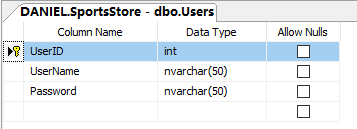
里面添加一行数据。
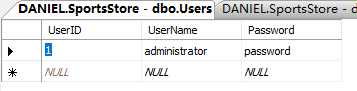
添加继承自AuthorizeAttribute类的自定义Authorize特性类MyAuthorizeAttribute。
 using System.Web;

 using System.Web.Mvc;

 namespace SportsStore.Infrastructure.Security

 {

     public class MyAuthorizeAttribute : AuthorizeAttribute

     {

         protected override bool AuthorizeCore(HttpContextBase httpContext)

         {

             UserProfile userProfile = null;

             if (httpContext.Session != null)

             {

                 userProfile = (UserProfile)httpContext.Session[UserProfile.SessionKey];

             }

             if (userProfile == null)

             {

                 return false;

             }

             else

             {

                 //some other validate logic here, like intercept IP

                 return userProfile.Identity.IsAuthenticated;

             }

         }

     }

 }
该类是根据Session对象存储的User对象。拦截控制器方法。
将自定义AuthorizeAttribute特性MyAuthorizeAttribute应用到AdminController控制器。
     [MyAuthorize]

     public class AdminController : Controller

     {
最后是修改Account控制器的Login方法。
         [HttpPost]

         public ActionResult Login(LoginViewModel model, string returnUrl)

         {

             if (ModelState.IsValid)

             {

                 UserProfile userProfile;

                 if (authProvider.Authenticate(model, out userProfile))

                 {

                     HttpContext.Session[UserProfile.SessionKey] = userProfile;

                     return Redirect(returnUrl ?? Url.Action("Index", "Admin"));

                 }

                 else

                 {

                     ModelState.AddModelError("", "Incorrect username or password");

                     return View();

                 }

             }

             else

             {

                 return View();

             }

         }
调用的authProvider.Authenticate方法增加了out参数userProfile。如果userProfile对象写入Session。
在首页上显示当前登录用户
在AdminController控制器里,添加LogonUser方法Action,返回包含当前登录用户对象的PartialViewResult。
         public PartialViewResult LogonUser()

         {

             var user = UserProfile.CurrentLogonUser != null ? UserProfile.CurrentLogonUser.Identity as UserIdentity : null;

             if (user != null)

             {

                 return PartialView("LogonUser", user.User);

             }

             return PartialView();

         }
在_AdminLayout.cshtml视图中嵌入这个Action。
 <!DOCTYPE html>

 <html>

 <head>

     <meta name="viewport" content="width=device-width" />

     <link href="~/Content/bootstrap.css" rel="stylesheet" />

     <link href="~/Content/bootstrap-theme.css" rel="stylesheet" />

     <link href="~/Content/ErrorStyles.css" rel="stylesheet" />

     <script src="~/Scripts/jquery-1.9.1.js"></script>

     <script src="~/Scripts/jquery.validate.js"></script>

     <script src="~/Scripts/jquery.validate.unobtrusive.js"></script>

     <title>@ViewBag.Title</title>

     <style>

         .navbar-right {

             float: right !important;

             margin-right: 15px;

             margin-left: 15px;

         }

     </style>

 </head>

 <body>

     <div class="navbar navbar-inverse" role="navigation">

         <a class="navbar-brand" href="#">

             <span class="hidden-xs">SPORTS STORE</span>

             <div class="visible-xs">SPORTS</div>

             <div class="visible-xs">STORE</div>

         </a>

         <span class="visible-xs">

             @Html.Action("LogonUser", "Admin", new { showPicture = true })

         </span>

         <span class="hidden-xs">

             @Html.Action("LogonUser", "Admin")

         </span>

     </div>

     <div>

         @if (TempData["message"] != null)

         {

             <div class="alert alert-success">@TempData["message"]</div>

         }

         @RenderBody()

     </div>

 </body>

 </html>
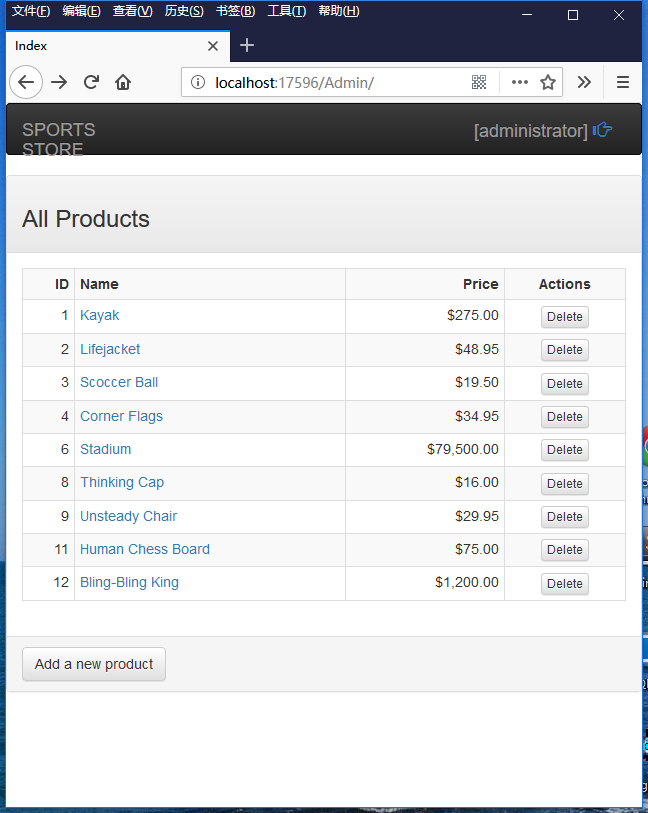
为了支持移动设备,使用了响应式布局。在超小屏幕上,向视图LogonUser传入了一个动态参数showPicture。视图LogonUser将使用这个参数,决定是否显示图片。
LogonUser视图:
 @model SportsStore.Domain.Entities.User

 @{

     bool showPicture = ((bool)(ViewContext.RouteData.Values["showPicture"] ?? false));

 }

 @if (!string.IsNullOrEmpty(Model.UserName))

 {

     <div class="navbar-brand navbar-right small">

         [<span>@Model.UserName</span>]

          @if (showPicture)

          {

             <a href="@Url.Action("Logout","Account")"><span class="glyphicon glyphicon-hand-right"></span></a>

          }

          else

          {

             @Html.RouteLink("Logout", new { controller = "Account", action = "Logout" }, new { @class = "navbar-link" })

          }

     </div>

 }
运行程序,程序运行结果跟之前一样。登录成功后,在首页的右上角显示当前登录用户的用户名。

超小屏幕上显示的效果是这样的:
最后,还需要添加Action方法Logout。
         public ActionResult Logout()

         {

             FormsAuthentication.SignOut();

             HttpContext.Session.Remove(UserProfile.SessionKey);

             return Redirect(Url.Action("Login"));

         }
Logout方法调用静态函数FormsAuthentication.SignOut,签出表单验证。从Session对象内删除了当前登录用户对象。调用Redirect函数,返回Login页面。
最后,你可以删除Web.config文件中forms节点的credentials子节点。
   <system.web>

     <compilation debug="true" targetFramework="4.5.1" />

     <httpRuntime targetFramework="4.5.1" />

     <authentication mode="Forms">

       <forms loginUrl="~/Account/Login" timeout="2880" >

       </forms>

     </authentication>

   </system.web>
跟我学ASP.NET MVC之十:SportsStrore安全的更多相关文章
- 跟我学ASP.NET MVC之五:SportsStrore开始
摘要: 这篇文章将介绍一个ASP.NET应用程序SportsStore的开发过程. 开始 创建解决方案 创建工程 在New ASP.NET Project - SportsStore窗口中,选择Emp ...
- 跟我学ASP.NET MVC之八:SportsStrore移动设备
摘要: 现在的web程序开发避免不了智能手机和平板电脑上的使用,如果你希望发布你的应用程序给更广大客户使用的话,你将要拥抱可移动web浏览器的世界.向移动设备用户发布一个好的使用体验是很困难的-比只是 ...
- 跟我学ASP.NET MVC之六:SportsStrore添加产品目录导航
摘要: 上一篇文章,我建立了SportsStore应用程序的核心架构.现在我将使用这个架构向这个应用程序添加功能,你将开始看到这个基础架构的作用.我将添加重要的面向客户的简单功能,在这个过程中,你将看 ...
- 跟我学ASP.NET MVC之七:SportsStrore一个完整的购物车
摘要: SportsStore应用程序进展很顺利,但是我不能销售产品直到设计了一个购物车.在这篇文章里,我就将创建一个购物车. 在目录下的每个产品旁边添加一个添加到购物车按钮.点击这个按钮将显示客户到 ...
- [转]我要学ASP.NET MVC 3.0(十二): MVC 3.0 使用自定义的Html控件
本文转自:http://www.cnblogs.com/lukun/archive/2011/08/05/2128693.html 概述 在ASP.NET MVC框架中已经封装了很多基于Html标 ...
- 跟我学ASP.NET MVC之三:完整的ASP.NET MVC程序-PartyInvites
摘要: 在这篇文章中,我将在一个例子中实际地展示MVC. 场景 假设一个朋友决定举办一个新年晚会,她邀请我创建一个用来邀请朋友参加晚会的WEB程序.她提出了四个注意的需求: 一个首页展示这个晚会 一个 ...
- 跟我学ASP.NET MVC之二:第一个ASP.NET MVC程序
摘要: 本篇文章带你一步一步创建一个简单的ASP.NET MVC程序. 创建新ASP.NET MVC工程 点击“OK”按钮后,打开下面的窗口: 这里选择“Empty”模板以及“MVC”选项.这次不创 ...
- 跟我学ASP.NET MVC之一:开篇有益
摘要: ASP.NET MVC是微软的Web开发框架,结合了模型-视图-控制器(MVC)架构的有效性和整洁性,敏捷开发最前沿的思想和技术,以及现存的ASP.NET平台最好的部分.它是传统ASP.NET ...
- ASP.NET MVC 4 (十) 模型验证
模型验证是在模型绑定时检查从HTTP请求接收的数据是否合规以保证数据的有效性,在收到无效数据时给出提示帮助用户纠正错误的数据. 显式模型验证 验证数据最直接的方式就是在action方法中对接收的数据验 ...
随机推荐
- [TypeStyle] Use TypeStyle keyframes to create CSS animations
We cover CSS keyframes and how to create them using TypeStyle. We then show how to use the keyframes ...
- 使用ionic3快速开发webapp(一)
Ionic可以让我们使用web技术快速构建接近原生体验的跨平台移动应用. 一.安装ionic 1.需要先安装 Node.js(版本8.x之上): 2.安装cordova 和 ionic: $ npm ...
- PatentTips - Multi-host SATA Controller
BACKGROUND The present subject matter relates, in general, to a computing system having multi-host p ...
- [Vue] Create Vue.js Layout and Navigation with Nuxt.js
Nuxt.js enables you to easily create layout and navigation by replacing the default App.vue template ...
- jQuery中serializeArray方法的使用及对象与字符串的转换
使用jQuery中的serializeArray()方法可以方便的将表单中的各个信息,转化为多个{name:xx,value:xx}对象的数组, 再使用遍历的方式可以方便的将数组转化为json对象, ...
- Word2010中插入多级列表编号
https://jingyan.baidu.com/article/3ea5148901919752e61bbafe.html Word2010中插入多级列表编号的三种方法 听语音 | 浏览:8719 ...
- android WebView总 结
浏览器控件是每个开发环境都具备的,这为马甲神功提供了用武之地,windows的有webbrowser,android和ios都有webview.只是其引擎不同,相对于微软的webbrowser,and ...
- mysql官网下载linux版本安装包
原文地址:点击打开链接 今天在Linux上部署项目,用到了Mysql,因此想要下载适用于Linux的安装版本,在Mysql官网找了半天,终于找到怎样下载了,这里写出来,以后大家找的时候就好找了. 第一 ...
- JM-1 手机网站开发测试环境搭建
JM-1 手机网站开发测试环境搭建 一.总结 一句话总结:WEB服务器环境可实现局域网内轻松访问.360wifi可以实现局域网. 二.微网站开发环境: 1.把微网站放到本机wamp环境下,用pc浏览器 ...
- url前面双斜杠、单斜杠、无斜杠、点+单斜杠的总结
原文:url前面双斜杠.单斜杠.无斜杠.点+单斜杠的总结 本来只是一个绝对url和相对url的简单问题,但实际使用中会碰到一些不常见的,比如双斜杠,经常不用竟然忘了,做一下总结.可以参考一下这篇文章 ...