
CUDA中block和thread的合理划分配置
CUDA并行编程的基本思路是把一个很大的任务划分成N个简单重复的操作,创建N个线程分别执行执行,每个网格(Grid)可以最多创建65535个线程块,每个线程块(Block)一般最多可以创建512个并行线程,在第一个CUDA程序中对核函数的调用是:
addKernel<<<1, size>>>(dev_c, dev_a, dev_b);
这里的<<<>>>运算符内是核函数的执行参数,告诉编译器运行时如何启动核函数,用于说明内核函数中的线程数量,以及线程是如何组织的。
<<<>>>运算符完整的执行配置参数形式是<<<Dg, Db, Ns, S>>>
- 参数Dg用于定义整个grid的维度和尺寸,即一个grid有多少个block。为dim3类型。Dim3 Dg(Dg.x, Dg.y, 1)表示grid中每行有Dg.x个block,每列有Dg.y个block,第三维恒为1(目前一个核函数只有一个grid)。整个grid中共有Dg.x*Dg.y个block,其中Dg.x和Dg.y最大值为65535。
- 参数Db用于定义一个block的维度和尺寸,即一个block有多少个thread。为dim3类型。Dim3 Db(Db.x, Db.y, Db.z)表示整个block中每行有Db.x个thread,每列有Db.y个thread,高度为Db.z。Db.x和Db.y最大值为512,Db.z最大值为62。 一个block中共有Db.x*Db.y*Db.z个thread。计算能力为1.0,1.1的硬件该乘积的最大值为768,计算能力为1.2,1.3的硬件支持的最大值为1024。
- 参数Ns是一个可选参数,用于设置每个block除了静态分配的shared Memory以外,最多能动态分配的shared memory大小,单位为byte。不需要动态分配时该值为0或省略不写。
- 参数S是一个cudaStream_t类型的可选参数,初始值为零,表示该核函数处在哪个流之中。
#include "cuda_runtime.h"

#include "device_launch_parameters.h"

#include <stdio.h>

cudaError_t addWithCuda(int *c, const int *a, const int *b, unsigned int size);

__global__ void addKernel(int *c, const int *a, const int *b)

{

	int i = blockIdx.x;

	c[i] = a[i] + b[i];

}

int main()

{

	const int arraySize = 5;

	const int a[arraySize] = { 1, 2, 3, 4, 5 };

	const int b[arraySize] = { 10, 20, 30, 40, 50 };

	int c[arraySize] = { 0 };

	// Add vectors in parallel.

	cudaError_t cudaStatus = addWithCuda(c, a, b, arraySize);

	if (cudaStatus != cudaSuccess) {

		fprintf(stderr, "addWithCuda failed!");

		return 1;

	}

	printf("{1,2,3,4,5} + {10,20,30,40,50} = {%d,%d,%d,%d,%d}\n",

		c[0], c[1], c[2], c[3], c[4]);

	// cudaDeviceReset must be called before exiting in order for profiling and

	// tracing tools such as Nsight and Visual Profiler to show complete traces.

	cudaStatus = cudaDeviceReset();

	if (cudaStatus != cudaSuccess) {

		fprintf(stderr, "cudaDeviceReset failed!");

		return 1;

	}

	getchar();

	return 0;

}

// Helper function for using CUDA to add vectors in parallel.

cudaError_t addWithCuda(int *c, const int *a, const int *b, unsigned int size)

{

	int *dev_a = 0;

	int *dev_b = 0;

	int *dev_c = 0;

	cudaError_t cudaStatus;

	// Choose which GPU to run on, change this on a multi-GPU system.

	cudaStatus = cudaSetDevice(0);

	if (cudaStatus != cudaSuccess) {

		fprintf(stderr, "cudaSetDevice failed!  Do you have a CUDA-capable GPU installed?");

		goto Error;

	}

	// Allocate GPU buffers for three vectors (two input, one output)    .

	cudaStatus = cudaMalloc((void**)&dev_c, size * sizeof(int));

	if (cudaStatus != cudaSuccess) {

		fprintf(stderr, "cudaMalloc failed!");

		goto Error;

	}

	cudaStatus = cudaMalloc((void**)&dev_a, size * sizeof(int));

	if (cudaStatus != cudaSuccess) {

		fprintf(stderr, "cudaMalloc failed!");

		goto Error;

	}

	cudaStatus = cudaMalloc((void**)&dev_b, size * sizeof(int));

	if (cudaStatus != cudaSuccess) {

		fprintf(stderr, "cudaMalloc failed!");

		goto Error;

	}

	// Copy input vectors from host memory to GPU buffers.

	cudaStatus = cudaMemcpy(dev_a, a, size * sizeof(int), cudaMemcpyHostToDevice);

	if (cudaStatus != cudaSuccess) {

		fprintf(stderr, "cudaMemcpy failed!");

		goto Error;

	}

	cudaStatus = cudaMemcpy(dev_b, b, size * sizeof(int), cudaMemcpyHostToDevice);

	if (cudaStatus != cudaSuccess) {

		fprintf(stderr, "cudaMemcpy failed!");

		goto Error;

	}

	// Launch a kernel on the GPU with one thread for each element.

	//addKernel<<<1, size>>>(dev_c, dev_a, dev_b);

	addKernel << <size, 1 >> > (dev_c, dev_a, dev_b);

	// Check for any errors launching the kernel

	cudaStatus = cudaGetLastError();

	if (cudaStatus != cudaSuccess) {

		fprintf(stderr, "addKernel launch failed: %s\n", cudaGetErrorString(cudaStatus));

		goto Error;

	}

	// cudaDeviceSynchronize waits for the kernel to finish, and returns

	// any errors encountered during the launch.

	cudaStatus = cudaDeviceSynchronize();

	if (cudaStatus != cudaSuccess) {

		fprintf(stderr, "cudaDeviceSynchronize returned error code %d after launching addKernel!\n", cudaStatus);

		goto Error;

	}

	// Copy output vector from GPU buffer to host memory.

	cudaStatus = cudaMemcpy(c, dev_c, size * sizeof(int), cudaMemcpyDeviceToHost);

	if (cudaStatus != cudaSuccess) {

		fprintf(stderr, "cudaMemcpy failed!");

		goto Error;

	}

Error:

	cudaFree(dev_c);

	cudaFree(dev_a);

	cudaFree(dev_b);

	return cudaStatus;

}
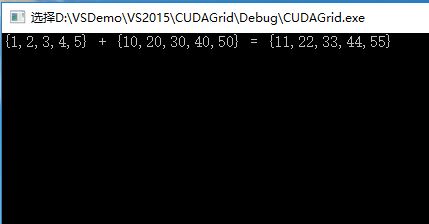
#include "cuda_runtime.h"

#include "device_launch_parameters.h"

#include <stdio.h>

cudaError_t addWithCuda(int *c, const int *a, const int *b, unsigned int size);

__global__ void addKernel(int *c, const int *a, const int *b)

{

	int i = threadIdx.x + blockIdx.x*blockDim.x;

	if (i < 15)

		c[i] = a[i] + b[i];

}

int main()

{

	const int arraySize = 15;

	const int a[arraySize] = { 1, 2, 3, 4, 5,6,7,8,9,10,11,12,13,14,15 };

	const int b[arraySize] = { 10, 20, 30, 40, 50,60,70,80,90,100,110,120,130,140,150 };

	int c[arraySize] = { 0 };

	// Add vectors in parallel.

	cudaError_t cudaStatus = addWithCuda(c, a, b, arraySize);

	if (cudaStatus != cudaSuccess) {

		fprintf(stderr, "addWithCuda failed!");

		return 1;

	}

	printf("{ 1, 2, 3, 4, 5,6,7,8,9,10,11,12,13,14,15}+\n{ 10, 20, 30, 40, 50,60,70,80,90,100,110,120,130,140,150}=\n{%d,%d,%d,%d,%d,%d,%d,%d,%d,%d,%d,%d,%d,%d,%d}\n",

		c[0], c[1], c[2], c[3], c[4], c[5], c[6], c[7], c[8], c[9], c[10], c[11], c[12], c[13], c[14]);

	// cudaDeviceReset must be called before exiting in order for profiling and

	// tracing tools such as Nsight and Visual Profiler to show complete traces.

	cudaStatus = cudaDeviceReset();

	if (cudaStatus != cudaSuccess) {

		fprintf(stderr, "cudaDeviceReset failed!");

		return 1;

	}

	getchar();

	return 0;

}

// Helper function for using CUDA to add vectors in parallel.

cudaError_t addWithCuda(int *c, const int *a, const int *b, unsigned int size)

{

	int *dev_a = 0;

	int *dev_b = 0;

	int *dev_c = 0;

	cudaError_t cudaStatus;

	// Choose which GPU to run on, change this on a multi-GPU system.

	cudaStatus = cudaSetDevice(0);

	if (cudaStatus != cudaSuccess) {

		fprintf(stderr, "cudaSetDevice failed!  Do you have a CUDA-capable GPU installed?");

		goto Error;

	}

	// Allocate GPU buffers for three vectors (two input, one output)    .

	cudaStatus = cudaMalloc((void**)&dev_c, size * sizeof(int));

	if (cudaStatus != cudaSuccess) {

		fprintf(stderr, "cudaMalloc failed!");

		goto Error;

	}

	cudaStatus = cudaMalloc((void**)&dev_a, size * sizeof(int));

	if (cudaStatus != cudaSuccess) {

		fprintf(stderr, "cudaMalloc failed!");

		goto Error;

	}

	cudaStatus = cudaMalloc((void**)&dev_b, size * sizeof(int));

	if (cudaStatus != cudaSuccess) {

		fprintf(stderr, "cudaMalloc failed!");

		goto Error;

	}

	// Copy input vectors from host memory to GPU buffers.

	cudaStatus = cudaMemcpy(dev_a, a, size * sizeof(int), cudaMemcpyHostToDevice);

	if (cudaStatus != cudaSuccess) {

		fprintf(stderr, "cudaMemcpy failed!");

		goto Error;

	}

	cudaStatus = cudaMemcpy(dev_b, b, size * sizeof(int), cudaMemcpyHostToDevice);

	if (cudaStatus != cudaSuccess) {

		fprintf(stderr, "cudaMemcpy failed!");

		goto Error;

	}

	// Launch a kernel on the GPU with one thread for each element.

	//addKernel<<<1, size>>>(dev_c, dev_a, dev_b);

	addKernel << <(size + 5) / 6, 6 >> > (dev_c, dev_a, dev_b);

	// Check for any errors launching the kernel

	cudaStatus = cudaGetLastError();

	if (cudaStatus != cudaSuccess) {

		fprintf(stderr, "addKernel launch failed: %s\n", cudaGetErrorString(cudaStatus));

		goto Error;

	}

	// cudaDeviceSynchronize waits for the kernel to finish, and returns

	// any errors encountered during the launch.

	cudaStatus = cudaDeviceSynchronize();

	if (cudaStatus != cudaSuccess) {

		fprintf(stderr, "cudaDeviceSynchronize returned error code %d after launching addKernel!\n", cudaStatus);

		goto Error;

	}

	// Copy output vector from GPU buffer to host memory.

	cudaStatus = cudaMemcpy(c, dev_c, size * sizeof(int), cudaMemcpyDeviceToHost);

	if (cudaStatus != cudaSuccess) {

		fprintf(stderr, "cudaMemcpy failed!");

		goto Error;

	}

Error:

	cudaFree(dev_c);

	cudaFree(dev_a);

	cudaFree(dev_b);

	return cudaStatus;

}
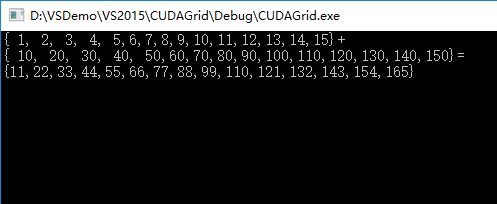
#include "cuda_runtime.h"

#include <highgui.hpp>

using namespace cv;

#define DIM 600   //图像长宽

__global__ void kernel(unsigned char *ptr)

{

	// map from blockIdx to pixel position

	int x = blockIdx.x;

	int y = blockIdx.y;

	int offset = x + y * gridDim.x;

	//BGR设置

	ptr[offset * 3 + 0] = 999 * x*y % 255;

	ptr[offset * 3 + 1] = 99 * x*x*y*y % 255;

	ptr[offset * 3 + 2] = 9 * offset*offset % 255;

}

// globals needed by the update routine

struct DataBlock

{

	unsigned char   *dev_bitmap;

};

int main(void)

{

	DataBlock   data;

	cudaError_t error;

	Mat image = Mat(DIM, DIM, CV_8UC3, Scalar::all(0));

	data.dev_bitmap = image.data;

	unsigned char    *dev_bitmap;

	error = cudaMalloc((void**)&dev_bitmap, 3 * image.cols*image.rows);

	data.dev_bitmap = dev_bitmap;

	dim3    grid(DIM, DIM);

	//DIM*DIM个线程块

	kernel <<<grid, 1 >>> (dev_bitmap);

	error = cudaMemcpy(image.data, dev_bitmap,

		3 * image.cols*image.rows,

		cudaMemcpyDeviceToHost);

	error = cudaFree(dev_bitmap);

	imshow("CUDA Grid/Block/Thread)", image);

	waitKey();

}
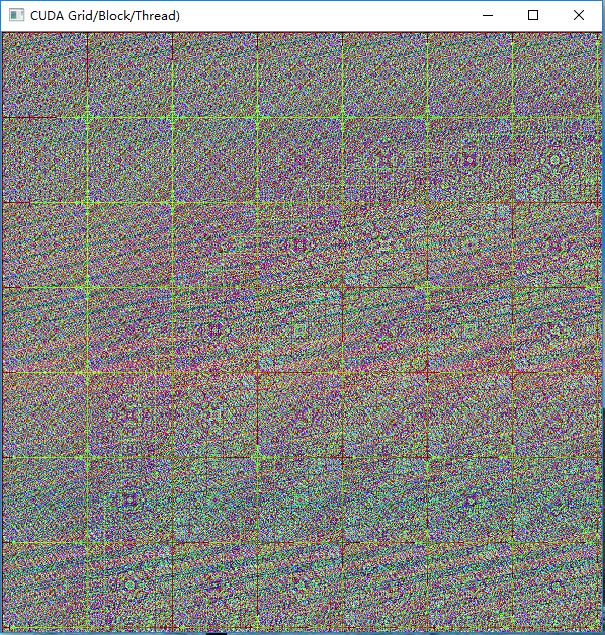
执行效果:
CUDA中block和thread的合理划分配置的更多相关文章
- CUDA中确定你显卡的thread和block数
CUDA中确定你显卡的thread和block数 在进行并行计算时, 你的显卡所支持创建的thread数与block数是有限制的, 因此, 需要自己提前确定够用, 再进行计算, 否则, 你需要改进你的 ...
- CUDA中并行规约(Parallel Reduction)的优化
转自: http://hackecho.com/2013/04/cuda-parallel-reduction/ Parallel Reduction是NVIDIA-CUDA自带的例子,也几乎是所有C ...
- cuda学习2-block与thread数量的选取
由上一节可知,在main函数中,cuda程序的并行能力是在add<<<N,1>>>( dev_a, dev_b, dev_c )函数中体现的,这里面设置的是由N个b ...
- OpenCV二维Mat数组(二级指针)在CUDA中的使用
CUDA用于并行计算非常方便,但是GPU与CPU之间的交互,比如传递参数等相对麻烦一些.在写CUDA核函数的时候形参往往会有很多个,动辄达到10-20个,如果能够在CPU中提前把数据组织好,比如使用二 ...
- CUDA中使用多维数组
今天想起一个问题,看到的绝大多数CUDA代码都是使用的一维数组,是否可以在CUDA中使用一维数组,这是一个问题,想了各种问题,各种被77的错误状态码和段错误折磨,最后发现有一个cudaMallocMa ...
- swift中block的使用
在OC中习惯用block来传值,而swift中,block被重新定义了一下,叫闭包: 使用的技巧:谁定义谁传值: 案例使用A.B控制器: 1~4步在B中执行,最后在A中执行: - B控制器: 1- ...
- Objective-C中block的底层原理
先出2个考题: 1. 上面打印的是几,captureNum2 出去作用域后是否被销毁?为什么? 同样类型的题目: 问:打印的数字为多少? 有人会回答:mutArray是captureObject方法的 ...
- iOS中block的用法 以及和函数用法的区别
ios中block的用法和函数的用法大致相同 但是block的用法的灵活性更高: 不带参数的block: void ^(MyBlock)() = ^{}; 调用的时候 MyBlock(); 带参数的 ...
- cuda中时间用法
转载:http://blog.csdn.net/jdhanhua/article/details/4843653 在CUDA中统计运算时间,大致有三种方法: <1>使用cutil.h中的函 ...
随机推荐
- Qt的焦点策略
Qt的窗口部件在图形用户界面中按用户的习惯的方式来处理键盘焦点.基本出发点是用户的击键能定向到屏幕上窗口中的任何一个,和在窗口中任何一个部件中.当用户按下一个键,他们期望键盘焦点能够到达正确的位置,并 ...
- PL/SQL笔记(一)
PL/SQL概述 PL/SQL是一种高级的数据库程序设计语言,专门使用与Oracle语言基于数据库的服务器的内部,所以PL/SQL代码可以对数据库进行快速的处理. 1.什么是PL/SQL? PL/SQ ...
- TCP套接字编程模型及实例
摘要: 本文讲述了TCP套接字编程模块,包括服务器端的创建套接字.绑定.监听.接受.读/写.终止连接,客户端的创建套接字.连接.读/写.终止连接.先给出实例,进而结合代码分析. PS:本文权当 ...
- 【BZOJ 4518】[Sdoi2016]征途
[链接] 链接 [题意] 在这里输入题意 [题解] DP+斜率优化; \(D(x) = E(x^2)-E(x)^2\) 其中\(E(x)^2\)这一部分是确定的. 因为总长是确定的,分成的段数又是确定 ...
- swift学习第十二天:类的属性定义
类的属性介绍 Swift中类的属性有多种 存储属性:存储实例的常量和变量 计算属性:通过某种方式计算出来的属性 类属性:与整个类自身相关的属性 存储属性 存储属性是最简单的属性,它作为类实例的一部分, ...
- swift学习第九天:可选类型以及应用场景
可选类型的介绍 注意: 可选类型时swift中较理解的一个知识点 暂时先了解,多利用Xcode的提示来使用 随着学习的深入,慢慢理解其中的原理和好处 概念: 在OC开发中,如果一个变量暂停不使用,可以 ...
- 【JAVA编码专题】总结 分类: B1_JAVA 2015-02-11 15:11 290人阅读 评论(0) 收藏
第一部分:编码基础 为什么需要编码:用计算机看得懂的语言(二进制数)表示各种各样的字符. 一.基本概念 ASCII.Unicode.big5.GBK等为字符集,它们只定义了这个字符集内有哪些字符,以及 ...
- C#操作SqlServer MySql Oracle通用帮助类
C#操作SqlServer MySql Oracle通用帮助类 [前言] 作为一款成熟的面向对象高级编程语言,C#在ADO.Net的支持上已然是做的很成熟,我们可以方便地调用ADO.Net操作各类关系 ...
- layer iframe 之间传值和关闭iframe弹窗
1.访问父页面元素值 var parentId=parent.$("#id").val();//访问父页面元素值 2.访问父页面方法 var parentMethodValue=p ...
- Java解惑八:很多其它库之谜
本文是依据JAVA解惑这本书,做的笔记. 电子书见:http://download.csdn.net/detail/u010378705/7527721 谜题76 将线程的启动方法start(),写成 ...