
CUDA中block和thread的合理划分配置
CUDA并行编程的基本思路是把一个很大的任务划分成N个简单重复的操作,创建N个线程分别执行执行,每个网格(Grid)可以最多创建65535个线程块,每个线程块(Block)一般最多可以创建512个并行线程,在第一个CUDA程序中对核函数的调用是:
addKernel<<<1, size>>>(dev_c, dev_a, dev_b);
这里的<<<>>>运算符内是核函数的执行参数,告诉编译器运行时如何启动核函数,用于说明内核函数中的线程数量,以及线程是如何组织的。
<<<>>>运算符完整的执行配置参数形式是<<<Dg, Db, Ns, S>>>
- 参数Dg用于定义整个grid的维度和尺寸,即一个grid有多少个block。为dim3类型。Dim3 Dg(Dg.x, Dg.y, 1)表示grid中每行有Dg.x个block,每列有Dg.y个block,第三维恒为1(目前一个核函数只有一个grid)。整个grid中共有Dg.x*Dg.y个block,其中Dg.x和Dg.y最大值为65535。
- 参数Db用于定义一个block的维度和尺寸,即一个block有多少个thread。为dim3类型。Dim3 Db(Db.x, Db.y, Db.z)表示整个block中每行有Db.x个thread,每列有Db.y个thread,高度为Db.z。Db.x和Db.y最大值为512,Db.z最大值为62。 一个block中共有Db.x*Db.y*Db.z个thread。计算能力为1.0,1.1的硬件该乘积的最大值为768,计算能力为1.2,1.3的硬件支持的最大值为1024。
- 参数Ns是一个可选参数,用于设置每个block除了静态分配的shared Memory以外,最多能动态分配的shared memory大小,单位为byte。不需要动态分配时该值为0或省略不写。
- 参数S是一个cudaStream_t类型的可选参数,初始值为零,表示该核函数处在哪个流之中。
#include "cuda_runtime.h"

#include "device_launch_parameters.h"

#include <stdio.h>

cudaError_t addWithCuda(int *c, const int *a, const int *b, unsigned int size);

__global__ void addKernel(int *c, const int *a, const int *b)

{

	int i = blockIdx.x;

	c[i] = a[i] + b[i];

}

int main()

{

	const int arraySize = 5;

	const int a[arraySize] = { 1, 2, 3, 4, 5 };

	const int b[arraySize] = { 10, 20, 30, 40, 50 };

	int c[arraySize] = { 0 };

	// Add vectors in parallel.

	cudaError_t cudaStatus = addWithCuda(c, a, b, arraySize);

	if (cudaStatus != cudaSuccess) {

		fprintf(stderr, "addWithCuda failed!");

		return 1;

	}

	printf("{1,2,3,4,5} + {10,20,30,40,50} = {%d,%d,%d,%d,%d}\n",

		c[0], c[1], c[2], c[3], c[4]);

	// cudaDeviceReset must be called before exiting in order for profiling and

	// tracing tools such as Nsight and Visual Profiler to show complete traces.

	cudaStatus = cudaDeviceReset();

	if (cudaStatus != cudaSuccess) {

		fprintf(stderr, "cudaDeviceReset failed!");

		return 1;

	}

	getchar();

	return 0;

}

// Helper function for using CUDA to add vectors in parallel.

cudaError_t addWithCuda(int *c, const int *a, const int *b, unsigned int size)

{

	int *dev_a = 0;

	int *dev_b = 0;

	int *dev_c = 0;

	cudaError_t cudaStatus;

	// Choose which GPU to run on, change this on a multi-GPU system.

	cudaStatus = cudaSetDevice(0);

	if (cudaStatus != cudaSuccess) {

		fprintf(stderr, "cudaSetDevice failed!  Do you have a CUDA-capable GPU installed?");

		goto Error;

	}

	// Allocate GPU buffers for three vectors (two input, one output)    .

	cudaStatus = cudaMalloc((void**)&dev_c, size * sizeof(int));

	if (cudaStatus != cudaSuccess) {

		fprintf(stderr, "cudaMalloc failed!");

		goto Error;

	}

	cudaStatus = cudaMalloc((void**)&dev_a, size * sizeof(int));

	if (cudaStatus != cudaSuccess) {

		fprintf(stderr, "cudaMalloc failed!");

		goto Error;

	}

	cudaStatus = cudaMalloc((void**)&dev_b, size * sizeof(int));

	if (cudaStatus != cudaSuccess) {

		fprintf(stderr, "cudaMalloc failed!");

		goto Error;

	}

	// Copy input vectors from host memory to GPU buffers.

	cudaStatus = cudaMemcpy(dev_a, a, size * sizeof(int), cudaMemcpyHostToDevice);

	if (cudaStatus != cudaSuccess) {

		fprintf(stderr, "cudaMemcpy failed!");

		goto Error;

	}

	cudaStatus = cudaMemcpy(dev_b, b, size * sizeof(int), cudaMemcpyHostToDevice);

	if (cudaStatus != cudaSuccess) {

		fprintf(stderr, "cudaMemcpy failed!");

		goto Error;

	}

	// Launch a kernel on the GPU with one thread for each element.

	//addKernel<<<1, size>>>(dev_c, dev_a, dev_b);

	addKernel << <size, 1 >> > (dev_c, dev_a, dev_b);

	// Check for any errors launching the kernel

	cudaStatus = cudaGetLastError();

	if (cudaStatus != cudaSuccess) {

		fprintf(stderr, "addKernel launch failed: %s\n", cudaGetErrorString(cudaStatus));

		goto Error;

	}

	// cudaDeviceSynchronize waits for the kernel to finish, and returns

	// any errors encountered during the launch.

	cudaStatus = cudaDeviceSynchronize();

	if (cudaStatus != cudaSuccess) {

		fprintf(stderr, "cudaDeviceSynchronize returned error code %d after launching addKernel!\n", cudaStatus);

		goto Error;

	}

	// Copy output vector from GPU buffer to host memory.

	cudaStatus = cudaMemcpy(c, dev_c, size * sizeof(int), cudaMemcpyDeviceToHost);

	if (cudaStatus != cudaSuccess) {

		fprintf(stderr, "cudaMemcpy failed!");

		goto Error;

	}

Error:

	cudaFree(dev_c);

	cudaFree(dev_a);

	cudaFree(dev_b);

	return cudaStatus;

}
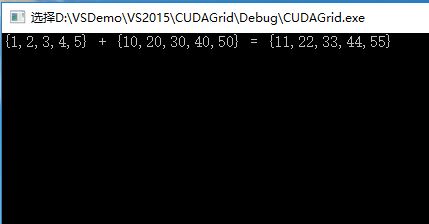
#include "cuda_runtime.h"

#include "device_launch_parameters.h"

#include <stdio.h>

cudaError_t addWithCuda(int *c, const int *a, const int *b, unsigned int size);

__global__ void addKernel(int *c, const int *a, const int *b)

{

	int i = threadIdx.x + blockIdx.x*blockDim.x;

	if (i < 15)

		c[i] = a[i] + b[i];

}

int main()

{

	const int arraySize = 15;

	const int a[arraySize] = { 1, 2, 3, 4, 5,6,7,8,9,10,11,12,13,14,15 };

	const int b[arraySize] = { 10, 20, 30, 40, 50,60,70,80,90,100,110,120,130,140,150 };

	int c[arraySize] = { 0 };

	// Add vectors in parallel.

	cudaError_t cudaStatus = addWithCuda(c, a, b, arraySize);

	if (cudaStatus != cudaSuccess) {

		fprintf(stderr, "addWithCuda failed!");

		return 1;

	}

	printf("{ 1, 2, 3, 4, 5,6,7,8,9,10,11,12,13,14,15}+\n{ 10, 20, 30, 40, 50,60,70,80,90,100,110,120,130,140,150}=\n{%d,%d,%d,%d,%d,%d,%d,%d,%d,%d,%d,%d,%d,%d,%d}\n",

		c[0], c[1], c[2], c[3], c[4], c[5], c[6], c[7], c[8], c[9], c[10], c[11], c[12], c[13], c[14]);

	// cudaDeviceReset must be called before exiting in order for profiling and

	// tracing tools such as Nsight and Visual Profiler to show complete traces.

	cudaStatus = cudaDeviceReset();

	if (cudaStatus != cudaSuccess) {

		fprintf(stderr, "cudaDeviceReset failed!");

		return 1;

	}

	getchar();

	return 0;

}

// Helper function for using CUDA to add vectors in parallel.

cudaError_t addWithCuda(int *c, const int *a, const int *b, unsigned int size)

{

	int *dev_a = 0;

	int *dev_b = 0;

	int *dev_c = 0;

	cudaError_t cudaStatus;

	// Choose which GPU to run on, change this on a multi-GPU system.

	cudaStatus = cudaSetDevice(0);

	if (cudaStatus != cudaSuccess) {

		fprintf(stderr, "cudaSetDevice failed!  Do you have a CUDA-capable GPU installed?");

		goto Error;

	}

	// Allocate GPU buffers for three vectors (two input, one output)    .

	cudaStatus = cudaMalloc((void**)&dev_c, size * sizeof(int));

	if (cudaStatus != cudaSuccess) {

		fprintf(stderr, "cudaMalloc failed!");

		goto Error;

	}

	cudaStatus = cudaMalloc((void**)&dev_a, size * sizeof(int));

	if (cudaStatus != cudaSuccess) {

		fprintf(stderr, "cudaMalloc failed!");

		goto Error;

	}

	cudaStatus = cudaMalloc((void**)&dev_b, size * sizeof(int));

	if (cudaStatus != cudaSuccess) {

		fprintf(stderr, "cudaMalloc failed!");

		goto Error;

	}

	// Copy input vectors from host memory to GPU buffers.

	cudaStatus = cudaMemcpy(dev_a, a, size * sizeof(int), cudaMemcpyHostToDevice);

	if (cudaStatus != cudaSuccess) {

		fprintf(stderr, "cudaMemcpy failed!");

		goto Error;

	}

	cudaStatus = cudaMemcpy(dev_b, b, size * sizeof(int), cudaMemcpyHostToDevice);

	if (cudaStatus != cudaSuccess) {

		fprintf(stderr, "cudaMemcpy failed!");

		goto Error;

	}

	// Launch a kernel on the GPU with one thread for each element.

	//addKernel<<<1, size>>>(dev_c, dev_a, dev_b);

	addKernel << <(size + 5) / 6, 6 >> > (dev_c, dev_a, dev_b);

	// Check for any errors launching the kernel

	cudaStatus = cudaGetLastError();

	if (cudaStatus != cudaSuccess) {

		fprintf(stderr, "addKernel launch failed: %s\n", cudaGetErrorString(cudaStatus));

		goto Error;

	}

	// cudaDeviceSynchronize waits for the kernel to finish, and returns

	// any errors encountered during the launch.

	cudaStatus = cudaDeviceSynchronize();

	if (cudaStatus != cudaSuccess) {

		fprintf(stderr, "cudaDeviceSynchronize returned error code %d after launching addKernel!\n", cudaStatus);

		goto Error;

	}

	// Copy output vector from GPU buffer to host memory.

	cudaStatus = cudaMemcpy(c, dev_c, size * sizeof(int), cudaMemcpyDeviceToHost);

	if (cudaStatus != cudaSuccess) {

		fprintf(stderr, "cudaMemcpy failed!");

		goto Error;

	}

Error:

	cudaFree(dev_c);

	cudaFree(dev_a);

	cudaFree(dev_b);

	return cudaStatus;

}
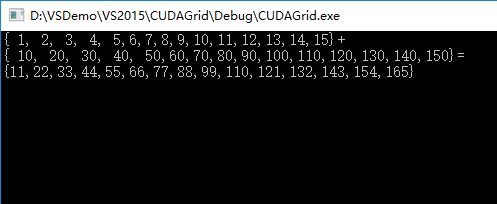
#include "cuda_runtime.h"

#include <highgui.hpp>

using namespace cv;

#define DIM 600   //图像长宽

__global__ void kernel(unsigned char *ptr)

{

	// map from blockIdx to pixel position

	int x = blockIdx.x;

	int y = blockIdx.y;

	int offset = x + y * gridDim.x;

	//BGR设置

	ptr[offset * 3 + 0] = 999 * x*y % 255;

	ptr[offset * 3 + 1] = 99 * x*x*y*y % 255;

	ptr[offset * 3 + 2] = 9 * offset*offset % 255;

}

// globals needed by the update routine

struct DataBlock

{

	unsigned char   *dev_bitmap;

};

int main(void)

{

	DataBlock   data;

	cudaError_t error;

	Mat image = Mat(DIM, DIM, CV_8UC3, Scalar::all(0));

	data.dev_bitmap = image.data;

	unsigned char    *dev_bitmap;

	error = cudaMalloc((void**)&dev_bitmap, 3 * image.cols*image.rows);

	data.dev_bitmap = dev_bitmap;

	dim3    grid(DIM, DIM);

	//DIM*DIM个线程块

	kernel <<<grid, 1 >>> (dev_bitmap);

	error = cudaMemcpy(image.data, dev_bitmap,

		3 * image.cols*image.rows,

		cudaMemcpyDeviceToHost);

	error = cudaFree(dev_bitmap);

	imshow("CUDA Grid/Block/Thread)", image);

	waitKey();

}
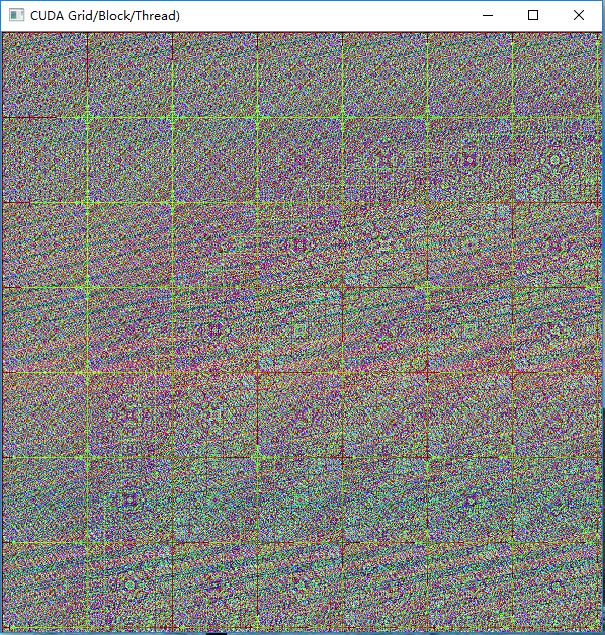
执行效果:
CUDA中block和thread的合理划分配置的更多相关文章
- CUDA中确定你显卡的thread和block数
CUDA中确定你显卡的thread和block数 在进行并行计算时, 你的显卡所支持创建的thread数与block数是有限制的, 因此, 需要自己提前确定够用, 再进行计算, 否则, 你需要改进你的 ...
- CUDA中并行规约(Parallel Reduction)的优化
转自: http://hackecho.com/2013/04/cuda-parallel-reduction/ Parallel Reduction是NVIDIA-CUDA自带的例子,也几乎是所有C ...
- cuda学习2-block与thread数量的选取
由上一节可知,在main函数中,cuda程序的并行能力是在add<<<N,1>>>( dev_a, dev_b, dev_c )函数中体现的,这里面设置的是由N个b ...
- OpenCV二维Mat数组(二级指针)在CUDA中的使用
CUDA用于并行计算非常方便,但是GPU与CPU之间的交互,比如传递参数等相对麻烦一些.在写CUDA核函数的时候形参往往会有很多个,动辄达到10-20个,如果能够在CPU中提前把数据组织好,比如使用二 ...
- CUDA中使用多维数组
今天想起一个问题,看到的绝大多数CUDA代码都是使用的一维数组,是否可以在CUDA中使用一维数组,这是一个问题,想了各种问题,各种被77的错误状态码和段错误折磨,最后发现有一个cudaMallocMa ...
- swift中block的使用
在OC中习惯用block来传值,而swift中,block被重新定义了一下,叫闭包: 使用的技巧:谁定义谁传值: 案例使用A.B控制器: 1~4步在B中执行,最后在A中执行: - B控制器: 1- ...
- Objective-C中block的底层原理
先出2个考题: 1. 上面打印的是几,captureNum2 出去作用域后是否被销毁?为什么? 同样类型的题目: 问:打印的数字为多少? 有人会回答:mutArray是captureObject方法的 ...
- iOS中block的用法 以及和函数用法的区别
ios中block的用法和函数的用法大致相同 但是block的用法的灵活性更高: 不带参数的block: void ^(MyBlock)() = ^{}; 调用的时候 MyBlock(); 带参数的 ...
- cuda中时间用法
转载:http://blog.csdn.net/jdhanhua/article/details/4843653 在CUDA中统计运算时间,大致有三种方法: <1>使用cutil.h中的函 ...
随机推荐
- 再谈ITFriend网站的定位
在网站开发阶段.内部测试阶段.公开测试阶段,让诸多好友和网友,参与了我们的网站ITFriend的体验和测试.其中,大家非常关心,我们的网站是干什么的.在我们不做任何解释的情况下,有的网站认为ITFri ...
- IDEA 创建Web项目并在Tomcat中部署运行(转)
原文地址:https://www.cnblogs.com/tufujie/p/5738250.html IDEA 14.0.5 apache-tomcat-8.0.32 步骤:File->New ...
- Launcher Activity在开机时重新启动两次解决的方法
今天在看log的时候发现,Launcher activity会被onDestroy掉一次.然后再重新启动. 可能原因推測: 1.横竖屏切换 2.MCC MNC等Configuration改变引起的 M ...
- AM335x(TQ335x)学习笔记——Nand&&网卡驱动移植
移植完毕声卡驱动之后本想再接再励,移植网卡驱动,但没想到的是TI维护的内核太健壮,移植网卡驱动跟之前移植按键驱动一样简单,Nand驱动也是如此,于是,本人将Nand和网卡放在同一篇文章中介绍.介绍之前 ...
- POJ 3628 Bookshelf 2 0-1背包
传送门:http://poj.org/problem?id=3628 题目看了老半天,牛来叠罗汉- -|||和书架什么关系啊.. 大意是:一群牛来叠罗汉,求超过书架的最小高度. 0-1背包的问题,对于 ...
- swift学习第十六天:懒加载和tableView
懒加载 懒加载的介绍 swift中也有懒加载的方式 (苹果的设计思想:希望所有的对象在使用时才真正加载到内存中) 和OC不同的是swift有专门的关键字来实现懒加载 lazy关键字可以用于定义某一个属 ...
- 使用xerces库的一个注意事项
作者:朱金灿 来源:http://blog.csdn.net/clever101 使用xerces库解析xml文件,结果出现这样一些链接错误: public: static classxercesc_ ...
- 数据结构与算法实验题 7.1 M 商人的求救
问题描述: A 国正面临着一场残酷的战争,城市被支持不同领导的两股势力占据,作为一个商人,M先生并不太关心政治,但是他知道局势很严重,他希望你能救他出去.M 先生说:"为了安全起见,我们的路 ...
- Android 圆角ListView
方法一:定义 <?xml version ="1.0" encoding ="UTF-8" ?> <shape xmlns:android = ...
- chrome-vimium在markdown插件的页面失去效果
chrome-vimium在markdown插件的页面失去效果