
linux 安装redis zookeeper
安装redis:
http://www.redis.cn/download.html
安装的前提条件:
需要安装gcc:yum install gcc-c++
wget http://download.redis.io/releases/redis-3.2.8.tar.gz

tar -zxvf redis-3.2..tar.gz

cd redis-3.2.8
#进行编译 make
make
#创建redis目录 /usr/local/redis
mkdir redis
#进入解压目录
cd /usr/local/redis-3.2.9

#安装目录

make install PREFIX=/usr/local/redis

如提示make无效需要安装gcc

安装完成
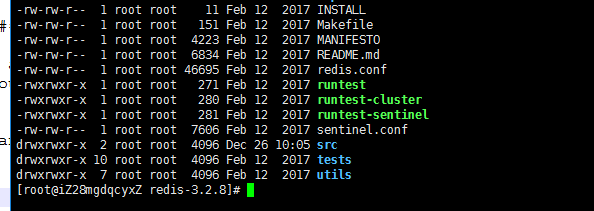
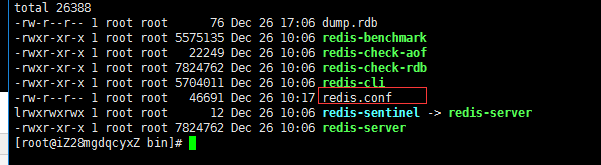
复制配置文件redis.conf 到安装目录
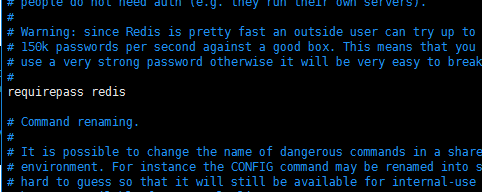
修改配置文件
daemonize yes 后台启动

requirepass redis 设置密码为redis
启动
[root@iZ28mgdqcyxZ bin]# ./redis-server redis.conf
安装zookeeper
安装之前要安装jdk 略
 wget http://mirror.bit.edu.cn/apache/zookeeper/zookeeper-3.3.6/zookeeper-3.3.6.tar.gz

#解压

 tar -zxvf zookeeper-3.3..tar.gz

cd zookeeper-3.3./conf

拷贝zoo_samle.cfg为zoo.cfg

cp  zoo_samle.cfg zoo.cfg

vi zoo.cfg
# The number of milliseconds of each tick

tickTime=

# The number of ticks that the initial

# synchronization phase can take

initLimit=

# The number of ticks that can pass between

# sending a request and getting an acknowledgement

syncLimit=

# the directory where the snapshot is stored.

dataDir=/mnt/disk/word/children/zookeeper-3.3./data

dataLogDir=/mnt/disk/word/children/zookeeper-3.3./logs

# the port at which the clients will connect

clientPort=
dataDir=/mnt/disk/word/children/zookeeper-3.3.6/data

dataLogDir=/mnt/disk/word/children/zookeeper-3.3.6/logs
注意:这里的data和logs是没有的,要自己创建 mkdir data ,mkdir logs
设置环境变量
vi /etc/profile
#zookeeper

export ZOOKEEPER_HOME=/mnt/disk/word/children/zookeeper-3.3.

export PATH=$PATH:$ZOOKEEPER_HOME/bin
使环境变量生效
source /etc/profile
启动,任何地方都可以启动
[root@iZ28mgdqcyxZ conf]# zkServer.sh start
设置redis & zookeeper 开机启动
vi /etc/rc.d/rc.local

#加载java环境变量 否则不能启动

export JAVA_HOME=/var/lib/jvm/jdk1..0_80

#启动zk

/mnt/disk/word/children/zookeeper-3.3./bin/zkServer.sh start

#启动redis

/mnt/disk/word/children/redis/bin/redis-server /mnt/disk/word/children/redis/bin/redis.conf

#在centos7中,/etc/rc.d/rc.local的权限被降低了,所以需要执行如下命令赋予其可执行权限
chmod +x /etc/rc.d/rc.local
centos 7防火墙:
0、开启防火墙:sudo systemctl start firewalld,service
1、关闭防火墙:sudo systemctl stop firewalld.service
2、关闭开机启动:sudo systemctl disable firewalld.service
3、开启开机启动:sudo systemctl enable firewalld.service
centos 6防火墙:
1、关闭防火墙:service iptables stop
2、开启防火墙:service iptables start
3、防火墙状态:service iptables status
完成
linux 安装redis zookeeper的更多相关文章
- Linux安装redis服务器
Linux安装redis服务器 初次接触,这里简单的说下我遇到的情况以及安装方法,当然也是参考了诸位大神的. 确定虚拟机的主机IP. 1)首先需要一个linux虚拟机,确定虚拟机的ip ,输入命令:# ...
- Linux 安装Redis<准备>(使用Mac远程访问)
阅读本文需要一定的Linux基础 一 Redis简介 redis是用c语言编写的一款开源的高性能键值对(key-value)数据库 它通过提供多种键值数据类型来适应不同场景下的存储需求 二 Redis ...
- 1.Linux安装redis
Linux安装redis 操作系统是Centos7 1.下载压缩包 2.解压 3.编译 4.启动redis 5.设置redis.conf和防火墙端口开放,外网可以访问 1.下载压缩包 下载地址:htt ...
- Linux安装redis服务器和部署
Linux安装redis和部署 第一步:下载安装包 wget http://download.redis.io/releases/redis-5.0.5.tar.gz 访问https://redis. ...
- Linux安装Redis,在测试阶段即make test出现“You need tcl 8.5 or newer in order to run the Redis test”问题解决方案
Linux安装Redis,在测试阶段即make test出现"You need tcl 8.5 or newer in order to run the Redis test"问题 ...
- Linux安装Redis 6.0.5 ./install_server.sh报错
Linux安装Redis 6.0.5 ./install_server.sh报错 linux 安装Redis6.0.5时 进行到./install_server.sh时报错, This systems ...
- Linux安装Redis步骤和make遇到的坑
Linux安装Redis服务步骤 1.获取redis资源 cd /usr/local wget https://mirrors.huaweicloud.com/redis/redis-6 ...
- linux安装redis(转)
一.Redis介绍 Redis是当前比较热门的NOSQL系统之一,它是一个key-value存储系统.和Memcache类似,但很大程度补偿了Memcache的不足,它支持存储的value类型相对更多 ...
- linux安装redis操作
redis官网地址:http://www.redis.io/ 最新版本:2.8.3 在Linux下安装Redis非常简单,具体步骤如下(官网有说明): 1.下载源码,解压缩后编译源码. $ wget ...
随机推荐
- [Offer收割]编程练习赛38
漏写的数字 #pragma comment(linker, "/STACK:102400000,102400000") #include<stdio.h> #inclu ...
- 【Oracle】修改参数的同时添加注释
当修改参数时添加注释,我们会用到如下语句: alter system set parameter=value comment='description'; --修改参数需要有相应权限的用户去执行. 例 ...
- 最简单的一致性Hash算法实现
import java.util.Collection;import java.util.SortedMap;import java.util.TreeMap; public class Consis ...
- PCL:Ubuntu下安装配置PCL
一:安装PCL 依据官网介绍:http://www.pointclouds.org/downloads/linux.html Ubuntu We currently support all Ubunt ...
- swift的属性与变量- Stored Properties and Instance Variables
是一个概念 Stored Properties and Instance Variables If you have experience with Objective-C, you may know ...
- Binary Agents FreeCodeCamp
function binaryAgent(str) { var arr = str.split(" "); var newStr = ""; for(var i ...
- CentOS7安装GitLab、汉化、邮箱配置及使用(转载)
同步首发: https://www.cnblogs.com/heyonggang/p/7778203.html http://www.yuanrengu.com/index.php/20171112. ...
- 【数据分析学习】016-numpy数据结构
通常对数据的矩阵进行操作,就用numpy操作,打开txt文件 使用help()去查询文档,可以看到官方的注释 import numpy path = r'F:\数据分析专用\数据分析与机器学习\wor ...
- Python编码显示中文乱码
爬虫时出现问题: import requests data=requests.get('http://roll.news.sina.com.cn/')print(data.text) 输出结果中文显示 ...
- HDU1114 - Piggy-Bank
Before ACM can do anything, a budget must be prepared and the necessary financial support obtained. ...