
【数据分析学习】016-numpy数据结构
import numpy

path = r'F:\数据分析专用\数据分析与机器学习\world_alcohol.txt'

world_alchol = numpy.genfromtxt(path, delimiter=",", dtype=str)

print(type(world_alchol))

print(world_alchol)

print(help(numpy.genfromtxt))
<class 'numpy.ndarray'>

[['Year' 'WHO region' 'Country' 'Beverage Types' 'Display Value']

['' 'Western Pacific' 'Viet Nam' 'Wine' '']

['' 'Americas' 'Uruguay' 'Other' '0.5']

...

['' 'Africa' 'Malawi' 'Other' '0.75']

['' 'Americas' 'Bahamas' 'Wine' '1.5']

['' 'Africa' 'Malawi' 'Spirits' '0.31']]

Help on function genfromtxt in module numpy.lib.npyio:

genfromtxt(fname, dtype=<class 'float'>, comments='#', delimiter=None, skip_header=0, skip_footer=0, converters=None, missing_values=None, filling_values=None, usecols=None, names=None, excludelist=None, deletechars=None, replace_space='_', autostrip=False, case_sensitive=True, defaultfmt='f%i', unpack=None, usemask=False, loose=True, invalid_raise=True, max_rows=None, encoding='bytes')

    Load data from a text file, with missing values handled as specified.

    Each line past the first `skip_header` lines is split at the `delimiter`

    character, and characters following the `comments` character are discarded.

    Parameters

    ----------

    fname : file, str, pathlib.Path, list of str, generator

        File, filename, list, or generator to read.  If the filename

        extension is `.gz` or `.bz2`, the file is first decompressed. Note

        that generators must return byte strings in Python 3k.  The strings

        in a list or produced by a generator are treated as lines.

    dtype : dtype, optional

        Data type of the resulting array.

        If None, the dtypes will be determined by the contents of each

        column, individually.

    comments : str, optional

        The character used to indicate the start of a comment.

        All the characters occurring on a line after a comment are discarded

    delimiter : str, int, or sequence, optional

        The string used to separate values.  By default, any consecutive

        whitespaces act as delimiter.  An integer or sequence of integers

        can also be provided as width(s) of each field.

    skiprows : int, optional

        `skiprows` was removed in numpy 1.10. Please use `skip_header` instead.

    skip_header : int, optional

        The number of lines to skip at the beginning of the file.

    skip_footer : int, optional

        The number of lines to skip at the end of the file.

    converters : variable, optional

        The set of functions that convert the data of a column to a value.

        The converters can also be used to provide a default value

        for missing data: ``converters = {3: lambda s: float(s or 0)}``.

    missing : variable, optional

        `missing` was removed in numpy 1.10. Please use `missing_values`

        instead.

    missing_values : variable, optional

        The set of strings corresponding to missing data.

    filling_values : variable, optional

        The set of values to be used as default when the data are missing.

    usecols : sequence, optional

        Which columns to read, with 0 being the first.  For example,

        ``usecols = (1, 4, 5)`` will extract the 2nd, 5th and 6th columns.

    names : {None, True, str, sequence}, optional

        If `names` is True, the field names are read from the first line after

        the first `skip_header` lines.  This line can optionally be proceeded

        by a comment delimeter. If `names` is a sequence or a single-string of

        comma-separated names, the names will be used to define the field names

        in a structured dtype. If `names` is None, the names of the dtype

        fields will be used, if any.

    excludelist : sequence, optional

        A list of names to exclude. This list is appended to the default list

        ['return','file','print']. Excluded names are appended an underscore:

        for example, `file` would become `file_`.

    deletechars : str, optional

        A string combining invalid characters that must be deleted from the

        names.

    defaultfmt : str, optional

        A format used to define default field names, such as "f%i" or "f_%02i".

    autostrip : bool, optional

        Whether to automatically strip white spaces from the variables.

    replace_space : char, optional

        Character(s) used in replacement of white spaces in the variables

        names. By default, use a '_'.

    case_sensitive : {True, False, 'upper', 'lower'}, optional

        If True, field names are case sensitive.

        If False or 'upper', field names are converted to upper case.

        If 'lower', field names are converted to lower case.

    unpack : bool, optional

        If True, the returned array is transposed, so that arguments may be

        unpacked using ``x, y, z = loadtxt(...)``

    usemask : bool, optional

        If True, return a masked array.

        If False, return a regular array.

    loose : bool, optional

        If True, do not raise errors for invalid values.

    invalid_raise : bool, optional

        If True, an exception is raised if an inconsistency is detected in the

        number of columns.

        If False, a warning is emitted and the offending lines are skipped.

    max_rows : int,  optional

        The maximum number of rows to read. Must not be used with skip_footer

        at the same time.  If given, the value must be at least 1. Default is

        to read the entire file.

        .. versionadded:: 1.10.0

    encoding : str, optional

        Encoding used to decode the inputfile. Does not apply when `fname` is

        a file object.  The special value 'bytes' enables backward compatibility

        workarounds that ensure that you receive byte arrays when possible

        and passes latin1 encoded strings to converters. Override this value to

        receive unicode arrays and pass strings as input to converters.  If set

        to None the system default is used. The default value is 'bytes'.

        .. versionadded:: 1.14.0

    Returns

    -------

    out : ndarray

        Data read from the text file. If `usemask` is True, this is a

        masked array.

    See Also

    --------

    numpy.loadtxt : equivalent function when no data is missing.

    Notes

    -----

    * When spaces are used as delimiters, or when no delimiter has been given

      as input, there should not be any missing data between two fields.

    * When the variables are named (either by a flexible dtype or with `names`,

      there must not be any header in the file (else a ValueError

      exception is raised).

    * Individual values are not stripped of spaces by default.

      When using a custom converter, make sure the function does remove spaces.

    References

    ----------

    .. [1] NumPy User Guide, section `I/O with NumPy

           <http://docs.scipy.org/doc/numpy/user/basics.io.genfromtxt.html>`_.

    Examples

    ---------

    >>> from io import StringIO

    >>> import numpy as np

    Comma delimited file with mixed dtype

    >>> s = StringIO("1,1.3,abcde")

    >>> data = np.genfromtxt(s, dtype=[('myint','i8'),('myfloat','f8'),

    ... ('mystring','S5')], delimiter=",")

    >>> data

    array((1, 1.3, 'abcde'),

          dtype=[('myint', '<i8'), ('myfloat', '<f8'), ('mystring', '|S5')])

    Using dtype = None

    >>> s.seek(0) # needed for StringIO example only

    >>> data = np.genfromtxt(s, dtype=None,

    ... names = ['myint','myfloat','mystring'], delimiter=",")

    >>> data

    array((1, 1.3, 'abcde'),

          dtype=[('myint', '<i8'), ('myfloat', '<f8'), ('mystring', '|S5')])

    Specifying dtype and names

    >>> s.seek(0)

    >>> data = np.genfromtxt(s, dtype="i8,f8,S5",

    ... names=['myint','myfloat','mystring'], delimiter=",")

    >>> data

    array((1, 1.3, 'abcde'),

          dtype=[('myint', '<i8'), ('myfloat', '<f8'), ('mystring', '|S5')])

    An example with fixed-width columns

    >>> s = StringIO("11.3abcde")

    >>> data = np.genfromtxt(s, dtype=None, names=['intvar','fltvar','strvar'],

    ...     delimiter=[1,3,5])

    >>> data

    array((1, 1.3, 'abcde'),

          dtype=[('intvar', '<i8'), ('fltvar', '<f8'), ('strvar', '|S5')])

None
用array输入数组
vector = numpy.array([5, 10, 15, 20])

matrix = numpy.array([[5, 10, 15], [20, 25, 30], [35, 40, 45]])

print(vector)

print(matrix)
输出结果
vector = numpy.array([1, 2, 3, 4])

print(vector.shape)

matrix = numpy.array([[5, 10, 15], [20, 25, 30]])

print(matrix.shape)
import numpy

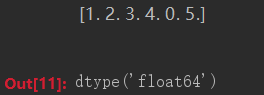
numbers = numpy.array([1, 2, 3, 4, 0, 5.0])

print(numbers)

numbers.dtype
world_alchol = numpy.genfromtxt(path, delimiter=',', dtype=str, skip_header=1)

print(world_alchol)
文件读取
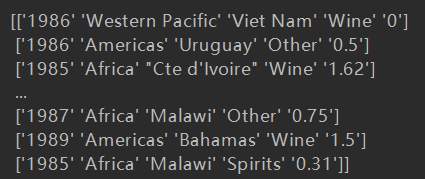
输出的是一个列表,那么读取的时候就可以根据切片读取出列表的值
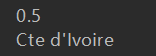
uruguay_other_1986 = world_alchol[1, 4]

third_country = world_alchol[2, 2]

print(uruguay_other_1986)

print(third_country)
切片取值
【数据分析学习】016-numpy数据结构的更多相关文章
- Python数据分析学习之Numpy
Numpy的简单操作 import numpy #导入numpy包 file = numpy.genfromtxt("文件路径",delimiter=" ",d ...
- Python数据分析学习目录
python数据分析学习目录 Anaconda的安装和更新 矩阵NumPy pandas数据表 matplotlib-2D绘图库学习目录
- 个人永久性免费-Excel催化剂功能第100波-透视多行数据为多列数据结构
在数据处理过程中,大量的非预期格式结构需要作转换,有大家熟知的多维转一维(准确来说应该是交叉表结构的数据转二维表标准数据表结构),也同样有一些需要透视操作的数据源,此篇同样提供更便捷的方法实现此类数据 ...
- Python数据分析学习(二):Numpy数组对象基础
1.1数组对象基础 .caret, .dropup > .btn > .caret { border-top-color: #000 !important; } .label { bord ...
- Python数据分析学习(一):Numpy与纯Python计算向量加法速度比较
import sys from datetime import datetime import numpy as np def numpysum(n): a = np.arange(n) ** 2 b ...
- python数据分析学习(2)pandas二维工具DataFrame讲解
目录 二:pandas数据结构介绍 下面继续讲解pandas的第二个工具DataFrame. 二:pandas数据结构介绍 2.DataFarme DataFarme表示的是矩阵的数据表,包含 ...
- python数据分析学习(1)pandas一维工具Series讲解
目录 一:pandas数据结构介绍 python是数据分析的主要工具,它包含的数据结构和数据处理工具的设计让python在数据分析领域变得十分快捷.它以NumPy为基础,并对于需要类似 for循环 ...
- 数据分析学习(zhuan)
http://www.zhihu.com/question/22119753 http://www.zhihu.com/question/20757000 ********************** ...
- [python]-数据科学库Numpy学习
一.Numpy简介: Python中用列表(list)保存一组值,可以用来当作数组使用,不过由于列表的元素可以是任何对象,因此列表中所保存的是对象的指针.这样为了保存一个简单的[1,2,3],需要有3 ...
随机推荐
- win7 VMware下安装centos和Ubuntu共存
最近在空闲时间学习Linux环境中各种服务的安装与配置,都属于入门级别的,这里把所有的学习过程记录下来,和大家一起分享. 我的电脑系统是win7,所以我需要在win7上安装一个虚拟机-VMware ...
- 【hihocoder 1329】平衡树·Splay(Splay做法)
[题目链接]:http://hihocoder.com/problemset/problem/1329 [题意] [题解] 插入操作:-,记住每次插入之后都要把它放到根节点去就好; 询问操作:对于询问 ...
- mybatis使用-helloword(一)
前言 首先感谢https://my.oschina.net/zudajun/blog/665956(jd上也出书了貌似) 这位作者.让自己能系统的看完和理解第一个框架的源码(其实我反复看了4遍以上, ...
- poj 1523 求割点把一个图分成几个联通部分
#include<stdio.h> #include<string.h> #define N 1100 struct node { int u,v,next; }bian[N* ...
- Spring注解@Repository、@Service、@Controller、@Component
继前几章所讲解的注解中: http://www.cnblogs.com/EasonJim/p/6892280.html http://www.cnblogs.com/EasonJim/p/689974 ...
- 服务器session,Tomcat有自己的session维护机制,apache有自己的session维护机制
1.SESSION一般不是你说的这种工作方式,你打开一个浏览器,再打开一个,请求同一个网址,然后其中一个登陆,另外一个绝对不会也登陆.SESSION和浏览器本身这个程序就是挂钩的,一般不通过IP和端口 ...
- 初步了解Shuttle ESB
ESB:EnterpriseService Bus,即企业服务总线.它是传统中间件技术与XML.Web服务等技术结合的产物.从面向服务体系架构发展而来. ESB採用了"总线"这种模 ...
- C# List数据批量更新
针对单条数据一般都是update语句直接更新 例如:update UserTable set UserName='小名' where userid=xxx 但是如果是针对List数据组进行更新的话 ...
- 问题: Unsupported major.minor version 51.0
Unsupported major.minor version 51.0 问题原因:外部jar包使用jdk1.7(jdk7)编译,而使用此jar包的工程jdk版本为jdk1.6(jdk6),算是版本不 ...
- zoj3886--Nico Number(素数筛+线段树)
Nico Number Time Limit: 2 Seconds Memory Limit: 262144 KB Kousaka Honoka and Minami Kotori are ...