
WPF 资源(StaticResource 静态资源、DynamicResource 动态资源、添加二进制资源、绑定资源树)
原文:WPF 资源(StaticResource 静态资源、DynamicResource 动态资源、添加二进制资源、绑定资源树)
一、WPF对象级(Window对象)资源的定义与查找
实例一: StaticResource 静态资源(如:皮肤配置方案,运行后不改变)
<Window x:Class="WpfApplication.Window12"

        xmlns="http://schemas.microsoft.com/winfx/2006/xaml/presentation"

        xmlns:x="http://schemas.microsoft.com/winfx/2006/xaml"

        xmlns:sys="clr-namespace:System;assembly=mscorlib"

        Title="Window12" Height="300" Width="300">

    <!--将System命名空间引入到xaml代码并映射为sys命名空间-->

    <!--在Window.Resources属性添加两个资源条目-->

    <Window.Resources>

       <!--键值对资源-->

        <ResourceDictionary>

            <sys:String x:Key="str">

                字符

            </sys:String>

            <sys:Double x:Key="dbl">

                3.1415926

            </sys:Double>

        </ResourceDictionary>

    </Window.Resources>

    <StackPanel>

        <TextBlock name="textblock1" Text="{StaticResource ResourceKey=str}" Margin="5"/>

    </StackPanel>

</Window>
简化:
<Window x:Class="WpfApplication.Window12"
xmlns="http://schemas.microsoft.com/winfx/2006/xaml/presentation"
xmlns:x="http://schemas.microsoft.com/winfx/2006/xaml"
xmlns:sys="clr-namespace:System;assembly=mscorlib"
Title="Window12" Height="300" Width="300">
<!--将System命名空间引入到xaml代码并映射为sys命名空间-->
<!--在Window.Resources属性添加两个资源条目-->
<Window.Resources>
</Window.Resources>
<StackPanel>
<TextBlock name="textblock1" Text="{StaticResource str}" Margin="5"/>
</StackPanel>
</Window>
在C#代码中,使用定义的XAML代码中定义的资源。
            //string text = (string)FindResource("str");

            string text = (string)this.Resources["str"];//键值获取

            this.textblock1.Text = text;
实例二:把资源像CSS或JavaScript放到独立文件中。
新建 “资源字典”
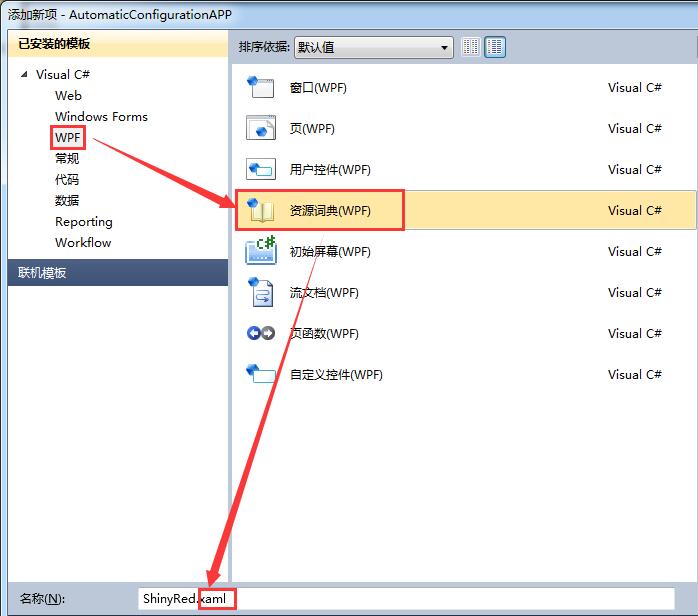
Themes 文件夹中的 ShinyRed.xaml
<ResourceDictionary xmlns="http://schemas.microsoft.com/winfx/2006/xaml/presentation"

                    xmlns:x="http://schemas.microsoft.com/winfx/2006/xaml"

                    xmlns:sys="clr-namespace:System;assembly=mscorlib">

    <sys:String x:Key="str">字符</sys:String>

    <sys:Double x:Key="dbl">3.1415926</sys:Double>

</ResourceDictionary>
<Window x:Class="WpfApplication.Window12"

        xmlns="http://schemas.microsoft.com/winfx/2006/xaml/presentation"

        xmlns:x="http://schemas.microsoft.com/winfx/2006/xaml"

        Title="Window12" Height="300" Width="300">

    <Window.Resources>

        <ResourceDictionary Source="Themes/ShinyRed.xaml"/>

    </Window.Resources>

    <StackPanel>

        <TextBlock Name="textblock1"  Margin="5" Text="{StaticResource str}"/>

    </StackPanel>

</Window>
合并多个外部资源字典成为本地字典
<Application.Resources>
<ResourceDictionary>
<ResourceDictionary.MergedDictionaries>
<ResourceDictionary Source="/Resources/Xml/TreeFile.xaml" />
</ResourceDictionary.MergedDictionaries>
</ResourceDictionary>
</Application.Resources>
实例三、DynamicResource 动态资源(如:运行时,允许用户更改皮肤)
<Window x:Class="WpfApplication.Window12"

        xmlns="http://schemas.microsoft.com/winfx/2006/xaml/presentation"

        xmlns:x="http://schemas.microsoft.com/winfx/2006/xaml"

        Title="Window12" Height="300" Width="300">

    <Window.Resources>

        <TextBlock x:Key="res1" Text="动态资源"/>

    </Window.Resources>

    <StackPanel>

        <Button Content="{DynamicResource res1}"/>

        <Button Content="Update" Click="Button_Click"/>

    </StackPanel>

</Window>
        private void Button_Click(object sender, RoutedEventArgs e)

        {

            this.Resources["res1"] = new TextBlock { Text="换皮肤"};

        }
三、向程序添加二进制资源
1、Resources.resx 文件添加 字符串二进制资源
双击 Resources.resx 文件
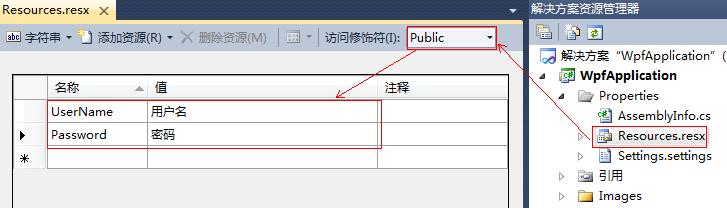
代码:
<Window x:Class="WpfApplication.Window13"
xmlns="http://schemas.microsoft.com/winfx/2006/xaml/presentation"
xmlns:x="http://schemas.microsoft.com/winfx/2006/xaml"
xmlns:prop="clr-namespace:WpfApplication.Properties"
Title="Window13" Height="300" Width="300">
<Grid>
<TextBox Text="{x:Static prop:Resources.UserName}"/>
</Grid>
</Window>
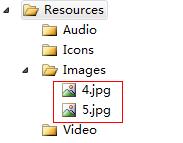
2、Resources.resx 文件添加 图片二进制资源
新建文件夹
设置图片属性
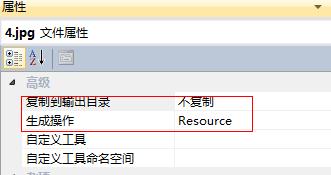
代码:
<Image Name="img" Source="Resources/Images/4.jpg" Stretch="Fill"/>
或者
img.Source = new BitmapImage(new Uri(@"Resources/Images/4.jpg", UriKind.Relative));
四、资源绑定树
效果:
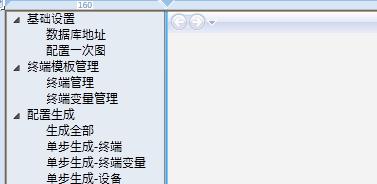
TreeFile.xaml
<ResourceDictionary xmlns="http://schemas.microsoft.com/winfx/2006/xaml/presentation"

                    xmlns:x="http://schemas.microsoft.com/winfx/2006/xaml"

                    xmlns:s="clr-namespace:System;assembly=mscorlib"

                    >

    <XmlDataProvider x:Key="xdp" XPath="FileSystem/Folder">

        <x:XData>

            <FileSystem xmlns="">

                <Folder Name="基础设置">

                    <Folder Name="数据库地址" Value="Pages/Page_SqlAddress.xaml"/>

                    <Folder Name="配置一次图" Value="Pages/Page_ConfigControls.xaml"/>

                </Folder>

                <Folder Name="终端模板管理">

                    <Folder Name="终端管理" Value="Pages/Page_Products.xaml"/>

                    <Folder Name="终端变量管理" Value="Pages/Page_Varibles.xaml"/>

                </Folder>

                <Folder Name="配置生成">

                    <Folder Name="生成全部" Value="Pages/Page_BuildAll.xaml"/>

                    <Folder Name="单步生成-终端" Value="Pages/Page_BuildProducts.xaml"/>

                    <Folder Name="单步生成-终端变量" Value="Pages/Page_BuildVaribles.xaml"/>

                    <Folder Name="单步生成-设备" Value="Pages/Page_BuildEquipment.xaml"/>

                    <Folder Name="单步生成-一次图" Value="Pages/Page_BuildGraphical.xaml"/>

                </Folder>

            </FileSystem>

        </x:XData>

    </XmlDataProvider>

<ResourceDictionary>
App.xaml
<Application x:Class="AutomaticConfigurationAPP.App"

             xmlns="http://schemas.microsoft.com/winfx/2006/xaml/presentation"

             xmlns:x="http://schemas.microsoft.com/winfx/2006/xaml"

             xmlns:d="http://schemas.microsoft.com/expression/blend/2008" xmlns:mc="http://schemas.openxmlformats.org/markup-compatibility/2006"

             >

    <!--启始页等一堆参数设置,相当于控制台程序Main,是整个程序入口-->

    <Application.Resources>

        <ResourceDictionary>

            <ResourceDictionary.MergedDictionaries>

                <ResourceDictionary Source="/Resources/Xml/TreeFile.xaml" />

                <ResourceDictionary Source="pack://application:,,,/AutomaticConfigurationAPP;component/Styles/Bootstrap.xaml"/>

                <ResourceDictionary Source="pack://application:,,,/AutomaticConfigurationAPP;component/PathGeometries/Glyphicons.xaml"/>

                <!--<ResourceDictionary Source="/Themes/Theme.xaml" />-->

            </ResourceDictionary.MergedDictionaries>

        </ResourceDictionary>

    </Application.Resources>

</Application>
ViewModel层
<Window x:Class="AutomaticConfigurationAPP.MWindow"

        xmlns="http://schemas.microsoft.com/winfx/2006/xaml/presentation"

        xmlns:x="http://schemas.microsoft.com/winfx/2006/xaml"

        Title="配置文件自动生成工具" Height="500" Width="800" Icon="/AutomaticConfigurationAPP;component/bitbug_favicon%20%282%29.ico">

    <Window.Background>

        <ImageBrush ImageSource="/AutomaticConfigurationAPP;component/Images/background_blue.jpg" Stretch="Fill" TileMode="Tile" Viewport="0,0,1174,600" ViewportUnits="Absolute" />

    </Window.Background>

    <Grid>

        <Grid.ColumnDefinitions>

            <ColumnDefinition Width="160"/>

            <ColumnDefinition Width="2"/>

            <ColumnDefinition Width="*"/>

        </Grid.ColumnDefinitions>

        <Grid.RowDefinitions>

            <RowDefinition Height="*"/>

            <RowDefinition Height="8"/>

        </Grid.RowDefinitions>

        <TreeView  ItemsSource="{Binding Source={StaticResource xdp}}" Grid.Row="0" Grid.Column="0" x:Name="TreeRoot" Background="#E5EBF3">

            <TreeView.ItemTemplate>

                <HierarchicalDataTemplate ItemsSource="{Binding XPath=Folder}">

                        <TextBlock x:Name="a" Text="{Binding XPath=@Name}" FontSize="12"/>

                </HierarchicalDataTemplate>

            </TreeView.ItemTemplate>

        </TreeView>

        <Frame x:Name="PageContext" Grid.Row="0" Grid.Column="2"  Background="#F3F3F3" BorderBrush="#888" BorderThickness="1" NavigationUIVisibility="Visible"

               Source="{Binding ElementName=TreeRoot, Path=SelectedItem.Attributes[Value].Value}"/>

    </Grid>

</Window>
WPF 资源(StaticResource 静态资源、DynamicResource 动态资源、添加二进制资源、绑定资源树)的更多相关文章
- Jquery 给Js动态新添加的元素 绑定的点击事件
//one $('.class').on("click",function(){ alert('one') }); //相当于$('.class').bind("clic ...
- 背水一战 Windows 10 (10) - 资源: StaticResource, ThemeResource
[源码下载] 背水一战 Windows 10 (10) - 资源: StaticResource, ThemeResource 作者:webabcd 介绍背水一战 Windows 10 之 资源 St ...
- [WPF]静态资源(StaticResource)和动态资源(DynamicResource)
一.文章概述 本演示介绍WPF基本采用静态和动态的资源.而且两者都做一个简单的比较. 静态资源(StaticResource)指的是在程序加载内存时对资源的一次性使用,之后就不再訪问这个资源了:动态资 ...
- WPF 精修篇 静态资源
原文:WPF 精修篇 静态资源 在WPF中 如果设置好了一个控件样式或者矩形样式 如果Copy出一个新的 那么样式也会双份 比如 下面的矩形 我定义好了一个 Copy 以后 就出现一个新的 但是改变样 ...
- 资源: StaticResource, ThemeResource
StaticResource ThemeResource 示例1.演示“StaticResource”相关知识点Resource/StaticResourceDemo.xaml <Page x: ...
- koa 基础(十二)koa-static 静态资源中间件 静态web服务
1.目录 2.app.js /** * koa-static 静态资源中间件 静态web服务 * 1.npm install --save koa-static * 2.const static = ...
- bundle绑定资源表
1.注册绑定资源表 在application_Start函数中: (注意不要加拓展名,否则压缩时出问题) BundleTable.Bundles.Add(new ScriptBundle(" ...
- ASP.NET 未被授权访问所请求的资源。请考虑授予 ASP.NET 请求标识访问此资源的权限
开发了一个导入TXT文件的功能,执行过程中出错.提示:.....ASP.NET 未被授权访问所请求的资源.请考虑授予 ASP.NET 请求标识访问此资源的权限.ASP.NET 有一个在应用程序没有模拟 ...
- 【spring boot】3.spring boot项目,绑定资源文件为bean并使用
整个例子的结构目录如下: 1.自定义一个资源文件 com.sxd.name = 申九日木 com.sxd.secret = ${random.value} com.sxd.intValue = ${r ...
随机推荐
- 一起学Python:tcp服务器
tcp服务器 生活中的电话机 如果想让别人能更够打通咱们的电话获取相应服务的话,需要做以下几件事情: 买个手机 插上手机卡 设计手机为正常接听状态(即能够响铃) 静静的等着别人拨打 tcp服务器 如同 ...
- [Ramda] Change Object Properties with Ramda Lenses
In this lesson we'll learn the basics of using lenses in Ramda and see how they enable you to focus ...
- BZOJ1297 迷路 - 矩阵的幂
传送门 题目大意: 输入n(点的数量),t(时间),和一个n*n的矩阵,第i行第j列表示第i个节点到第j个节点有一条matrix[i][j](0~9)时间的边,若为0则没有边,问从1到n恰好经过t时间 ...
- radio实现第一次点击选中第二次点击取消
Jquery代码如下: $("#add_form .radio input").bind("click",function(){ var $radio = $( ...
- python2代码转换python3(2018新)
Python 3自带了一个叫做2to3.py,这个脚本会将你的Python 2程序源文件作为输入,然后自动将其转换到Python 3的形式,可进行to3.py -w 文件夹路径 若文件名2to3-sc ...
- Cryptographic method and system
The present invention relates to the field of security of electronic data and/or communications. In ...
- 查询系统状态 内存大小 cpu信息 设备负载情况
1.1 查看内存状态 /proc/meminfo里面存放着内存的信息 查看内存命令(包括虚拟内存swap): free -h (低版本系统可能不支持-h) 或者 free -m (以mb单位显示) a ...
- 【19.27%】【codeforces 618D】Hamiltonian Spanning Tree
time limit per test2 seconds memory limit per test256 megabytes inputstandard input outputstandard o ...
- CSS 中的高度百分比
CSS 中可以使用%来给定指定元素的大小,也就是高度.宽度.margin,padding 等等,但是相信很多人都对百分比表示法的具体含义并不清楚,那么不懂就练,毕竟是检验真理的唯一标准(考研党举个手我 ...
- postman VS restlet client基本使用
postman与restlet都是使用的google浏览器的插件(出不去自行解决,you get!),此两款软件的强大这里就不在赘述了,postman的网上说明很多,restlet的中文配置很少了.这 ...