
C#写文本日志帮助类(支持多线程)
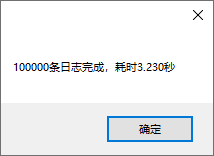
CPU:i5-8265U 硬盘:固态硬盘 测试结果:每秒写入文件大约1万到3万条日志,每条日志的字符串长度是140多个字符
支持多线程并发,支持多进程并发,支持按文件大小分隔日志文件
LogUtil.cs代码:
using System;

using System.Collections.Concurrent;

using System.Collections.Generic;

using System.IO;

using System.Linq;

using System.Reflection;

using System.Text;

using System.Text.RegularExpressions;

using System.Threading;

using System.Threading.Tasks;

namespace Utils

{

    /// <summary>

    /// 写日志类

    /// </summary>

    public class LogUtil

    {

        #region 字段

        private static string _path = null;

        private static Mutex _mutexDebug = new Mutex(false, "LogUtil.Mutex.Debug.252F8025254D4DAA8EFB7FFE177F13E0");

        private static Mutex _mutexInfo = new Mutex(false, "LogUtil.Mutex.Info.180740C3B1C44D428683D35F84F97E22");

        private static Mutex _mutexError = new Mutex(false, "LogUtil.Mutex.Error.81273C1400774A3B8310C2EC1C3AFFFF");

        private static ConcurrentDictionary<string, int> _dictIndex = new ConcurrentDictionary<string, int>();

        private static ConcurrentDictionary<string, long> _dictSize = new ConcurrentDictionary<string, long>();

        private static ConcurrentDictionary<string, FileStream> _dictStream = new ConcurrentDictionary<string, FileStream>();

        private static ConcurrentDictionary<string, StreamWriter> _dictWriter = new ConcurrentDictionary<string, StreamWriter>();

        private static ConcurrentDictionary<string, string> _dictPathFolders = new ConcurrentDictionary<string, string>();

        private static LimitedTaskScheduler _scheduler = new LimitedTaskScheduler();

        private static int _fileSize =  *  * ; //日志分隔文件大小

        #endregion

        #region 写文件

        /// <summary>

        /// 写文件

        /// </summary>

        private static void WriteFile(LogType logType, string log, string path)

        {

            try

            {

                FileStream fs = null;

                StreamWriter sw = null;

                if (!(_dictStream.TryGetValue(logType.ToString() + path, out fs) && _dictWriter.TryGetValue(logType.ToString() + path, out sw)))

                {

                    foreach (string key in _dictWriter.Keys)

                    {

                        if (key.StartsWith(logType.ToString()))

                        {

                            StreamWriter item;

                            _dictWriter.TryRemove(key, out item);

                            item.Close();

                        }

                    }

                    foreach (string key in _dictStream.Keys)

                    {

                        if (key.StartsWith(logType.ToString()))

                        {

                            FileStream item;

                            _dictStream.TryRemove(key, out item);

                            item.Close();

                        }

                    }

                    if (!Directory.Exists(Path.GetDirectoryName(path)))

                    {

                        Directory.CreateDirectory(Path.GetDirectoryName(path));

                    }

                    fs = new FileStream(path, FileMode.Append, FileAccess.Write, FileShare.ReadWrite);

                    sw = new StreamWriter(fs);

                    _dictWriter.TryAdd(logType.ToString() + path, sw);

                    _dictStream.TryAdd(logType.ToString() + path, fs);

                }

                fs.Seek(, SeekOrigin.End);

                sw.WriteLine(log);

                sw.Flush();

                fs.Flush();

            }

            catch (Exception ex)

            {

                string str = ex.Message;

            }

        }

        #endregion

        #region 生成日志文件路径

        /// <summary>

        /// 生成日志文件路径

        /// </summary>

        private static string CreateLogPath(LogType logType, string log)

        {

            try

            {

                if (_path == null)

                {

                    UriBuilder uri = new UriBuilder(Assembly.GetExecutingAssembly().CodeBase);

                    _path = Path.GetDirectoryName(Uri.UnescapeDataString(uri.Path));

                }

                string pathFolder = Path.Combine(_path, "Log\\" + logType.ToString() + "\\");

                if (!_dictPathFolders.ContainsKey(pathFolder))

                {

                    if (!Directory.Exists(Path.GetDirectoryName(pathFolder)))

                    {

                        Directory.CreateDirectory(Path.GetDirectoryName(pathFolder));

                    }

                    _dictPathFolders.TryAdd(pathFolder, pathFolder);

                }

                int currentIndex;

                long size;

                string strNow = DateTime.Now.ToString("yyyyMMdd");

                string strKey = pathFolder + strNow;

                if (!(_dictIndex.TryGetValue(strKey, out currentIndex) && _dictSize.TryGetValue(strKey, out size)))

                {

                    _dictIndex.Clear();

                    _dictSize.Clear();

                    GetIndexAndSize(pathFolder, strNow, out currentIndex, out size);

                    if (size >= _fileSize) currentIndex++;

                    _dictIndex.TryAdd(strKey, currentIndex);

                    _dictSize.TryAdd(strKey, size);

                }

                int index = _dictIndex[strKey];

                string logPath = Path.Combine(pathFolder, strNow + (index ==  ? "" : "_" + index.ToString()) + ".txt");

                _dictSize[strKey] += Encoding.UTF8.GetByteCount(log);

                if (_dictSize[strKey] > _fileSize)

                {

                    _dictIndex[strKey]++;

                    _dictSize[strKey] = ;

                }

                return logPath;

            }

            catch (Exception ex)

            {

                string str = ex.Message;

                return null;

            }

        }

        #endregion

        #region 拼接日志内容

        /// <summary>

        /// 拼接日志内容

        /// </summary>

        private static string CreateLogString(LogType logType, string log)

        {

            return string.Format(@"{0} {1} {2}", DateTime.Now.ToString("yyyy-MM-dd HH:mm:ss.fff"), ("[" + logType.ToString() + "]").PadRight(, ' '), log);

        }

        #endregion

        #region 获取初始Index和Size

        /// <summary>

        /// 获取初始Index和Size

        /// </summary>

        private static void GetIndexAndSize(string pathFolder, string strNow, out int index, out long size)

        {

            index = ;

            size = ;

            Regex regex = new Regex(strNow + "_*(\\d*).txt");

            string[] fileArr = Directory.GetFiles(pathFolder);

            string currentFile = null;

            foreach (string file in fileArr)

            {

                Match match = regex.Match(file);

                if (match.Success)

                {

                    string str = match.Groups[].Value;

                    if (!string.IsNullOrWhiteSpace(str))

                    {

                        int temp = Convert.ToInt32(str);

                        if (temp > index)

                        {

                            index = temp;

                            currentFile = file;

                        }

                    }

                    else

                    {

                        index = ;

                        currentFile = file;

                    }

                }

            }

            if (currentFile != null)

            {

                FileInfo fileInfo = new FileInfo(currentFile);

                size = fileInfo.Length;

            }

        }

        #endregion

        #region 写调试日志

        /// <summary>

        /// 写调试日志

        /// </summary>

        public static Task Debug(string log)

        {

            return Task.Factory.StartNew(() =>

            {

                try

                {

                    _mutexDebug.WaitOne();

                    log = CreateLogString(LogType.Debug, log);

                    string path = CreateLogPath(LogType.Debug, log);

                    WriteFile(LogType.Debug, log, path);

                }

                catch (Exception ex)

                {

                    string str = ex.Message;

                }

                finally

                {

                    _mutexDebug.ReleaseMutex();

                }

            }, CancellationToken.None, TaskCreationOptions.None, _scheduler);

        }

        #endregion

        #region 写错误日志

        public static Task Error(Exception ex, string log = null)

        {

            return Error(string.IsNullOrEmpty(log) ? ex.Message + "\r\n" + ex.StackTrace : (log + ":") + ex.Message + "\r\n" + ex.StackTrace);

        }

        /// <summary>

        /// 写错误日志

        /// </summary>

        public static Task Error(string log)

        {

            return Task.Factory.StartNew(() =>

            {

                try

                {

                    _mutexError.WaitOne();

                    log = CreateLogString(LogType.Error, log);

                    string path = CreateLogPath(LogType.Error, log);

                    WriteFile(LogType.Error, log, path);

                }

                catch (Exception ex)

                {

                    string str = ex.Message;

                }

                finally

                {

                    _mutexError.ReleaseMutex();

                }

            }, CancellationToken.None, TaskCreationOptions.None, _scheduler);

        }

        #endregion

        #region 写操作日志

        /// <summary>

        /// 写操作日志

        /// </summary>

        public static Task Log(string log)

        {

            return Task.Factory.StartNew(() =>

            {

                try

                {

                    _mutexInfo.WaitOne();

                    log = CreateLogString(LogType.Info, log);

                    string path = CreateLogPath(LogType.Info, log);

                    WriteFile(LogType.Info, log, path);

                }

                catch (Exception ex)

                {

                    string str = ex.Message;

                }

                finally

                {

                    _mutexInfo.ReleaseMutex();

                }

            }, CancellationToken.None, TaskCreationOptions.None, _scheduler);

        }

        #endregion

    }

    #region 日志类型

    /// <summary>

    /// 日志类型

    /// </summary>

    public enum LogType

    {

        Debug,

        Info,

        Error

    }

    #endregion

}
依赖的LimitedTaskScheduler.cs代码:
using System;

using System.Collections.Concurrent;

using System.Collections.Generic;

using System.Linq;

using System.Runtime.InteropServices;

using System.Text;

using System.Threading;

using System.Threading.Tasks;

namespace Utils

{

    public class LimitedTaskScheduler : TaskScheduler, IDisposable

    {

        #region 外部方法

        [DllImport("kernel32.dll", EntryPoint = "SetProcessWorkingSetSize")]

        public static extern int SetProcessWorkingSetSize(IntPtr process, int minSize, int maxSize);

        #endregion

        #region 变量属性事件

        private BlockingCollection<Task> _tasks = new BlockingCollection<Task>();

        List<Thread> _threadList = new List<Thread>();

        private int _threadCount = ;

        private int _timeOut = Timeout.Infinite;

        private Task _tempTask;

        #endregion

        #region 构造函数

        public LimitedTaskScheduler(int threadCount = )

        {

            CreateThreads(threadCount);

        }

        #endregion

        #region override GetScheduledTasks

        protected override IEnumerable<Task> GetScheduledTasks()

        {

            return _tasks;

        }

        #endregion

        #region override TryExecuteTaskInline

        protected override bool TryExecuteTaskInline(Task task, bool taskWasPreviouslyQueued)

        {

            return false;

        }

        #endregion

        #region override QueueTask

        protected override void QueueTask(Task task)

        {

            _tasks.Add(task);

        }

        #endregion

        #region 资源释放

        /// <summary>

        /// 资源释放

        /// 如果尚有任务在执行,则会在调用此方法的线程上引发System.Threading.ThreadAbortException,请使用Task.WaitAll等待任务执行完毕后,再调用该方法

        /// </summary>

        public void Dispose()

        {

            _timeOut = ;

            foreach (Thread item in _threadList)

            {

                item.Abort();

            }

            _threadList.Clear();

            GC.Collect();

            GC.WaitForPendingFinalizers();

            if (Environment.OSVersion.Platform == PlatformID.Win32NT)

            {

                SetProcessWorkingSetSize(System.Diagnostics.Process.GetCurrentProcess().Handle, -, -);

            }

        }

        #endregion

        #region 创建线程池

        /// <summary>

        /// 创建线程池

        /// </summary>

        private void CreateThreads(int? threadCount = null)

        {

            if (threadCount != null) _threadCount = threadCount.Value;

            _timeOut = Timeout.Infinite;

            for (int i = ; i < _threadCount; i++)

            {

                Thread thread = new Thread(new ThreadStart(() =>

                {

                    Task task;

                    while (_tasks.TryTake(out task, _timeOut))

                    {

                        TryExecuteTask(task);

                    }

                }));

                thread.IsBackground = true;

                thread.Start();

                _threadList.Add(thread);

            }

        }

        #endregion

        #region 全部取消

        /// <summary>

        /// 全部取消

        /// 当前正在执行的任务无法取消,取消的只是后续任务,相当于AbortAll

        /// </summary>

        public void CancelAll()

        {

            while (_tasks.TryTake(out _tempTask)) { }

        }

        #endregion

    }

}
测试代码:
using System;

using System.Collections.Generic;

using System.ComponentModel;

using System.Data;

using System.Diagnostics;

using System.Drawing;

using System.Linq;

using System.Text;

using System.Threading;

using System.Threading.Tasks;

using System.Windows.Forms;

using Utils;

namespace LogUtilTest

{

    public partial class Form1 : Form

    {

        public Form1()

        {

            InitializeComponent();

        }

        private void button1_Click(object sender, EventArgs e)

        {

            Task.Factory.StartNew(() =>

            {

                int n = ;

                string processId = Process.GetCurrentProcess().Id.ToString().PadLeft(, ' ');

                List<Task> taskList = new List<Task>();

                string str = "    abcdabcdabcdabcdabcdabcdabcdabcdabcdabcdabcda3.1415bcdabcdabcdabcdabc@#$%^&dabcdabcdabcdabcdabcdabcdabcdabcd";

                DateTime dtStart = DateTime.Now;

                for (int i = ; i <= n; i++)

                {

                    Task task = LogUtil.Log("ProcessId:【" + processId + "】 测试" + i.ToString().PadLeft(, '') + str);

                    taskList.Add(task);

                    task = LogUtil.Debug("ProcessId:【" + processId + "】 测试" + i.ToString().PadLeft(, '') + str);

                    taskList.Add(task);

                }

                Task.WaitAll(taskList.ToArray());

                double sec = DateTime.Now.Subtract(dtStart).TotalSeconds;

                MessageBox.Show(n + "条日志完成,耗时" + sec.ToString("0.000") + "秒");

            });

        }

    }

}
测试结果截图:
C#写文本日志帮助类(支持多线程)的更多相关文章
- C#写文本日志帮助类(支持多线程)改进版(不适用于ASP.NET程序)
由于iis的自动回收机制,不适用于ASP.NET程序 代码: using System; using System.Collections.Concurrent; using System.Confi ...
- Android开发调试日志工具类[支持保存到SD卡]
直接上代码: package com.example.callstatus; import java.io.File; import java.io.FileWriter; import java.i ...
- glog另启动线程写文本日志
glog本身是很高效的,google的大牛肯定知道大规模的写日志用glog的话肯定会影响业务线程的处理,带负荷的磁盘IO谁都桑不起.比方levelDB就是默认异步写,更不用说google的三驾马车都是 ...
- Asp.Net写文本日志
底层代码: using System; using System.Collections.Generic; using System.Linq; using System.Text; namespac ...
- C#写日志工具类
代码: using System; using System.Collections.Generic; using System.IO; using System.Linq; using System ...
- 支持异步写入的日志类,支持Framework2.0
因为工作需要需要在XP上运行一个C#编写的Winform插件,我就用Framework2.0,因为存在接口交互所以想保留交易过程的入参出参. 考虑到插件本身实施的因素,就没有使用Log4.NLog等成 ...
- 如何将Unicode文本写到日志文件中
有时为了定位问题,我们需要结合打印日志来处理.特别是较难复现的,一般都需要查看上下文日志才能找出可能存在的问题.考虑到程序要在不同语言的操作系统上运行,程序界面显示要支持Unicode,打印出来的日志 ...
- c#中@标志的作用 C#通过序列化实现深表复制 细说并发编程-TPL 大数据量下DataTable To List效率对比 【转载】C#工具类:实现文件操作File的工具类 异步多线程 Async .net 多线程 Thread ThreadPool Task .Net 反射学习
c#中@标志的作用 参考微软官方文档-特殊字符@,地址 https://docs.microsoft.com/zh-cn/dotnet/csharp/language-reference/toke ...
- Linux是一个基于POSIX和Unix的多用户、多任务、支持多线程和多CPU的性能稳定的操作系统,可免费使用并自由传播。
Linux是一个基于POSIX和Unix的多用户.多任务.支持多线程和多CPU的性能稳定的操作系统,可免费使用并自由传播. Linux是众多操作系统之一 , 目前流行的服务器和 PC 端操作系统有 L ...
随机推荐
- IT技术团队行而有效的管理之道
在博客园看到的一份读书笔记,如果日后有机会去管理一个技术团队,那么下面这些经验可能会让你更好地实施工作. IT技术团队员工的特点 高学历,知识密集型,技术立身. 人际关系简单,摩擦大多数由技术产生,相 ...
- [转] Visual Studio Code behind a proxy
http://www.tuicool.com/articles/jyyIBf3 http://blog.majcica.com/2016/04/07/visual-studio-code-behind ...
- Windows Azure 入门系列课程Windows Azure 入门系列课程
Windows Azure 入门系列课程 https://www.microsoft.com/china/msdn/events/webcasts/shared/webcast/NewSeries/A ...
- C#集合 -- Equality和Order插件
在前面的文章C#相等性比较和C#排序比较中,我已经叙述了类型相等,类型哈希,和类型比较的.NET标准协议.实现了这些协议的类型在一个字典或者列表中也可以正常工作.但是需要注意的是: 只有当类型的Equ ...
- file_get_contents()获取https出现这个错误Unable to find the wrapper “https” – did
file_get_contents()获取https出现这个错误Unable to find the wrapper “https” – did 解决办法 ,如果你是用的服务器,可以参考这个办法,修改 ...
- [原创]Android从xml加载到View对象过程解析
我们从Activity的setContentView()入手,开始源码解析, //Activity.setContentView public void setContentView(int layo ...
- iOS开发中一些常见的并行处理
本文主要探讨一些常用多任务的最佳实践.包括Core Data的多线程访问,UI的并行绘制,异步网络请求以及一些在运行态内存吃紧的情况下处理大文件的方案等.??其实编写异步处理的程序有很多坑!所以,本文 ...
- LintCode-- Remove Linked List Elements
Remove all elements from a linked list of integers that have valueval. 样例 Given 1->2->3->3- ...
- c# socket 框架学习 SocketAsyncEventArgsPool 封装
public class SocketAsyncEventArgsPool{ //已使用记录 private List<Int32> usedRecord; //未使用记录 private ...
- [转]Android dex分包方案
转载自:https://m.oschina.net/blog/308583 当一个app的功能越来越复杂,代码量越来越多,也许有一天便会突然遇到下列现象: 1. 生成的apk在2.3以前的机器无法安装 ...