
Android IOS WebRTC 音视频开发总结(七)-- 基于浏览器的开发
前面写的一系列总结都是讲webrtc如何下载,编译,开发的,有些人可能有点云里雾里了,WEBRTC不是用来搞跨浏览器开发的吗,怎么我讲的这些跟浏览器扯不上任何关系,其实看看下面这个架构图,你就明白了,转载请说明出处(博客园RTC.Blacker)
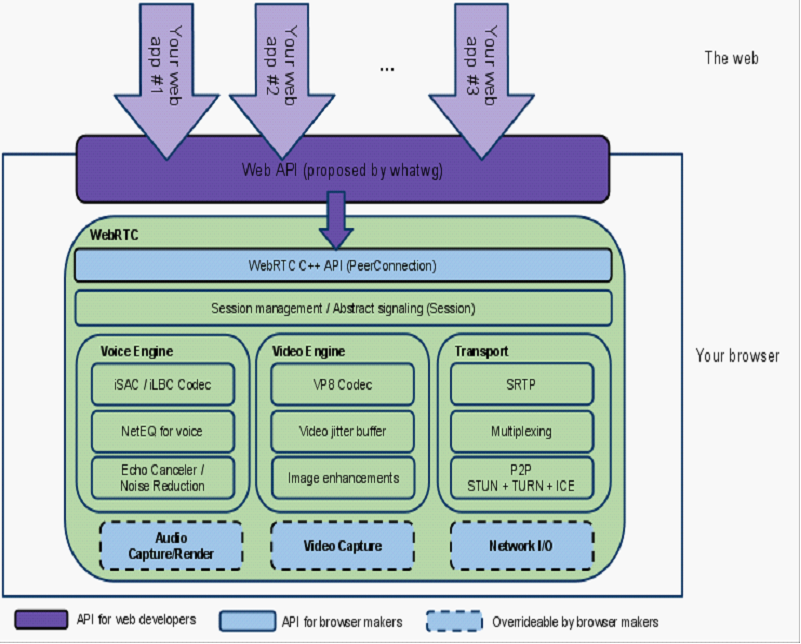
我前面讲的这些内容都封装在browser里面了,如音视频的采集,编码,传输,回声消除,丢包重传.所以如果你想将这些功能集成到你的产品里面就必须理解这些东西.
如果你只想做基于浏览器的视频通话功能,上面这些你可以不理解,更不需要去下载编译WEBRTC代码,因为实现这些功能所需要的JS接口浏览器已经帮你实现了,你只需要简单调用即可,我们先看看实现下面这样一个功能主要涉及哪些步骤?
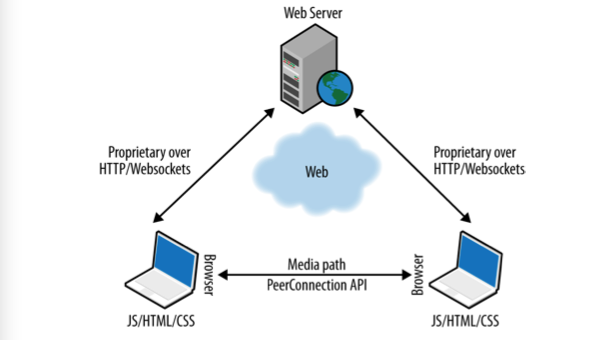
1,信令交互:开始视频通话前发起端和接收端需要一些交互,如通知对方开始视频,接收视频,视频参数协商(SDP信息),NAT地址交换,这个过程我们称之为信令交互,WEBRTC没有定义标准信令格式,既可以使用SIP也可以使用XMPP,还可以使用自定义的信令格式,最简单的方式就是使用websocket或XMLHttpRequest,自定义格式完成信令交互过程.
2,获取本地视频流:navigator.getUserMedia(constraints, successCallback, errorCallback);
navigator.getUserMedia = navigator.getUserMedia ||

  navigator.webkitGetUserMedia || navigator.mozGetUserMedia;

// Callback to be called in case of success...

function successCallback(gotStream) {

video.src = window.URL.createObjectURL(stream);

  // Start playing video

  video.play();

}

// Callback to be called in case of failure...

function errorCallback(error){ console.log("navigator.getUserMedia error: ", error);

}

// Constraints object for low resolution video

var qvgaConstraints = { video: {

    mandatory: {

      maxWidth: 320,

      maxHeight: 240

} }

};

// Constraints object for standard resolution video

var vgaConstraints = { video: {

    mandatory: {

      maxWidth: 640,

      maxHeight: 480

} }

};

// Constraints object for high resolution video

var hdConstraints = { video: {

    mandatory: {

      minWidth: 1280,

      minHeight: 960

} }

};

function getMedia(constraints){

if (!!stream) { video.src = null; stream.stop();

}

  navigator.getUserMedia(constraints, successCallback, errorCallback);

}
3,SDP协商:createOffer,createAnswer.
 localPeerConnection.createOffer(gotLocalDescription, onSignalingError);

 // Handler to be called when the 'local' SDP becomes available

 function gotLocalDescription(description){

 // Add the local description to the local PeerConnection
  localPeerConnection.setLocalDescription(description);
  log("Offer from localPeerConnection: \n" + description.sdp);

 // ...do the same with the 'pseudoremote' PeerConnection

 // Note: this is the part that will have to be changed if you want // the communicating peers to become remote

 // (which calls for the setup of a proper signaling channel) remotePeerConnection.setRemoteDescription(description);

   // Create the Answer to the received Offer based on the 'local' description

   remotePeerConnection.createAnswer(gotRemoteDescription, onSignalingError);

 }

 // Handler to be called when the remote SDP becomes available

 function gotRemoteDescription(description){

 // Set the remote description as the local description of the

 // remote PeerConnection.
  remotePeerConnection.setLocalDescription(description);

 log("Answer from remotePeerConnection: \n" + description.sdp);

 // Conversely, set the remote description as the remote description of the // local PeerConnection
  localPeerConnection.setRemoteDescription(description);

 }
4,ICE协商:
 // Add a handler associated with ICE protocol events

 localPeerConnection.onicecandidate = gotLocalIceCandidate;

 4 remotePeerConnection.onicecandidate = gotRemoteIceCandidate;

 // Handler to be called whenever a new local ICE candidate becomes available

 function gotLocalIceCandidate(event){ if (event.candidate) {

             // Add candidate to the remote PeerConnection

        remotePeerConnection.addIceCandidate(new RTCIceCandidate(event.candidate));

           log("Local ICE candidate: \n" + event.candidate.candidate);

       }

 }

 // Handler to be called whenever a new remote ICE candidate becomes available

 function gotRemoteIceCandidate(event){ if (event.candidate) {

             // Add candidate to the local PeerConnection

       localPeerConnection.addIceCandidate(new RTCIceCandidate(event.candidate));

           log("Remote ICE candidate: \n " + event.candidate.candidate);

       }

 }
5,使用RTCPeerConnection对象在浏览器之间交换媒体流数据.

 function call() {

   log("Starting call");

   // Note well: getVideoTracks() and getAudioTracks() are not currently supported in Firefox...

   // ...just use them with Chrome

   if (navigator.webkitGetUserMedia) {

       // Log info about video and audio device in use

       if (localStream.getVideoTracks().length > 0) {

         log('Using video device: ' + localStream.getVideoTracks()[0].label);

       }

       if (localStream.getAudioTracks().length > 0) {

         log('Using audio device: ' + localStream.getAudioTracks()[0].label);

       }

   }

   // Chrome

   if (navigator.webkitGetUserMedia) {

       RTCPeerConnection = webkitRTCPeerConnection;

   // Firefox

   }else if(navigator.mozGetUserMedia){

       RTCPeerConnection = mozRTCPeerConnection;

       RTCSessionDescription = mozRTCSessionDescription;

       RTCIceCandidate = mozRTCIceCandidate;

   }

   log("RTCPeerConnection object: " + RTCPeerConnection);

   // This is an optional configuration string, associated with NAT traversal setup

   var servers = null;

   // Create the local PeerConnection object

   localPeerConnection = new RTCPeerConnection(servers);

   log("Created local peer connection object localPeerConnection");

   // Add a handler associated with ICE protocol events

   localPeerConnection.onicecandidate = gotLocalIceCandidate;

   // Create the remote PeerConnection object

   remotePeerConnection = new RTCPeerConnection(servers);

   log("Created remote peer connection object remotePeerConnection");

   // Add a handler associated with ICE protocol events...

   remotePeerConnection.onicecandidate = gotRemoteIceCandidate;

   // ...and a second handler to be activated as soon as the remote stream becomes available

   remotePeerConnection.onaddstream = gotRemoteStream;

   // Add the local stream (as returned by getUserMedia() to the local PeerConnection

   localPeerConnection.addStream(localStream);

   log("Added localStream to localPeerConnection");

   // We're all set! Create an Offer to be 'sent' to the callee as soon as the local SDP is ready

   localPeerConnection.createOffer(gotLocalDescription, onSignalingError);

 }

 function onSignalingError(error) {

     console.log('Failed to create signaling message : ' + error.name);

 }

 // Handler to be called when the 'local' SDP becomes available

 function gotLocalDescription(description){

   // Add the local description to the local PeerConnection

   localPeerConnection.setLocalDescription(description);

   log("Offer from localPeerConnection: \n" + description.sdp);

   // ...do the same with the 'pseudo-remote' PeerConnection

   // Note well: this is the part that will have to be changed if you want the communicating peers to become

   // remote (which calls for the setup of a proper signaling channel)

   remotePeerConnection.setRemoteDescription(description);

   // Create the Answer to the received Offer based on the 'local' description

   remotePeerConnection.createAnswer(gotRemoteDescription, onSignalingError);

 }

 // Handler to be called when the 'remote' SDP becomes available

 function gotRemoteDescription(description){

   // Set the 'remote' description as the local description of the remote PeerConnection

   remotePeerConnection.setLocalDescription(description);

   log("Answer from remotePeerConnection: \n" + description.sdp);

   // Conversely, set the 'remote' description as the remote description of the local PeerConnection

   localPeerConnection.setRemoteDescription(description);

 }

 // Handler to be called as soon as the remote stream becomes available

 function gotRemoteStream(event){

   // Associate the remote video element with the retrieved stream

   if (window.URL) {

       // Chrome

       remoteVideo.src = window.URL.createObjectURL(event.stream);

   } else {

       // Firefox

       remoteVideo.src = event.stream;

   }

   log("Received remote stream");

 }

 // Handler to be called whenever a new local ICE candidate becomes available

 function gotLocalIceCandidate(event){

   if (event.candidate) {

     // Add candidate to the remote PeerConnection

     remotePeerConnection.addIceCandidate(new RTCIceCandidate(event.candidate));

     log("Local ICE candidate: \n" + event.candidate.candidate);

   }

 }

 // Handler to be called whenever a new 'remote' ICE candidate becomes available

 function gotRemoteIceCandidate(event){

   if (event.candidate) {

     // Add candidate to the local PeerConnection

     localPeerConnection.addIceCandidate(new RTCIceCandidate(event.candidate));

     log("Remote ICE candidate: \n " + event.candidate.candidate);

   }
上面基本上就是浏览器上视频通话涉及的主要对象.
对应到手机端就是webrtc编译成功后的appRTCDemo.apk.
Android IOS WebRTC 音视频开发总结(七)-- 基于浏览器的开发的更多相关文章
- 转:Android IOS WebRTC 音视频开发总结 (系列文章集合)
随笔分类 - webrtc Android IOS WebRTC 音视频开发总结(七八)-- 为什么WebRTC端到端监控很关键? 摘要: 本文主要介绍WebRTC端到端监控(我们翻译和整理的,译 ...
- Android IOS WebRTC 音视频开发总结(八十五)-- 使用WebRTC广播网络摄像头视频(下)
本文主要介绍WebRTC (我们翻译和整理的,译者:weizhenwei,校验:blacker),最早发表在[编风网] 支持原创,转载必须注明出处,欢迎关注我的微信公众号blacker(微信ID:bl ...
- Android IOS WebRTC 音视频开发总结(八十三)-- 使用WebRTC广播网络摄像头视频(上)
本文主要介绍WebRTC (我们翻译和整理的,译者:weizhenwei,校验:blacker),最早发表在[编风网] 支持原创,转载必须注明出处,欢迎关注我的微信公众号blacker(微信ID:bl ...
- Android IOS WebRTC 音视频开发总结(四六)-- 从另一个角度看国内首届WebRTC大会
文章主要从开发者角度谈国内首届WebRTC大会,支持原创,文章来自博客园RTC.Blacker,支持原创,转载必须说明出处,更多详见www.rtc.help. -------------------- ...
- Android IOS WebRTC 音视频开发总结(六)-- iOS开发之含泪经验
前段时间在搞webrtc iOS开发,所以将标题改为了Android IOS WebRTC 音视频开发总结, 下面都是开发过程中的经验总结,转载请说明出处(博客园RTC.Blacker): 1. IO ...
- Android IOS WebRTC 音视频开发总结(二四)-- p2p调用堆栈
本文主要分析webrtc音视频点对点部分的代码结构,文章来自博客园RTC.Blacker,转载请说明出处. 前段时间在查一个偶尔断线的问题(这种问题最蛋疼,不好重现,只能凭经验去搞),所以理了下web ...
- Android IOS WebRTC 音视频开发总结(二三)-- hurtc使用说明
本文主要介绍如何测试基于浏览器和手机的视频通话程序,转载请说明出处,文章来自博客园RTC.Blacker,更多详见www.blackerteam.com 很多人想测试浏览器(包括浏览器版本和桌面e ...
- Android IOS WebRTC 音视频开发总结(五七)-- 网络传输上的一种QoS方案
本文主要介绍一种QoS的解决方案,文章来自博客园RTC.Blacker,欢迎关注微信公众号blacker,更多详见www.rtc.help QoS出现的背景: 而当网络发生拥塞的时候,所有的数据流都有 ...
- Android IOS WebRTC 音视频开发总结(七十)-- 移动端音视频技术优化的七个方向
最近直播很火,很多朋友对背后的技术比较感兴趣,所以今天我们整理一篇关于移动端视频优化的文章,这篇文章是我朋友在一个技术大会上分享过的,更多内容请关注我们的微信公众号:rtcblacker 视频直播为什 ...
随机推荐
- 牢骚 - 你代码写得丑,又不肯用好一点的IDE,这让我很为难啊。
又有人问我代码错误,发过来就是一篇巨丑无比的代码,先不说左大括号转行还和代码写在同一行的谭浩强风格,你这狗啃的一样的缩进是闹哪样!粘进VS2015里面,自动格式化,瞬间赏心悦目,编译错误出了5行,我直 ...
- React Native 开发。
1.react-native run-android 安装 2.react-native start 开启调试端口
- JavaScript笔记之数组 keyword(存储和释放&堆栈 & 按值 引用)
1.数组创建及初始化 var obj=new Array(); var arr=[]; 可以延伸为长度一定的,字面量定义数组 2.堆栈 按值传递 引用类型 数组是引用类型,不是值传递, 栈:系桶自动分 ...
- JS正则实例
<html> <body> </body> </html> <script> var strSrc = "xxa1b01c001y ...
- 理解perl的编码转换——utf8以及乱码
工作需要,闲暇之余,仔细研究了一下脚本乱码的问题 1. vim新建的文件 1)在linux命令行 vim命令建立的文件,如果内容中不出现中文,默认是ASCII.那么用notepad++打开的时候,就是 ...
- ckfinder的配置使用
1.单纯的上传图片和预览图片 修改configasp中CheckAuthentication = true; 否则的话会报没有权限或修改配置错误 此时如果可以查看的话,单击图片应该是放大并且预览图片 ...
- HDU 5521 [图论][最短路][建图灵感]
/* 思前想后 还是决定坚持写博客吧... 题意: n个点,m个集合.每个集合里边的点是联通的且任意两点之间有一条dis[i]的边(每个集合一个dis[i]) 求同时从第1个点和第n个点出发的两个人相 ...
- POJ 3270 【组合数学】
题意: 给长度为N的学列,然后让你通过置换来使其递增.原序列没有相同的数字. 1 ≤ N ≤ 10,000 ai<=100000 思路: 先找到循环,然后根据贪心只有两种比较好的情况,让循环里边 ...
- bash 学习笔记
shell:能够操作应用程序的接口就称为shell. Linux由C编写的. TAB键的使用 alias:设置别名
- Spring Data Jpa真爽啊
http://www.ibm.com/developerworks/cn/opensource/os-cn-spring-jpa/ 持久层的实现类可以让框架生成.只需要声明持久层接口,框架直接生成代理 ...