
C# 文本文件打印类库(C#)
我写了一个打印文本文件的类库,功能包括:打印预览、打印。打印时可以选择打印机,可以指定页码范围。调用方法非常简单:
TextFilePrinter p = new TextFilePrinter(tbxFileName.Text);
p.View(); // 打印预览
p.Print(); // 打印文件
使用 TextFilePrinter 类的以下构造函数可以指定打印时使用的字体:
TextFilePrinter(string fileName, Encoding theEncode, Font theFont)
下面测试程序运行时的截图: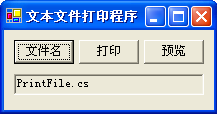
点击“预览”按钮后: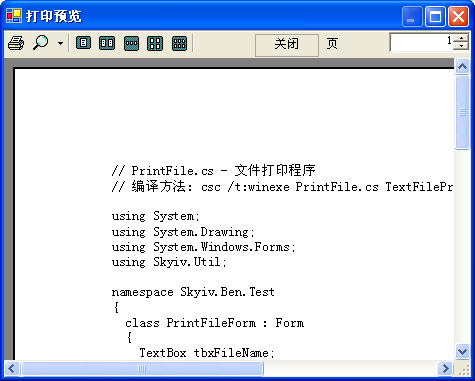
点击“打印”按钮后: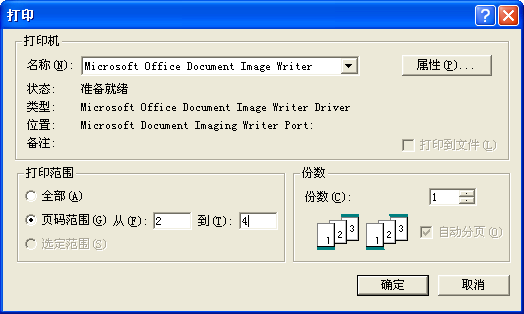
这幅图中的打印机:“Microsoft Office Doument Image Writer”是 Microsoft Office 2003 软件提供一个虚拟打印机,用来调试打印程序非常方便(使用“打印预览”也可以调试打印程序,但“打印预览”只能使用默认的打印机和默认的打印属性,也不能设置页码范围),可以设置打印属性和页码范围以及打印份数。使用它来调试打印程序,可以节省不少打印纸。为建设节约型社会作贡献 :) 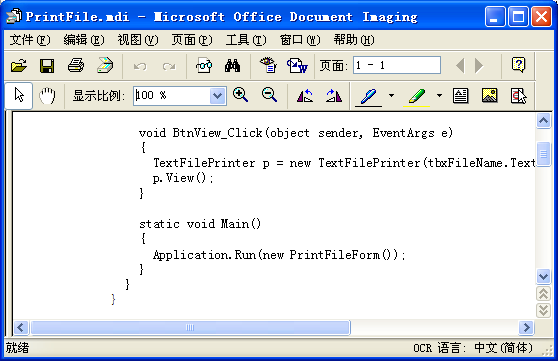
这幅图就是该虚拟打印机在屏幕上的显示的结果。
这里是测试程序的源代码:
// PrintFile.cs - 文件打印程序

// 编译方法: csc /t:winexe PrintFile.cs TextFilePrinter.cs

using System;

using System.Drawing;

using System.Windows.Forms;

using Skyiv.Util;

namespace Skyiv.Ben.Test

{

  class PrintFileForm : Form

  {

    TextBox tbxFileName;

    public PrintFileForm()

    {

      SuspendLayout();

      Button btnFileName = new Button();

      btnFileName.Text = "文件名";

      btnFileName.Location = new Point(, );

      btnFileName.Size = new Size(, );

      btnFileName.Click += new EventHandler(BtnFileName_Click);

      Button btnPrint = new Button();

      btnPrint.Text = "打印";

      btnPrint.Location = new Point(, );

      btnPrint.Size = new Size(, );

      btnPrint.Click += new EventHandler(BtnPrint_Click);

      Button btnView = new Button();

      btnView.Text = "预览";

      btnView.Location = new Point(, );

      btnView.Size = new Size(, );

      btnView.Click += new EventHandler(BtnView_Click);

      tbxFileName = new TextBox();

      tbxFileName.Text = "PrintFile.cs";

      tbxFileName.Location = new Point(, );

      tbxFileName.Size = new Size(, );

      tbxFileName.ReadOnly = true;

      tbxFileName.Anchor = (AnchorStyles.Top | AnchorStyles.Left | AnchorStyles.Right);

      Controls.AddRange(new Control[]{btnFileName, btnPrint, btnView, tbxFileName});

      Text = "文本文件打印程序";

      ClientSize = new Size(, );

      ResumeLayout(false);

    }

    void BtnFileName_Click(object sender, EventArgs e)

    {

      OpenFileDialog dlg = new OpenFileDialog();

      if(dlg.ShowDialog() != DialogResult.OK) return;

      tbxFileName.Text = dlg.FileName;

    }

    void BtnPrint_Click(object sender, EventArgs e)

    {

      TextFilePrinter p = new TextFilePrinter(tbxFileName.Text);

      p.Print();

    }

    void BtnView_Click(object sender, EventArgs e)

    {

      TextFilePrinter p = new TextFilePrinter(tbxFileName.Text);

      p.View();

    }

    static void Main()

    {

      Application.Run(new PrintFileForm());

    }

  }

}
这里是该类的源代码:
using System;

using System.Drawing;

using System.Drawing.Printing;

using System.Windows.Forms;

using System.IO;

using System.Text;

namespace Skyiv.Util

{

  sealed class TextFilePrinter

  {

    string fileName;

    Encoding theEncode;

    Font theFont;

    StreamReader srToPrint;

    int currPage;

    public TextFilePrinter(string fileName)

      : this(fileName, Encoding.GetEncoding("GB18030"), new Font("新宋体", ))

    {

    }

    public TextFilePrinter(string fileName, Encoding theEncode, Font theFont)

    {

      this.fileName = fileName;

      this.theEncode = theEncode;

      this.theFont = theFont;

    }

    public void Print()

    {

      using (srToPrint = new StreamReader(fileName, theEncode))

      {

        PrintDialog dlg = new PrintDialog();

        dlg.Document = GetPrintDocument();

        dlg.AllowSomePages = true;

        dlg.AllowPrintToFile = false;

        if (dlg.ShowDialog() == DialogResult.OK) dlg.Document.Print();

      }

    }

    public void View()

    {

      using (srToPrint = new StreamReader(fileName, theEncode))

      {

        PrintPreviewDialog dlg = new PrintPreviewDialog();

        dlg.Document = GetPrintDocument();

        dlg.ShowDialog();

      }

    }

    PrintDocument GetPrintDocument()

    {

      currPage = ;

      PrintDocument doc = new PrintDocument();

      doc.DocumentName = fileName;

      doc.PrintPage += new PrintPageEventHandler(PrintPageEvent);

      return doc;

    }

    void PrintPageEvent(object sender, PrintPageEventArgs ev)

    {

      string line = null;

      float linesPerPage = ev.MarginBounds.Height / theFont.GetHeight(ev.Graphics);

      bool isSomePages = ev.PageSettings.PrinterSettings.PrintRange == PrintRange.SomePages;

      if (isSomePages)

      {

        while (currPage < ev.PageSettings.PrinterSettings.FromPage)

        {

          for (int count = ; count < linesPerPage; count++)

          {

            line = srToPrint.ReadLine();

            if (line == null) break;

          }

          if (line == null) return;

          currPage++;

        }

        if (currPage > ev.PageSettings.PrinterSettings.ToPage) return;

      }

      for (int count = ; count < linesPerPage; count++)

      {

        line = srToPrint.ReadLine();

        if (line == null) break;

        ev.Graphics.DrawString(line, theFont, Brushes.Black, ev.MarginBounds.Left,

          ev.MarginBounds.Top + (count * theFont.GetHeight(ev.Graphics)), new StringFormat());

      }

      currPage++;

      if (isSomePages && currPage > ev.PageSettings.PrinterSettings.ToPage) return;

      if (line != null) ev.HasMorePages = true;

    }

  }

}
这些程序都相当简当明了,这里就不再解释了。
这个类库有个缺点:当文本文件中的一行不能在打印纸的一行中打印完时,该行的后半部就丢失了。
C# 文本文件打印类库(C#)的更多相关文章
- 文本文件打印类库(C#)
我写了一个打印文本文件的类库,功能包含:打印预览.打印.打印时能够选择打印机.能够指定页码范围. 调用方法很easy: TextFilePrinter p = new TextFilePrinter( ...
- whoosh----索引|搜索文本类库
先了解基本概念和步骤: Quick Start Whoosh是一个索引文本和搜索文本的类库,他可以为你提供搜索文本的服务,比如如果你在创建一个博客的软件,你可以用whoosh为它添加添加一个搜索功能以 ...
- 利用人工智能(Magpie开源库)给一段中文的文本内容进行分类打标签
当下人工智能是真心的火热呀,各种原来传统的业务也都在尝试用人工智能技术来处理,以此来节省人工成本,提高生产效率.既然有这么火的利器,那么我们就先来简单认识下什么是人工智能吧,人工智能是指利用语音识别. ...
- 移除HTML标签(CharacterUtility)类库
最近时间,专案需要,写了一个类库,主要是为了移除HTML标签以及截取前一段文本的类库. 下载地址:http://download.cnblogs.com/insus/Library/Character ...
- 怎样做出通用的pos小票打印程序
POS小票打印机分为热敏和针式俩种. 打印纸的宽度分为58毫米.76毫米和80毫米三种. 打印接口分为:串口.并口.USB和网口(以太网). 热敏打印机速度较快,打印的时候噪音少,针打可以使用多联纸自 ...
- Linux系统文件与目录管理(1)
文件与目录的操作 在Linux系统的文件与目录的管理上,不外乎『显示属性』.『拷贝』.『删除文件』.『移动文件或目录』.『重命名』等常用操作,由于文件与目录的管理在 Linux当中是很重要的,尤其是每 ...
- java-编码解码-流的操作规律
一 编码解码 字符串:String 字节数组:byte[]字符串--编码(getBytes())-->字节数组字节数组--解码(new String(byte[]))-->字符串 publ ...
- Linux 系统常用管理命令(精简笔记)
Linux是一套免费使用和自由传播的类Unix操作系统,下面的笔记是我从鸟菜中摘抄出来的重要命令,并进行了一定的排版,摒弃了一些用不到的乱七八糟的命令,目的是在生产环境中能够快速的定位并查询需要命令的 ...
- Arch系统软件列表
1. 安装统计 2. 安装列表 3. 安装说明 4. 作为依赖项的安装列表 5. 更正 mangaro使用减的方式安装系统.开箱即用的豪华版本,大部分人需要的都有了,同样包括个别用户不需要的,配置方面 ...
随机推荐
- Mysql数据库表排序规则不一致导致联表查询,索引不起作用问题
Mysql数据库表排序规则不一致导致联表查询,索引不起作用问题 表更描述: 将mysql数据库中的worktask表添加ishaspic字段. 具体操作:(1)数据库worktask表新添是否有图片字 ...
- C++中定义比较函数的三种方法
原文地址:http://fusharblog.com/3-ways-to-define-comparison-functions-in-cpp/ C++编程优与Pascal的原因之一是C++中存在ST ...
- [haoi2009]毛毛虫 树形dp
这道题细节处理不少,但要AC不难: 设以i节点为根节点的子树能形成的最大的毛毛虫长度为f[i],则f[i]=max(f[j])+i节点的孩子数: 答案需要f最大和次大的两个子树合并,而且若合并的位置不 ...
- 2-Highcharts 3D图之3D柱状图带可调试倾斜角度
<!DOCTYPE> <html lang='en'> <head> <title>2-Highcharts 3D图之3D柱状图带可调试倾斜角度< ...
- [百度空间] [转]内存屏障 - MemoryBarrier
处理器的乱序和并发执行 目前的高级处理器,为了提高内部逻辑元件的利用率以提高运行速度,通常会采用多指令发射.乱序执行等各种措施.现在普遍使用的一些超标量处理器通常能够在一个指令周期内并发执行多条指令. ...
- Java多线程程序设计详细解析
一.理解多线程 多线程是这样一种机制,它允许在程序中并发执行多个指令流,每个指令流都称为一个线程,彼此间互相独立. 线程又称为轻量级进程,它和进程一样拥有独立的执行控制,由操作系统负责调度,区别在于线 ...
- HDOJ 1220 Cube
CubeTime Limit: 2000/1000 MS (Java/Others) Memory Limit: 65536/32768 K (Java/Others)Total Submiss ...
- Properties的用法
/** * Description:Properties是HashTable的子類,其存儲形式鍵值對. */ import java.util.*; public class PropertysTes ...
- 【mysql5.6】下载安装
每次学新技术最烦的就是安软件了..... 下载的mysql5.6 http://dev.mysql.com/downloads/windows/ 一路默认安装.安装后 1.以管理员身份打开C:\WIN ...
- POJ 1316
#include<iostream> using namespace std; #define NUM 10000 int main(){ }; int i; ; int j; ;i< ...