
Pivot-Header的花式效果
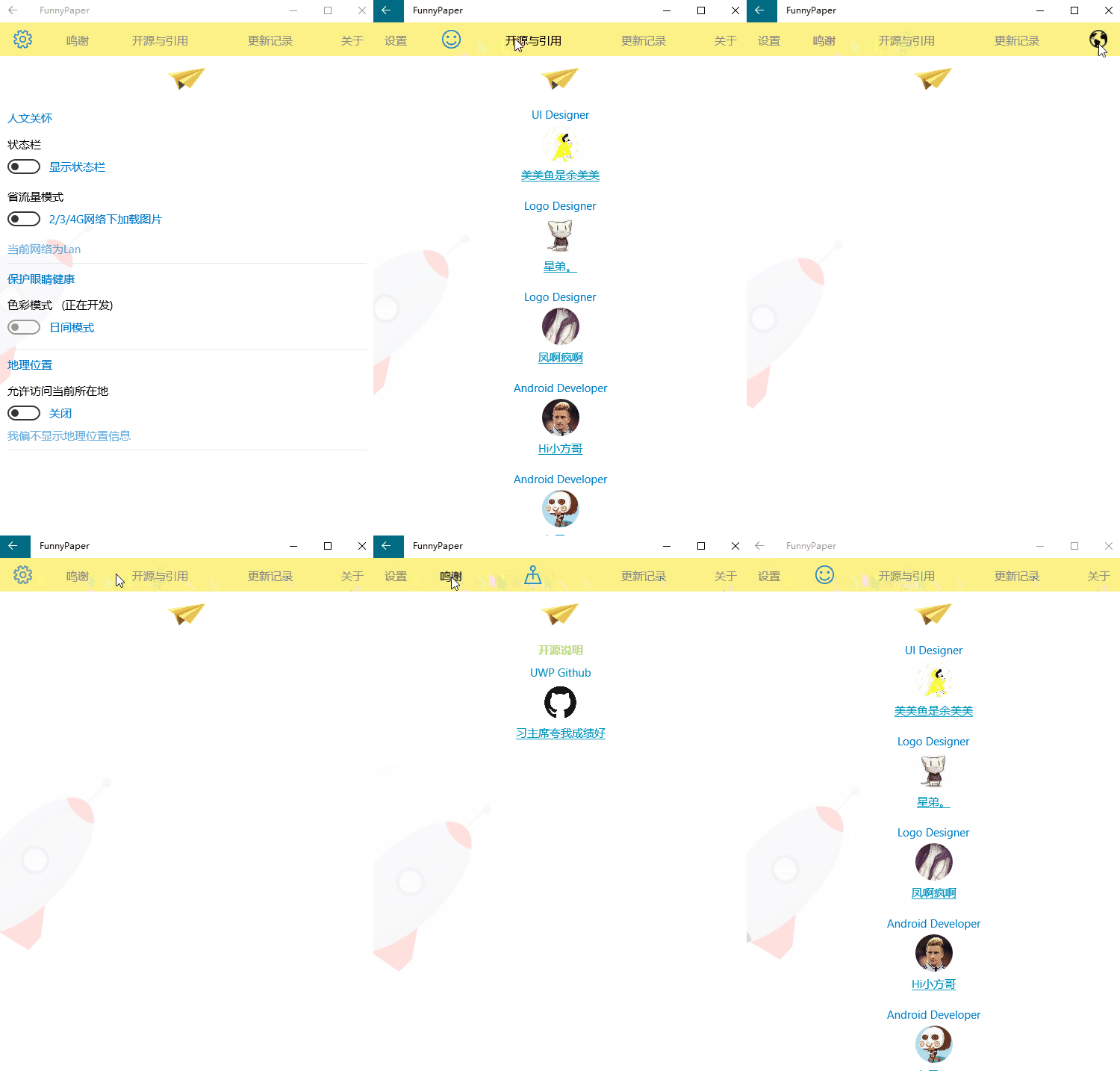
要实现如上图所示的效果分为三步:
1.重写Pivot样式,去掉Pivot的Header或者是直接使用默认的Pivot的样式然后不写Header
2.使用一个ListView或者是横向的StackPanel或者是横向的Grid加上一个Button代替Header的效果(我使用的是Grid,建议使用ListView)
3.在Pivot的SelelctionChanged事件中以及当做Header的Button的Click事件做一个同步
首先Pivot的Item你想放什么就放什么
然后就是代替Header的问题:我用的Grid套了5个Button
 <Grid Grid.Row="" x:Name="TopBar" Background="#FDF187">

             <Grid.ColumnDefinitions>

                 <ColumnDefinition Width="*"/>

                 <ColumnDefinition Width="*"/>

                 <ColumnDefinition Width="2*"/>

                 <ColumnDefinition Width="2*"/>

                 <ColumnDefinition Width="*"/>

             </Grid.ColumnDefinitions>

             <Button x:Name="Header0" Style="{StaticResource GrayLightButton}"

                     Background="Transparent" Grid.Column="" Content="设置" FontFamily="Segoe MDL2 Assets,Segoe UI"

                     FontSize="" HorizontalAlignment="Center" VerticalAlignment="Center" Click="Header0_Click"/>

             <Button x:Name="Header1" Style="{StaticResource GrayLightButton}"

                     Background="Transparent" Grid.Column="" Content="鸣谢" FontFamily="Segoe MDL2 Assets,Segoe UI"

                     FontSize="" HorizontalAlignment="Center" VerticalAlignment="Center" Click="Header1_Click"/>

             <Button x:Name="Header2" Style="{StaticResource GrayLightButton}"

                     Background="Transparent" Grid.Column="" Content="开源与引用" FontFamily="Segoe MDL2 Assets,Segoe UI"

                     FontSize="" HorizontalAlignment="Center" VerticalAlignment="Center" Click="Header2_Click"/>

             <Button x:Name="Header3" Style="{StaticResource GrayLightButton}"

                     Background="Transparent" Grid.Column="" Content="更新记录" FontFamily="Segoe MDL2 Assets,Segoe UI"

                     FontSize="" HorizontalAlignment="Center" VerticalAlignment="Center" Click="Header3_Click"/>

             <Button x:Name="Header4" Style="{StaticResource GrayLightButton}"

                     Background="Transparent" Grid.Column="" Content="关于" FontFamily="Segoe MDL2 Assets,Segoe UI"

                     FontSize="" HorizontalAlignment="Center" VerticalAlignment="Center" Click="Header4_Click"/>

         </Grid>
最后就是在后台代码中实现PivotItem与Grid的同步:
Pivot的SelelctionChanged事件实现Button的文字和颜色切换
private void Pivot_SelectionChanged(object sender, SelectionChangedEventArgs e)
{
Header0.Content = "设置";
Header0.FontSize = ;
Header0.Foreground = new SolidColorBrush(Color.FromArgb(, , , ));
Header1.Content = "鸣谢";
Header1.FontSize = ;
Header1.Foreground = new SolidColorBrush(Color.FromArgb(, , , ));
Header2.Content = "开源与引用";
Header2.FontSize = ;
Header2.Foreground = new SolidColorBrush(Color.FromArgb(, , , ));
Header3.Content = "更新记录";
Header3.FontSize = ;
Header3.Foreground = new SolidColorBrush(Color.FromArgb(, , , ));
Header4.Content = "关于";
Header4.FontSize = ;
Header4.Foreground = new SolidColorBrush(Color.FromArgb(, , , ));
switch (pivot.SelectedIndex)
{
case :
Header0.Content = "";//Segoe MDL2 Assets图标
Header0.FontSize = ;
Header0.Foreground = new SolidColorBrush(Color.FromArgb(, , , ));
break;
case :
Header1.Content = "";//Segoe MDL2 Assets图标
Header1.FontSize = ;
Header1.Foreground = new SolidColorBrush(Color.FromArgb(, , , ));
break;
case :
Header2.Content = "";//Segoe MDL2 Assets图标
Header2.FontSize = ;
Header2.Foreground = new SolidColorBrush(Color.FromArgb(, , , ));
break;
case :
Header3.Content = "";//Segoe MDL2 Assets图标
Header3.FontSize = ;
Header3.Foreground = new SolidColorBrush(Color.FromArgb(, , , ));
break;
case :
Header4.Content = "";//Segoe MDL2 Assets图标
Header4.FontSize = ;
Header4.Foreground = new SolidColorBrush(Color.FromArgb(, , , ));
break;
}
}
然后就是点击Button实现PivotItem的切换
以第一个Button举个栗子,以此类推
         private void Header0_Click(object sender, RoutedEventArgs e)

         {

             pivot.SelectedIndex = ;

             pivot.SelectedItem = pivot.Items[];

         }
就这样就可以实现如上效果了。
还可以做一个扩展:在Grid中Button下面加一扁扁的矩形,然后后台代码处理矩形的隐藏和出现,可以实现更加好看的效果。
抛砖引玉,如有更炫酷的方法请联系我~
Pivot-Header的花式效果的更多相关文章
- win10 uwp 修改Pivot Header 颜色
我们在xaml创建一个Pivot <Pivot Grid.Row="1"> <PivotItem Header="lindexi">&l ...
- android自定义listview实现header悬浮框效果
之前在使用iOS时,看到过一种分组的View,每一组都有一个Header,在上下滑动的时候,会有一个悬浮的Header,这种体验觉得很不错,请看下图: 上图中标红的1,2,3,4四张图中,当向上滑动时 ...
- react better-scroll 编写类似手机chrome的header显示隐藏效果
关键代码 const H = 50; // header的高度 const H2 = H / 2; let cy = 0; class Home extends Component { @observ ...
- Panorama和Pivot控件
Windows Phone提供了Panorama和Pivot这两种控件供用户横向切换导航的方式来显示具有内容比较相关的页面.本文主要对这两个控件进行描述,包括如何使用,以及一些最佳实践. 其中包括如下 ...
- 在后台代码中动态生成pivot项并设置EventTrigger和Action的绑定
最近在做今日头条WP的过程中,遇到需要动态生成Pivot项的问题.第一个版本是把几个频道写死在xaml里了,事件绑定也写在xaml里,每个频道绑定一个ObservableCollection<A ...
- Pivot 和 Global 的一些总结
相信大家一定有在 Unity 編輯器上看到這樣功能 這邊會跟大家說明這項功能有什麼用處 Pivot 意思為,輔助編輯的工具標示,會顯示在第一個選取的物件身上. Center 意思為,輔助 ...
- dotnet 从入门到放弃的 500 篇文章合集
本文是记录我从入门到放弃写的博客 博客包括 C#.WPF.UWP.dotnet core .git 和 VisualStudio 和一些算法,所有博客使用 docx 保存 下载:dotnet 从入门到 ...
- Observable 示例之 Windows Phone 列表内项目逐个加载
在写 Windows phone应用性能优化(一)的时候,在 ListBox 的项加载的时候,添加了一些简单的动画. 其实在 Windows Phone 的应用中使用 Blend 设计动画是很容易的, ...
- 2018-8-10-dotnet-从入门到放弃的-500-篇文章合集
title author date CreateTime categories dotnet 从入门到放弃的 500 篇文章合集 lindexi 2018-08-10 19:16:52 +0800 2 ...
随机推荐
- Java jvm级别native关键词、JNI详解
1.native关键词的引入 再完美的编程语言也有自己的不足之处,当然Java也不例外,Java的不足之处除了体现在运行速度(这点往往被一些其他编程语言使用者所诟病)上要比传统的C++慢许多之外,Ja ...
- 【PHP】最详细PHP从入门到精通(五)——PHP错误处理
PHP从入门到精通 之PHP中的字符串 在创建脚本和 web 应用程序时,错误处理是一个重要的部分.如果您的代码缺少错误检测编码,那么程序看上去很不专业,也为安全风险敞开了大门. 本教程介绍了 PH ...
- eclipse 小方法
- CSS 回流(reflow)
摘录: 1. 回流 回流是指浏览器为了重新渲染部分或者全部的文档而重新计算文档中元素的位置和几何构造的过程. 因为回流可能导致整个dom树的重新构造,所以会影响性能. 2. display:no ...
- HDU 3829 Cat VS Dog / NBUT 1305 Cat VS Dog(二分图最大匹配)
HDU 3829 Cat VS Dog / NBUT 1305 Cat VS Dog(二分图最大匹配) Description The zoo have N cats and M dogs, toda ...
- Android帧动画笔记
创建drawable资源文件,选择animation-list<?xml version="1.0" encoding="utf-8"?><a ...
- MongoDB数据库文档操作
前面的话 本文将详细介绍MongoDB数据库关于文档的增删改查 数据类型 在介绍文档操作之前,首先要了解MongoDB的数据类型 MongoDB支持许多数据类型,包括 1.字符串 - 这是用于存储数据 ...
- 使用ajax方法实现form表单的提交(附源码)
写在前面的话 在使用form表单的时候,一旦点击提交触发submit事件,一般会使得页面跳转,页面间的跳转等行为的控制权往往在后端,后端会控制页面的跳转及数据传递,但是在某些时候不希望页面跳转,或者说 ...
- vue 自定义组件
1.Vue.component('component-test', { props:{}, data:function(){ return{} }, mounted:function(){}, com ...
- Golang 基于libpcap/winpcap的底层网络编程——gopacket安装
Go简介 Go是一种编译型语言,它结合了解释型语言的游刃有余,动态类型语言的开发效率,以及静态类型的安全性. 语法类似C/C++,但是又带有一点python的味道 其中个人认为最出色的特点就是他的包管 ...