
Unity3d—做一个年月日选择器(Scroll Rect拖动效果优化)— 无限滚动 + 锁定元素
效果图
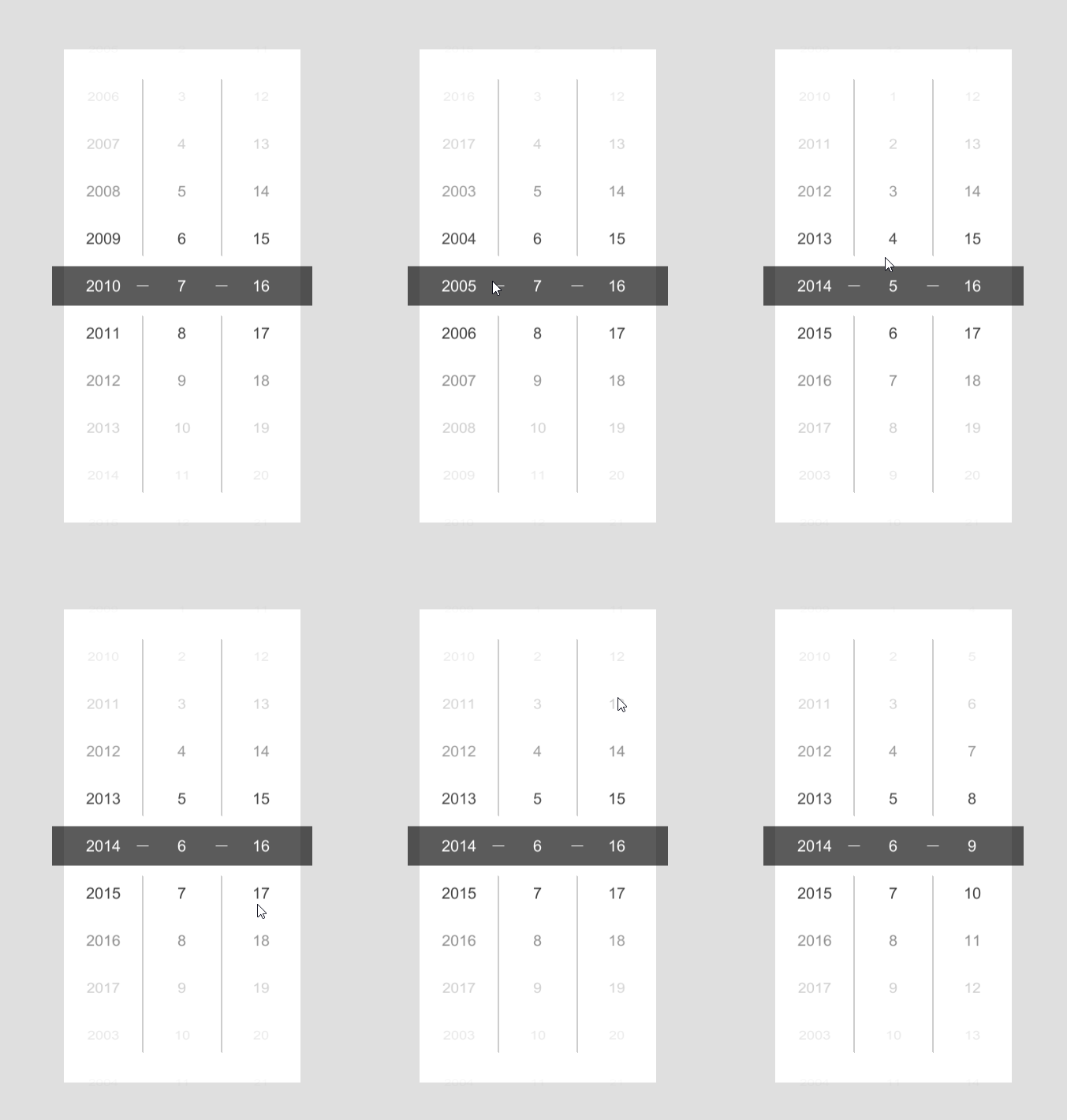
用的是UGUI
我先说思路
通过判断元素的位置信息来改变Hierarchy的顺序 实现无限滚动
改变位置的同时也要不断的调整Content的位置防止乱跳
元素锁定就是直接锁死的元素的移动范围 当只有拖动大于一定程度时才会发生改变
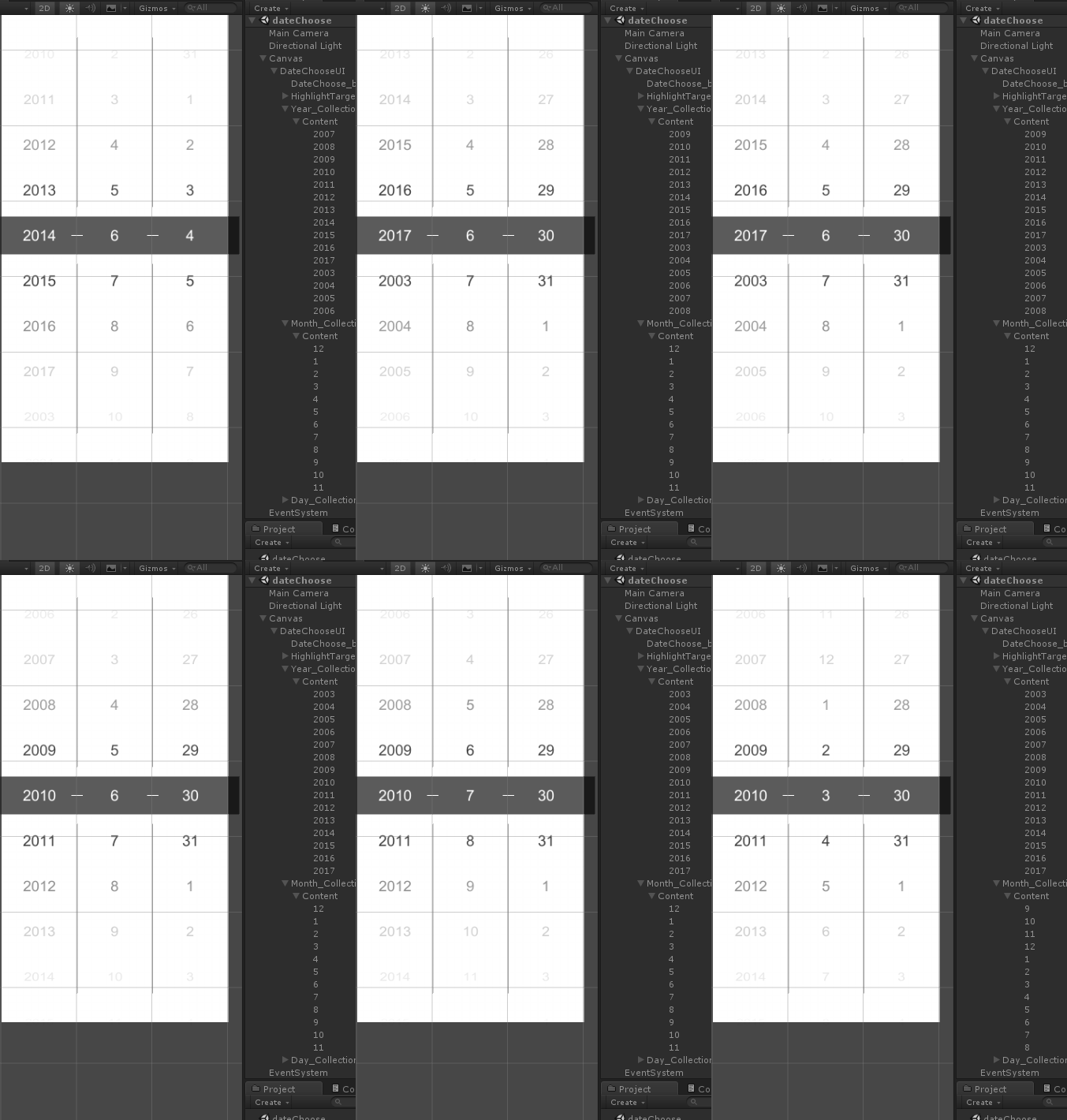
然后是面板设置
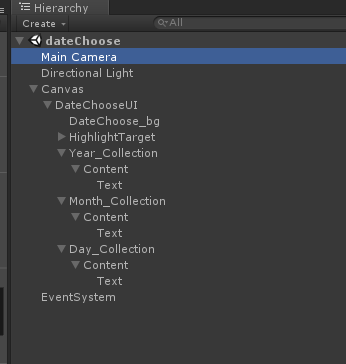
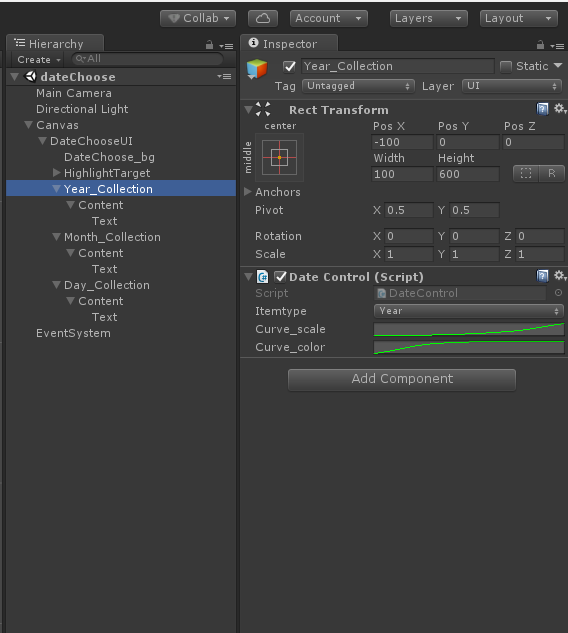
整体结构是这样子的
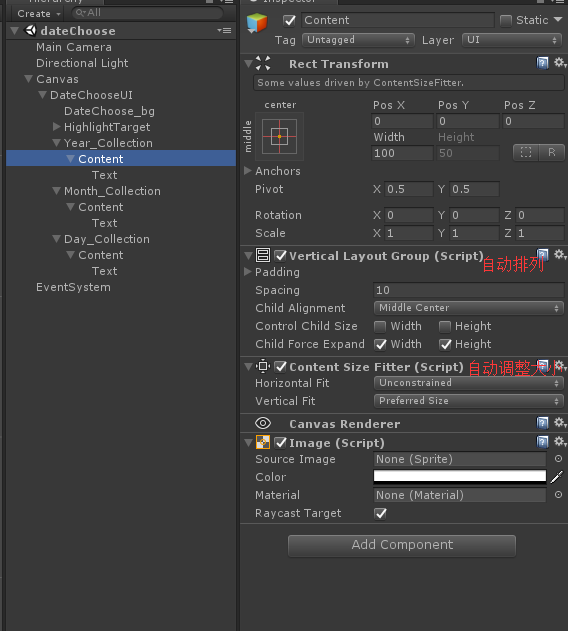
需要注意的是Content需要的两个组件
Content的爸爸只需要一个脚本
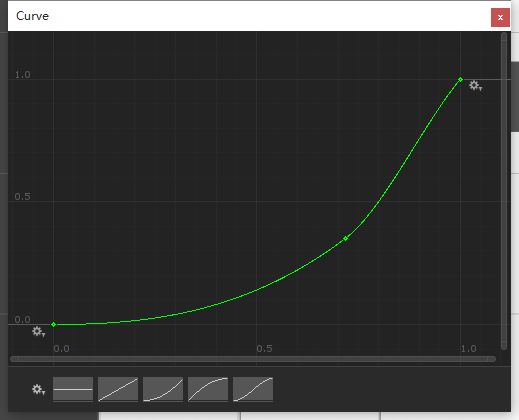
大小改变曲线(大致就行)
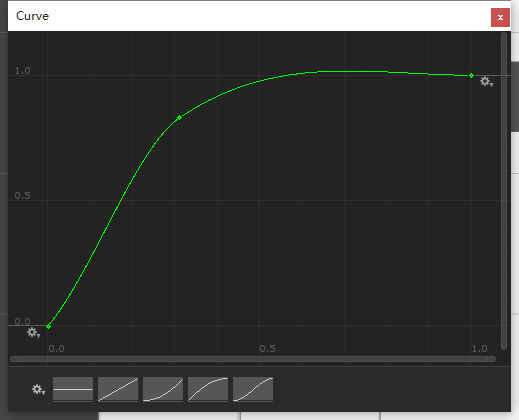
颜色渐变曲线
最后是脚本
 using System;

 using System.Collections;

 using System.Collections.Generic;

 using UnityEngine;

 using UnityEngine.EventSystems;

 using UnityEngine.UI;

 public class DateControl : MonoBehaviour, IBeginDragHandler, IDragHandler, IEndDragHandler {

     public enum ItemType { _year, _month, _day }

     public ItemType _itemtype;

     RectTransform conentRect;

     RectTransform targetRec;

     Vector3 oldDragPos;

     Vector3 newDragPos;

     public AnimationCurve curve_scale;//改变大小曲线

     public AnimationCurve curve_color;//渐变效果曲线

     List<Text> textList = new List<Text>();

     Button testBtn;

     float

         itemHeight,             //子项item的高

         contentParentHeight,    //Content爸爸的高

         itemNum,                //子项数量

         itemHeight_min,         //子项最小发生改变位置

         itemHeight_max,         //子项最大发生改变位置

         conentLimit,            //Conent纠正位置

         conentSpacing;          //子项间隔大小

     float deltaX, deltaY;

     [HideInInspector]

     public static int _year, _month, _day;

     [HideInInspector]

     int dateItemNum;

     Color itemColor_hig = new Color32(, , , );

     void Awake() {

         conentRect = transform.FindChild("Content").GetComponent<RectTransform>();

         targetRec = transform.parent.FindChild("HighlightTarget").GetComponent<RectTransform>();

     }

     void OnEnable() {

         ItemList();

     }

     void Start() {

         switch (_itemtype) {

             case ItemType._year: InstantiateData(, ); break;

             case ItemType._month: InstantiateData(, ); break;

             case ItemType._day: InstantiateData(, ); break;

         }

         itemNum = transform.FindChild("Content").childCount - ;

         contentParentHeight = conentRect.parent.GetComponent<RectTransform>().sizeDelta.y;

         conentSpacing = conentRect.GetComponent<VerticalLayoutGroup>().spacing / ;

         itemHeight = textList[].rectTransform.sizeDelta.y + conentSpacing;

         if (itemNum %  == ) conentLimit = (itemHeight + ) / ;

         else conentLimit = ;

         conentRect.anchoredPosition = new Vector2(conentRect.anchoredPosition.x, conentLimit);

         deltaX = textList[].GetComponent<RectTransform>().sizeDelta.x;

         deltaY = textList[].GetComponent<RectTransform>().sizeDelta.y;

         Invoke("ItemList", 0.05f);

     }

     /// <summary>

     /// 生成子项item

     /// </summary>

     /// <param name="itemNum">子项数量</param>

     /// <param name="dat">子项最大值</param>

     void InstantiateData(int itemNum, int dat) {

         GameObject go;

         Text testObj = conentRect.FindChild("Text").GetComponent<Text>();

         for (int i = dat - itemNum + ; i <= dat; i++) {

             go = Instantiate(testObj.gameObject, conentRect);

             go.GetComponent<Text>().text = i.ToString();

             go.name = i.ToString();

             textList.Add(go.GetComponent<Text>());

             ShowItem(true);

         }

         Destroy(conentRect.FindChild("Text").gameObject);

     }

     /// <summary>

     /// 是增加或减少

     /// </summary>

     /// <param name="isIncreaseOrdecrease"></param>

     void ShowItem(bool isIncreaseOrdecrease) {

         itemHeight_min = -itemHeight;

         if (_itemtype == ItemType._day) itemHeight_max = -itemHeight * itemNum - ;

         else itemHeight_max = -itemHeight * itemNum;

         if (isIncreaseOrdecrease) {

             foreach (Text rectItem in textList) {

                 if (rectItem.GetComponent<RectTransform>().anchoredPosition.y > itemHeight_min) {

                     print("+");

                     rectItem.transform.SetSiblingIndex((int)itemNum);

                 }

             }

             print(itemHeight_min);

         } else {

             foreach (Text rectItem in textList) {

                 if (rectItem.GetComponent<RectTransform>().anchoredPosition.y < itemHeight_max) {

                     print("-");

                     rectItem.transform.SetSiblingIndex();

                 }

             }

             print(itemHeight_max);

         }

     }

     /// <summary>

     /// 渐变效果,改变大小,高亮显示

     /// </summary>

     void ItemList() {

         foreach (Text item in textList) {

             float indexA = Mathf.Abs(item.GetComponent<RectTransform>().position.y - targetRec.position.y);

             float indexSc_scale = Mathf.Abs(curve_scale.Evaluate(indexA / contentParentHeight));

             float indexSc_color = Mathf.Abs(curve_color.Evaluate(indexA / contentParentHeight));

             if (indexA < ) {

                 item.color = itemColor_hig;

                 switch (_itemtype) {

                     case ItemType._year: _year = int.Parse(item.text); break;

                     case ItemType._month: _month = int.Parse(item.text); break;

                     case ItemType._day: _day = int.Parse(item.text); break;

                 }

             } else item.color = new Color(, , ,  - indexSc_color);

             item.GetComponent<RectTransform>().localScale = new Vector3( - indexSc_scale,  - indexSc_scale * ,  - indexSc_scale);

             //item.GetComponent<RectTransform>().sizeDelta = new Vector2(deltaX - (deltaX * indexSc), deltaY - (deltaY * indexSc));

         }

     }

     /// <summary>

     /// 获取int类型日期,并转换为指定格式

     /// </summary>

     /// <returns></returns>

     public static string GetDateInfo() { return _year + "-" + _month + "-" + _day; }

     /// <summary>

     /// 纠正Conent位置

     /// </summary>

     void UpdateEx() {

         if (conentRect.anchoredPosition.y > conentLimit) {

             ShowItem(true);

             conentRect.anchoredPosition = new Vector2(conentRect.anchoredPosition.x, conentRect.anchoredPosition.y - itemHeight);

         }

         if (conentRect.anchoredPosition.y < conentLimit) {

             ShowItem(false);

             conentRect.anchoredPosition = new Vector2(conentRect.anchoredPosition.x, conentRect.anchoredPosition.y + itemHeight);

         }

     }

     /// <summary>

     /// 获取拖拽信息并改变Conent位置

     /// </summary>

     /// <param name="eventData"></param>

     void SetDraggedPosition(PointerEventData eventData) {

         if (RectTransformUtility.ScreenPointToWorldPointInRectangle(conentRect, eventData.position, eventData.pressEventCamera, out newDragPos)) {

             newDragPos = eventData.position;

             if (Mathf.Abs(newDragPos.y - oldDragPos.y) >= itemHeight) {

                 if (newDragPos.y > oldDragPos.y) {

                     conentRect.anchoredPosition = new Vector2(conentRect.anchoredPosition.x, conentRect.anchoredPosition.y + itemHeight);

                     oldDragPos += new Vector3(, itemHeight, );

                     ItemList();

                 } else {

                     conentRect.anchoredPosition = new Vector2(conentRect.anchoredPosition.x, conentRect.anchoredPosition.y - itemHeight);

                     oldDragPos -= new Vector3(, itemHeight, );

                     ItemList();

                 }

             }

         }

     }

     /// <summary>

     /// 当开始拖拽

     /// </summary>

     /// <param name="eventData"></param>

     public void OnBeginDrag(PointerEventData eventData) {

         oldDragPos = eventData.position;

     }

     public void OnDrag(PointerEventData eventData) {

         SetDraggedPosition(eventData);

         UpdateEx();

     }

     public void OnEndDrag(PointerEventData eventData) {

         SetDraggedPosition(eventData);

         UpdateEx();

     }

 }
照着来的话基本没什么问题
因为赶时间所以很多地方写的简单粗暴请谅解
如果调整元素大小或者间隙大小 需要改变itemHeight_min 和 itemHeight_max 的值
他们分别为
itemHeight_min
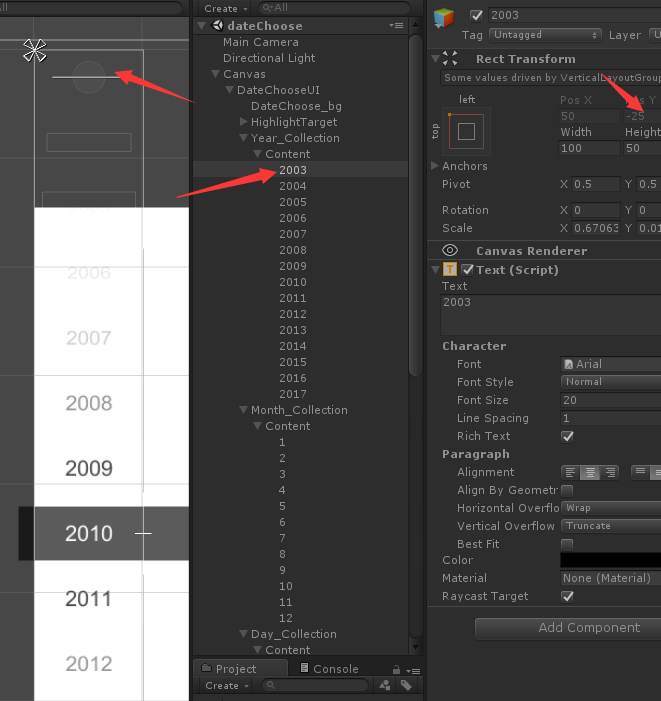
itemHeight_max
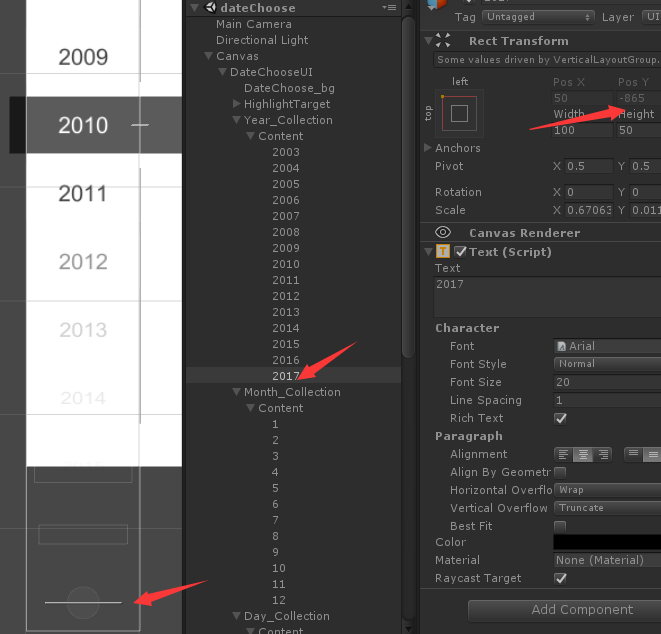
也就是元素的最顶层和最底层的Y值
以上就是年月日选择器的具体步骤
Unity3d—做一个年月日选择器(Scroll Rect拖动效果优化)— 无限滚动 + 锁定元素的更多相关文章
- 用Django做一个省份选择器
做一个省份选择器 使用django做后端, mysql数据库, jQuery 列出结构主要的文件, 其它配置比较简单 models.py 因为所有数据的结构基本一致, 把所有省份, 市和区全部存储一张 ...
- 关于longPressGesture做一个长按连加的效果(原创)
关于longPressGesture做一个长按连加的效果 解释一下什么意思呢?就是一个button长按之后其数字的一直累加.朋友们可能看起来很简单,无非就是加一个长按手势(longPressGestu ...
- WPF 自己做一个颜色选择器
程序开发过程中,经常会遇到需要支持动态配置主题颜色的问题,通常,一个程序会有多种不同的颜色风格主题供选 有时候,更细致一些的地方,会需要支持自己配置颜色,这样我们就需要一个颜色选择器啦,下面是我自己开 ...
- 做一个360度看车的效果玩玩(web)
前几天在 Lexus 官网看到有这样的一个效果:http://www.lexus.com.cn/models/es/360 于是顺手打开控制台看了下他们是怎么做的,发现使用的技术还是比较简单的,通过背 ...
- css3加js做一个简单的3D行星运转效果
前几天在园子里看到一篇关于CSS3D行星运转的文章,原文在这里,感觉这个效果也太酷炫了,于是自己也就心血来潮的来尝试的做了一下.因为懒得去用什么插件了,于是就原生的JS写,效果有点粗超,还有一些地方处 ...
- 做一个阅读管理APP
背景 由于最近在看的书有点多,所以一直想找一个能够管理阅读进度的书(鄙人记性不是很好,两天不看就忘了)可惜Android平台上一直找不到合适的APP: 有没有读书进度管理的网站或软件啊? 有没有记录读 ...
- Infinite Scroll - jQuery & WP 无限滚动插件
无限滚动(Infinite Scroll)也称为自动分页.滚动分页和无限分页.常用在图片.文章或其它列表形式的网页中,用来在滚动网页的时候自动加载下一页的内容.Infinite Scroll 这款 ...
- 用Jquery做一个时间日期选择器
今天我们就用Jquery做一个时间日期选择器,当打开网页时,文本框里面显示的是当前的日期,点击文本框可以出现年.月.日的下拉菜单,并且可以选择,会根据年份的选择判断是否是闰年,从而改变二月的天数,闰年 ...
- 【跟我一起学Unity3D】做一个2D的90坦克大战之AI系统
对于AI,我的初始想法非常easy,首先他要能动,而且是在地图里面动. 懂得撞墙后转弯,然后懂得射击,其它的没有了,基于这个想法,我首先创建了一个MyTank类,用于管理玩家的坦克的活动,然后创建AI ...
随机推荐
- [ext4]07 磁盘布局 - 块/inode分配策略
Ext4系统从设计上就认为数据局部性是文件系统的文件系统的一个理想品质. 在机械硬盘上,相关联的数据存放在相近的blocks上,可以使得在访问数据时减少磁头驱动器的移动距离,从而加快IO访问. 在SS ...
- lightoj1281快速幂+数学知识
https://vjudge.net/contest/70017#problem/E 后半部分快速幂就能求出来,要注意03lld不然001是输出错误为1.前半部分用log10() 对于给定的一个数n, ...
- 音频特征提取——librosa工具包使用
作者:桂. 时间:2017-05-06 11:20:47 链接:http://www.cnblogs.com/xingshansi/p/6816308.html 前言 本文主要记录librosa工具 ...
- Spring Cloud 学习笔记(一)——入门、特征、配置
[TOC] 0 放在前面 0.1 参考文档 http://cloud.spring.io/spring-cloud-static/Brixton.SR7/ https://springcloud.cc ...
- Unity SLua 如何调用Unity中C#方法
1.原理 就是通常在Lua框架中所说的,开放一个C#的web接口,或者叫做在Slua框架中注册函数. 2.作用 在Lua中调用C#中的方法,这个是在做热更新中很常用的一种方法,无论是slua,还是lu ...
- selenium+python
最近在学习selenium自动化测试,但是一直遇到一个问题,总是打不开指定的网址,今天突然成功了, 主要原因是因为selenium版本太低的缘故,所以只需要在终端输入:pip install -U s ...
- eclipse配置相关
1,配置gradle,操作都正确,就是报gradle dependencies Uninitialized或者gradle dependencies怎么都不出现,此时的解决方案是在外部cmd下执行gr ...
- Python基本语法--数据结构与运算符
# -*- coding: utf-8 -*- print "Hello, Python!"; print ("Hello, Python!"); #行和缩进 ...
- OC—Setter、Getter
一.本篇以Setter和Getter 来进行成员变量的赋值. 二.Setter 与 Getter 1. 命名规范 为对象中的某个实例变量赋值的方法称为修改方法,用来修改对象的状态这类修改方法称为set ...
- java基础---->hashMap的简单分析(一)
HashMap是一种十分常用的数据结构对象,可以保存键值对.它在项目中用的比较多,今天我们就来学习一下关于它的知识. HashMap的简单使用 一.hashMap的put和get方法 Map<S ...