
ABP集成WIF实现单点登录
ABP集成WIF实现单点登录
参考
ojlovecd写了三篇关于WIF文章。
使用WIF的一些开源示例。
https://github.com/obhita/PROCenter/tree/master/ProCenter.LocalSTS/STS
https://github.com/primaryobjects/SingleSignOn
https://github.com/shinpou/Windows-Identity-Foundation-Tutorial/tree/master/Learning%20SSO
WSFederation and SAML library for Java based web applications
https://github.com/auth10/auth10-java
WIF配置过程中的一些问题
1、WIF授权
MVC项目中使用[Authorize],注解方式鉴权。
webform项目中使用配置文件方式鉴权。
<system.web>

     <authorization>

        <deny users="?" />

      </authorization>

</system.web>
2、密钥集合不存在
Exception: System.Security.Cryptography.CryptographicException
Message: 密钥集不存在。
解决方法:
C:\Documents and Settings\All Users\Application Data\Microsoft\Crypto\RSA\MachineKeys这个目录授权的时候出错了,一直报这个错误
“将安全信息应用到以下对象时发生错误 拒绝访问”,为ereryone用户分配完全控制权限,密钥集的错误就解决了。
3、部署时,出现
用户代码未处理 System.Security.Cryptography.CryptographicException 错误解决方法
解决方法:
IIS 应用程序池--选中你网站的所配置的应用程序池--右键 选择 “高级配置” --将“加载用户配置文件” 设置为True 。
4、thumbprint值
配置文件中<add thumbprint="xxxxxxxxxx" name="sts" />的值,使用IIS服务器证书中的指纹值。复制粘贴会带一些特殊字符,还是手敲吧!
在ABP中集成
User.Identity && User.Identity.IsAuthenticated并不依赖Session。
Web.config文件设置或者浏览器请求时候删除ASP.NET_SessionId只要保留.AspNet.ApplicationCookie存在请求身份一样能通过验证。
<system.web>
<sessionState mode="Off" />
</system.web>
RP站
RP OnAuthentication鉴权:
        protected override void OnAuthentication(AuthenticationContext filterContext)

        {

            if (filterContext.HttpContext == null)

                throw new ArgumentNullException("httpContext");

            IPrincipal user = filterContext.HttpContext.User;

            bool isFederation = false;

            bool isApp = false;

            IEnumerable<ClaimsIdentity> cl = ((ClaimsPrincipal)User).Identities;

            if (cl != null && cl.Count() > )

            {

                foreach (var item in cl)

                {

                    if (item.AuthenticationType.Equals("Federation") && item.IsAuthenticated)

                    {

                        isFederation = true;

                    }

                    else if (item.AuthenticationType.Equals("ApplicationCookie") && item.IsAuthenticated)

                    {

                        isApp = true;

                        if (item.Claims.Where(p => p.Type == "SSO-Login").Count() == )

                            isFederation = true;

                    }

                }

            }

            if (!isFederation || !isApp)

                filterContext.Result = new RedirectResult("/Account/Login");

            if (!user.Identity.IsAuthenticated || !AbpSession.UserId.HasValue)

                filterContext.Result = new RedirectResult("/Account/Login");

        }
RP登录:
        public async Task<ActionResult> Login(string userNameOrEmailAddress = "", string returnUrl = "", string successMessage = "")

        {

            bool isFederation = false, isApp = false;

            var identities = ((ClaimsPrincipal)User).Identities;

            if(identities!=null && identities.Count() > )

            {

                var federation = identities.Where(p => p.AuthenticationType == "Federation").FirstOrDefault();

                if (federation != null)

                    isFederation = federation.IsAuthenticated;

                var applicationCookie = identities.Where(p => p.AuthenticationType == "ApplicationCookie").FirstOrDefault();

                if (applicationCookie != null)

                    isApp = applicationCookie.IsAuthenticated;

            }

            if (!isFederation)

            {

                FederatedAuthentication.WSFederationAuthenticationModule.SignIn(null);

                return null;

            }

            //创建本地abpsession

            if (!isApp)

            {

                string name = string.Empty, role = string.Empty;

                ClaimsIdentity claims = User.Identity as ClaimsIdentity;

                if (claims != null)

                {

                    var list = claims.Claims.ToList();

                    if (list != null && list.Count > )

                    {

                        var cName = claims.Claims.Where(p => p.Type == ClaimTypes.Name).FirstOrDefault();

                        if (cName != null)

                            name = cName.Value;

                        var cRole = claims.Claims.Where(p => p.Type == ClaimTypes.Role).FirstOrDefault();

                        if (cRole != null)

                            role = cRole.Value;

                        var cEmail = claims.Claims.Where(p => p.Type == ClaimTypes.Email).FirstOrDefault();

                        if (cEmail != null)

                            name = cEmail.Value;

                        if (name.Contains("\\"))

                            name = name.Replace("\\", "");

                        if (string.IsNullOrEmpty(role))

                            role = ConfigHelper.GetAppSetting("UserRole");

                    }

                }

                var user = _userIdentity.GetUserByName(name);

                if (user == null)

                {

                    CreateOrUpdateUserInput input = new CreateOrUpdateUserInput();

                    input.User = new UserEditDto();

                    input.User.Name = name;

                    input.User.Surname = input.User.Name;

                    input.User.UserName = input.User.Name;

                    input.User.Password = Infrastructure.Authorization.Users.User.CreateRandomPassword();

                    input.User.EmailAddress = name + "@xx.com";

                    input.AssignedRoleNames = new string[] { role };

                    user = await _userIdentity.CreateUserAsync(input);

                }

                await SignInAsync(user);

            }

            return RedirectToAction("Index", "Home");

        }
RP 登出:
        public ActionResult Logout()

        {

            IEnumerable<ClaimsIdentity> cis = ((ClaimsPrincipal)User).Identities;

            if (cis != null && cis.Count() > )

            {

                foreach (var item in cis)

                {

                    if (item.AuthenticationType.Equals("Federation"))

                    {

                        var authModule = FederatedAuthentication.WSFederationAuthenticationModule;

                        WSFederationAuthenticationModule.FederatedSignOut(new Uri(authModule.Issuer + "/Account/Logout"), new Uri(authModule.Reply));

                    }

                    else if (item.AuthenticationType.Equals("ApplicationCookie"))

                    {

                        _authenticationManager.SignOutAll();

                    }

                }

            }

            return RedirectToAction("Login");

        }
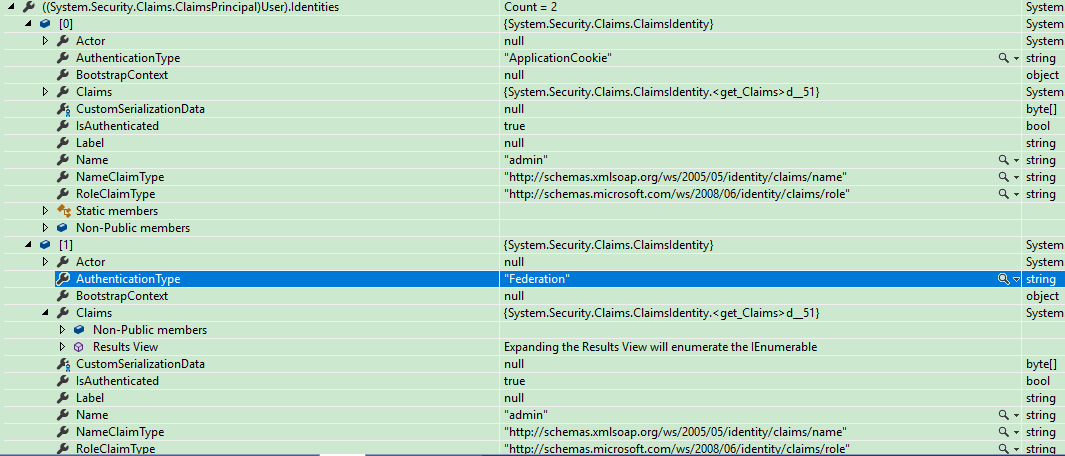
STS认证成功后回调RP(host:www.test.com)会传入如下信息
将信息.AspNet.ApplicationCookie、FedAuth、FedAuth1复制后使用其它浏览器写入这三个Cookie刷新可正常验证用户信息。
FedAuth、FedAuth1是WIF STS给的认证信息。

如果访问的子站点(www.test.com)没有通过STS将认证(FedAuth、FedAuth1)信息回写到子站点的Cookie中,此时使用其它已认证的子站点(FedAuth、FedAuth1)信息模拟到www.test.com站点是无法识别的。
WIF认证服务端:
CustomSecurityTokenService.cs
        protected override ClaimsIdentity GetOutputClaimsIdentity(ClaimsPrincipal principal, RequestSecurityToken request, Scope scope)

        {

            //WIF返回Claims中信息,里面了包含自己想要的声明

            ClaimsIdentity outgoingIdentity = new ClaimsIdentity();

            var claims = principal.Claims.ToList();

            foreach(var item in claims)

            {

                if(item.Type != "AspNet.Identity.SecurityStamp" && item.Type != ClaimTypes.NameIdentifier)

                {

                    outgoingIdentity.AddClaim(new Claim(item.Type, item.Value));

                }

            }

            SingleSignOnManager.RegisterRP(scope.AppliesToAddress);

            return outgoingIdentity;

        }
将Claims信息调用RP站管道信息带入到RP站:
        [UnitOfWork]

        public ActionResult Index()

        {

            FederatedPassiveSecurityTokenServiceOperations.ProcessRequest(

                System.Web.HttpContext.Current.Request,

                User as ClaimsPrincipal,

                CustomSecurityTokenServiceConfiguration.Current.CreateSecurityTokenService(),

                System.Web.HttpContext.Current.Response);

            var loginInfo = AsyncHelper.RunSync(() => _sessionAppService.GetCurrentLoginInformations());

            return View(loginInfo);

        }
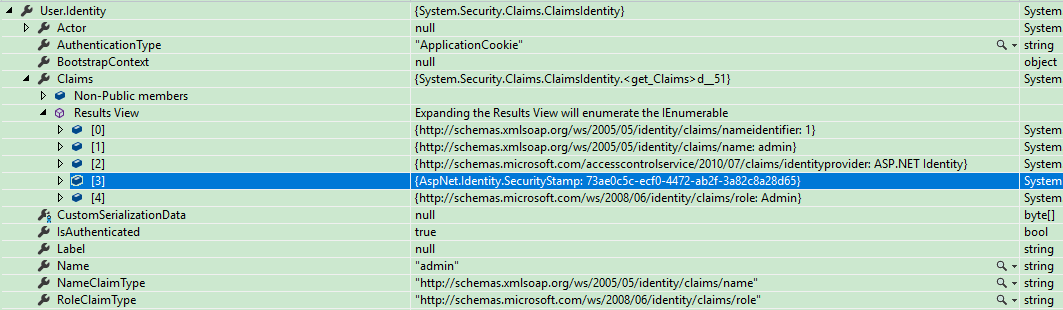
服务端登录的用户信息。
ABP集成WIF实现单点登录的更多相关文章
- abp集成IdentityServer4和单点登录
在abp开发的系统后,需要使用这个系统作单点登录,及其他项目登录账号依靠abp开发的系统.在官方文档上只找到作为登录服务Identity Server Integration,但是host项目却无法使 ...
- 使用WIF实现单点登录Part III —— 正式实战 -摘自网络
经过前两篇文章,估计大家对WIF已经有比较充分的认识了,估计大家在经过了枯燥的理论以后,肯定是摩拳擦掌赶紧付诸于行动了.没办法,咱们程序员就是这个毛病.那好吧,我也不那么多废话了,直接进入正题吧. 我 ...
- 使用WIF实现单点登录Part II —— Windows Identity Foundation基本原理
在上一篇文章中,我们已经使用WIF构建了一个基于MVC4的简单的身份验证程序,在这篇文章里,我们将探讨一下到底什么是WIF,以及它的工作原理.然后在下一篇文章开始,我们将实际操作,实现单点登录功能. ...
- 使用WIF实现单点登录Part II —— Windows Identity Foundation基本原理 -摘自网络
在上一篇文章中,我们已经使用WIF构建了一个基于MVC4的简单的身份验证程序,在这篇文章里,我们将探讨一下到底什么是WIF,以及它的工作原理.然后在下一篇文章开始,我们将实际操作,实现单点登录功能. ...
- 使用WIF实现单点登录Part I——Windows Identity Foundation介绍及环境搭建 -摘自网络
上个月有一个星期的时间都在研究asp.net mvc统一身份验证及单点登录的实现.经过了一番的探索,最终决定使用微软的Windows Identity Foundation.但是这东西用的人貌似不多, ...
- 使用WIF实现单点登录Part IV —— 常见问题
InvalidOperationException: ID1073: 尝试使用 ProtectedData API 解密 Cookie 时出现 CryptographicException (有关详细 ...
- 使用WIF实现单点登录Part III —— 正式实战
我们接下来的demo将包括以下的工程: SiteA —— 基于.net framework 4.5的MVC 4程序,使用WIF 4.5的SDK,第一个RP SiteB —— 基于.net framew ...
- spring security集成cas实现单点登录
spring security集成cas 0.配置本地ssl连接 操作记录如下: =====================1.创建证书文件thekeystore ,并导出为thekeystore.c ...
- Spring Security 集成CAS实现单点登录
参考:http://elim.iteye.com/blog/2270446 众所周知,Cas是对单点登录的一种实现.本文假设读者已经了解了Cas的原理及其使用,这些内容在本文将不会讨论.Cas有Ser ...
随机推荐
- 第30章:MongoDB-索引--地理信息索引
①地理信息索引 地理信息索引分为两类:2D平面索引,另外就是2DSphere球面索引.在2D索引里面基本上能够保存的信息都是坐标,而且坐标保存的就是经纬度坐标. 范例:定义一个商铺的集合 db.sho ...
- UVaLive 4628 Jack's socks (贪心)
题意:给定一个无向图,让你把所有点的和它的任意一个相邻点匹配起来,问你是方案是不是唯一,如果是,则输出方案. 析:贪心,很容易知道,如果一个点的度数是 1,那么它只有一个相邻点,这样的话,我们就可以把 ...
- shell字符串分割截取和转换总结
一:字符串的截取 假定有定义变量VAR=mm/aa/bb/dd 1.获取字符串长度:echo "${#VAR}",即输出11: 2.非贪婪模式删除左边的,保留右边的:echo &q ...
- JS如何创建对象
js创建对象的方法很多,以下分别介绍
- Ng第十二课:支持向量机(Support Vector Machines)(二)
7 核函数(Kernels) 最初在“线性回归”中提出的问题,特征是房子的面积x,结果y是房子的价格.假设从样本点的分布中看到x和y符合3次曲线,那么我们希望使用x的三次多项式来逼近这些样本点.那么首 ...
- MATLAB二分法函数求根
function xc = bisect(f,a,b,tol) ind = b-a; while ind > tol xx = (a+b)/; b = xx; else a = xx; end ...
- (最长不降子序列)最少拦截系统 -- hdu -- 1257
http://acm.hdu.edu.cn/showproblem.php?pid=1257 最少拦截系统 Time Limit: 2000/1000 MS (Java/Others) Memo ...
- Beta阶段第五篇Scrum冲刺博客-Day4
1.站立式会议 提供当天站立式会议照片一张 2.每个人的工作 (有work item 的ID),并将其记录在码云项目管理中: 昨天已完成的工作. 张晨晨:目标增加单词收藏功能 郭琪容:学习收藏功能的实 ...
- WP8整合Bing应用,生活有求Bing
在Windows 8中,Bing应用一直随系统而存在,提供多样化的资讯.它们是我的“御用”App,因为可以根据我的使用习惯对应用进行定制. 在Windows Phone 8系统第三次官方更新之后, B ...
- bootstrap4相关文档
本节课我们主要学习一下Bootstrap的两个个组件功能:输入框组件和导航导航条组件. 一.输入框组件 文本输入框就是可以在<input>元素前后加上文字或按钮,可以实现对表单控件的扩 展 ...