
Magento2 php商城在windows10上安装
magento2
下载地址:https://github.com/magento/magento2/archive/develop.zip
参考地址: 版本要求 这个magento2 要选择好php的版本 下载综合版服务器时看好这个服务器支持的具体版本 下边的网站有具体的版本要求页,在此就不列出了
https://www.magentochina.org/blog/download-install-magento.html
XAMPP 版本上边明确提示里边带有php的版本.我选的是支持 php 7.0.6的版本
下载地址, https://jaist.dl.sourceforge.net/project/xampp/XAMPP%20Windows/7.0.6/xampp-win32-7.0.6-0-VC14-installer.exe
如果php 版本没选择好,则进行 安装时会出现版本不正确的提示,导致失败
第二:报错2:打开安装页提示
Vendor autoload is not found. Please run 'composer install' under application root directory.

没安装composer 是php的依赖项下载服务吧.个人理解,总之需要安装. 运行xammpp 里边的 命令行 cd 进入htdoc目录 composer install
结果又报错:
# composer install

Loading composer repositories with package information

Installing dependencies (including require-dev) from lock file

Your requirements could not be resolved to an installable set of packages.

  Problem

    - The requested PHP extension ext-intl * is missing from your system. Install or enable PHP's intl extension.

  Problem

    - The requested PHP extension ext-xsl * is missing from your system. Install or enable PHP's xsl extension.
这是提示,php.ini 没有把上边要求的注释掉的内容打开,这两个intl 和xsl 都有相关的dll 库在php的ext 目录下.
extension=php_intl.dll
extension=php_xsl.dll
在重新运行composer install 问题解决
# composer install

Loading composer repositories with package information

Updating dependencies (including require-dev)

Package operations:  installs,  updates,  removals

  - Installing magento/magento-composer-installer (0.1.): Downloading (%)

  - Installing zendframework/zend-stdlib (2.7.): Downloading (%)

  - Installing zendframework/zend-hydrator (1.1.): Downloading (%)

  - Installing psr/container (1.0.): Downloading (%)

  - Installing container-interop/container-interop (1.2.): Downloading (%)

  - Installing zendframework/zend-validator (2.9.): Downloading (%)

  - Installing zendframework/zend-escaper (2.5.): Downloading (%)

  - Installing zendframework/zend-uri (2.5.): Downloading (%)

  - Installing zendframework/zend-eventmanager (2.6.): Downloading (%)

  - Installing zendframework/zend-code (3.1.): Downloading (%)

  - Installing zendframework/zend-server (2.7.): Downloading (%)

  - Installing zendframework/zend-soap (2.6.): Downloading (%)

  - Installing zendframework/zend-math (2.7.): Downloading (%)

  - Installing zendframework/zend-crypt (2.6.): Downloading (%)

  - Installing zendframework/zend-console (2.6.): Downloading (%)

  - Installing zendframework/zend-filter (2.7.): Downloading (%)

  - Installing zendframework/zend-inputfilter (2.7.): Downloading (%)

  - Installing zendframework/zend-form (2.10.): Downloading (%)

  - Installing zendframework/zend-servicemanager (2.7.): Downloading (%)

  - Installing zendframework/zend-mvc (2.6.): Downloading (%)

  - Installing zendframework/zend-text (2.6.): Downloading (%)

  - Installing zendframework/zend-di (2.6.): Downloading (%)

  - Installing zendframework/zend-loader (2.5.): Downloading (%)

  - Installing zendframework/zend-http (2.6.): Downloading (%)

  - Installing zendframework/zend-db (2.8.): Downloading (%)

  - Installing paragonie/random_compat (v2.0.10): Downloading (%)

  - Installing zendframework/zend-captcha (2.7.): Downloading (%)

  - Installing colinmollenhour/credis (1.6): Downloading (%)

  - Installing colinmollenhour/php-redis-session-abstract (v1.2.2): Downloading (%)

  - Installing symfony/polyfill-mbstring (v1.4.0): Downloading (%)

  - Installing psr/log (1.0.): Downloading (%)

  - Installing symfony/debug (v3.0.9): Downloading (%)

  - Installing symfony/console (v2.8.22): Downloading (%)

  - Installing colinmollenhour/cache-backend-redis (1.10.): Downloading (%)

  - Installing colinmollenhour/cache-backend-file (1.4): Downloading (%)

  - Installing pelago/emogrifier (v0.1.1): Downloading (%)

  - Installing tubalmartin/cssmin (v3.0.0): Downloading (%)

  - Installing braintree/braintree_php (3.22.): Downloading (%)

  - Installing tedivm/jshrink (v1.1.0): Downloading (%)

  - Installing symfony/process (v2.8.22): Downloading (%)

  - Installing symfony/finder (v3.3.2): Downloading (%)

  - Installing symfony/filesystem (v3.3.2): Downloading (%)

  - Installing seld/phar-utils (1.0.): Downloading (%)

  - Installing seld/jsonlint (1.6.): Downloading (%)

  - Installing seld/cli-prompt (1.0.): Downloading (%)

  - Installing justinrainbow/json-schema (5.2.): Downloading (%)

  - Installing composer/spdx-licenses (1.1.): Downloading (%)

  - Installing composer/semver (1.4.): Downloading (%)

  - Installing composer/ca-bundle (1.0.): Downloading (%)

  - Installing composer/composer (1.4.): Downloading (%)

  - Installing magento/composer (1.2.): Downloading (%)

  - Installing ramsey/uuid (3.6.): Downloading (%)

  - Installing symfony/yaml (v2.8.22): Downloading (%)

  - Installing sebastian/version (1.0.): Downloading (%)

  - Installing sebastian/recursion-context (1.0.): Downloading (%)

  - Installing sebastian/exporter (1.2.): Downloading (%)

  - Installing sebastian/environment (1.3.): Downloading (%)

  - Installing sebastian/diff (1.4.): Downloading (%)

  - Installing sebastian/comparator (1.2.): Downloading (%)

  - Installing doctrine/instantiator (1.0.): Downloading (%)

  - Installing phpunit/php-text-template (1.2.): Downloading (%)

  - Installing phpunit/phpunit-mock-objects (2.3.): Downloading (%)

  - Installing phpunit/php-timer (1.0.): Downloading (%)

  - Installing phpunit/php-file-iterator (1.3.): Downloading (%)

  - Installing phpunit/php-token-stream (1.4.): Downloading (%)

  - Installing phpunit/php-code-coverage (2.2.): Downloading (%)

  - Installing phpunit/phpunit (4.1.): Downloading (%)
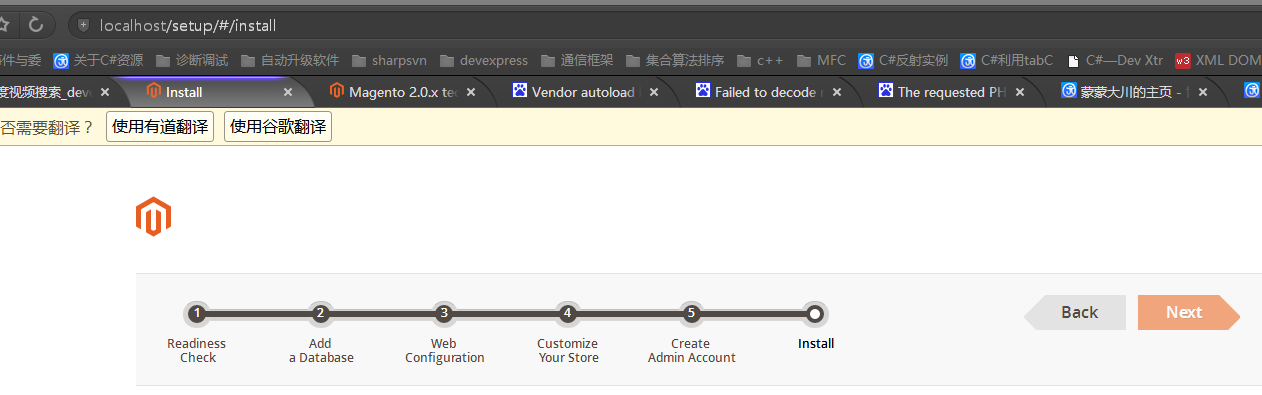
成功:
Magento2 php商城在windows10上安装的更多相关文章
- 在windows10上安装caffe和tensorflow
最近在Windows10上安装了caffe和tensorflow,折腾了好久.在此记录一下. 安装caffe的过程已在另一篇博客中进行了记录,在此不再赘述.而tensorflow也是非常简单的,也不再 ...
- 在Ubuntu16.04.4和Windows10上安装jdk
在Ubuntu16.04.4和Windows10上安装jdk 一.在Ubuntu16.04.4上安装jdk 1.下载jdk安装包 首先我们在oracle官网上下载jdk-8u161-linu ...
- windows10上安装mysql详细图文教程
在windows10上安装mysql详细图文教程 这篇文章主要介绍了在windows10上安装mysql详细图文教程,本文介绍的非常详细,具有参考借鉴价值,感兴趣的朋友一起看看吧 环境:windw ...
- Windows10上安装Linux子系统(WSL2,Ubuntu),配合Windows Terminal使用
Linux 的 Windows 子系统可让开发人员按原样运行 GNU/Linux 环境 - 包括大多数命令行工具.实用工具和应用程序 - 且不会产生传统虚拟机或双启动设置开销. WSL 说白了安装Li ...
- Windows10上安装EDEM2.7
这次我们来安装EDEM2.7. 安装软件来自于互联网,本文仅作学习交流之用,工程应用请购买正版. 1 软件准备 从网上找到EDEM2.7安装包,解压后里面包含两个文件,如下图所示. 2 软件安装 鼠标 ...
- windows10上安装 .NET Framework 3.5
在安装一些软件时,需要 .NET Framework3.5.按照windows给的提示下载不了.在官方网站上给了解决方案: 运行 DISM 工具 从屏幕右边缘向中间轻扫,然后点击“搜索”.(如果使用的 ...
- windows10上安装mysql(详细步骤)
2016年09月06日 08:09:34 阅读数:46198 环境:windwos 10(1511) 64bit.mysql 5.7.14 时间:2016年9月5日 一.下载mysql 1. 在浏览器 ...
- MPI 在Windows10 上安装,使用VS2013编译生成可执行程序
原文地址:http://www.cnblogs.com/leijin0211/p/6851789.html 参考博客: http://www.cnblogs.com/shixiangwan/p/662 ...
- Windows10上安装Keras 和 TensorFlow-GPU
安装环境: Windows 10 64bit GPU: GeForce gt 720 Python: 3.5.3 CUDA: 8 首先下载Anaconda3的Win10 64bit版,安装Python ...
随机推荐
- 电子表格Excel
电子表格Excel 本次课内容一.认识下Excel1.扩展名 office2007以前,扩展名是xls office2007,扩展名是xlsx 2.文件扩展名是xls或xlsx的文件,excel电子表 ...
- 法门扫地僧总结vue面试题(部分来源网络)
Front-End 前端开发工程师面试宝典! (本文部分有转载,不定期更新!) 前言(README.md) 本仓库是我整理的前端常见面试题,大部分由我整理,其中个别部分参考 ...
- 学Android开发的人可以去的几个网站
学Android开发的人可以去的几个网站 1.<IT蓝豹>Android开源项目分享平台国内非常好的一个Android开发者分享站,分享android所有特效,每天都有最新的Android ...
- C#整数的三种强制类型转换int、Convert.ToInt32()、int.Parse()的区别
.int适合简单数据类型之间的转换,C#的默认整型是int32(不支持bool型): .int.Parse(string sParameter)是个构造函数,参数类型只支持string类型: .Con ...
- 学JS的心路历程 - PixiJS -基础(三)
今天我们来试着移动图片吧! 首先,一样先把图片放到PIXI的stage中: let app = new PIXI.Application({ width: 800, height: 600, back ...
- Ubuntu中更改所有子文件和子目录所有者权限
转自:http://www.linuxidc.com/Linux/2015-03/114695.htm Ubuntu中有两个修改命令可以用到,「change mode」&「change own ...
- SPSS-聚类分析
聚类分析(层次聚类分析(Q型聚类和R型聚类).快速聚类分析) 聚类分析的实质:是建立一种分类方法,它能够将一批样本数据按照他们在性质上的亲密程度在没有先验知识的情况下自动进行分类.这里所说的类就是一个 ...
- vue 高级属性父组件provide向子组件发送数据,子组件通过inject接收数据
以前父组件向子组件中传值是通过props传值,子组件不能更改父组件中的值,但是可以通过从父组件中获取的值定义给自己的data值,这里父组件可以通过provide向子组件传递自己组件中的data值,子组 ...
- requests库的文档--快速上手
快速上手 迫不及待了吗?本页内容为如何入门 Requests 提供了很好的指引.其假设你已经安装了 Requests.如果还没有,去安装一节看看吧. 首先,确认一下: Requests 已安装 Req ...
- asp.net之发送邮件1
/// <summary> ///发邮件给用户 /// </summary> /// <param name="userEmail">用户的邮件 ...