
批量导出access某表内容到word文档
一、需求:
需要将表中每一条记录中的某些内容导出在一个word文档中,并将这些文档保存在指定文件夹目录下
二、界面,简单设计如下:
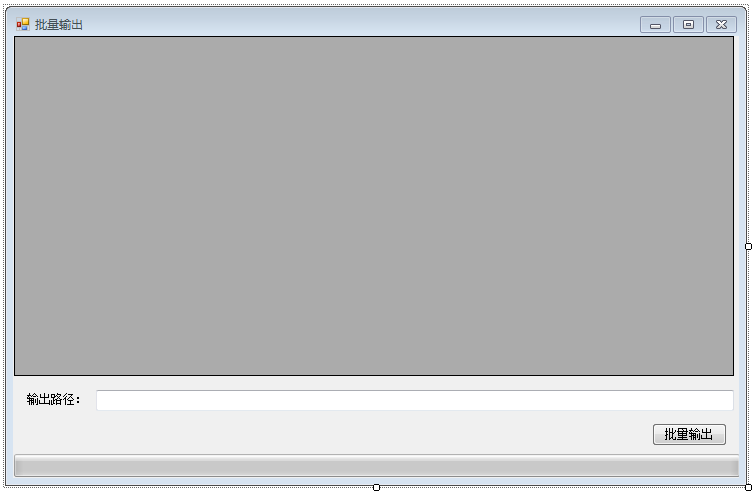
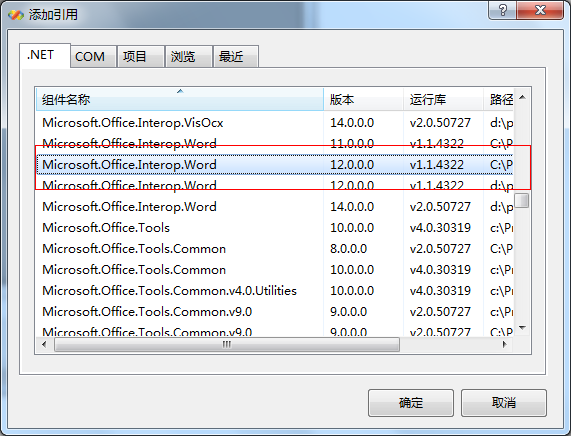
三、添加office相关引用
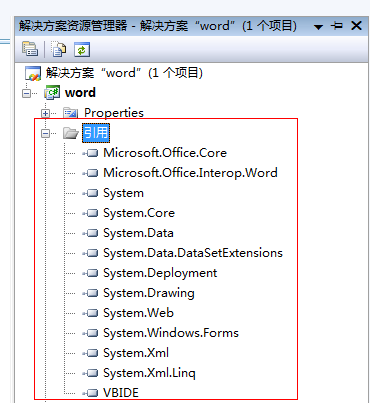
添加后可在解决方案资源管理器中看到:
四、添加form1中的引用
using System.Data.OleDb;
using System.Data.SqlClient;
using System.IO;
using Microsoft.Office.Core;
using Word=Microsoft.Office.Interop.Word;
using System.Reflection;
五、窗体Form1中代码如下:
using System;

using System.Collections.Generic;

using System.ComponentModel;

using System.Data;

using System.Drawing;

using System.Linq;

using System.Text;

using System.Windows.Forms;

using System.Data.OleDb;

using System.Data.SqlClient;

using System.IO;

using Microsoft.Office.Core;

using Word=Microsoft.Office.Interop.Word;

using System.Reflection;

using System.Threading;//线程需用,进程中

namespace word

{

    delegate void ShowProgressDelegate(int totalStep, int currentStep); //定义委托,异步调用

    public partial class Form1 : Form

    {

        public Form1()

        {

            InitializeComponent();

        }

        public string filepath = "D:\\zjy\\其他\\NCTDCBJYQ04.mdb";   //数据库所在位置设置

        public string path;    //输出路径

        private void Form1_Load(object sender, EventArgs e)

        {

            string sqlstr = "select OBJECTID,CBFBM,CBFMC from CBF";

            //string sqlstr = "select * from CBF";

            DataSet ds = AccessDAO.getDataSetFromAccessTable(sqlstr, filepath);

            this.dataGridView1.DataSource = ds.Tables[].DefaultView;

            dataGridView1.AllowUserToAddRows = false;

        }

        private void textBox1_MouseClick(object sender, MouseEventArgs e)//输出路径设置

        {

            FolderBrowserDialog dilog = new FolderBrowserDialog();

            dilog.Description = "请选择文件夹";

            if (dilog.ShowDialog() == DialogResult.OK || dilog.ShowDialog() == DialogResult.Yes)

            {

                path = dilog.SelectedPath;

                this.textBox1.Text = path;

            }

        }

        object pathword;                      //声明文件路径变量

        private void button2_Click(object sender, EventArgs e)    //批量输出

        {

            ParameterizedThreadStart start = new ParameterizedThreadStart(SetProgress);

            Thread progressThread = new Thread(start);

            progressThread.IsBackground = true;//标记为后台进程,在窗口退出时,正常退出

            progressThread.Start();

        }

         /// <summary>

        /// 刷新进度条

        /// </summary>

        /// <param name="totalStep"></param>

        /// <param name="currentStep"></param>

        void ShowProgress(int totalStep, int currentStep)

        {

            this.progressBar1.Maximum = totalStep;

            this.progressBar1.Value = currentStep;

            if (this.progressBar1.Value *  / progressBar1.Maximum != )

            {

                this.label2.Text = "当前输出进度为:" + this.progressBar1.Value *  / progressBar1.Maximum + "%" + "    请耐心等待:)";

            }

            else if (this.progressBar1.Value *  / progressBar1.Maximum == )

            {

                this.label2.Text = "输出结束!";

            }

        }

        /// <summary>

        /// 设置当前进度

        /// </summary>

        /// <param name="state"></param>

        void SetProgress(object state)

        {

            if (this.textBox1.Text == "")

            {

                MessageBox.Show("请选择文件输出路径", "提示");

            }

            else

            {

                for (int i = ; i < this.dataGridView1.Rows.Count; i++)   //遍历获取table中需要的值,并分别创建word文档

                {

                    #region 打开进度条

                    Thread.Sleep();

                    object[] objs = new object[] { this.dataGridView1.RowCount, i+ };

                    //异步调用

                    this.Invoke(new ShowProgressDelegate(ShowProgress), objs);

                    #endregion

                    #region 获取word中需要添加的内容

                    string dm = this.dataGridView1.Rows[i].Cells[].Value.ToString();//承包方编码

                    string mc = this.dataGridView1.Rows[i].Cells[].Value.ToString();//承包方名称

                    #endregion

                    #region 创建word文档,并将内容写入word,并保存起来

                    //初始化变量

                    object Nothing = Missing.Value;                       //COM调用时用于占位

                    object format = Word.WdSaveFormat.wdFormatDocument;   //Word文档的保存格式

                    Word.ApplicationClass wordApp = new Word.ApplicationClass();              //声明一个wordAPP对象

                    Word.Document worddoc = wordApp.Documents.Add(ref Nothing, ref Nothing, ref Nothing, ref Nothing);//新建一个word对象

                    //向文档中写入内容

                    string wordstr = "承包方代码:" + dm + "\n" + "承包方名称:" + mc;

                    worddoc.Paragraphs.Last.Range.Text = wordstr;

                    //保存文档

                    pathword = path + "\\" + dm;   //设置文件保存路径

                    worddoc.SaveAs(ref pathword, ref format, ref Nothing, ref Nothing,

                        ref Nothing, ref Nothing, ref Nothing, ref Nothing, ref Nothing,

                        ref Nothing, ref Nothing, ref Nothing, ref Nothing,

                        ref Nothing, ref Nothing, ref Nothing);

                    //关闭文档

                    worddoc.Close(ref Nothing, ref Nothing, ref Nothing);  //关闭worddoc文档对象

                    wordApp.Quit(ref Nothing, ref Nothing, ref Nothing);   //关闭wordApp组对象

                    #endregion

                }

                MessageBox.Show("文档创建成功!","提示");

            }

        }

    }

}
六、读取数据库中表需要的数据库类AccessDAO.cs代码如下:
using System;

using System.Collections.Generic;

using System.Linq;

using System.Text;

using System.Data;

using System.Data.OleDb;

using System.Data.SqlClient;

using System.Text.RegularExpressions; //正则表达式引用所需

namespace word

{

    //access的数据访问接口

    class AccessDAO

    {

        public static class Property

        {

            public static string accessFilePath = "d:\\nCTDCBJYQ04DataSet.mdb";

            //若放入主程序,则可如下设置

            //one mainFrm = (one)this.Owner;

            //string prjName = mainFrm.laPrj.Text;

            //string prjPath = mainFrm.laFile_Path.Text;

            // public static string accessFilePath = prjPath + "\\矢量数据\\" + prjName + ".mdb";

        }

        //从access数据库获取数据

        //dataFilePath指定access文件的路径

        //sql指定数据库的查询语句

        //DataSet为查询返回的数据集

        public static DataSet getDataSetFromAccessTable(string sql, string dataFilePath)

        {

            // 连接数据库

            OleDbConnection connct = new OleDbConnection();

            string oleDB = "Provider=Microsoft.Jet.OLEDB.4.0;Data Source=" + dataFilePath;

            connct.ConnectionString = oleDB;

            //创建命令

            OleDbCommand command = new OleDbCommand(sql, connct);

            //打开数据库

            connct.Open();

            //执行命令

            DataSet dataSet = new DataSet();

            OleDbDataAdapter dataAdapter = new OleDbDataAdapter(command);

            dataAdapter.Fill(dataSet);

            // 关闭连接

            connct.Close();

            return dataSet;

        }

        //更新或者插入数据到access数据库

        //dataFilePath指定access文件的路径

        //sql指定数据库的更新或者插入语句

        //返回值int表示此次更新影响的行数

        public static int updateAccessTable(string sql, string dataFilePath)

        {

            // 连接数据库

            OleDbConnection connct = new OleDbConnection();

            string oleDB = "Provider=Microsoft.Jet.OLEDB.4.0;Data Source=" + dataFilePath;

            connct.ConnectionString = oleDB;

            //打开数据库

            connct.Open();

            //执行命令

            OleDbCommand myCommand = new OleDbCommand(sql, connct);

            int res = myCommand.ExecuteNonQuery();

            // 关闭连接

            connct.Close();

            return res;

        }

        //更新或者插入数据到access数据库

        //dataFilePath指定access文件的路径

        //command指定操作(更新或者插入)数据库的命令

        //返回值int表示此次更新影响的行数

        public static int updateAccessTable(OleDbCommand command, string dataFilePath)

        {

            // 连接数据库

            OleDbConnection connct = new OleDbConnection();

            string oleDB = "Provider=Microsoft.Jet.OLEDB.4.0;Data Source=" + dataFilePath;

            connct.ConnectionString = oleDB;

            //打开数据库

            connct.Open();

            //执行命令

            //OleDbCommand myCommand = new OleDbCommand(sql, connct);

            command.Connection = connct;

            int res = command.ExecuteNonQuery();

            // 关闭连接

            connct.Close();

            return res;

        }

        public bool ckDigital_Num(string digitalItem, int digitalNum)                //正则检查是否为数字,且位数一定

        {

            bool isDigital_Num = false;

            Regex reGen = new Regex(@"^\d{" + digitalNum.ToString("F0") + "}$");                 //正则表达式,n位数字

            if (reGen.IsMatch(digitalItem))

                isDigital_Num = true;

            return isDigital_Num;

        }

    }

}
ok了,至此就可完成批量导出成word文档了
批量导出access某表内容到word文档的更多相关文章
- Java 导出数据库表信息生成Word文档
一.前言 最近看见朋友写了一个导出数据库生成word文档的业务,感觉很有意思,研究了一下,这里也拿出来与大家分享一波~ 先来看看生成的word文档效果吧 下面我们也来一起简单的实现吧 二.Java 导 ...
- C#导出文本内容到word文档源码
将做工程过程中较好的代码片段珍藏起来,下面的代码内容是关于C#导出文本内容到word文档的代码,希望能对小伙伴们也有好处.<%@ Page Language="C#" Aut ...
- 用注册表清除Office Word文档杀手病毒
不久前,笔者打开word文件时遇到了一件离奇的怪事,常用的Word文件怎么也打不开,总是出现提示框:"版本冲突:无法打开高版本的word文档".再仔细查看,文件夹里竟然有两个名字一 ...
- java通过freemarker导出包含富文本图片的word文档
废话不多说,进入正题! 本文重点在于:对富文本图片的导出(基础的freemarker+word模板导出这里不做详细解说哈) 参考文章:http://www.cnblogs.com/liaofeifig ...
- 孤荷凌寒自学python第七十九天开始写Python的第一个爬虫9并使用pydocx模块将结果写入word文档
孤荷凌寒自学python第七十九天开始写Python的第一个爬虫9 (完整学习过程屏幕记录视频地址在文末) 今天在上一天的基础上继续完成对我的第一个代码程序的书写. 到今天终于完成了对docx模块针对 ...
- Java生成word文档
itext-rtf-2.1.7.jar,下载地址:http://download.csdn.net/detail/xuxu198899223/7717727 itext-2.1.7.jar 下载地址: ...
- c#word文档输出
在工作中有时需要把内容用word文档展示出来 在写代码前要引用word的dll Microsoft.Office.Interop.Word“ sing System; using System.Col ...
- C# 导出word文档及批量导出word文档(4)
接下来是批量导出word文档和批量打印word文件,批量导出word文档和批量打印word文件的思路差不多,只是批量打印不用打包压缩文件,而是把所有文件合成一个word,然后通过js来调用 ...
- C# 导出word文档及批量导出word文档(3)
在初始化WordHelper时,要获取模板的相对路径.获取文档的相对路径多个地方要用到,比如批量导出时要先保存文件到指定路径下,再压缩打包下载,所以专门写了个关于获取文档的相对路径的类. #regio ...
随机推荐
- 浅谈WEB跨域的实现(前端向)
同源策略/SOP(Same origin policy)是一种约定,它是浏览器最核心也最基本的安全功能,如果缺少了同源策略,浏览器很容易受到XSS.CSFR等攻击(可以参考我的这篇文章). SOP要求 ...
- 三种观察者模式的C#实现
系列主题:基于消息的软件架构模型演变 说起观察者模式,估计在园子里能搜出一堆来.所以写这篇博客的目的有两点: 观察者模式是写松耦合代码的必备模式,重要性不言而喻,抛开代码层面,许多组件都采用了Publ ...
- Sql Server数据库备份和恢复:原理篇
本文与您探讨为什么Sql Server有完整备份.差异备份和事务日志备份三种备份方式,以及为什么数据库又有简单模式.完整模式和大容量日志模式这三种恢复模式.本文内容适用于2005以上所有版本的Sql ...
- 跟vczh看实例学编译原理——二:实现Tinymoe的词法分析
文章中引用的代码均来自https://github.com/vczh/tinymoe. 实现Tinymoe的第一步自然是一个词法分析器.词法分析其所作的事情很简单,就是把一份代码分割成若干个tok ...
- 文件上传之Apache commons fileupload使用
后台servlet代码: File file1 = null,file2=null; String description1 = null,description2 = ...
- padding标准盒模型和怪异盒子模型
我们都知道padding是为块级元素设置内边距 但是在使用过程中,我们却会遇到一些问题.padding的标准盒模型和怪异盒模型 padding盒子模型 我们通过demo来讲这个问题,用文字干讲第一没意 ...
- xamarin UWP证书问题汇总
打算开发一个软件使用rsa加密的东西,所以有用到数字证书这块,最近遇到些问题, 问题一:使用如下代码添加数字证书后,在证书管理器的当前用户和本地计算机下都找不到这张证书. using (X509Sto ...
- Android开发学习之路-Android Studio真神器!
放假之后电脑配置升级就开始用Android Studio(下面简称AS)了,那个酸爽真的不是一般的啊,这里开一篇博客来记录下AS里面各种酷炫的功能,有更好玩的,大家不要吝啬,评论告诉我吧! 最近And ...
- Maven Plugins常用配置
官方文档:http://maven.apache.org/plugins/index.html# 这里主要介绍compiler插件的配置.http://maven.apache.org/plugins ...
- iOS开发之SQLite-C语言接口规范(一)——Ready And Open Your SQLite
为什么要搞一搞SQLite的C语言接口规范呢? 因为在做iOS开发中难免会遇到操作数据库的情况,你可以使用第三方的FMDB等,或者使用CoreData.但我们还是有必要去搞清楚如何去使用SQLite的 ...