
入门篇-contrail-command(对接openstack)All-In-One
基础环境
系统:
centos7.6(3.10.0-957) 64G内存 500G磁盘
关闭防火墙
systemctl disable firewalld
关闭selinux
sed -i 's/SELINUX=enforcing/SELINUX=disabled/' /etc/selinux/config
安装依赖包
yum install python-devel gcc -y
设置主机名
hostnamectl set-hostname opcontroller
hosts文件
[root@bogon ~]# cat /etc/hosts
127.0.0.1 localhost localhost.localdomain localhost4 localhost4.localdomain4
::1 localhost localhost.localdomain localhost6 localhost6.localdomain6
10.49.252.200 ctfdeploy
10.49.252.201 opopenstack
登录ctfdeploy节点进行部署
安装docker
[root@ctfdeploy ~]yum install -y yum-utils device-mapper-persistent-data lvm2
[root@ctfdeploy ~]yum-config-manager --add-repo https://download.docker.com/linux/centos/docker-ce.repo
[root@ctfdeploy ~]yum install -y docker-ce-18.06.0.ce
[root@ctfdeploy ~]systemctl start docker && systemctl enable docker
拉取contrail-command-deployer镜像
[root@ctfdeploy ~]docker login hub.juniper.net --username xxxx --password xxxxxx
[root@ctfdeploy ~]docker pull hub.juniper.net/contrail/contrail-command-deployer:1909.30
下面参数默认就可以一会web ui 可以更改
[root@ctfdeploy ~]# egrep -v "^#|^$|*#" command_servers1910.yml
 [root@ctfdeploy ~]# egrep -v "^#|^$|*#" command_servers1910.yml

 ---

 command_servers:

     server1:

         ip: 10.49.252.200

         connection: ssh

         ssh_user: root

         ssh_pass: abc@123

         sudo_pass: abc@123

         ntpserver: ntp1.aliyun.com

         registry_insecure: false

         container_registry: hub.juniper.net/contrail

         container_name: contrail-command

         container_tag: 1910.23

         container_registry_username: xxxxxxxxxxxxxxxxx

         container_registry_password: yyyyyyyyyyyyyyy

         config_dir: /etc/contrail

         contrail_config:

             database:

                 type: postgres

                 dialect: postgres

                 host: localhost

                 user: root

                 password: contrail123

                 name: contrail_test

                 max_open_conn: 100

                 connection_retries: 10

                 retry_period: 3s

             log_level: debug

             cache:

               enabled: true

               timeout: 10s

               max_history: 100000

               rdbms:

                 enabled: true

             server:

               enabled: true

               read_timeout: 10

               write_timeout: 5

               log_api: true

               address: ":9091"

               tls:

                   enabled: true

                   key_file: /usr/share/contrail/ssl/cs-key.pem

                   cert_file: /usr/share/contrail/ssl/cs-cert.pem

               enable_grpc: false

               static_files:

                   /: /usr/share/contrail/public

               notify_etcd: false

               enable_vnc_replication: true

             keystone:

                 local: true

                 assignment:

                     type: static

                     data:

                       domains:

                         default: &default

                           id: default

                           name: default

                       projects:

                         admin: &admin

                           id: admin

                           name: admin

                           domain: *default

                         demo: &demo

                           id: demo

                           name: demo

                           domain: *default

                       users:

                         admin:

                           id: admin

                           name: Admin

                           domain: *default

                           password: contrail123

                           email: admin@juniper.nets

                           roles:

                           - id: admin

                             name: admin

                             project: *admin

                         bob:

                           id: bob

                           name: Bob

                           domain: *default

                           password: bob_password

                           email: bob@juniper.net

                           roles:

                           - id: Member

                             name: Member

                             project: *demo

                 store:

                     type: memory

                     expire: 36000

                 insecure: true

                 authurl: https://localhost:9091/keystone/v3

             insecure: true

             etcd:

               endpoints:

                 - localhost:2379

               username: ""

               password: ""

               path: contrail

             watcher:

               enabled: false

               storage: json

             client:

               id: admin

               password: contrail123

               project_name: admin

               domain_id: default

               schema_root: /

               endpoint: https://localhost:9091

             compilation:

               enabled: false

               plugin_directory: 'etc/plugins/'

               number_of_workers: 4

               max_job_queue_len: 5

               msg_queue_lock_time: 30

               msg_index_string: 'MsgIndex'

               read_lock_string: "MsgReadLock"

               master_election: true

               plugin:

                   handlers:

                       create_handler: 'HandleCreate'

                       update_handler: 'HandleUpdate'

                       delete_handler: 'HandleDelete'

             agent:

               enabled: true

               backend: file

               watcher: polling

               log_level: debug
启动contrail-command-deployer容器(用来部署contrail和openstack、K8S、OpenShift)
[root@ctfdeploy ~]# docker run -td --net host -v /root/ctf.yml:/command_servers.yml --privileged --name contrail_command_deployer hub.juniper.net/contrail/contrail-command-deployer:1910.23
6bacc0541e5b37e445c4f0a48bac9a25340c4592a4fa1df1919579e15bde1770
登录Contrail-command web UI
https://10.49.252.200:9091/ 用户名admin 密码contrail123
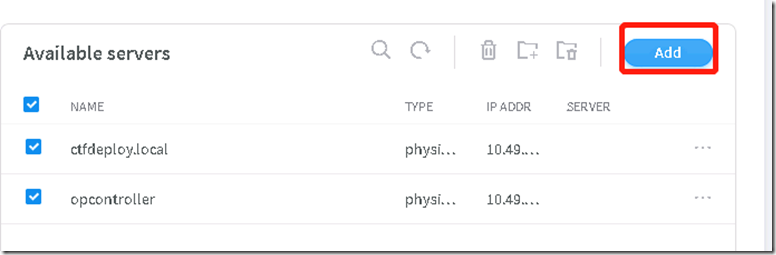
1、添加机器
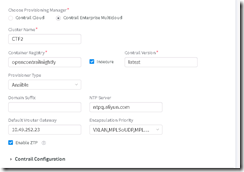
2、配置仓库源等信息
3、选择Control Nodes节点
选择opcontroller
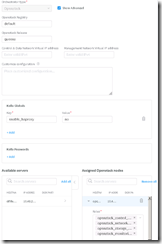
4、配置openstack选项
5、选择计算节点
选择opcontroller
下一步直到完成,部署开始了
查看部署日志(节点)
[root@ctfdeploy ~]# docker logs -f contrail_command_deployer
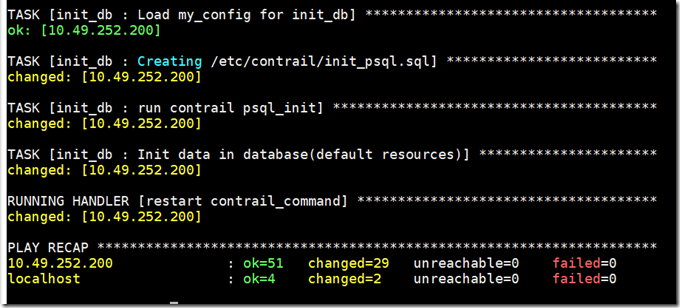
部署日志查看(由于网络问题问题经常出现timeout错误就需要重新跑下):
docker exec contrail_command tail -f /var/log/contrail/deploy.log
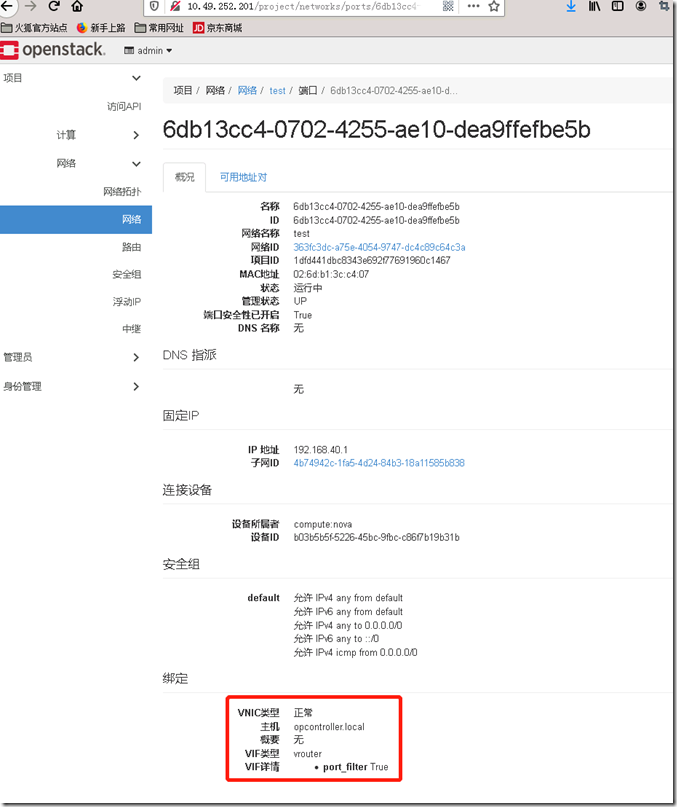
登录OpenStack dashboard
admin/contrail123
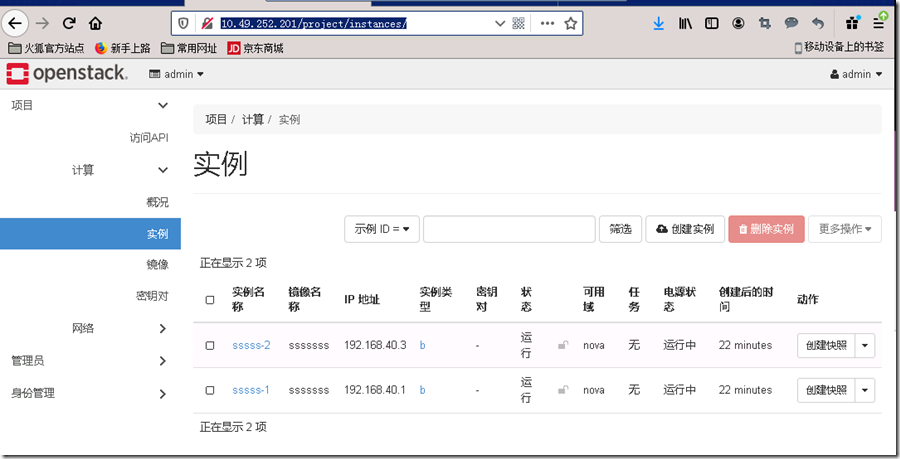
创建的端口类型是vroute
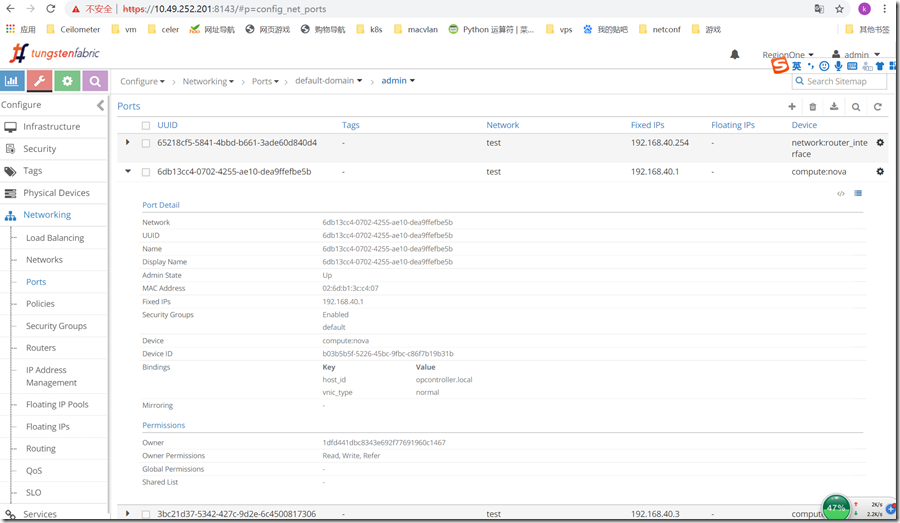
登录TF dashboard
admin/contrail123
查看port
contrail-command这个是商业版的UI部署工具,底层也是通过contrail-ansible-deployer来部署https://github.com/Juniper/contrail-ansible-deployer,拿不到contrail-command 工具小伙伴的可以使用contrail-ansible-deployer 部署
入门篇-contrail-command(对接openstack)All-In-One的更多相关文章
- Swift入门篇-Hello World
提示:如果您使用手机和平板电脑看到这篇文章,您请在WIFI的环境下阅读,里面有很多图片, 会浪费很多流量. 博主语文一直都不好(如有什么错别字,请您在下评论)望您谅解,没有上过什么学的 最近这2天主要 ...
- [转载]ios入门篇 -hello Word(1)
温馨提示:,如果您使用移动终端阅读本篇文章,请连接wifi的情况下阅读,里面有大量图片,以免造成您不必要的损失. 潜水博客园很多年,闲来无事,聊一下自己的经历,语文不好(如有什么错别字,请您在下评 ...
- 【N年前的文章脑补:HttpHandler HttpModule入门篇】
HttpHandler HttpModule入门篇 ASP.Net处理Http Request时,使用Pipeline(管道)方式,由各个HttpModule对请求进行处理,然后到达 HttpHand ...
- sed修炼系列(一):花拳绣腿之入门篇
本文为花拳绣腿招式入门篇,主要目的是入门,为看懂sed修炼系列(二):武功心法做准备.虽然是入门篇,只介绍了基本工作机制以及一些选项和命令,但其中仍然包括了很多sed的工作机制细节.对比网上各sed相 ...
- Linux入门篇(三)——文件与目录
这一系列的Linux入门都是本人在<鸟哥的Linux私房菜>的基础上总结的基本内容,主要是记录下自己的学习过程,也方便大家简要的了解 Linux Distribution是Ubuntu而不 ...
- Pandas系列之入门篇
Pandas系列之入门篇 简介 pandas 是 python用来数据清洗.分析的包,可以使用类sql的语法方便的进行数据关联.查询,属于内存计算范畴, 效率远远高于硬盘计算的数据库存储.另外pand ...
- Redis详解入门篇
Redis详解入门篇 [本教程目录] 1.redis是什么2.redis的作者3.谁在使用redis4.学会安装redis5.学会启动redis6.使用redis客户端7.redis数据结构 – 简介 ...
- 私有仓库GitLab快速入门篇
私有仓库GitLab快速入门篇 作者:尹正杰 版权声明:原创作品,谢绝转载!否则将追究法律责任. 安装文档请参考官网:https://about.gitlab.com/installation/#ce ...
- ios入门篇 -hello Word(1)
温馨提示:,如果您使用移动终端阅读本篇文章,请连接wifi的情况下阅读,里面有大量图片,以免造成您不必要的损失. 潜水博客园很多年,闲来无事,聊一下自己的经历,语文不好(如有什么错别字,请您在下评 ...
- SpringMVC.入门篇《二》form表单
SpringMVC.入门篇<二>form表单 项目工程结构: 在<springmvc入门篇一.HelloWorld>基础上继续添加代码,新增:FormController.ja ...
随机推荐
- Shell 中eval的用法
test.sh:pipe="|"eval ls $pipe wc -l 输出bogon:Desktop macname$ ./test.sh 45 test.sh:eval ech ...
- MySQL性能优化 分区
简述 分区是指根据一定的规则,数据库将表分解为多个更小的,更容易管理的部分,就访问数据库而言,逻辑上只有一张表或一个索引,但实际上这张表可能又多个物理分区共同构成,每一个分区都是一个独立的对象,可以独 ...
- GIT-本地仓库
用户配置 git config --global user.name "name" git config --global user.email "123@qq.com& ...
- centos如何添加ftp目录
检查Centos服务器中是否安装了vsftpd rpm -qa |grep vsftpd 如果没有显示则没有安装 2.安装vsftpd yum -y install vsftpd 3.打开vsftpd ...
- Spring Cloud-新一代Web框架微服务
序言 springcloud是微服务架构的集大成者,将一系列优秀的组件进行了整合.基于springboot构建,对我们熟悉spring的程序员来说,上手比较容易. 通过一些简单的注解,我们就可以快速的 ...
- RSA加密和数字签名在Java中常见应用【原创】
相关术语解释: RSA,参考: https://en.wikipedia.org/wiki/RSA_(cryptosystem) 非对称加密算法 ,参考:https://baike.baidu.com ...
- MLflow系列4:MLflow模型
英文链接:https://mlflow.org/docs/latest/models.html 本文链接:https://www.cnblogs.com/CheeseZH/p/11946260.htm ...
- 在 Windows 服务中托管 ASP.NET Core
众所周知,ASP.NET Core采用了和传统ASP.NET不同的托管和HTTP处理方式,即把服务器和托管环境完全解耦.ASP.NET Core内置了两个HTTP服务器实现,一个是基于libuv实现的 ...
- django文章对本项目有用的收集
1.在django中使用自定义标签实现分页功能 https://www.cnblogs.com/MnCu8261/p/5943609.html https://www.cnblogs.com/bail ...
- unity 如何打开本地文件夹,并选中文件
public static void OpenDirectory(string path, bool isFile = false) { if (string.IsNullOrEmpty(path)) ...