
项目(1-2)ES32获取mpu9250传入数据库
、
报一个错,找不到min函数
#define min(X,Y) ((X) < (Y) ? (X) : (Y))
手动添加
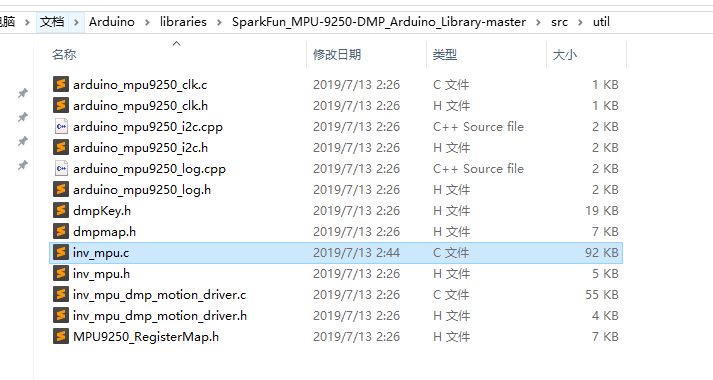

之后不报错了
、最原始的采集
/************************************************************

MPU9250_Basic

 Basic example sketch for MPU-9250 DMP Arduino Library

Jim Lindblom @ SparkFun Electronics

original creation date: November 23, 2016

https://github.com/sparkfun/SparkFun_MPU9250_DMP_Arduino_Library

This example sketch demonstrates how to initialize the

MPU-9250, and stream its sensor outputs to a serial monitor.

Development environment specifics:

Arduino IDE 1.6.12

SparkFun 9DoF Razor IMU M0

Supported Platforms:

- ATSAMD21 (Arduino Zero, SparkFun SAMD21 Breakouts)

*************************************************************/

#include <SparkFunMPU9250-DMP.h>

#define SerialPort Serial

MPU9250_DMP imu;

void setup()

{

  SerialPort.begin(115200);

  // Call imu.begin() to verify communication with and

  // initialize the MPU-9250 to it's default values.

  // Most functions return an error code - INV_SUCCESS (0)

  // indicates the IMU was present and successfully set up

  if (imu.begin() != INV_SUCCESS)

  {

    while (1)

    {

      SerialPort.println("Unable to communicate with MPU-9250");

      SerialPort.println("Check connections, and try again.");

      SerialPort.println();

      delay(5000);

    }

  }

  // Use setSensors to turn on or off MPU-9250 sensors.

  // Any of the following defines can be combined:

  // INV_XYZ_GYRO, INV_XYZ_ACCEL, INV_XYZ_COMPASS,

  // INV_X_GYRO, INV_Y_GYRO, or INV_Z_GYRO

  // Enable all sensors:

  imu.setSensors(INV_XYZ_GYRO | INV_XYZ_ACCEL | INV_XYZ_COMPASS);

  // Use setGyroFSR() and setAccelFSR() to configure the

  // gyroscope and accelerometer full scale ranges.

  // Gyro options are +/- 250, 500, 1000, or 2000 dps

  imu.setGyroFSR(2000); // Set gyro to 2000 dps

  // Accel options are +/- 2, 4, 8, or 16 g

  imu.setAccelFSR(2); // Set accel to +/-2g

  // Note: the MPU-9250's magnetometer FSR is set at

  // +/- 4912 uT (micro-tesla's)

  // setLPF() can be used to set the digital low-pass filter

  // of the accelerometer and gyroscope.

  // Can be any of the following: 188, 98, 42, 20, 10, 5

  // (values are in Hz).

  imu.setLPF(5); // Set LPF corner frequency to 5Hz

  // The sample rate of the accel/gyro can be set using

  // setSampleRate. Acceptable values range from 4Hz to 1kHz

  imu.setSampleRate(10); // Set sample rate to 10Hz

  // Likewise, the compass (magnetometer) sample rate can be

  // set using the setCompassSampleRate() function.

  // This value can range between: 1-100Hz

  imu.setCompassSampleRate(10); // Set mag rate to 10Hz

}

void loop()

{

  // dataReady() checks to see if new accel/gyro data

  // is available. It will return a boolean true or false

  // (New magnetometer data cannot be checked, as the library

  //  runs that sensor in single-conversion mode.)

  if ( imu.dataReady() )

  {

    // Call update() to update the imu objects sensor data.

    // You can specify which sensors to update by combining

    // UPDATE_ACCEL, UPDATE_GYRO, UPDATE_COMPASS, and/or

    // UPDATE_TEMPERATURE.

    // (The update function defaults to accel, gyro, compass,

    //  so you don't have to specify these values.)

    imu.update(UPDATE_ACCEL | UPDATE_GYRO | UPDATE_COMPASS | UPDATE_TEMP);

    printIMUData();

  }

}

void printIMUData(void)

{

  // After calling update() the ax, ay, az, gx, gy, gz, mx,

  // my, mz, time, and/or temerature class variables are all

  // updated. Access them by placing the object. in front:

  // Use the calcAccel, calcGyro, and calcMag functions to

  // convert the raw sensor readings (signed 16-bit values)

  // to their respective units.

  float accelX = imu.calcAccel(imu.ax);

  float accelY = imu.calcAccel(imu.ay);

  float accelZ = imu.calcAccel(imu.az);

  float gyroX = imu.calcGyro(imu.gx);

  float gyroY = imu.calcGyro(imu.gy);

  float gyroZ = imu.calcGyro(imu.gz);

  float magX = imu.calcMag(imu.mx);

  float magY = imu.calcMag(imu.my);

  float magZ = imu.calcMag(imu.mz);

 // long imu_temperature=imu.temperature;

  SerialPort.println();

  SerialPort.print("Time: " + String(imu.time) + " ms");

  SerialPort.print("Accel: " + String(accelX) + ", " +

              String(accelY) + ", " + String(accelZ) + " g");

  SerialPort.print("  ");

  SerialPort.print("Gyro: " + String(gyroX) + ", " +

              String(gyroY) + ", " + String(gyroZ) + " dps");

  SerialPort.print("  ");

  SerialPort.print("Mag: " + String(magX) + ", " +

              String(magY) + ", " + String(magZ) + " uT");

  SerialPort.print("  ");

//  SerialPort.print("temperature: " +imu_temperature);

}
增加数据库交互,增加wifi连接
修改自己的数据库地址
#include <Arduino.h>

#include <WiFi.h>

#include <WiFiMulti.h>

#include <HTTPClient.h>

#include <SparkFunMPU9250-DMP.h>

#define USE_SERIAL Serial

#define SerialPort Serial

WiFiMulti wifiMulti;

MPU9250_DMP imu;

const char* ssid     = "love";

const char* password = "love123456";

// 1 WIFI连接初始化

void wifi_int(){

    USE_SERIAL.println();

    USE_SERIAL.println();

    USE_SERIAL.println();

    WiFi.begin(ssid, password);

    while (WiFi.status() != WL_CONNECTED) {

        delay(500);

        Serial.print(".");

    }

    Serial.println("");

    Serial.println("WiFi connected.");

    Serial.println("IP address: ");

    Serial.println(WiFi.localIP());

 //   wifiMulti.addAP("love", "love123456");

  }

// 2 传感器初始化

 void IMU_int(){

   // Call imu.begin() to verify communication with and

  // initialize the MPU-9250 to it's default values.

  // Most functions return an error code - INV_SUCCESS (0)

  // indicates the IMU was present and successfully set up

  if (imu.begin() != INV_SUCCESS)

  {

    while (1)

    {

      SerialPort.println("Unable to communicate with MPU-9250");

      SerialPort.println("Check connections, and try again.");

      SerialPort.println();

      delay(5000);

    }

  }

  // Use setSensors to turn on or off MPU-9250 sensors.

  // Any of the following defines can be combined:

  // INV_XYZ_GYRO, INV_XYZ_ACCEL, INV_XYZ_COMPASS,

  // INV_X_GYRO, INV_Y_GYRO, or INV_Z_GYRO

  // Enable all sensors:

  imu.setSensors(INV_XYZ_GYRO | INV_XYZ_ACCEL | INV_XYZ_COMPASS);

  // Use setGyroFSR() and setAccelFSR() to configure the

  // gyroscope and accelerometer full scale ranges.

  // Gyro options are +/- 250, 500, 1000, or 2000 dps

  imu.setGyroFSR(2000); // Set gyro to 2000 dps

  // Accel options are +/- 2, 4, 8, or 16 g

  imu.setAccelFSR(2); // Set accel to +/-2g

  // Note: the MPU-9250's magnetometer FSR is set at

  // +/- 4912 uT (micro-tesla's)

  // setLPF() can be used to set the digital low-pass filter

  // of the accelerometer and gyroscope.

  // Can be any of the following: 188, 98, 42, 20, 10, 5

  // (values are in Hz).

  imu.setLPF(5); // Set LPF corner frequency to 5Hz

  // The sample rate of the accel/gyro can be set using

  // setSampleRate. Acceptable values range from 4Hz to 1kHz

  imu.setSampleRate(10); // Set sample rate to 10Hz

  // Likewise, the compass (magnetometer) sample rate can be

  // set using the setCompassSampleRate() function.

  // This value can range between: 1-100Hz

  imu.setCompassSampleRate(10); // Set mag rate to 10Hz

  }

//3 发送数据给服务器 数据库

void send_imu_http(float accelX,float accelY , float accelZ, float gyroX , float gyroY, float gyroZ,float magX,float magY,float magZ,float imu_temperature){

        HTTPClient http;

        USE_SERIAL.print("[HTTP] begin...\n");

       // String http_msg="http://45.76.105.89/IMU/msql_inset.php?ax=1.0&ay=2.0&az=3.0&gx=4.0&gy=5.0&gz=6.0&mx=7.0&my=8.0&mz=9.0&temperature=10.0";

       // -1 修改自己的服务器

          String http_msg=String("")+"http://45.76.105.89/IMU/msql_inset.php?"

                         +"ax="+accelX+"&ay="+accelY+"&az="+accelZ

                        +"&gx="+gyroX+"&gy="+gyroY+"&gz="+ gyroZ

                        +"&mx="+magX+"&my="+magY+"&mz="+magZ

                        +"&temperature="+imu_temperature;

        http.begin(http_msg); //HTTP

        USE_SERIAL.print("[HTTP] GET...\n");

        // start connection and send HTTP header

        int httpCode = http.GET();

        // httpCode will be negative on error

        if(httpCode > 0) {

            // HTTP header has been send and Server response header has been handled

            USE_SERIAL.printf("[HTTP] GET... code: %d\n", httpCode);

            // file found at server

            if(httpCode == HTTP_CODE_OK) {

                String payload = http.getString();

                USE_SERIAL.println(payload);

            }

        } else {

            USE_SERIAL.printf("[HTTP] GET... failed, error: %s\n", http.errorToString(httpCode).c_str());

        }

        http.end();

  }

// 4 主函数 初始化

void setup() {

    USE_SERIAL.begin(115200);//串口初始化

    wifi_int();// wifi连接初始化

    IMU_int();// 传感器初始化 mpu9250

}

// 5 主函数 无限循环

void loop() {

 delay(9000);// 延迟9秒  程序运行约1秒 加起来10秒循环一次

// 读取传感器数据

 if ( imu.dataReady() )

  {

   imu.update(UPDATE_ACCEL | UPDATE_GYRO | UPDATE_COMPASS | UPDATE_TEMP);//

// 原始数据转换

  float accelX = imu.calcAccel(imu.ax); //加速度

  float accelY = imu.calcAccel(imu.ay);

  float accelZ = imu.calcAccel(imu.az);

  float gyroX = imu.calcGyro(imu.gx);  // 陀螺仪

  float gyroY = imu.calcGyro(imu.gy);

  float gyroZ = imu.calcGyro(imu.gz);

  float magX = imu.calcMag(imu.mx);//磁力计

  float magY = imu.calcMag(imu.my);

  float magZ = imu.calcMag(imu.mz);

//串口打印传感器数据

  SerialPort.println();

  SerialPort.print("Time: " + String(imu.time) + " ms");

  SerialPort.print("Accel: " + String(accelX) + ", " +

              String(accelY) + ", " + String(accelZ) + " g");

  SerialPort.print("  ");

  SerialPort.print("Gyro: " + String(gyroX) + ", " +

              String(gyroY) + ", " + String(gyroZ) + " dps");

  SerialPort.print("  ");

  SerialPort.print("Mag: " + String(magX) + ", " +

              String(magY) + ", " + String(magZ) + " uT");

  SerialPort.print("  ");

//  SerialPort.print("temperature: " +imu_temperature);

//发送给服务器数据库

  send_imu_http(accelX,accelY,accelZ,gyroX,gyroY,gyroZ,magX,magY,magZ,23.5);

  }

}
数据库php代码
<?php

//   http://45.76.105.88/IMU/msql_inset.php?ax=1.0&ay=2.0&az=3.0&gx=4.0&gy=5.0&gz=6.0&mx=7.0&my=8.0&mz=9.0&temperature=10.0

 echo "设备请求插入新数据:<br>";

// 1获取请求参数

echo "服务器时间:".date('Y-m-d H:i:s')."<br>";// 当前时间

echo "加速度   ";

echo "ax:   ";echo $_GET["ax"]."    ";//

echo "ay:   ";echo $_GET["ay"]."    ";//

echo "az:   ";echo $_GET["az"]."    ";//

echo "陀螺仪   ";

echo "gx:   ";echo $_GET["gx"]."    ";//

echo "gy:   ";echo $_GET["gy"]."    ";//

echo "gz:   ";echo $_GET["gz"]."    ";//

echo "磁力计   ";

echo "mx:   ";echo $_GET["mx"]."    ";//

echo "my:   ";echo $_GET["my"]."    ";//

echo "mz:   ";echo $_GET["mz"]."    ";//

echo "温度   ";

echo $_GET["temperature"];

echo "<br>";

// 2交互数据库

// 2-1连接

$servername = "localhost";

$username = "root";

$password = "root";

$dbname = "IMU";// 数据库

$tablename = "IMU";// 数据库

//创建数据库连接

$conn = new mysqli($servername, $username, $password, $dbname);

//检测是否连接成功

if ($conn->connect_error) {

    die("数据库连接失败: " . $conn->connect_error."<br>");

}

echo "数据库连接成功<br> ";

// 2-2插入

$sql="INSERT INTO ".$tablename." (ax,ay,az,gx,gy,gz,mx,my,mz,temperature) VALUES (".$_GET["ax"].",".$_GET["ay"].",".$_GET["az"].",".$_GET["gx"].",".$_GET["gy"].",".$_GET["gz"].",".$_GET["mx"].",".$_GET["my"].",".$_GET["mz"].",".$_GET["temperature"].");";

if ($conn->query($sql) === TRUE) {

    echo "新记录插入成功" . "<br>";

} else {

    echo "数据库插入失败: " . $sql . "<br>" . $conn->error;

}

// 2-4关闭结束

$conn->close();

//echo "数据库关闭<br>";

?>
项目(1-2)ES32获取mpu9250传入数据库的更多相关文章
- 项目(1-1)ES32获取mpu9250数据网页交互显示
教程 https://www.hackster.io/donowak/esp32-mpu9250-3d-orientation-visualisation-467dc1 项目地址 https://gi ...
- 大项目之网上书城(八)——数据库大改&添加图书
目录 大项目之网上书城(八)--数据库大改&添加图书 主要改动 1.数据库新增表 代码 2.数据库新增触发器 3.其他对BookService和BookDao的修改 代码 4.addBook. ...
- AngularJS进阶(三十一)AngularJS项目开发技巧之获取模态对话框中的组件ID
AngularJS项目开发技巧之获取模态对话框中的组件ID 需求 出于项目开发需求,需要实现的业务逻辑是:药店端点击查看"已发货""已收货"订单详情时,模块弹出 ...
- 项目管理---git----快速使用git笔记(四)------远程项目代码的首次获取
使用git最常见的场景是 你需要参与到一个项目中,而这个项目的代码,同事已经上传到github或者https://coding.net了. 这时候他会给你一个项目代码的远程仓库链接. 例如: http ...
- Flutter实战视频-移动电商-09.首页_项目结构建立和获取数据
09.首页_项目结构建立和获取数据 在config下创建service_url.dart 用来配置我们后端接口的配置文件 一个变量存 接口地址,一个接口方法地址 所有后天请求数据的方法都放在这个文件夹 ...
- mysql 获取所有的数据库名字
mysql 获取所有的数据库名字 一.如果使用的是mysqli: $con = @mysqli_connect("localhost", "root", &qu ...
- WebRTC从摄像头获取图片传入canvas
WebRTC从摄像头获取图片传入canvas 前面我们已经能够利用WebRTC的功能,通过浏览器打开摄像头,并把预览的图像显示在video元素中. 接下来我们尝试从视频中截取某一帧,显示在界面上. h ...
- C#Winform从页面获取数据,传入数据库
环境: 1.SQLite数据库新建数据表,设置相应的字段.(其他数据库形式都相似,using相应数据库的包即可) 2.页面有两个textBox:textBox1.textBox2, 3.一个保存按钮: ...
- android项目 之 记事本(11) ----- 加入数据库
本文是自己学习所做笔记.欢迎转载.但请注明出处:http://blog.csdn.net/jesson20121020 通过之前的10节,已实现了记事本的大部分功能,有加入拍照.加入照片,加入录音,加 ...
随机推荐
- play framework + sbt入门之环境搭建
一 sbt的使用 SBT = (not so) Simple Build Tool,是scala的构建工具,与java的maven地位相同.其设计宗旨是让简单的项目可以简单的配置,而复杂的项目可以复杂 ...
- 【LeetCode】633. Sum of Square Numbers
Difficulty: Easy More:[目录]LeetCode Java实现 Description https://leetcode.com/problems/sum-of-square-n ...
- TCP和UDP的差异
TCP建立连接 如果有人问TCP如何建立连接?大部分的回答都是三次握手成功,就建立连接了. 那么握手的目的是什么呢? 1)告知对方自己的序号 2)初始化资源 例如以下握手案例,握手两次由客户端主动发起 ...
- C#项目 App.config 配置文件不同使用环境配置
问题 部署项目时,常常需要根据不同的环境使用不同的配置文件.例如,在部署网站时可能希望禁用调试选项,并更改连接字符串以使其指向不同的数据库.在创建 Web 项目时,Visual Studio 自动生成 ...
- dotnet core 之 CORS使用示例
这里列举几个经过验证的可用的CORS使用示例, 方便在需要的时候可以直接使用 示例1 #region snippet2 public void ConfigureServices(IServiceCo ...
- API之Scanner,Random,ArrayList基础运用。重点是ArrayList
有关API的这些类可以参考JDK的官方中文文档,看我的另一篇文章有下载==> https://www.cnblogs.com/gz18221/p/11968505.html<==文章地址 ...
- Java自学-JDK环境变量配置
JDK环境变量配置 分下载,配置,验证三个步骤进行JDK环境变量配置. 步骤 1 : 首先看配置成功后的效果 点WIN键->运行(或者使用win+r) 输入cmd命令 输入java -versi ...
- python json库
JSON(JavaScript Object Notation) 是一种轻量级的数据交换格式,易于人阅读和编写. 1.json库的使用 使用 JSON 函数需要导入 json 库:import jso ...
- axios + vue导出excel文件
(使用到了elementUI框架) <template> <el-button type="primary" size="mini" @cli ...
- 干货分享 | 3个开发IoT项目的开源物联网平台
物联网(IoT)是帮助人工智能(AI)以更好的方式控制和理解事物的未来技术. 艾艺收集了一些最有名的物联网平台,帮助您以受控方式开发物联网项目.物联网平台是帮助设置和管理互联网连接设备的组件套件. 一 ...