
ubuntu 本地生成被浏览器信任的证书
vhosts添加https证书两步:
1:生成证书:
sudo openssl req -x509 -nodes -days 365 -newkey rsa:2048 -keyout /etc/ssl/private/apache-selfsigned.key -out /etc/ssl/certs/apache-selfsigned.crt
关于参数:
- openssl: 基本命令行工具,用于创建并管理OpenSSL证书、密钥与其它文件。
- req: 此子命令指定我们希望使用X.509证书签名请求(简称CSR)管理。其中X.509是一项公钥基础设施标准,SSL与TLS将其指定为密钥与证书管理机制。
- -x509: 进一步修改前一条子命令,告知工具我们需要的是自签名证书,而非生成普通的证书签名请求。
- -nodes: 告知OpenSSL跳过利用密码保护证书的选项。我们的Apache需要在服务器启动时能够在不经用户许可的情况下读取该文件,而密码会影响到这一流程。
- -days 365: 此选项选定证书的有效时限。我们将其设定为一年。
- -newkey rsa:2048: 指定我们希望同时生成一份新证书与新密钥。我们在上一步设定中无需创建密钥即可签署证书,因此这里需要将密钥与证书一同创建。其中rsa:2048部分指定生成RSA密钥,长度为2048位。
- -keyout: 此行告知OpenSSL将生成的密钥文件保存在何处。
- -out: 告知OpenSSL将我们创建的证书保存在何处。
参考:https://blog.csdn.net/zstack_org/article/details/70048745
2:添加带证书的虚拟主机:
sudo lnmp ssl add
响应:
+-------------------------------------------+

|    Manager for LNMP, Written by Licess    |

+-------------------------------------------+

|              https://lnmp.org             |

+-------------------------------------------+

Please enter domain(example: www.lnmp.org): localhost

 Your domain: localhost

Enter more domain name(example: lnmp.org *.lnmp.org):

Please enter the directory for domain localhost: /home/wwwroot/www

Allow access log? (y/n) y

Enter access log filename(Default:localhost.log):

You access log filename: localhost.log

Please enter Administrator Email Address: ××××@.com

Server Administrator Email:××××@.com

: Use your own SSL Certificate and Key

: Use Let's Encrypt to create SSL Certificate and Key

Enter  or :

Please enter full path to SSL Certificate file: /etc/ssl/certs/apache-selfsigned.crt

Please enter full path to SSL Certificate Key file: /etc/ssl/private/apache-selfsigned.key

Please enter full path to SSL Chain file:

SSL Chain file will not set.Test Apache configure file...
访问localhost
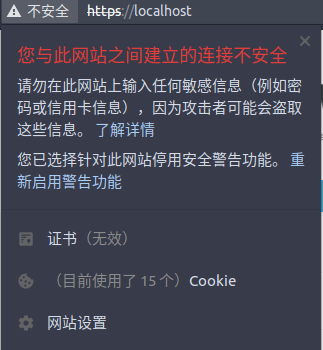
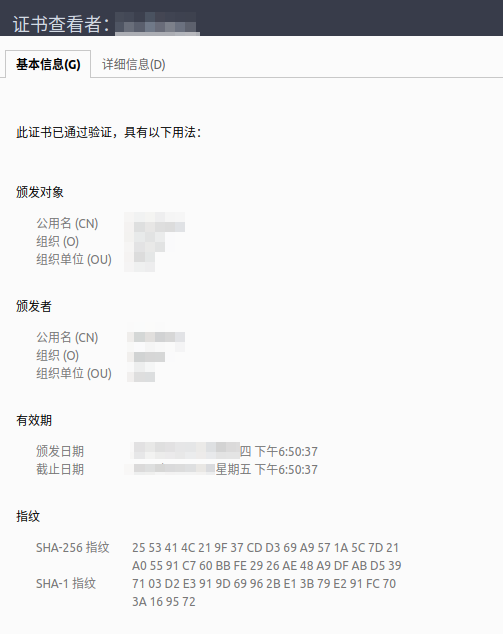
重启电脑apache 无法访问,可通过命令进行查看错误。
httpd -k start
AH00112: Warning: DocumentRoot [/home/wwwroot/default] does not exist

AH00526: Syntax error on line  of /usr/local/apache/conf/vhost/localhost.conf:

SSLCertificateKeyFile: file '/etc/ssl/private/apache-selfsigned.key' does not exist or is empty
解决:
/home/wwwroot/default 目录不存在,vhost如果没有指定path,在/usr/local/apache/conf/extra/httpd-vhosts.conf 中修改。
/etc/ssl/private/apache-selfsigned.key 不存在,是因为www-data 组没有读取/etc/ssl的全选。
sudo chmod - /etc/ssl/*
生成被浏览器信任的证书
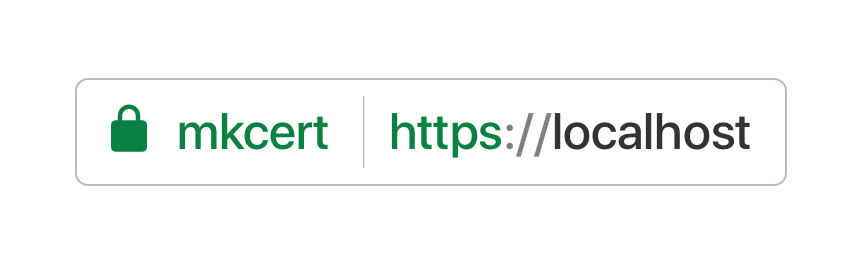
自签证书很简单,但生成的不被浏览器认可,在地址栏显示为 “不安全”。
有一个开源工具,mkcert ,由google Go 团队开发,生成可被浏览器信任的证书。原理是生成证书的同时生成自己的证书颁发机构CA, 在系统里插入一个自己的 CA root,信任这个 CA root,然后用这个根生成 SAN 证书。
github地址: https://github.com/FiloSottile/mkcert
可通过项目github的Releases打包文件直接运行生成;
./mkcert-v1.3.0-linux-amd64
是步骤帮助说明:
Using the local CA at "/home/×××/.local/share/mkcert" ✨

Usage of mkcert:

    $ mkcert -install

    Install the local CA in the system trust store.

    $ mkcert example.org

    Generate "example.org.pem" and "example.org-key.pem".

    $ mkcert example.com myapp.dev localhost 127.0.0.1 ::

    Generate "example.com+4.pem" and "example.com+4-key.pem".

    $ mkcert "*.example.it"

    Generate "_wildcard.example.it.pem" and "_wildcard.example.it-key.pem".

    $ mkcert -uninstall

    Uninstall the local CA (but do not delete it).

For more options, run "mkcert -help".
执行 ./mkcert-v1.3.0-linux-amd64 --install 就会安装本地的私有CA,并添加系统信任此CA。
执行 ./mkcert-v1.3.0-linux-amd64 localhost 生成 The certificate is at "./localhost.pem" and the key at "./localhost-key.pem" ✅ 将证书添加nginx或apache即可。

参考: https://blog.filippo.io/mkcert-valid-https-certificates-for-localhost/
ubuntu 本地生成被浏览器信任的证书的更多相关文章
- 一键自签本地 TLSv3 多域名 SAN 域名证书工具 HTTPS(最新版 Chrome 浏览器策略测试通过)
一键自动生成本地自签名SAN域名证书工具 原生OpenSSL生成自签名SAN CA域名(V3签名),在Linux.MacOS系统下签发测试通过. 用于一键快速生成开发和测试场景证书,内部平台授权和私有 ...
- Chrome:不受信任的证书----openssl签发带Subject Alternative Name的证书
Chrome下自签名证书提示无效的问题 发现chrome验证证书很严格,必须带有Subject Alternative Name.签发csr时,修改openssl.cnf : vi /etc/ssl/ ...
- IIS6的SSL配置,如何配置SSL到登陆页,如何将SSL证书设置成受信任的证书
一. 申请证书1. 到受信任的机构申请 略 2. 到自建的证书服务器申请 a. 安装证书服务 通过控制面板中的“添加/删除程序”,选择“添加/删除Windows组件”.在Windows组件向导中找到“ ...
- https学习笔记三----OpenSSL生成root CA及签发证书
在https学习笔记二,已经弄清了数字证书的概念,组成和在https连接过程中,客户端是如何验证服务器端的证书的.这一章,主要介绍下如何使用openssl库来创建key file,以及生成root C ...
- [svc]cfssl模拟https站点-探究浏览器如何校验证书
准备cfssl环境 wget https://pkg.cfssl.org/R1.2/cfssl_linux-amd64 -O /usr/local/bin/cfssl wget https://pkg ...
- webpack-dev-server 搭建本地服务以及浏览器实时刷新
一.概述开发项目中为了保证上线,开发项目是都需要使用localhost进行开发,以前的做法就是本地搭建Apache或者Tomcat服务器.有的前端开发人员 对服务器的搭建和配置并不熟悉,这个时候需要后 ...
- dos批量导入不受信任的证书及软件限制策略的应用
certmgr.exe -add "证书.cer" -s -r localMachine Disallowed 导入授信机构 certmgr -add "证书.cer&q ...
- OpenSSL生成root CA及签发证书
一.openssl 简介 openssl 是目前最流行的 SSL 密码库工具,其提供了一个通用.健壮.功能完备的工具套件,用以支持SSL/TLS 协议的实现.官网:https://www.openss ...
- iOS开发HTTPS实现之信任SSL证书和自签名证书
iOS开发HTTPS实现之信任SSL证书和自签名证书 转自:http://www.jianshu.com/p/6b9c8bd5005a/comments/5539345 (收录一下供自己学习用的) 字 ...
随机推荐
- Prometheus学习笔记(6)Alertmanager告警
目录 一.Alertmanager简介 二.Alertmanager部署 三.Alertmanager配置 四.自定义告警规则和发送 五.自定义告警模板 一.Alertmanager简介 Promet ...
- Prometheus学习笔记(4)什么是pushgateway???
目录 一.pushgateway介绍 二.pushgateway的安装运行和配置 三.自定义脚本发送pushgateway 四.使用pushgateway的优缺点 一.pushgateway介绍 pu ...
- python的with语法的深入理解
如果你有一些对象(比如一个文件.网络连接或锁),需要支持 with 语句,下面介绍两种定义方法. 方法(1): 首先介绍下with 工作原理 (1)紧跟with后面的语句被求值后,返回对象的“__en ...
- 转:spring mvc 设置@Scope("prototype")
spring中bean的scope属性,有如下5种类型: singleton 表示在spring容器中的单例,通过spring容器获得该bean时总是返回唯一的实例prototype表示每次获得bea ...
- KVM虚拟机被OOM killer
一.线上环境的虚拟机被KVM物理机kill掉 Linux 内核根据应用程序的要求分配内存,通常来说应用程序分配了内存但是并没有实际全部使用,为了提高性能,这部分没用的内存可以留作它用,这部分内存是属于 ...
- SpringCloud2.0 Feign 服务发现 基础教程(五)
1.启动[服务中心]集群,即 Eureka Server 参考 SpringCloud2.0 Eureka Server 服务中心 基础教程(二) 2.启动[服务提供者]集群,即 Eureka Cli ...
- httprunner学习6-参数化(引用外部csv数据)
前言 上一篇已经实现参数化,但是数据是放在.yml文件里面,当测试数据非常多的时候,我们希望把测试数据写到csv文件. httprunner==1.5.8 独立参数 对于已有参数列表,并且数据量比较大 ...
- “2018宁夏邀请赛 ” 兼 “The 2019 Asia Yinchuan First Round Online Programming”
------------7题弟弟,被各位半小时13题的大佬打惨了(滑稽)---------- 签到题就不写了. F :Moving On (1247ms) 题意:给定大小为N的带 ...
- dump array
<?php //array_dump.php $a=array(); $a[]=1; $a[]=2; $a[]=3; $a[]=4; $a[]='a'; $a[]='b'; $a[]='c'; ...
- CSS进阶之路
下面主要引用http://www.cnblogs.com/wangfupeng1988/tag/css知多少/ CSS进阶笔记: 一.学习CSS的三个突破点 1.浏览器如何加载和解析CSS——CSS的 ...