
JavaFX 井字棋游戏
利用JavaFX设计一个井字棋游戏,其中包括了能够与玩家对战的AI。AI的实现相比五子棋来说要简单得多,可以保证AI在后手情况下绝对不会输,具体实现如下:
/*
* To change this license header, choose License Headers in Project Properties.
* To change this template file, choose Tools | Templates
* and open the template in the editor.
*/
package 井字棋;
import javafx.application.Application;
import javafx.scene.Scene;
import javafx.stage.Stage;
import javafx.scene.layout.GridPane;
import javafx.scene.shape.Circle;
import javafx.scene.shape.Line;
import javafx.scene.control.Button;
import javafx.event.EventHandler;
import javafx.event.ActionEvent;
import javafx.animation.Timeline;
import javafx.util.Duration;
import javafx.animation.KeyFrame;
import javafx.scene.control.TextArea;
/**
*
* @author Midori
*/
public class 井字棋 extends Application{
private static int a[][]=new int[3][3];
private static int step=1;
private static int last=5;
private static boolean win=false;
private static boolean draw=false;
private static int wincount=0;
private static int drawcount=0;
private static String s="<( ̄︶ ̄)↗[GO!]"+"\n"+"[^ェ^] よろしく!";
@Override
public void start(Stage primaryStage){
GridPane pane=new GridPane();
pane.setMinSize(500, 300);
primaryStage.setResizable(false);
Button bt1=new Button();
bt1.setMinSize(100,100);
Button bt2=new Button();
bt2.setMinSize(100,100);
Button bt3=new Button();
bt3.setMinSize(100,100);
Button bt4=new Button();
bt4.setMinSize(100,100);
Button bt5=new Button();
bt5.setMinSize(100,100);
Button bt6=new Button();
bt6.setMinSize(100,100);
Button bt7=new Button();
bt7.setMinSize(100,100);
Button bt8=new Button();
bt8.setMinSize(100,100);
Button bt9=new Button();
bt9.setMinSize(100,100);
pane.add(bt1,0,0);
pane.add(bt2,0,1);
pane.add(bt3,0,2);
pane.add(bt4,1,0);
pane.add(bt5,1,1);
pane.add(bt6,1,2);
pane.add(bt7,2,0);
pane.add(bt8,2,1);
pane.add(bt9,2,2);
Button bt=new Button("Again");
pane.add(bt,5,1);
Scene scene=new Scene(pane);
EventHandler<ActionEvent>eventHandler=e1->{
bt.setOnMousePressed(e->{
for(int i=0;i<3;i++){
for(int j=0;j<3;j++)
a[i][j]=0;
}
step=1;
last=5;
win=false;
draw=false;
s="<( ̄︶ ̄)↗[GO!]"+"\n"+"[^ェ^] よろしく!";
});
if(last==0){
draw=true;
last=-1;
drawcount++;
}
if(win){
last=-1;
s="你咋又输了~"+"\n"+"( ̄_, ̄ )";
}
if(draw){
s="欸~平局~~"+"\n"+"╮(╯-╰)╭";
}
TextArea t2=new TextArea();
t2.setText(s);
t2.setMaxHeight(80);
pane.add(t2,5,2);
TextArea t1=new TextArea();
t1.setText("你已经输了"+wincount+"局!"+"\n"+"你已经平了"+drawcount+"局!"+"\n"+"你还没赢过~");
t1.setMaxHeight(80);
pane.add(t1,5,0);
bt1.setText(Switch(a[0][0]));
bt2.setText(Switch(a[0][1]));
bt3.setText(Switch(a[0][2]));
bt4.setText(Switch(a[1][0]));
bt5.setText(Switch(a[1][1]));
bt6.setText(Switch(a[1][2]));
bt7.setText(Switch(a[2][0]));
bt8.setText(Switch(a[2][1]));
bt9.setText(Switch(a[2][2]));
bt1.setOnMousePressed(e->{
if(step>0&&a[0][0]==0&&last>0){
a[0][0]=1;
step--;
last--;
Play(1);
step++;
}
});
bt2.setOnMousePressed(e->{
if(step>0&&a[0][1]==0&&last>0){
a[0][1]=1;
step--;
last--;
Play(2);
step++;
}
});
bt3.setOnMousePressed(e->{
if(step>0&&a[0][2]==0&&last>0){
a[0][2]=1;
step--;
last--;
Play(3);
step++;
}
});
bt4.setOnMousePressed(e->{
if(step>0&&a[1][0]==0&&last>0){
a[1][0]=1;
step--;
last--;
Play(4);
step++;
}
});
bt5.setOnMousePressed(e->{
if(step>0&&a[1][1]==0&&last>0){
a[1][1]=1;
step--;
last--;
Play(5);
step++;
}
});
bt6.setOnMousePressed(e->{
if(step>0&&a[1][2]==0&&last>0){
a[1][2]=1;
step--;
last--;
Play(6);
step++;
}
});
bt7.setOnMousePressed(e->{
if(step>0&&a[2][0]==0&&last>0){
a[2][0]=1;
step--;
last--;
Play(7);
step++;
}
});
bt8.setOnMousePressed(e->{
if(step>0&&a[2][1]==0&&last>0){
a[2][1]=1;
step--;
last--;
Play(8);
step++;
}
});
bt9.setOnMousePressed(e->{
if(step>0&&a[2][2]==0&&last>0){
a[2][2]=1;
step--;
last--;
Play(9);
step++;
}
});
};
Timeline animation=new Timeline(
new KeyFrame(Duration.millis(100),eventHandler)
);
animation.setCycleCount(Timeline.INDEFINITE);
animation.play();
primaryStage.setScene(scene);
primaryStage.setTitle("井字棋");
primaryStage.show();
}
public String Switch(int i){
String s="";
switch(i){
case 0:
s=" ";
break;
case -1:
s="O";
break;
case 1:
s="X";
}return s;
}
public static void main(String[] args) {
Application.launch(args);
}
public void Reset(){
}
public void Play(int i){
if(last==4)
if(i!=5)
a[1][1]=-1;
else
a[0][0]=-1;
else{
if(a[0][0]!=1&&a[0][1]!=1&&a[0][2]!=1&&a[0][0]+a[0][1]+a[0][2]<-1){
for(int j=0;j<3;j++)
if(a[0][j]==0)
a[0][j]=-1;
win=true;wincount++;
}
else if(a[1][0]!=1&&a[1][1]!=1&&a[1][2]!=1&&a[1][0]+a[1][1]+a[1][2]<-1){
for(int j=0;j<3;j++)
if(a[1][j]==0)
a[1][j]=-1;
win=true;wincount++;
}
else if(a[2][0]!=1&&a[2][1]!=1&&a[2][2]!=1&&a[2][0]+a[2][1]+a[2][2]<-1){
for(int j=0;j<3;j++)
if(a[2][j]==0)
a[2][j]=-1;
win=true;wincount++;
}
else if(a[0][0]!=1&&a[1][0]!=1&&a[2][0]!=1&&a[0][0]+a[1][0]+a[2][0]<-1){
for(int j=0;j<3;j++)
if(a[j][0]==0)
a[j][0]=-1;
win=true;wincount++;
}
else if(a[0][1]!=1&&a[1][1]!=1&&a[2][1]!=1&&a[0][1]+a[1][1]+a[2][1]<-1){
for(int j=0;j<3;j++)
if(a[j][1]==0)
a[j][1]=-1;
win=true;wincount++;
}
else if(a[0][2]!=1&&a[1][2]!=1&&a[2][2]!=1&&a[0][2]+a[1][2]+a[2][2]<-1){
for(int j=0;j<3;j++)
if(a[j][2]==0)
a[j][2]=-1;
win=true;wincount++;
}else if(a[0][0]!=1&&a[1][1]!=1&&a[2][2]!=1&&a[0][0]+a[1][1]+a[2][2]<-1){
for(int j=0;j<3;j++)
if(a[j][j]==0)
a[j][j]=-1;
win=true;wincount++;
}
else if(a[2][0]!=1&&a[1][1]!=1&&a[0][2]!=1&&a[2][0]+a[1][1]+a[0][2]<-1){
for(int j=0;j<3;j++)
if(a[j][2-j]==0)
a[j][2-j]=-1;
win=true;wincount++;
}
else if(a[0][0]!=-1&&a[0][1]!=-1&&a[0][2]!=-1&&a[0][0]+a[0][1]+a[0][2]>1){
for(int j=0;j<3;j++)
if(a[0][j]==0)
a[0][j]=-1;
}
else if(a[1][0]!=-1&&a[1][1]!=-1&&a[1][2]!=-1&&a[1][0]+a[1][1]+a[1][2]>1){
for(int j=0;j<3;j++)
if(a[1][j]==0)
a[1][j]=-1;
}
else if(a[2][0]!=-1&&a[2][1]!=-1&&a[2][2]!=-1&&a[2][0]+a[2][1]+a[2][2]>1){
for(int j=0;j<3;j++)
if(a[2][j]==0)
a[2][j]=-1;
}
else if(a[0][0]!=-1&&a[1][0]!=-1&&a[2][0]!=-1&&a[0][0]+a[1][0]+a[2][0]>1){
for(int j=0;j<3;j++)
if(a[j][0]==0)
a[j][0]=-1;
}
else if(a[0][1]!=-1&&a[1][1]!=-1&&a[2][1]!=-1&&a[0][1]+a[1][1]+a[2][1]>1){
for(int j=0;j<3;j++)
if(a[j][1]==0)
a[j][1]=-1;
}
else if(a[0][2]!=-1&&a[1][2]!=-1&&a[2][2]!=-1&&a[0][2]+a[1][2]+a[2][2]>1){
for(int j=0;j<3;j++)
if(a[j][2]==0)
a[j][2]=-1;
}else if(a[0][0]!=-1&&a[1][1]!=-1&&a[2][2]!=-1&&a[0][0]+a[1][1]+a[2][2]>1){
for(int j=0;j<3;j++)
if(a[j][j]==0)
a[j][j]=-1;
}
else if(a[2][0]!=-1&&a[1][1]!=-1&&a[0][2]!=-1&&a[2][0]+a[1][1]+a[0][2]>1){
for(int j=0;j<3;j++)
if(a[j][2-j]==0)
a[j][2-j]=-1;
}else{
if(a[0][0]==0)
a[0][0]=-1;
else if(a[2][0]==0)
a[2][0]=-1;
else if(a[0][2]==0)
a[0][2]=-1;
else if(a[2][2]==0)
a[2][2]=-1;
else if(a[0][1]==0)
a[0][1]=-1;
else if(a[1][0]==0)
a[1][0]=-1;
else if(a[1][2]==0)
a[1][2]=-1;
else
a[2][1]=-1;
}
}
}
}
下面是图形界面:

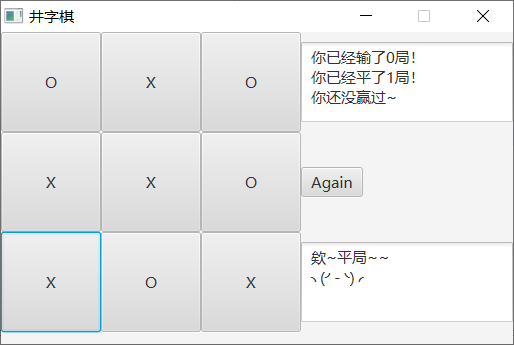
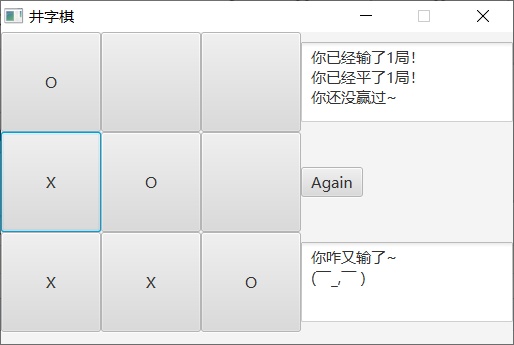
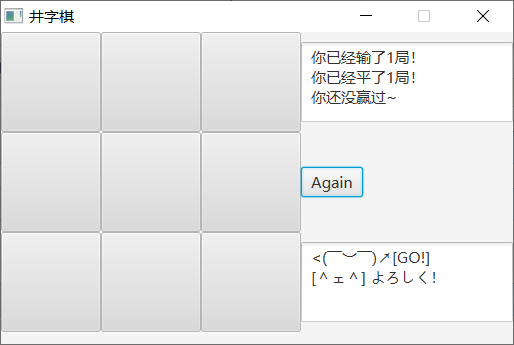
JavaFX 井字棋游戏的更多相关文章
- [CareerCup] 17.2 Tic Tac Toe 井字棋游戏
17.2 Design an algorithm to figure out if someone has won a game oftic-tac-toe. 这道题让我们判断玩家是否能赢井字棋游戏, ...
- 井字棋游戏升级版 - TopTicTacToe项目 简介
一.游戏简介 井字棋是一款世界闻名的游戏,不用我说,你一定知道它的游戏规则. 这款游戏简单易学,玩起来很有意思,不过已经证明出这款游戏如果两个玩家都足够聪明的话, 是很容易无法分出胜负的,即我们得到的 ...
- C++井字棋游戏,DOS界面版
据说有一个能保证不败的算法.明天看看先再写个PVC版的. 正题.今天无聊写了个井字棋游戏,顺便逐渐让自己习惯良好的代码风格,放上来给新手学习学习. jzq2.cpp /* N字棋游戏PVP版,DOS版 ...
- Java井字棋游戏
试着写了一个井字棋游戏,希望各位能给予一些宝贵的建议. 一.棋盘类 package 井字棋游戏; public class ChessBoard { private int number; Perso ...
- [C++] 井字棋游戏源码
TicTac.h #define EX 1 //该点左鼠标 #define OH 2 //该点右鼠标 class CMyApp : public CWinApp { public: virtual B ...
- [LeetCode] 348. Design Tic-Tac-Toe 设计井字棋游戏
Design a Tic-tac-toe game that is played between two players on a n x n grid. You may assume the fol ...
- [LeetCode] Design Tic-Tac-Toe 设计井字棋游戏
Design a Tic-tac-toe game that is played between two players on a n x n grid. You may assume the fol ...
- Raptor井字棋游戏
作为大学第一个小作品,记录一下,也给那些想接触到Raptor游戏的人一个小小的参考QAQ至于Raptor的语法和使用,可以参考一下他的帮助手册,看不懂英文的话可以复制放到翻译上看. 以上是主函数 以下 ...
- [Swift]LeetCode348. 设计井字棋游戏 $ Design Tic-Tac-Toe
Design a Tic-tac-toe game that is played between two players on a n x n grid. You may assume the fol ...
随机推荐
- 关于qt creator各种假死的问题
来自CSDN网友( qq191329827)内容,亲自尝试,且经历一致: 我有两个笔记本,1个台式机,都装了qt, 然后,我的thinkpad x1c,装上之后creator各种假死,网上看了好多解决 ...
- DDD(Domain Driven Design) 架构设计
一.为什么要分层 分层架构是所有架构的鼻祖,分层的作用就是隔离,不过,我们有时候有个误解,就是把层和程序集对应起来,就比如简单三层架构中,在你的解决方案中,一般会有三个程序集项目:XXUI.dll.X ...
- 一张MGR切换的图,不解释
- Failed to contact the endpoint at http://controller:35357/ for discovery. Fallback to using that endpoint as the base url.
问题描述 openstack安装过程中,执行 openstack domain create --description "Domain" example 报错如下: Failed ...
- ASP.NET Core Swagger接入使用IdentityServer4 的 WebApi
写在前面 是这样的,我们现在接口使用了Ocelot做网关,Ocelot里面集成了基于IdentityServer4开发的授权中心用于对Api资源的保护.问题来了,我们的Api用了SwaggerUI做接 ...
- linux下杀掉某用户所有进程
直接删除用户,提示该用户下还有进程,以下两种方法可解决: 1.结束所有username的进程(如果提示没有该命令,那么用下面方法) killall -u username 2.杀死某一用户下的所有进程 ...
- 模拟 + 暴搜 --- Help Me with the Game
Help Me with the Game Time Limit: 1000MS Memory Limit: 65536K Total Submissions: 3175 Accepted: ...
- Flutter 宽高比(比率)控件 AspectRatio
const AspectRatio({ Key key, @required this.aspectRatio, Widget child,}) void main() { runApp( n ...
- HDU校赛 | 2019 Multi-University Training Contest 5
2019 Multi-University Training Contest 5 http://acm.hdu.edu.cn/contests/contest_show.php?cid=852 100 ...
- Asp.Net Core Web Api 使用 Swagger 生成 api 说明文档
最近使用 Asp.Net Core Web Api 开发项目服务端.Swagger 是最受欢迎的 REST APIs 文档生成工具之一,进入我的视野.以下为学习应用情况的整理. 一.Swagger 介 ...