
DevExpress.LookUpEdit控件实现自动搜索定位功能 兼使用方法(looUpEdit可编辑)
DevExpress.LookUpEdit 使用方法
设置可手动输入
this.LookUpEdit1.Properties.TextEditStyle = DevExpress.XtraEditors.Controls.TextEditStyles.Standard;
  public static void LookUpbd(DevExpress.XtraEditors.LookUpEdit look, string sql,int display,int value)

        {

            DataTable dt = DAL.SqlDbhelp.GetDataSet(sql);

            look.Properties.SearchMode = DevExpress.XtraEditors.Controls.SearchMode.AutoComplete;

            look.Properties.DataSource = dt;

            look.Properties.DisplayMember = dt.Columns[display].ColumnName; //显示在文本框上的值

            look.Properties.ValueMember = dt.Columns[value].ColumnName; //获取的值

            look.Properties.NullText = "";

            look.Properties.SortColumnIndex = 0;

            look.Properties.ImmediatePopup = true;

        }
以下内容为转载
文章来源 http://blog.sina.com.cn/s/blog_6d1c583c01011qiv.html
详解DevExpress.LookUpEdit控件实现自动搜索定位功能
首先介绍三个重要的属性:
1. LookUpEdit.Properties.ImmediatePopup在输入框按任一可见字符键时立即弹出下拉窗体。
2. LookUpEdit.Properties.AutoSearchColumnIndex设置自动搜索的栏位序号,下拉窗体第一个栏位为0,依此类推,此属性配合SearchMode=OnlyInPopup时有效。
3. LookUpEdit.Properties.SearchMode 自动搜索定位模式
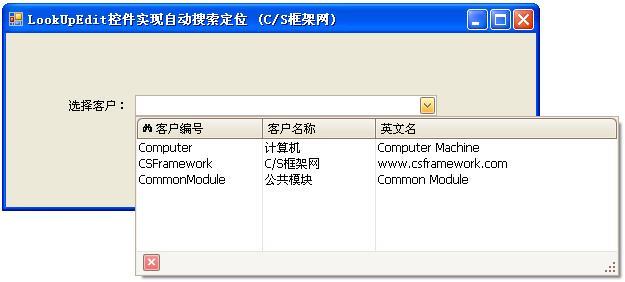
关于枚举类型SearchMode的定义:
//Summary:
// Enumerates search modes for a lookup edior.
public enumSearchMode
{
// Summary:
// The incremental search is enabled only when the dropdown window isopen.
// If the window is closed, the user can modify the text in the editbox. However
// these changes are ignored.
// When the dropdown is open the incremental search is performedagainst the
// column whose index is specified by theDevExpress.XtraEditors.Repository.RepositoryItemLookUpEdit.AutoSearchColumnIndex
// property. The header of this column contains the search icon(binoculars).
// The user can click a specific column header to perform the searchagainst
// this column.
// The following screenshot shows a sample lookup editor. Theincremental search
// is performed against the second column.
OnlyInPopup = 0,
//
// Summary:
// Enables the automatic completion feature. In this mode, when thedropdown
// is closed, the text in the edit box is automatically completed ifit matches
// aDevExpress.XtraEditors.Repository.RepositoryItemLookUpEditBase.DisplayMember
// field value of one of dropdown rows.
// When the dropdown is open, the automatic completion feature isdisabled but
// the editor allows you to perform an incremental search in the samemanner
// as when DevExpress.XtraEditors.Controls.SearchMode.OnlyInPopup modeis active.
AutoComplete = 1,
//
// Summary:
// Enables the incremental filtering feature. When you type within theedit
// box, the editor automatically opens the dropdown window anddisplays only
// records whoseDevExpress.XtraEditors.Repository.RepositoryItemLookUpEditBase.DisplayMember
// field value starts with the characters typed. Other records are notdisplayed.
// If you enter a value that does not match any record, the dropdownwindow
// will not contain any rows.
// The following image shows a lookup editor when AutoFilter mode isenabled.
AutoFilter = 2,
}
//来源:C/S框架网(www.csframework.com)QQ:1980854898
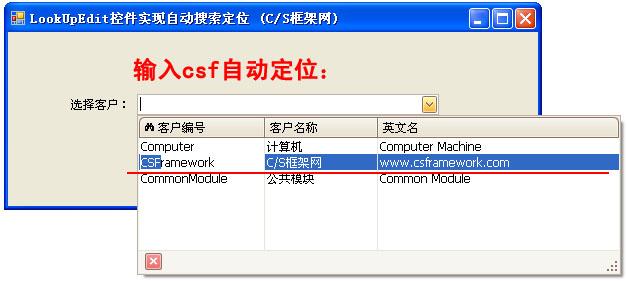
OnlyInPopup :配合ImmediatePopup=True时使用,当用户在输入框按任一可见字符键时立即弹出下拉窗体,并跟据输入的字符从头部开始匹配AutoSearchColumnIndex属性指定栏位字段的值,第一个栏位为0.
特点:在下拉窗体能显示匹配结果(蓝底白字),但在输入框内不显示。
效果图如下:
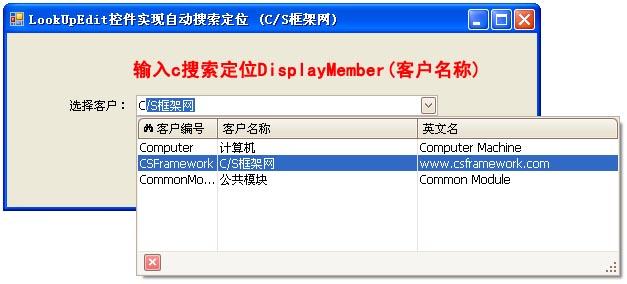
AutoComplete:配合ImmediatePopup=True时使用,当用户在输入框按任一可见字符键时立即弹出下拉窗体,并在输入框自动完成您想要输入的数据,同时下拉窗体自动匹配最佳记录。AutoComplete模式仅匹配DisplayMember对应字段的值。
特点:能在输入框显示匹配的数据,并且下拉窗体显示匹配的记录。
效果图如下:
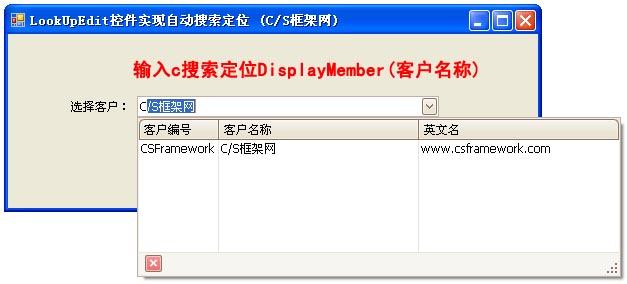
AutoFilter:配合ImmediatePopup=True时使用,当用户在输入框按任一可见字符键时立即弹出下拉窗体,并在输入框自动完成您想要输入的数据,同时下拉窗体自动过滤掉不匹配的记录。
特点:能在输入框显示匹配的数据,并过滤过不想要的记录。
DevExpress.LookUpEdit控件实现自动搜索定位功能 兼使用方法(looUpEdit可编辑)的更多相关文章
- 详解DevExpress.LookUpEdit控件实现自动搜索定位功能(转)
转载自csdn博客 爱拼才会赢 的博客 地址是详解DevExpress.LookUpEdit控件实现自动搜索定位功能(转)
- Devexpress TreeList控件绑定显示父子节点对像
今天一位同事咨询Devexpress TreeList控件绑定自动显示父子节点对像,但结果是不会显示带父子节点关系,而是将所有的节点作为父节点显示出来了,对像类的代码如下 public class I ...
- DevExpress 中 用 LookUpEdit 控件 代替 ComboBoxEdit 控件来绑定 DataTable
绑定数据及定义列信息 LookUpEdit lue = lookUpEdit1; DataTable dt = new DataTable(); dt.Columns.Add(new DataColu ...
- 基于MVC4+EasyUI的Web开发框架经验总结(13)--DataGrid控件实现自动适应宽带高度
在默认情况下,EasyUI的DataGrid好像都没有具备自动宽度的适应功能,一般是指定像素宽度的,但是使用的人员计算机的屏幕分辨率可能不一样,因此导致有些地方显示太大或者太小,总是不能达到好的预期效 ...
- (转)基于MVC4+EasyUI的Web开发框架经验总结(13)--DataGrid控件实现自动适应宽带高度
http://www.cnblogs.com/wuhuacong/p/4085725.html 在默认情况下,EasyUI的DataGrid好像都没有具备自动宽度的适应功能,一般是指定像素宽度的,但是 ...
- DevExpress WPF控件记录
以下是博主用到DevExpress WPF控件时的一些记录笔记: 1.Canvas控件:Canvas控件的背景色一定要设置(background="Transparent"),不然 ...
- DevExpress 用户控件 分页(上)
说明:使用用户控件分页,完成后,使用时非常简单,数据绑定,调用自己写的一个事件就OK了 前期准备工作: (1)添加一个用户控件 命名PageCtrl (2)打开代码: [csharp] view ...
- DevExpress 用户控件 分页(中)
说明: 1)具体调用请关注 看DevExpress 用户控件 分页(下) datanavi_ButtonClick 是DataNavigator的ButtonClikc事件 视图设计器: 分页用户控件 ...
- devexpress表格控件gridcontrol图片列,按钮列,时间列等特殊列的实现
1.项目中经常会在表格中插入按钮列,图片列,表格列一些非文本的特殊列.如何在devexpress表格控件gridcontrol中实现呢?以下列举一个实现添加图片列,按钮列,时间列,按钮列,开关列的示例 ...
随机推荐
- ****ural 1141. RSA Attack(RSA加密,扩展欧几里得算法)
1141. RSA Attack Time limit: 1.0 secondMemory limit: 64 MB The RSA problem is the following: given a ...
- url 取出文件扩展名
/**url 取出文件扩展名 *///方法一function getExt1($url) { $arr = parse_url($url); $file = basename($arr[' ...
- CSS的基本概念
<!--CSS 一.概念:CSS的全称是Cascading Style Sheets,层叠样式表,用来控制HTML标签样式,在美化网页中起到非常重要的作用 CSS的编写格式是键值对形式的,比如 ...
- UVALive - 4670 Dominating Patterns AC 自动机
input n 1<=n<=150 word1 word2 ... wordn 1<=len(wirdi)<=70 s 1<=len(s)<=1000000 out ...
- Ext 下拉框联动第一次显示不正常的问题
做下拉框联动,异步加载数据,第一次显示时数据不准确,不要在combo_2的下拉框直接绑定store,在combo_1的改变事件里调用下面的方法 function GetAllCustomerBrand ...
- VBS基础篇 - 杂项 - Sendkeys
VBS基础篇 - 杂项 - Sendkeys 模拟键盘操作,将一个或多个按键指令发送到指定Windows窗口来控制应用程序运行 其使用格式为:object.SendKeys(string) obj ...
- Bitcode问题
原因:Xcode7 及以上版本会默认开启 bitcode .bitcode具体是什么就不解释了.解决方法:1.更新library使包含Bitcode,否则会出现以上的警告.2.关闭Bitcode,简单 ...
- hdu_4547_CD操作(在线LCA)
题目连接:http://acm.hdu.edu.cn/showproblem.php?pid=4547 题意:中文,不解释 题解:很裸的LCA,注意父目录打开子目录一次就够了,这里我才用倍增在线LCA ...
- debian下安装repo
1.去google网站上下载repo脚本(用php语言写成的脚本) https://gerrit.googlesource.com/git-repo/+/stable/repo 可以将脚本复制下来并保 ...
- 【Machine Learning in Action --2】K-近邻算法改进约会网站的配对效果
摘自:<机器学习实战>,用python编写的(需要matplotlib和numpy库) 海伦一直使用在线约会网站寻找合适自己的约会对象.尽管约会网站会推荐不同的人选,但她没有从中找到喜欢的 ...