
DevExpress.LookUpEdit控件实现自动搜索定位功能 兼使用方法(looUpEdit可编辑)
DevExpress.LookUpEdit 使用方法
设置可手动输入
this.LookUpEdit1.Properties.TextEditStyle = DevExpress.XtraEditors.Controls.TextEditStyles.Standard;
  public static void LookUpbd(DevExpress.XtraEditors.LookUpEdit look, string sql,int display,int value)

        {

            DataTable dt = DAL.SqlDbhelp.GetDataSet(sql);

            look.Properties.SearchMode = DevExpress.XtraEditors.Controls.SearchMode.AutoComplete;

            look.Properties.DataSource = dt;

            look.Properties.DisplayMember = dt.Columns[display].ColumnName; //显示在文本框上的值

            look.Properties.ValueMember = dt.Columns[value].ColumnName; //获取的值

            look.Properties.NullText = "";

            look.Properties.SortColumnIndex = 0;

            look.Properties.ImmediatePopup = true;

        }
以下内容为转载
文章来源 http://blog.sina.com.cn/s/blog_6d1c583c01011qiv.html
详解DevExpress.LookUpEdit控件实现自动搜索定位功能
首先介绍三个重要的属性:
1. LookUpEdit.Properties.ImmediatePopup在输入框按任一可见字符键时立即弹出下拉窗体。
2. LookUpEdit.Properties.AutoSearchColumnIndex设置自动搜索的栏位序号,下拉窗体第一个栏位为0,依此类推,此属性配合SearchMode=OnlyInPopup时有效。
3. LookUpEdit.Properties.SearchMode 自动搜索定位模式
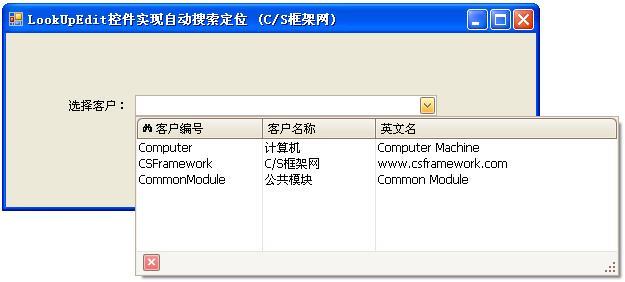
关于枚举类型SearchMode的定义:
//Summary:
// Enumerates search modes for a lookup edior.
public enumSearchMode
{
// Summary:
// The incremental search is enabled only when the dropdown window isopen.
// If the window is closed, the user can modify the text in the editbox. However
// these changes are ignored.
// When the dropdown is open the incremental search is performedagainst the
// column whose index is specified by theDevExpress.XtraEditors.Repository.RepositoryItemLookUpEdit.AutoSearchColumnIndex
// property. The header of this column contains the search icon(binoculars).
// The user can click a specific column header to perform the searchagainst
// this column.
// The following screenshot shows a sample lookup editor. Theincremental search
// is performed against the second column.
OnlyInPopup = 0,
//
// Summary:
// Enables the automatic completion feature. In this mode, when thedropdown
// is closed, the text in the edit box is automatically completed ifit matches
// aDevExpress.XtraEditors.Repository.RepositoryItemLookUpEditBase.DisplayMember
// field value of one of dropdown rows.
// When the dropdown is open, the automatic completion feature isdisabled but
// the editor allows you to perform an incremental search in the samemanner
// as when DevExpress.XtraEditors.Controls.SearchMode.OnlyInPopup modeis active.
AutoComplete = 1,
//
// Summary:
// Enables the incremental filtering feature. When you type within theedit
// box, the editor automatically opens the dropdown window anddisplays only
// records whoseDevExpress.XtraEditors.Repository.RepositoryItemLookUpEditBase.DisplayMember
// field value starts with the characters typed. Other records are notdisplayed.
// If you enter a value that does not match any record, the dropdownwindow
// will not contain any rows.
// The following image shows a lookup editor when AutoFilter mode isenabled.
AutoFilter = 2,
}
//来源:C/S框架网(www.csframework.com)QQ:1980854898
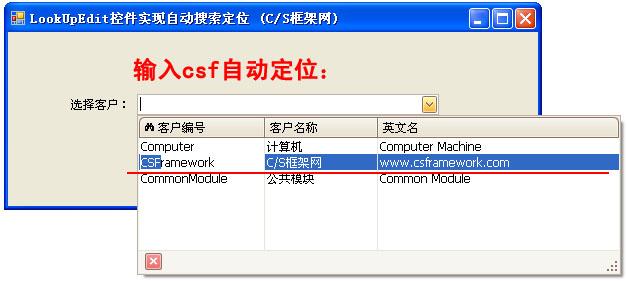
OnlyInPopup :配合ImmediatePopup=True时使用,当用户在输入框按任一可见字符键时立即弹出下拉窗体,并跟据输入的字符从头部开始匹配AutoSearchColumnIndex属性指定栏位字段的值,第一个栏位为0.
特点:在下拉窗体能显示匹配结果(蓝底白字),但在输入框内不显示。
效果图如下:
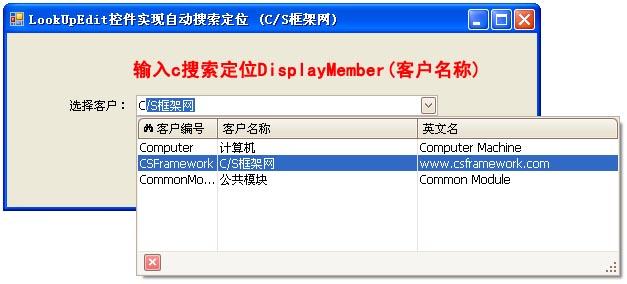
AutoComplete:配合ImmediatePopup=True时使用,当用户在输入框按任一可见字符键时立即弹出下拉窗体,并在输入框自动完成您想要输入的数据,同时下拉窗体自动匹配最佳记录。AutoComplete模式仅匹配DisplayMember对应字段的值。
特点:能在输入框显示匹配的数据,并且下拉窗体显示匹配的记录。
效果图如下:
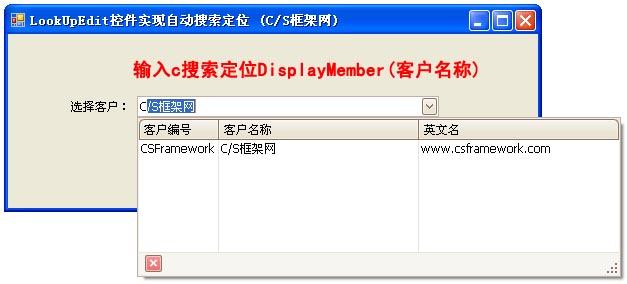
AutoFilter:配合ImmediatePopup=True时使用,当用户在输入框按任一可见字符键时立即弹出下拉窗体,并在输入框自动完成您想要输入的数据,同时下拉窗体自动过滤掉不匹配的记录。
特点:能在输入框显示匹配的数据,并过滤过不想要的记录。
DevExpress.LookUpEdit控件实现自动搜索定位功能 兼使用方法(looUpEdit可编辑)的更多相关文章
- 详解DevExpress.LookUpEdit控件实现自动搜索定位功能(转)
转载自csdn博客 爱拼才会赢 的博客 地址是详解DevExpress.LookUpEdit控件实现自动搜索定位功能(转)
- Devexpress TreeList控件绑定显示父子节点对像
今天一位同事咨询Devexpress TreeList控件绑定自动显示父子节点对像,但结果是不会显示带父子节点关系,而是将所有的节点作为父节点显示出来了,对像类的代码如下 public class I ...
- DevExpress 中 用 LookUpEdit 控件 代替 ComboBoxEdit 控件来绑定 DataTable
绑定数据及定义列信息 LookUpEdit lue = lookUpEdit1; DataTable dt = new DataTable(); dt.Columns.Add(new DataColu ...
- 基于MVC4+EasyUI的Web开发框架经验总结(13)--DataGrid控件实现自动适应宽带高度
在默认情况下,EasyUI的DataGrid好像都没有具备自动宽度的适应功能,一般是指定像素宽度的,但是使用的人员计算机的屏幕分辨率可能不一样,因此导致有些地方显示太大或者太小,总是不能达到好的预期效 ...
- (转)基于MVC4+EasyUI的Web开发框架经验总结(13)--DataGrid控件实现自动适应宽带高度
http://www.cnblogs.com/wuhuacong/p/4085725.html 在默认情况下,EasyUI的DataGrid好像都没有具备自动宽度的适应功能,一般是指定像素宽度的,但是 ...
- DevExpress WPF控件记录
以下是博主用到DevExpress WPF控件时的一些记录笔记: 1.Canvas控件:Canvas控件的背景色一定要设置(background="Transparent"),不然 ...
- DevExpress 用户控件 分页(上)
说明:使用用户控件分页,完成后,使用时非常简单,数据绑定,调用自己写的一个事件就OK了 前期准备工作: (1)添加一个用户控件 命名PageCtrl (2)打开代码: [csharp] view ...
- DevExpress 用户控件 分页(中)
说明: 1)具体调用请关注 看DevExpress 用户控件 分页(下) datanavi_ButtonClick 是DataNavigator的ButtonClikc事件 视图设计器: 分页用户控件 ...
- devexpress表格控件gridcontrol图片列,按钮列,时间列等特殊列的实现
1.项目中经常会在表格中插入按钮列,图片列,表格列一些非文本的特殊列.如何在devexpress表格控件gridcontrol中实现呢?以下列举一个实现添加图片列,按钮列,时间列,按钮列,开关列的示例 ...
随机推荐
- (转载)CSS中zoom:1的作用
CSS中zoom:1的作用兼容IE6.IE7.IE8浏览器,经常会遇到一些问题,可以使用zoom:1来解决,有如下作用:触发IE浏览器的haslayout解决ie下的浮动,margin重叠等一些问题. ...
- ( ̄▽ ̄") 没钱了
( ̄▽ ̄") 没钱了 TimeLimit: 1000ms MenoryLimit:65536KB 64-bit integer IO format:%lld Problem Descrip ...
- 第二部分 职责型模式responsibility
普通职责无法提供的内容,据此可以定义以下几种模式: 将职责集中到某个类的一个单独实例,单件模式 当一个对象发生改变时,依赖于这个对象的其他对象都能够得到通知,而这个发生改变的对象无须了解自己被其他哪些 ...
- Oracle SQL 内置函数大全
SQL中的单记录函数 1.ASCII 返回与指定的字符对应的十进制数;SQL> select ascii('A') A,ascii('a') a,ascii('0') zero,ascii(' ...
- maven下载,安装与eclipse中maven配置
1.maven下载.安装与环境变量配置 http://blog.csdn.net/jiuqiyuliang/article/details/45390313 2.Eclipse中maven的配置 ht ...
- Javaweb 第4 天xml 课程
XML课程 今日大纲 ● XML概念 ● XML基本语法 ● XML约束 ● dom4j技术 ● xpath技术 ******************************************* ...
- Fine Uploader 简单配置方法
由于jquery.uploadify是基于flash的jquery上传控件,客户老是说出问题,所以今天换成了一个纯js的异步上传控件. 这方面的资料很少,故此记下来分享一下. 项目地址:Fine Up ...
- hdu_5293_Tree chain problem(DFS序+树形DP+LCA)
题目连接:http://acm.hdu.edu.cn/showproblem.php?pid=5293 被这题打蹦了,看着题解写的,很是爆炸,确实想不到,我用的DFS序+LCA+树形DP,当然也可以写 ...
- c专家编程---优先级规则
对于一些复杂的类型组合,总是搞不明白,今天阅读了“优先级规则”这块,有了进一步的理解,特将规则记在此处,供自己学习查询使用. 优先级规则: A.声明从它的名字开始读取,然后按照优先级顺序依次读取 B. ...
- LeetCode OJ 109. Convert Sorted List to Binary Search Tree
Given a singly linked list where elements are sorted in ascending order, convert it to a height bala ...