
ckeditor_3.6.6.2+CKFinder2.0.2配置
一、首先工具的下载,找到相应的版本进行下载


二、配置文件
1、在web.xml中配置如下,增加ckeditor的启动
<servlet><servlet-name>ConnectorServlet</servlet-name><servlet-class>com.ckfinder.connector.ConnectorServlet</servlet-class><init-param><param-name>XMLConfig</param-name><param-value>/WEB-INF/ckfinder.xml</param-value></init-param><init-param><param-name>debug</param-name><param-value>false</param-value></init-param><load-on-startup>1</load-on-startup></servlet><servlet-mapping><servlet-name>ConnectorServlet</servlet-name><url-pattern>/js/ckfinder/core/connector/java/connector.java</url-pattern></servlet-mapping><filter><filter-name>FileUploadFilter</filter-name><filter-class>com.ckfinder.connector.FileUploadFilter</filter-class><init-param><param-name>sessionCookieName</param-name><param-value>JSESSIONID</param-value></init-param><init-param><param-name>sessionParameterName</param-name><param-value>jsessionid</param-value></init-param></filter><filter-mapping><filter-name>FileUploadFilter</filter-name><url-pattern>/js/ckfinder/core/connector/java/connector.java</url-pattern></filter-mapping>
2、在web.xml文件统计目录下新建ckfinder.xml,保存
<config><enabled>true</enabled><baseDir></baseDir> //这里不要添加任何目录<baseURL>/medsite/upload/</baseURL> //这里指定上传的文 件夹,medsite为项目名称<licenseKey></licenseKey><licenseName></licenseName><imgWidth>1600</imgWidth><imgHeight>1200</imgHeight><imgQuality>80</imgQuality><uriEncoding>UTF-8</uriEncoding><forceASCII>false</forceASCII><userRoleSessionVar>CKFinder_UserRole</userRoleSessionVar><checkDoubleExtension>true</checkDoubleExtension><checkSizeAfterScaling>true</checkSizeAfterScaling><secureImageUploads>true</secureImageUploads><htmlExtensions>html,htm,xml,js</htmlExtensions><hideFolders><folder>.svn</folder><folder>CVS</folder></hideFolders><hideFiles><file>.*</file></hideFiles><defaultResourceTypes></defaultResourceTypes><types><type name="Files"><url>%BASE_URL%files/</url><directory>%BASE_DIR%files</directory><maxSize>0</maxSize><allowedExtensions>7z,aiff,asf,avi,bmp,csv,doc,docx,fla,flv,gif,gz,gzip,jpeg,jpg,mid,mov,mp3,mp4,mpc,mpeg,mpg,ods,odt,pdf,png,ppt,pptx,pxd,qt,ram,rar,rm,rmi,rmvb,rtf,sdc,sitd,swf,sxc,sxw,tar,tgz,tif,tiff,txt,vsd,wav,wma,wmv,xls,xlsx,zip</allowedExtensions><deniedExtensions></deniedExtensions></type><type name="Images"><url>%BASE_URL%images/</url><directory>%BASE_DIR%images</directory><maxSize>0</maxSize><allowedExtensions>bmp,gif,jpeg,jpg,png</allowedExtensions><deniedExtensions></deniedExtensions></type><type name="Flash"><url>%BASE_URL%flash/</url><directory>%BASE_DIR%flash</directory><maxSize>0</maxSize><allowedExtensions>swf,flv</allowedExtensions><deniedExtensions></deniedExtensions></type></types><accessControls><accessControl><role>*</role><resourceType>*</resourceType><folder>/</folder><folderView>true</folderView><folderCreate>true</folderCreate><folderRename>true</folderRename><folderDelete>true</folderDelete><fileView>true</fileView><fileUpload>true</fileUpload><fileRename>true</fileRename><fileDelete>true</fileDelete></accessControl></accessControls><thumbs><enabled>true</enabled><url>%BASE_URL%_thumbs/</url><directory>%BASE_DIR%_thumbs</directory><directAccess>false</directAccess><maxHeight>100</maxHeight><maxWidth>100</maxWidth><quality>80</quality></thumbs><plugins><plugin><name>imageresize</name><class>com.ckfinder.connector.plugins.ImageResize</class><params><param name="smallThumb" value="90x90"></param><param name="mediumThumb" value="120x120"></param><param name="largeThumb" value="180x180"></param></params></plugin><plugin><name>fileeditor</name><class>com.ckfinder.connector.plugins.FileEditor</class><params></params></plugin></plugins><basePathBuilderImpl>com.ckfinder.connector.configuration.ConfigurationPathBuilder</basePathBuilderImpl></config>
3、配置ckeditor,可供ckfinder上传图片和文件
/*Copyright (c) 2003-2013, CKSource - Frederico Knabben. All rights reserved.For licensing, see LICENSE.html or http://ckeditor.com/license*/CKEDITOR.editorConfig = function( config ){//配置CKFinderconfig.filebrowserBrowseUrl ='js/ckfinder/ckfinder.html';config.filebrowserImageBrowseUrl ='js/ckfinder/ckfinder.html?Type=Images';config.filebrowserFlashBrowseUrl = 'js/ckfinder/ckfinder.html?Type=Flash';config.filebrowserUploadUrl = 'js/ckfinder/core/connector/java/connector.java?command=QuickUpload&type=Files';config.filebrowserImageUploadUrl = 'js/ckfinder/core/connector/java/connector.java?command=QuickUpload&type=Images';config.filebrowserFlashUploadUrl = 'js/ckfinder/core/connector/java/connector.java?command=QuickUpload&type=Flash';config.filebrowserWindowHeight='50%';//CKFinder浏览窗口高度,默认值70%config.filebrowserWindowWidth='70%';//CKFinder浏览窗口宽度,默认值80%};
4、拷贝此目录下的文件,复制到src下


5、lib包给大家展示一下

6、效果展示


7、修改上传文件的文件名称
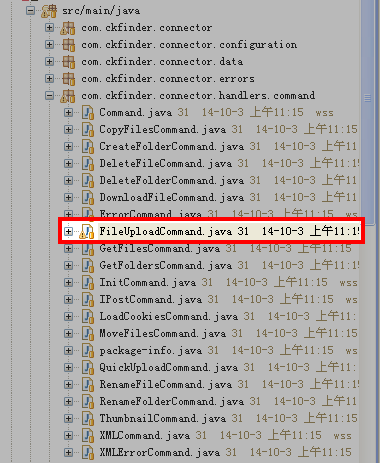
private boolean validateUploadItem(final FileItem item, final String path) {if (item.getName() != null && item.getName().length() > 0) {this.fileName = getFileItemName(item);} else {this.errorCode = Constants.Errors.CKFINDER_CONNECTOR_ERROR_UPLOADED_INVALID;return false;}//this.newFileName = this.fileName;String sExtentsion = FileUtils.getFileExtension(this.fileName);SimpleDateFormat format = new SimpleDateFormat("yyyyMMddHHmmss");this.newFileName = format.format(new Date()) + "." + sExtentsion;String unsafeFileName = this.newFileName;for (char c : UNSAFE_FILE_NAME_CHARS) {this.newFileName = unsafeFileName.replace(c, '_');}if (configuration.forceASCII()) {this.newFileName = FileUtils.convertToASCII(this.newFileName);}if (!unsafeFileName.equals(this.newFileName)) {this.errorCode =Constants.Errors.CKFINDER_CONNECTOR_ERROR_UPLOADED_INVALID_NAME_RENAMED;}if (FileUtils.checkIfDirIsHidden(this.currentFolder, configuration)) {this.errorCode = Constants.Errors.CKFINDER_CONNECTOR_ERROR_INVALID_REQUEST;return false;}if (!FileUtils.checkFileName(this.newFileName)|| FileUtils.checkIfFileIsHidden(this.newFileName,configuration)) {this.errorCode = Constants.Errors.CKFINDER_CONNECTOR_ERROR_INVALID_NAME;return false;}int checkFileExt = FileUtils.checkFileExtension(this.newFileName,configuration.getTypes().get(type),configuration,true);if (checkFileExt == 1) {this.errorCode = Constants.Errors.CKFINDER_CONNECTOR_ERROR_INVALID_EXTENSION;return false;} else if (checkFileExt == 2) {this.newFileName = FileUtils.renameFileWithBadExt(this.newFileName);}try {File file = new File(path, getFinalFileName(path,this.newFileName));if (!FileUtils.checkFileSize(configuration.getTypes().get(this.type),item.getSize())&& !(configuration.checkSizeAfterScaling() && ImageUtils.isImage(file))) {this.errorCode =Constants.Errors.CKFINDER_CONNECTOR_ERROR_UPLOADED_TOO_BIG;return false;}if (configuration.getSecureImageUploads() && ImageUtils.isImage(file)&& !ImageUtils.checkImageFile(item)) {this.errorCode =Constants.Errors.CKFINDER_CONNECTOR_ERROR_UPLOADED_CORRUPT;return false;}if (!FileUtils.checkIfFileIsHtmlFile(file.getName(), configuration)&& FileUtils.detectHtml(item)) {this.errorCode =Constants.Errors.CKFINDER_CONNECTOR_ERROR_UPLOADED_WRONG_HTML_FILE;return false;}} catch (SecurityException e) {if (configuration.isDebugMode()) {this.exception = e;}this.errorCode = Constants.Errors.CKFINDER_CONNECTOR_ERROR_ACCESS_DENIED;return false;} catch (IOException e) {if (configuration.isDebugMode()) {this.exception = e;}this.errorCode = Constants.Errors.CKFINDER_CONNECTOR_ERROR_ACCESS_DENIED;return false;}return true;}
ckeditor_3.6.6.2+CKFinder2.0.2配置的更多相关文章
- CentOS 7.0安装配置Vsftp服务器
一.配置防火墙,开启FTP服务器需要的端口 CentOS 7.0默认使用的是firewall作为防火墙,这里改为iptables防火墙. 1.关闭firewall: systemctl stop fi ...
- Solr4.0 如何配置使用UUID自动生成id值
原文链接http://blog.csdn.net/keepthinking_/article/details/8501058#comments 最近学习了Lucene,随便也学习了Solr,Solr规 ...
- 网站开启https后加密协议始终是TLS1.0如何配置成TLS1.2?
p { margin-bottom: 0.1in; line-height: 120% } 网站开启https后加密协议始终是TLS1.0如何配置成TLS1.2? 要在服务器上开启 TLSv1.,通常 ...
- 驱动开发学习笔记. 0.01 配置arm-linux-gcc 交叉编译器
驱动开发读书笔记. 0.01 配置arm-linux-gcc 交叉编译器 什么是gcc: 就像windows上的VS 工具,用来编译代码,具体请自己搜索相关资料 怎么用PC机的gcc 和 arm-li ...
- RHEL 7.0 本地配置yum源
RHEL 7.0 本地配置yum源 yum简介 yum = Yellow dog Updater, Modified 主要功能是更方便的添加/删除/更新RPM包. 它能自动解决包的倚赖性问题. 它 ...
- JSP的那些事儿(2)---- DWR2.0 的配置和使用
JSP的那些事儿(2)----DWR2.0 的配置和使用 分类: Web开发 JAVA 2009-04-23 15:43 999人阅读 评论(0) 收藏 举报 jspdwrjavascriptserv ...
- CentOS 7.0系统安装配置LAMP服务器(Apache+PHP+MariaDB)
CentOS 7.0接触到的用户是比较少的,今天看了站长写了一篇关于centos7中安装配置LAMP服务器的教程,下面我把文章稍加整理一下转给大家学习交流,希望例子能给各位带来帮助哦. cento ...
- CentOS 7.0安装配置LAMP服务器(Apache+PHP+MariaDB)
CentOS 7.0默认使用的是firewall作为防火墙,这里改为iptables防火墙. 1.关闭firewall: systemctl stop firewalld.service #停止fir ...
- Ubuntu14.10+cuda7.0+caffe配置
转自:http://blog.csdn.net/lu597203933/article/details/46742199 Ubuntu14.10+cuda7.0+caffe配置 一:linux安装 L ...
随机推荐
- 1.2 eclipse使用 :working set
working set可以是相当于文件夹~~有多个project时, 分别存放在不同的 workingset下,可以方便管理 新建或编辑 working set时,需要记住选择project *可参照 ...
- 为ubuntu添加右键打开终端效果
安装工具:nautilus-open-terminal sudo apt-get install nautilus-open-terminal 注销或重启
- Git本地项目上传 & SourceTree & GitHub 简单使用
Git(分布式版本控制系统) Git是一款免费.开源的分布式版本控制系统,用于敏捷高效地处理任何或小或大的项目. Git是一个开源的分布式版本控制系统,用以有效.高速的处理从很小到非常大的项目版本管理 ...
- 初探JavaScript魅力(三)
复选框的全选.反选和不选 <title>无标题文档</title> <style> body{background:#666;} </style> &l ...
- unity中的update、Lateupdate和FixedUpdate。
MonoBehaviour.Update 更新 当MonoBehaviour启用时,其Update在每一帧被调用. MonoBehaviour.FixedUpdate 固定更新 当MonoBehavi ...
- w3chtml页面和css书写规范
http://www.cnblogs.com/Wenwang/archive/2011/09/07/2169881.html
- L3,please send me a card
expressions: a few words几句话 lend sb sth或lend sth to sb borrow sth或borrow sth from sb 都表示借,但是行为不同. wo ...
- java工程开发之图形化界面之(第一课)
下面我们先上代码: package 一个事例图形小应用程序; import javax.swing.JApplet; import java.awt.Graphics; public class 绘制 ...
- 移动端h5页面的设计稿尺寸
当我们在做手机端H5网页设计稿时(当然包含微信端的H5网页设计),如果没有做过类似的移动端的设计,UI设计师和前端工程师肯定会纠结的.如果是app设计师,就不会那么纠结啦. 延伸阅读: 2015年度最 ...
- jq中的css-Dom
1,height() ,width() 此方法用来获取匹配元素的高和宽的值,如果括号内有值,则是修改匹配元素的值, 2.offset() 此方法的作用是获取元素在当前视窗的相对偏移,其中返回的对象包含 ...