
pygame系列_mouse鼠标事件
pygame.mouse提供了一些方法获取鼠标设备当前的状态

'''

pygame.mouse.get_pressed - get the state of the mouse buttons    get the state of the mouse buttons

pygame.mouse.get_pos - get the mouse cursor position    get the mouse cursor position

pygame.mouse.get_rel - get the amount of mouse movement    get the amount of mouse movement

pygame.mouse.set_pos - set the mouse cursor position    set the mouse cursor position

pygame.mouse.set_visible - hide or show the mouse cursor    hide or show the mouse cursor

pygame.mouse.get_focused - check if the display is receiving mouse input    check if the display is receiving mouse input

pygame.mouse.set_cursor - set the image for the system mouse cursor    set the image for the system mouse cursor

pygame.mouse.get_cursor - get the image for the system mouse cursor    get the image for the system mouse cursor

'''
在下面的demo中,主要用到了:
pygame.mouse.get_pressed()
pygame.mouse.get_pos()
展示的效果:
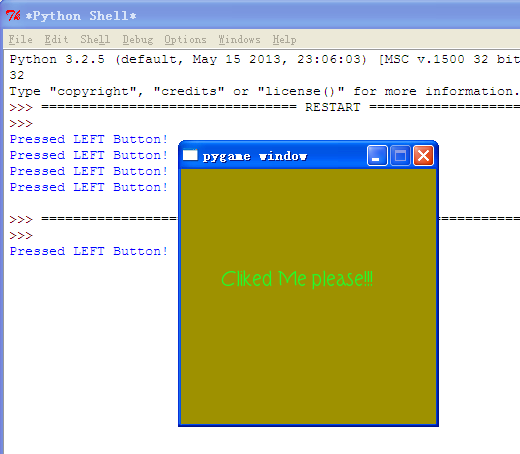
游戏效果:
当鼠标经过窗口的时候,窗口背景颜色会随着鼠标的移动而发生改变,当鼠标点击窗口
会在控制台打印出是鼠标的那个键被点击了:左,右,滚轮
========================================
代码部分:
========================================
 1 #pygame mouse

 2

 3 import os, pygame

 4 from pygame.locals import *

 5 from sys import exit

 6 from random import *

 7

 8 __author__ = {'name' : 'Hongten',

 9               'mail' : 'hongtenzone@foxmail.com',

10               'blog' : 'http://www.cnblogs.com/hongten',

11               'Version' : '1.0'}

12

13 if not pygame.font:print('Warning, Can not found font!')

14

15 pygame.init()

16

17 screen = pygame.display.set_mode((255, 255), 0, 32)

18 screen.fill((255,255,255))

19

20 font = pygame.font.Font('data\\font\\TORK____.ttf', 20)

21 text = font.render('Cliked Me please!!!', True, (34, 252, 43))

22

23 mouse_x, mouse_y = 0, 0

24 while 1:

25     for event in pygame.event.get():

26         if event.type == QUIT:

27             exit()

28         elif event.type ==  MOUSEBUTTONDOWN:

29             pressed_array = pygame.mouse.get_pressed()

30             for index in range(len(pressed_array)):

31                 if pressed_array[index]:

32                     if index == 0:

33                         print('Pressed LEFT Button!')

34                     elif index == 1:

35                         print('The mouse wheel Pressed!')

36                     elif index == 2:

37                         print('Pressed RIGHT Button!')

38         elif event.type == MOUSEMOTION:

39             #return the X and Y position of the mouse cursor

40             pos = pygame.mouse.get_pos()

41             mouse_x = pos[0]

42             mouse_y = pos[1]

43

44     screen.fill((mouse_x, mouse_y, 0))

45     screen.blit(text, (40, 100))

46     pygame.display.update()
pygame系列_mouse鼠标事件的更多相关文章
- JavaScript进阶系列07,鼠标事件
鼠标事件有Keydown, Keyup, Keypress,但Keypress与Keydown和Keyup不同,如果按ctrl, shift, caps lock......等修饰键,不会触发Keyp ...
- Selenium3 + Python3自动化测试系列四——鼠标事件和键盘事件
一.鼠标事件 在 WebDriver 中, 将这些关于鼠标操作的方法封装在 ActionChains 类提供. ActionChains 类提供了鼠标操作的常用方法. ActionChains 类的成 ...
- opencv-python教程学习系列5-处理鼠标事件
前言 opencv-python教程学习系列记录学习python-opencv过程的点滴,本文主要介绍opencv-python处理鼠标事件,坚持学习,共同进步. 系列教程参照OpenCV-Pytho ...
- 吴裕雄--天生自然python学习笔记:python 用pygame模块检测键盘事件和鼠标事件
用户可通过键盘输入来操控游戏中角色的运动,取得键盘事件的方法有以下两种 : 常用的按键与键盘常数对应表 : 按下右箭头键,蓝色小球会 向 右移动:按住右箭头键不放 , 球体会快速 向 右移 动, 若到 ...
- 深入理解DOM事件类型系列第一篇——鼠标事件
× 目录 [1]类型 [2]顺序 [3]坐标位置[4]修改键[5]相关元素[6]鼠标按键[7]滚轮事件[8]移动设备 前面的话 鼠标事件是web开发中最常用的一类事件,毕竟鼠标是最主要的定位设备.本文 ...
- opencv入门系列教学(四)处理鼠标事件
一.鼠标事件的简单演示 opencv中的鼠标事件,值得是任何与鼠标相关的任何事物,例如左键按下,左键按下,左键双击等.我们先来看看鼠标事件有哪些,在python中执行下面代码: import cv2 ...
- pygame系列_原创百度随心听音乐播放器_完整版
程序名:PyMusic 解释:pygame+music 之前发布了自己写的小程序:百度随心听音乐播放器的一些效果图 你可以去到这里再次看看效果: pygame系列_百度随心听_完美的UI设计 这个程序 ...
- Java知多少(93)鼠标事件
鼠标事件的事件源往往与容器相关,当鼠标进入容器.离开容器,或者在容器中单击鼠标.拖动鼠标时都会发生鼠标事件.java语言为处理鼠标事件提供两个接口:MouseListener,MouseMotionL ...
- 第53天:鼠标事件、event事件对象
-->鼠标事件-->event事件对象-->默认事件-->键盘事件(keyCode)-->拖拽效果 一.鼠标事件 onclick ---------------鼠标点击事 ...
随机推荐
- 使用apache daemon让java程序在unix系统上以服务方式运行
通过使用apache_commons_daemon,可以让Java程序在unix系统上以服务器的方式运行. 当然,通过wrapper也是可以达到这样的目的,wrapper还可以指定java应用中用到的 ...
- cell中button怎么得到对应cell的indexpath 以及关于UITableViewCellContentView的问题
============================================================ 博文原创,转载请声明出处 电子咖啡-专注于移动互联网 ============ ...
- ABP分层设计
ABP分层设计 一.为什么要分层 分层架构是所有架构的鼻祖,分层的作用就是隔离,不过,我们有时候有个误解,就是把层和程序集对应起来,就比如简单三层架构中,在你的解决方案中,一般会有三个程序集项目:XX ...
- TComponent,TControl,TWinControl,TGraphic的DefineProperties赏析与说明(不懂)
先观赏一下最后的实现效果: object Form1: TForm1 Left = Top = Width = Height = Caption = 'Form1' Color = clBtnFace ...
- Lucene.Net 2.3.1开发介绍 —— 三、索引(二)
原文:Lucene.Net 2.3.1开发介绍 -- 三.索引(二) 2.索引中用到的核心类 在Lucene.Net索引开发中,用到的类不多,这些类是索引过程的核心类.其中Analyzer是索引建立的 ...
- 【ASP.NET Web API教程】5.4 ASP.NET Web API批处理器
原文:[ASP.NET Web API教程]5.4 ASP.NET Web API批处理器 注:本文是[ASP.NET Web API系列教程]的一部分,如果您是第一次看本系列教程,请先看前面的内容. ...
- windows socket----select模型
一般我们的网络编程都是用bind ,listen,accept,send/sendto,recv/recvfrom.在创建套接字的时候,是默认使用阻塞模式的,每当我们调用send/sendto等方法时 ...
- mybatis 的简单使用
须要用到的包:(这里仅仅是当中一个版本号.其它的百度) mysql-connector-java-5.1.6-bin mybatis-3.2.2 先看项目文件夹: 配置文件mybatisconfig. ...
- ExtJs4 笔记(7) Ext.tip.ToolTip 提示
本篇介绍提示控件,ExtJs支持两种方式定义提示,可以支持普通html元素和一般的ExtJs UI控件. 一.基本提示 Ext.tip.ToolTip 1.最简单的提示 下面通过代码定义一个最简单的提 ...
- [Android学习笔记]使用getIdentifier()获取资源Id
使用getIdentifier()获取资源Id Android中可以使用getIdentifier()获取资源ID ex: 根据图片名称获取图片Id private int getImageResId ...