
基于jQuery弹性展开收缩菜单插件gooey.js
首先 引入css
<link rel="stylesheet" href="css/bootstrap.min.css">
<link rel="stylesheet" href="css/font-awesome.min.css">
<link rel="stylesheet" href="css/gooey.min.css">
引入js
<script type="text/javascript" src="js/jquery-2.1.3.min.js"></script>
<script src="js/gooey.min.js"></script>
html:
<div class="nav1">
<nav id="gooey-upper">
<input type="checkbox" class="menu-open" name="menu-open1" id="menu-open1"/>
<label class="open-button" for="menu-open1">
<span class="burger burger-1"></span>
<span class="burger burger-2"></span>
<span class="burger burger-3"></span>
</label>
<a href="#features" class="gooey-menu-item"> <i title="Features" class="fa fa-cog fa-2x"></i> </a>
<a href="#h-spaced-menu" class="gooey-menu-item"> <i title="Horizontal Menu" class="fa fa-arrows-h fa-2x"></i> </a>
<a href="#menu-v-example" class="gooey-menu-item"> <i title="Vertical Menu" class="fa fa-arrows-v fa-2x"></i> </a>
<a href="#docs" class="gooey-menu-item"> <i title="Docs" class="fa fa-book fa-2x"></i> </a>
<a href="#event-api" class="gooey-menu-item"> <i title="Event API" class="fa fa-code fa-2x"></i> </a>
<a href="#round" class="gooey-menu-item"> <i title="Round Menu" class="fa fa-circle fa-2x"></i> </a>
</nav>
</div>
<div class="nav1">
<nav id="gooey-h">
<input type="checkbox" class="menu-open" name="menu-open2" id="menu-open2"/>
<label class="open-button" for="menu-open2">
<span class="burger burger-1"></span>
<span class="burger burger-2"></span>
<span class="burger burger-3"></span>
</label>
<a href="#features" class="gooey-menu-item"> <i title="Features" class="fa fa-cog fa-2x"></i> </a>
<a href="#h-spaced-menu" class="gooey-menu-item"> <i title="Horizontal Menu" class="fa fa-arrows-h fa-2x"></i> </a>
<a href="#menu-v-example" class="gooey-menu-item"> <i title="Vertical Menu" class="fa fa-arrows-v fa-2x"></i> </a>
<a href="#docs" class="gooey-menu-item"> <i title="Docs" class="fa fa-book fa-2x"></i> </a>
<a href="#event-api" class="gooey-menu-item"> <i title="Event API" class="fa fa-code fa-2x"></i> </a>
<a href="#round" class="gooey-menu-item"> <i title="Round Menu" class="fa fa-circle fa-2x"></i> </a>
</nav>
</div>
js:
<script>
$(function(){
$("#gooey-upper").gooeymenu({
bgColor: "#ff6666",
contentColor: "white",
style: "circle",
horizontal: {
menuItemPosition: "glue"
},
vertical: {
menuItemPosition: "spaced",
direction: "up"
},
circle: {
radius: 80
},
margin: "small",
size: 90,
bounce: true,
bounceLength: "small",
transitionStep: 100,
hover: "#e55b5b"
});
$("#gooey-h").gooeymenu({
bgColor: "#68d099",
contentColor: "white",
style: "horizontal",
horizontal: {
menuItemPosition: "glue"
},
vertical: {
menuItemPosition: "spaced",
direction: "up"
},
circle: {
radius: 90
},
margin: "small",
size: 80,
bounce: true,
bounceLength: "small",
transitionStep: 100,
hover: "#5dbb89"
});
$("#gooey-round").gooeymenu({
bgColor: "#68d099",
contentColor: "white",
style: "circle",
horizontal: {
menuItemPosition: "spaced"
},
vertical: {
menuItemPosition: "spaced",
direction: "up"
},
circle: {
radius: 85
},
margin: "small",
size: 80,
bounce: true,
bounceLength: "small",
transitionStep: 100,
hover: "#5dbb89"
});
$("#gooey-API").gooeymenu({
bgColor: "#68d099",
contentColor: "white",
style: "circle",
circle: {
radius: 85
},
margin: "small",
size: 70,
bounce: true,
bounceLength: "small",
transitionStep: 100,
hover: "#5dbb89",
open: function () {
$(this).find(".gooey-menu-item").css("background-color", "steelblue");
$(this).find(".open-button").css("background-color", "steelblue");
},
close: function () {
$(this).find(".gooey-menu-item").css("background-color", "#ffdf00");
$(this).find(".open-button").css("background-color", "#ffdf00");
}
});
$("#gooey-v").gooeymenu({
bgColor: "#68d099",
contentColor: "white",
style: "vertical",
horizontal: {
menuItemPosition: "glue"
},
vertical: {
menuItemPosition: "spaced",
direction: "up"
},
circle: {
radius: 90
},
margin: "small",
size: 70,
bounce: true,
bounceLength: "small",
transitionStep: 100,
hover: "#68d099"
});
})
/*style:gooey菜单的样式,可用值有:”horizontal”,”vertical”,”circle”。
size:菜单项的尺寸,单位像素。
margin:菜单项之间的margin值。只有在”horizontal” 或 “vertical”参数设置为”spaced”时才有效。可用值有:”small”,”medium” 和 “large”。
bgColor:设置菜单项的背景颜色。
contentColor:设置菜单项的字体颜色。
transitionStep:设置菜单项打开的速度,单位毫秒。
bounce:是否打开”bounce”效果。
bounceLength:如果打开了”bounce”效果,设置bounce的长度。可用值有:”small”, “medium” 和 “large”。
hover:设置鼠标滑过菜单项时的颜色。
circle:设置菜单打开时圆形的半径。
horizontal:menuItemPosition:设置为”Spaced”表示要指定菜单项之间的margin值。设置为”Glue”表示菜单项堆叠在一起。
vertical:menuItemPosition:设置为”Spaced”表示要指定菜单项之间的margin值。设置为”Glue”表示菜单项堆叠在一起。
vertical:direction:菜单的垂直展开方向,可用值有:”up” 或 “down”。
回调函数
open:function(){}:菜单打开是触发。
close:function() {}:菜单关闭时触发。*/
</script>
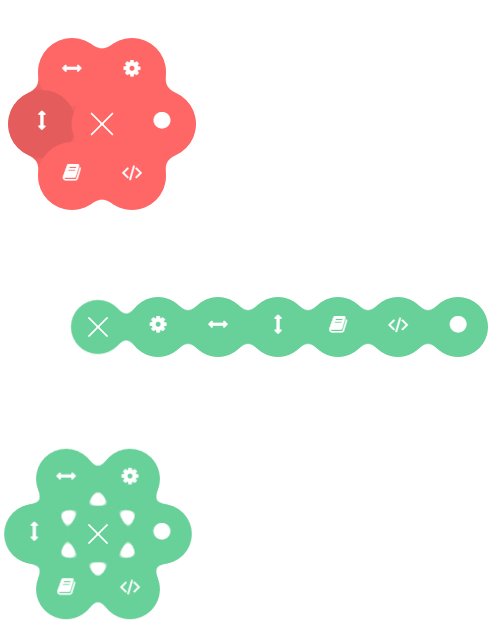
效果图:
基于jQuery弹性展开收缩菜单插件gooey.js的更多相关文章
- jQuery弹性展开收缩菜单插件gooey.js
分享一款基于jQuery弹性展开收缩菜单插件gooey.js.这是一款基于gooey.js插件实现的弹性菜单特效代码.效果图如下: 在线预览 源码下载 实现的代码. html代码: <hea ...
- 推荐20款基于 jQuery & CSS 的文本效果插件
jQuery 和 CSS 可以说是设计和开发行业的一次革命.这一切如此简单,快捷的一站式服务.jQuery 允许你在你的网页中添加一些真正令人惊叹的东西而不用付出很大的努力,要感谢那些优秀的 jQue ...
- 一款效果精致的 jQuery 多层滑出菜单插件
想要以用户友好的方式呈现多级菜单是件不容易的事情,而且还要跨浏览器兼容就更难了.Multi-Level Push Menu 这款 jQuery 插件提供了呈现这种菜单的解决方案,能够让你无限制的展示菜 ...
- 基于jQuery右下角旋转环状菜单代码
基于jQuery右下角旋转环状菜单代码.这是一款固定在页面的右下角位置,当用户点击了主菜单按钮后,子菜单项会以环状旋转进入页面,并使用animate.css来制作动画效果.效果图如下: 在线预览 ...
- js之展开收缩菜单,用到window.onload ,onclick,
目标效果:点击标签1,如果列表标签的style的display是block,改成none,否则改成block,来达到展开收缩菜单效果 一.准备阶段 html文件 <!DOCTYPE html&g ...
- 基于jQuery垂直多级导航菜单代码
基于jQuery垂直多级导航菜单代码是一款黑色风格的jQuery竖直导航菜单特效下载.效果图如下: 在线预览 源码下载 实现的代码. html代码: <ul class="ce&q ...
- 基于jQuery图片元素网格布局插件
基于jQuery图片元素网格布局插件是一款可以将图片或HTML元素均匀分布排列为网格布局的jQuery插件jMosaic.效果图如下: 在线预览 源码下载 实现的代码. html代码: <c ...
- 基于jquery的锚点滚动插件(百度百科效果) anchorScroll.js
1.插进使用场景 请打开https://baike.baidu.com/item/%E6%97%A5%E6%9C%AC%E5%8A%A8%E7%94%BB#hotspotmining,查看百度百科页面 ...
- 基于jquery的json转table插件jsontotable
分享一款基于jquery的json转table插件jsontotable.效果图如下: 在线预览 源码下载 实现的代码. html代码: <div class="container ...
随机推荐
- 先对数组排序,在进行折半查找(C++)
第一步:输入15个整数 第二步:对这15个数进行排序 第三部:输入一个数,在后在排好序的数中进行折半查找,判断该数的位置 实现代码如下: 方法一: 选择排序法+循环折半查找法 #include< ...
- MongoDB自学笔记1----1.1 NoSQL是什么?
第一章 走进MongoDB 1.1NoSQL是什么? 1.1.1NoSQL简介 对于不了解NoSQL的人都会认为NoSQL为No SQL,即不是SQL.但是这种理解是错误的, ...
- 手机端H5 header定义样式
<meta content="width=device-width,initial-scale=1.0, maximum-scale=1.0, user-scalable=0" ...
- virtualbox 中的linux 共享文件
首先要安装VirtualBox的增强版功能(VBoxGuestAdditions) 在 设备--->安装增强版功能----->运行,重启电脑. 出现这个问题,看看安装增强功能的时候,有没有 ...
- 无线网卡连接internet,有线网卡向另一台电脑分享网络(笔记本当有线路由器)
有一台笔记本和一台台式机,都放在卧室内 笔记本能用无线网卡连接到客厅的路由器,台式机没有配备无线网卡,不能上网 要从客厅的路由器那边拉一条网线到卧室内连接台式机显然很蠢,在卧室内购置一台中继路由器也不 ...
- CodeVS 3415-最小和
原题 题目描述 Description 小浣熊松松来到文具店,选择了K支自己喜欢的水彩笔,并抄下了它们的价格.可是到结算时,他发现自己抄价格时抄得太密集,以至于所有价格连成了一个数字串(你可 ...
- linux中如何查看某一进程的启动时间
mark下: ps -p PID -o lstart 其中PID是进程的pid ps的参数好多啊,够摸索一下了
- javascript实现页面右侧在线客服始终跟随鼠标滚动而上下滚动且始终位于屏幕中间
效果如图,右侧的联系一栏始终位于页面的中间位置,且随着页面的上下滚动而滚动跟随 css的话没什么好说的,看图 代码 window.onload=window.onresize=window.onscr ...
- find指令
1.命令格式 find path -options [-print -exec -ok ...] 2.命令功能 查找文件,并作出相应处理 3.命令参数
- 动态网站加速,cdn义不容辞
"双十一"大战已经落下帷幕,各大电商纷纷拿出了亮眼的成绩单,但在这些成绩单的背后,CDN加速技术是功不可没的.随着互联网的发展,电商.视频直播等网站的火热,以及各个云加速平台的流行 ...