
解决 java 使用ssl过程中出现"PKIX path building failed: sun.security.provider.certpath.SunCertPathBuilderException: unable to find valid certification path to requested target"
今天,封装HttpClient使用ssl时报一下错误:
javax.net.ssl.SSLHandshakeException: sun.security.validator.ValidatorException: PKIX path building failed: sun.security.provider.certpath.SunCertPathBuilderException: unable to find valid certification path to requested target

	at sun.security.ssl.Alerts.getSSLException(Alerts.java:192)

	at sun.security.ssl.SSLSocketImpl.fatal(SSLSocketImpl.java:1949)

	at sun.security.ssl.Handshaker.fatalSE(Handshaker.java:302)

	at sun.security.ssl.Handshaker.fatalSE(Handshaker.java:296)

...

Caused by: sun.security.validator.ValidatorException: PKIX path building failed: sun.security.provider.certpath.SunCertPathBuilderException: unable to find valid certification path to requested target

	at sun.security.validator.PKIXValidator.doBuild(PKIXValidator.java:387)

	at sun.security.validator.PKIXValidator.engineValidate(PKIXValidator.java:292)

	at sun.security.validator.Validator.validate(Validator.java:260)

	at sun.security.ssl.X509TrustManagerImpl.validate(X509TrustManagerImpl.java:324)

	at sun.security.ssl.X509TrustManagerImpl.checkTrusted(X509TrustManagerImpl.java:229)
在参考了图解https协议之后,发现这个报错应该就是在客户端“validate crt”的过程中,所以正常的解决思路应该想办法将服务器的证书写入到客户端。
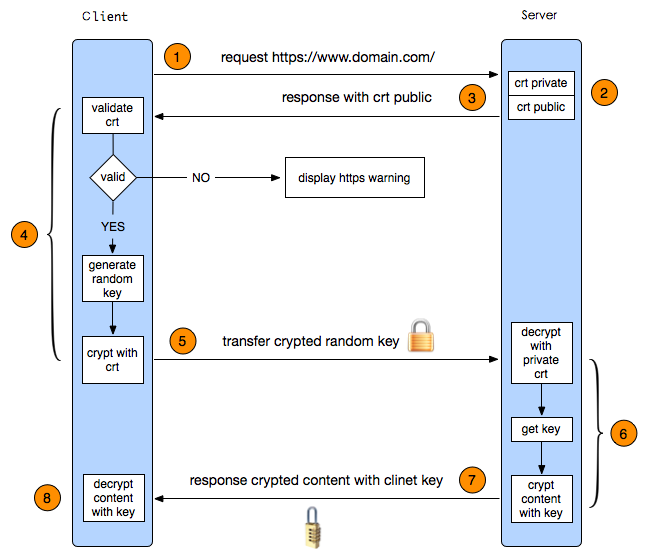
后来在oracle的一篇博客中找到一下的解决方式:
关键步骤:
% java InstallCert _web_site_hostname_

显示相关的证书信息

此时输入'q' 则为'退出', '1' 则将添加CA证书。

将新生成的 "jssecacerts" 移到"$JAVA_HOME/jre/lib/security"
注意:添加CA证书的行为,新生成的jssecacerts则是与旧的jssecacerts叠加的后产生的文件,旧的jssecacerts查找方式如代码所示:
File file = new File("jssecacerts");

if (file.isFile() == false) {

    char SEP = File.separatorChar;

    File dir = new File(System.getProperty("java.home") + SEP + "lib"

            + SEP + "security");

    file = new File(dir, "jssecacerts");

    if (file.isFile() == false) {

        file = new File(dir, "cacerts");

    }

}
有点遗憾的是博客中InstallCert下载链接已经失效了。需要异步到github进行下载。
代码也留一份到此处:
/*

 * Copyright 2006 Sun Microsystems, Inc.  All Rights Reserved.

 *

 * Redistribution and use in source and binary forms, with or without

 * modification, are permitted provided that the following conditions

 * are met:

 *

 *   - Redistributions of source code must retain the above copyright

 *     notice, this list of conditions and the following disclaimer.

 *

 *   - Redistributions in binary form must reproduce the above copyright

 *     notice, this list of conditions and the following disclaimer in the

 *     documentation and/or other materials provided with the distribution.

 *

 *   - Neither the name of Sun Microsystems nor the names of its

 *     contributors may be used to endorse or promote products derived

 *     from this software without specific prior written permission.

 *

 * THIS SOFTWARE IS PROVIDED BY THE COPYRIGHT HOLDERS AND CONTRIBUTORS "AS

 * IS" AND ANY EXPRESS OR IMPLIED WARRANTIES, INCLUDING, BUT NOT LIMITED TO,

 * THE IMPLIED WARRANTIES OF MERCHANTABILITY AND FITNESS FOR A PARTICULAR

 * PURPOSE ARE DISCLAIMED.  IN NO EVENT SHALL THE COPYRIGHT OWNER OR

 * CONTRIBUTORS BE LIABLE FOR ANY DIRECT, INDIRECT, INCIDENTAL, SPECIAL,

 * EXEMPLARY, OR CONSEQUENTIAL DAMAGES (INCLUDING, BUT NOT LIMITED TO,

 * PROCUREMENT OF SUBSTITUTE GOODS OR SERVICES; LOSS OF USE, DATA, OR

 * PROFITS; OR BUSINESS INTERRUPTION) HOWEVER CAUSED AND ON ANY THEORY OF

 * LIABILITY, WHETHER IN CONTRACT, STRICT LIABILITY, OR TORT (INCLUDING

 * NEGLIGENCE OR OTHERWISE) ARISING IN ANY WAY OUT OF THE USE OF THIS

 * SOFTWARE, EVEN IF ADVISED OF THE POSSIBILITY OF SUCH DAMAGE.

 */

/**

 * Originally from:

 * http://blogs.sun.com/andreas/resource/InstallCert.java

 * Use:

 * java InstallCert hostname

 * Example:

 *% java InstallCert ecc.fedora.redhat.com

 */

import javax.net.ssl.*;

import java.io.*;

import java.security.KeyStore;

import java.security.MessageDigest;

import java.security.cert.CertificateException;

import java.security.cert.X509Certificate;

/**

 * Class used to add the server's certificate to the KeyStore

 * with your trusted certificates.

 */

public class InstallCert {

    public static void main(String[] args) throws Exception {

        String host;

        int port;

        char[] passphrase;

        if ((args.length == 1) || (args.length == 2)) {

            String[] c = args[0].split(":");

            host = c[0];

            port = (c.length == 1) ? 443 : Integer.parseInt(c[1]);

            String p = (args.length == 1) ? "changeit" : args[1];

            passphrase = p.toCharArray();

        } else {

            System.out.println("Usage: java InstallCert <host>[:port] [passphrase]");

            return;

        }

        File file = new File("jssecacerts");

        if (file.isFile() == false) {

            char SEP = File.separatorChar;

            File dir = new File(System.getProperty("java.home") + SEP

                    + "lib" + SEP + "security");

            file = new File(dir, "jssecacerts");

            if (file.isFile() == false) {

                file = new File(dir, "cacerts");

            }

        }

        System.out.println("Loading KeyStore " + file + "...");

        InputStream in = new FileInputStream(file);

        KeyStore ks = KeyStore.getInstance(KeyStore.getDefaultType());

        ks.load(in, passphrase);

        in.close();

        SSLContext context = SSLContext.getInstance("TLS");

        TrustManagerFactory tmf =

                TrustManagerFactory.getInstance(TrustManagerFactory.getDefaultAlgorithm());

        tmf.init(ks);

        X509TrustManager defaultTrustManager = (X509TrustManager) tmf.getTrustManagers()[0];

        SavingTrustManager tm = new SavingTrustManager(defaultTrustManager);

        context.init(null, new TrustManager[]{tm}, null);

        SSLSocketFactory factory = context.getSocketFactory();

        System.out.println("Opening connection to " + host + ":" + port + "...");

        SSLSocket socket = (SSLSocket) factory.createSocket(host, port);

        socket.setSoTimeout(10000);

        try {

            System.out.println("Starting SSL handshake...");

            socket.startHandshake();

            socket.close();

            System.out.println();

            System.out.println("No errors, certificate is already trusted");

        } catch (SSLException e) {

            System.out.println();

            e.printStackTrace(System.out);

        }

        X509Certificate[] chain = tm.chain;

        if (chain == null) {

            System.out.println("Could not obtain server certificate chain");

            return;

        }

        BufferedReader reader =

                new BufferedReader(new InputStreamReader(System.in));

        System.out.println();

        System.out.println("Server sent " + chain.length + " certificate(s):");

        System.out.println();

        MessageDigest sha1 = MessageDigest.getInstance("SHA1");

        MessageDigest md5 = MessageDigest.getInstance("MD5");

        for (int i = 0; i < chain.length; i++) {

            X509Certificate cert = chain[i];

            System.out.println

                    (" " + (i + 1) + " Subject " + cert.getSubjectDN());

            System.out.println("   Issuer  " + cert.getIssuerDN());

            sha1.update(cert.getEncoded());

            System.out.println("   sha1    " + toHexString(sha1.digest()));

            md5.update(cert.getEncoded());

            System.out.println("   md5     " + toHexString(md5.digest()));

            System.out.println();

        }

        System.out.println("Enter certificate to add to trusted keystore or 'q' to quit: [1]");

        String line = reader.readLine().trim();

        int k;

        try {

            k = (line.length() == 0) ? 0 : Integer.parseInt(line) - 1;

        } catch (NumberFormatException e) {

            System.out.println("KeyStore not changed");

            return;

        }

        X509Certificate cert = chain[k];

        String alias = host + "-" + (k + 1);

        ks.setCertificateEntry(alias, cert);

        OutputStream out = new FileOutputStream("jssecacerts");

        ks.store(out, passphrase);

        out.close();

        System.out.println();

        System.out.println(cert);

        System.out.println();

        System.out.println

                ("Added certificate to keystore 'jssecacerts' using alias '"

                        + alias + "'");

    }

    private static final char[] HEXDIGITS = "0123456789abcdef".toCharArray();

    private static String toHexString(byte[] bytes) {

        StringBuilder sb = new StringBuilder(bytes.length * 3);

        for (int b : bytes) {

            b &= 0xff;

            sb.append(HEXDIGITS[b >> 4]);

            sb.append(HEXDIGITS[b & 15]);

            sb.append(' ');

        }

        return sb.toString();

    }

    private static class SavingTrustManager implements X509TrustManager {

        private final X509TrustManager tm;

        private X509Certificate[] chain;

        SavingTrustManager(X509TrustManager tm) {

            this.tm = tm;

        }

        public X509Certificate[] getAcceptedIssuers() {

	    /**

	     * This change has been done due to the following resolution advised for Java 1.7+

		http://infposs.blogspot.kr/2013/06/installcert-and-java-7.html

       	     **/

	    return new X509Certificate[0];

            //throw new UnsupportedOperationException();

        }

        public void checkClientTrusted(X509Certificate[] chain, String authType)

                throws CertificateException {

            throw new UnsupportedOperationException();

        }

        public void checkServerTrusted(X509Certificate[] chain, String authType)

                throws CertificateException {

            this.chain = chain;

            tm.checkServerTrusted(chain, authType);

        }

    }

}
解决 java 使用ssl过程中出现"PKIX path building failed: sun.security.provider.certpath.SunCertPathBuilderException: unable to find valid certification path to requested target"的更多相关文章
- java程序中访问https时,报 PKIX path building failed: sun.security.provider.certpath.SunCertPathBuilderException: unable to find valid certification path to requested target
在java中使用https访问数据时报异常: Caused by: sun.security.validator.ValidatorException: PKIX path building fail ...
- Maven:sun.security.validator.ValidatorException: PKIX path building failed: sun.security.provider.certpath.SunCertPathBuilderException: unable to find valid certification path to requested target
还是记录使用 maven 时遇到的问题. 一.maven报错 maven package 进行打包时出现了以下报错: Non-resolvable parent POM for com.wpbxin: ...
- PKIX path building failed: sun.security.provider.certpath.SunCertPathBuilderException: unable to find valid certification path to requested target
注:网上搜来的快照,暂未验证 在java代码中请求https链接的时候,可能会报下面这个错误javax.net.ssl.SSLHandshakeException: sun.security.vali ...
- Flutter配置环境报错“PKIX path building failed: sun.security.provider.certpath.SunCertPathBuilderException: unable to find valid certification path to requested target”
背景:最近看了很多Flutter漂亮的项目,想要尝试一下.所有环境都搭建好之后,按照文档一步一步配置(抄袭),但始终报如下图错误. PKIX path building failed: sun.sec ...
- mvn 编译报错mavn sun.security.validator.ValidatorException: PKIX path building failed: sun.security.provider.certpath.SunCertPathBuilderException: unable to find valid certification path to requested targ
mavn 编译报错: mavn sun.security.validator.ValidatorException: PKIX path building failed: sun.security.p ...
- 报错PKIX path building failed: sun.security.provider.certpath.SunCertPathBuilderException: unable to find valid certification path to requested target"
今天在调用第三方HTTPS接口的时候,一直显示这个报错,然后百度很久,有2种解决方法,一个是说自己手动去导入,第二种用代码忽略证书验证.我用二种方式, 复制即用, public void test2( ...
- maven PKIX path building failed: sun.security.provider.certpath.SunCertPathBuilderException: unable to find valid certification path
maven编译的时候遇到的奇葩问题, 非常奇葩, 所有其他同事都没有遇到 , 仅仅是我遇到了 不清楚是因为用了最新的JDK的缘故(1.8 update91)还是其他什么原因. 总之是证书的问题. 当 ...
- sun.security.validator.ValidatorException: PKIX path building failed: sun.security.provider.certpath.SunCertPathBuilderException: unable to find valid certification path to requested target
httpclient-4.5.jar 定时发送http包,忽然有一天报错,http证书变更引起的. 之前的代码 try { CloseableHttpClient httpClient = build ...
- ES访问遇到sun.security.validator.ValidatorException: PKIX path building failed: sun.security.provider.certpath.SunCertPathBuilderException: unable to find valid certification path to requested target
cmd命令cd到jre/bin目录下 输入命令keytool -import -alias 别名 -keystore cacerts -file C://certs//elasticsearch// ...
随机推荐
- paper 116:自然图像抠图/视频抠像技术梳理(image matting, video matting)
1. Bayesian Matting, Chuang, CVPR 2001.http://grail.cs.washington.edu/projects/digital-matting/paper ...
- getStyle(obj, attr)兼容获取css
设置元素(element)的css属性值可以用element的style属性,dom.style.attr 这样或取得到的值大多数是undefined:何解? dom.style.attr 是用来 ...
- asp .Net TreeView实现数据绑定和事件响应
最近做了一个图书馆管理系统,其中要实现中图法分类号查询,因为初学asp ,感觉还有点难度, 第一步:数据库文件 第二步 向界面中拖进TreeView控件 第三步添加事件 下面是cs文件代码 //Tre ...
- 字符串操作 replace
"hello".charAt(0); // "h" "hello, world".replace("hello", &q ...
- [转]MySQL innodb buffer pool
最近在对公司的 MySQL 服务器做性能优化, 一直对 innodb 的内存使用方式不是很清楚, 乘这机会做点总结. 在配置 MySQL 的时候, 一般都会需要设置 innodb_buffer_poo ...
- Weblogic日志机制详解
服务器日志 每个 WebLogic Server 实例将来自子系统和应用程序的所有消息写入位于本地主机上的服务器日志文件.默认情况下,服务器日志文件位于服务器实例根目录下的 logs 目录中:例如, ...
- spring " expected single matching bean but found 2" 问题一例。
初入java,使用spring时遇到一个问题,左边是一个接口和实现.右边是service和实现. @Service@Transactional(rollbackFor = Exception.clas ...
- 了解FreeRTOS源文件目录结构
参考文献: Understanding the FreeRTOS directory structure. 从官网下载下来的FreeRTOS源文件包,对于每一个已经移植完成的处理器,都有一个与之对应的 ...
- Dedecms 图片加上Alt或Title等属性写法
代码如下:$this->Fields['typename'] = $this->TypeLink->TypeInfos['typename']; SetSysEnv($this-&g ...
- JS的兼容函数
获取类名的兼容函数 //obj.getElementsByClassName 只能在现代浏览器中使用,不能在IE8以下使用 //两个参数 classname 类名 obj 范围 function ge ...