
GIT使用—补丁与钩子
一、补丁
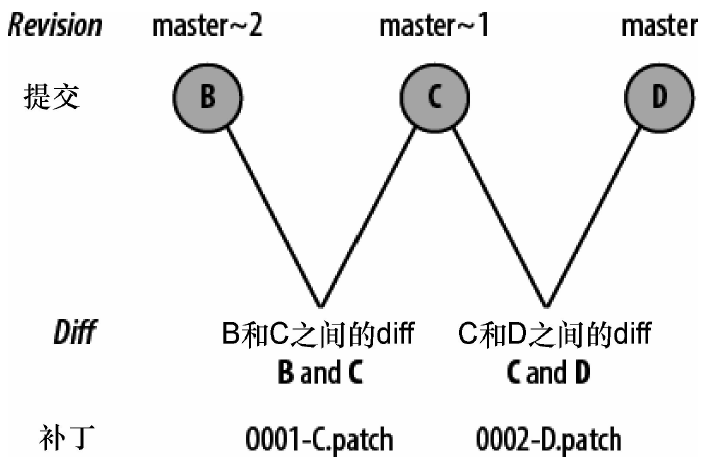
生成补丁
[root@localhost buding]# echo B > file;git add file;git commit -m "B"

[master a8a93f8] B

 1 files changed, 1 insertions(+), 1 deletions(-)

[root@localhost buding]# echo C >> file;git add file;git commit -m "C"

[master 9eae16f] C

 1 files changed, 1 insertions(+), 0 deletions(-)

[root@localhost buding]# echo D >> file;git add file;git commit -m "D"

[master e2f238b] D

 1 files changed, 1 insertions(+), 0 deletions(-)

[root@localhost buding]# cat file

B

C

D

[root@localhost buding]# git show-branch --more=5 master

[master] D

[master^] C

[master~2] B

[master~3] A

[root@localhost buding]# git format-patch -1

0001-D.patch

[root@localhost buding]# git format-patch -2

0001-C.patch

0002-D.patch

[root@localhost buding]# git format-patch -3

0001-B.patch

0002-C.patch

0003-D.patch

[root@localhost buding]# git format-patch master~2..master

0001-C.patch

0002-D.patch

[root@localhost buding]# cat 0001-B.patch

From a8a93f836eacad245b518a3c92f2e17c2fc984a6 Mon Sep 17 00:00:00 2001

From: tong <tong@test.com>

Date: Wed, 28 Feb 2018 12:00:06 +0800

Subject: [PATCH 1/3] B

---

 file |    2 +-

 1 files changed, 1 insertions(+), 1 deletions(-)

diff --git a/file b/file

index f70f10e..223b783 100644

--- a/file

+++ b/file

@@ -1 +1 @@

-A

+B

--

1.7.1
应用补丁
git am /tmp/buding/0001-C.patch
二、钩子
当版本库出现提交或补丁这样的特殊事件时,会触发执行一个或多个任意的脚本。
- 前置(pre)钩子
会在动作完成前调用,要在变更应用前进行批准、拒绝或调整操作,可以使用这种钩子 - 后置(post)钩子
在动作完成之后调用,常用来触发邮件通知或进行额外处理
安装钩子
[root@localhost buding]# cat .git/hooks/pre-commit.sample

#!/bin/sh

......

if git rev-parse --verify HEAD >/dev/null 2>&1

then

	against=HEAD

else

	# Initial commit: diff against an empty tree object

	against=4b825dc642cb6eb9a060e54bf8d69288fbee4904

fi

.........
创建一个钩子
[root@localhost tmp]# mkdir hooktest

[root@localhost tmp]# cd hooktest/

[root@localhost hooktest]# git init

Initialized empty Git repository in /tmp/hooktest/.git/

[root@localhost hooktest]# touch a b c

[root@localhost hooktest]# git add a b c

[root@localhost hooktest]# git commit -m "added a, b, and c"

[master (root-commit) c9ecaec] added a, b, and c

 0 files changed, 0 insertions(+), 0 deletions(-)

 create mode 100644 a

 create mode 100644 b

 create mode 100644 c

创建一个钩子,用来阻止包含“broken”这个词的变更被检入

vim pre-commit

echo "Hello, I'm a pre-commit script!" >&2

if git diff --cached | grep '^\+' | grep -q 'broken';then

    echo "ERROR:Can't commit the word 'broken'" >&2

    exit 1 # reject

fi

exit 0 # accept
GIT使用—补丁与钩子的更多相关文章
- Git打补丁常见问题
Git打补丁常见问题 往往觉得得到某个功能的补丁就觉得这个功能我就已经成功拥有了,可是在最后一步的打补丁的工作也是须要相当慎重的,甚至有可能还要比你获取这个补丁花费的时间还要多.看到好多同行遇到这个问 ...
- Git 打补丁流程
A. 使用git制作补丁时, 需要创建一个新的分支, 修改之后再提交只需要修改需要修改的文件, 并使用git -format-patch -M master 将当前的分支与主分支(master)进行比 ...
- git 的补丁使用方法
1.生成补丁 format-patch可以基于分支进行打包,也可以基于上几次更新内容打包. 基于上几次内容打包 git format-patch HEAD^ 有几个^就会打几个patch,从最近一次 ...
- Git 应用补丁报错 “sha1 information is lacking or useless”
因为现场代码在客户局域网内,不能连接到公司网络,所以一般更新的时候都是打补丁, 然后在客户现场应用补丁,但是最近在应用补丁的时候出现了如下问题: ... fatal: sha1 information ...
- git打补丁、还原补丁
打补丁.还原补丁 1.两个commit间的修改(包含两个commit,<r1>.<r2>表示两个提交的版本号,<r1>是最近提交) git format-patch ...
- git 系统中 post-receive 钩子不能正常执行 git pull 解决方法
有一个需求是本地git在push到远程 git repo 之后,在远程服务器上自动在/dir/foo下执行 git pull 的操作.想来是一个很简单的需求,不就是在远程的 foo.git 仓库中的 ...
- GIT打补丁 - patch和diff应用
一. 准备工作: [root@guangzhou gittest]# git br * master [root@guangzhou gittest]# git chk -b patch-test1 ...
- git 打补丁,即git review之后需要二次修改并提交代码
假如代码已经push上去了,可是当review时,发现有地方需要修改,你可以继续在本地修改你的文件,之后git status查看修改的文件,然后git add修改的文件,此时不能直接git commi ...
- 利用Git钩子实现代码发布
目录 1.什么是git钩子 2.安装一个钩子 3.常用的钩子脚本类型 3.1 客户端钩子 3.1.1 pre-commit 3.1.2 prepare-commit-msg 3.1.3 commit- ...
随机推荐
- Linux 下8种优秀的屏幕录制机
导读 屏幕录制机已经成为常见的和良好的实践来记录一个重要桌面会话,例如,你想玩一个难度较大的游戏,并且向记录是如何完成的,或者你打算创建一个视频教程,入门文章或指南,或任何其他活动和记录你的桌面会话, ...
- hdu1024(最大m串子序列)
m的范围没给,很坑爹 Max Sum Plus Plus Time Limit: 2000/1000 MS (Java/Others) Memory Limit: 65536/32768 K ( ...
- Linux 磁盘管理的命令
Linux 磁盘管理 磁盘分区及挂载: 先查询系统的使用情况: 使用fdisk -l语句 查询结果: 进行磁盘的新建:***添加磁盘时系统必须处于关机状态** 在进行对系统磁盘的使用情况的查询 查 ...
- 2017-2018-2 20165330 实验四《Android程序设计》实验报告
下载与安装Android Studio 下载地址:Download Android Studio 安装教程参考Android开发简易教程 实验内容 码云链接 任务一 参考<Java和Androi ...
- 使用 Apache Commons CLI 解析命令行参数示例
很好的输入参数解析方法 ,转载记录下 转载在: https://www.cnblogs.com/onmyway20xx/p/7346709.html Apache Commons CLI 简介 Apa ...
- git同步遇到报错“fatal: unable to access 'https://github.com/lizhong24/mysite2.git/': Peer reports incompatible or unsupported protocol version.”
git同步遇到报错“fatal: unable to access 'https://github.com/lizhong24/mysite2.git/': Peer reports incompat ...
- LINUX内核分析20133201
实验:通过汇编一个简单的C程序,分析汇编代码理解计算机是如何工作的 学号:20133201 姓名:李冬辉 注: 原创作品转载请注明出处 +<Linux内核分析>MOOC课程http://m ...
- 利用AES算法加密数据
准备工作: 模块安装问题: 首先在python中安装Crypto这个包 但是在安装模块后在使用过程中他会报错 下面是解决方法: pip3 install pycrypto 安装会报错 https:// ...
- 在django项目中手动模拟实现settings的配置
一 文件结构目录 手写配置文件 有两套配置文件,默认配置,用户的配置 如果某个字段,用户配置了,就用用户的,如果没配置,就用默认的 1.1 test import os os.environ.se ...
- 【我的Android进阶之旅】Android目录过长造成错误:Failed to crunch file abc_textfield_search_activated_mtrl_alpha.9.png
一.编译异常描述 一大早来开发一个新的需求,拉取了一个新的分支,然后导入Android Studio之后,编译就报错了,报错如下所示: 错误具体日志如下所示: Information:Gradle t ...