
第8步:安装Oracle
- 安装Oracle
| [root@sgdb1~]# xhost+
[root@sgdb1~]# su - oracle
|
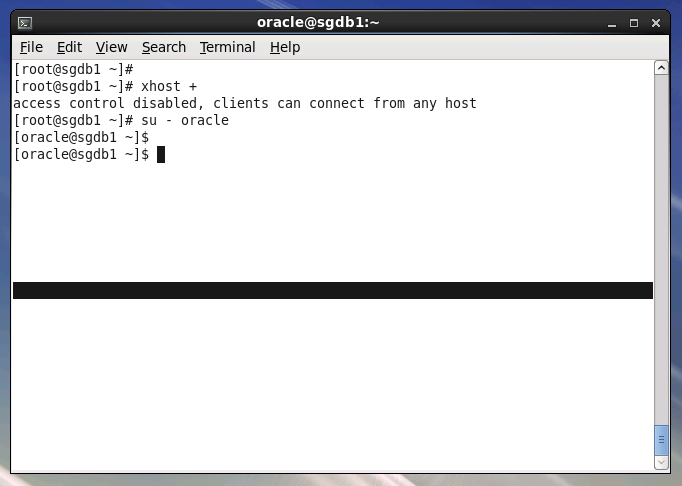
.png)
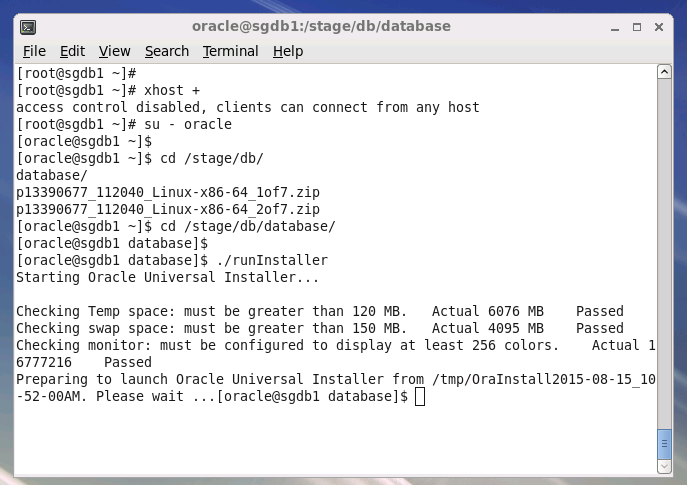
| [oracle @sgdb1~]$ cd database
[oracle @sgdb1~]$ ./runinstaller
|
.png)
- 取消软件更新
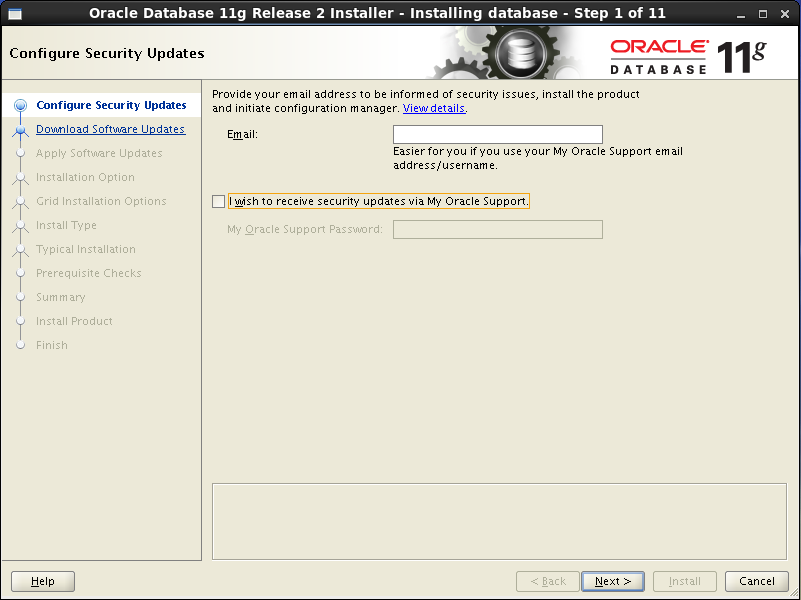
.png)
- 跳过软件更新
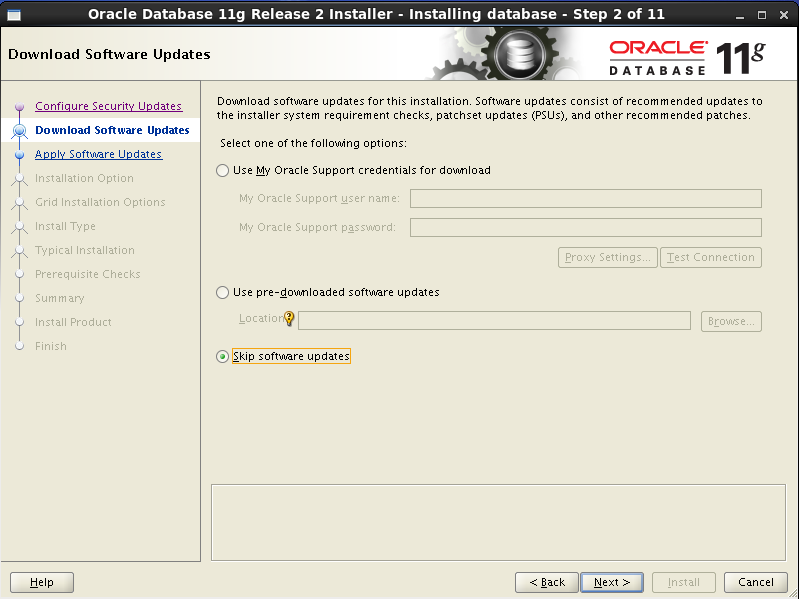
.png)
- Oracle安装选项
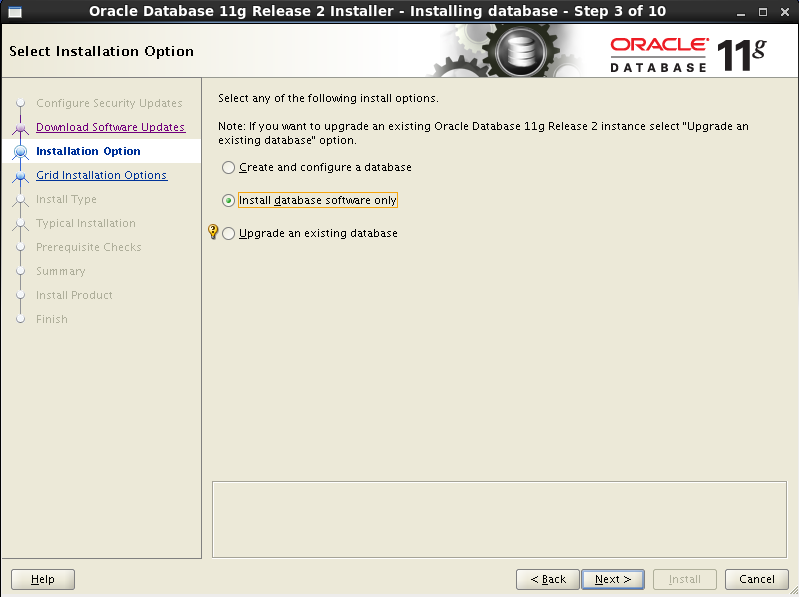
.png)
- Oracle安装方式
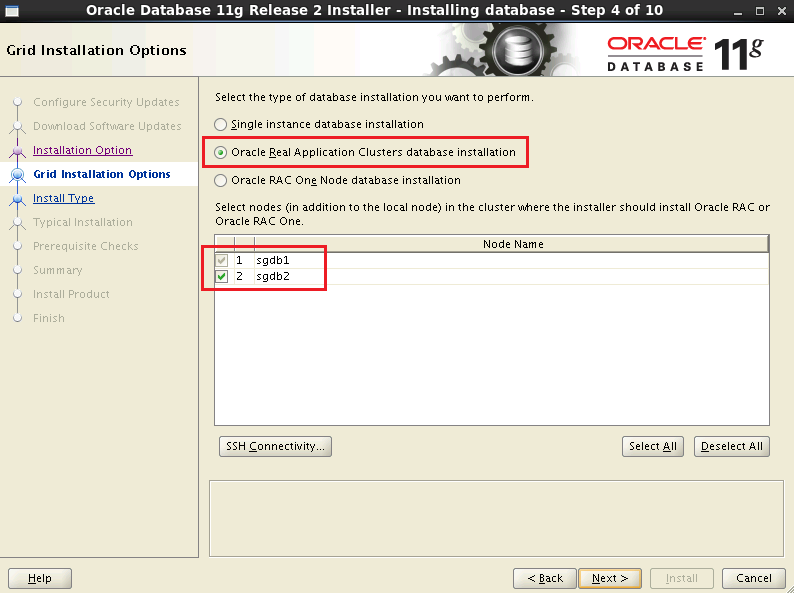
.png)
- Oralce安装语言
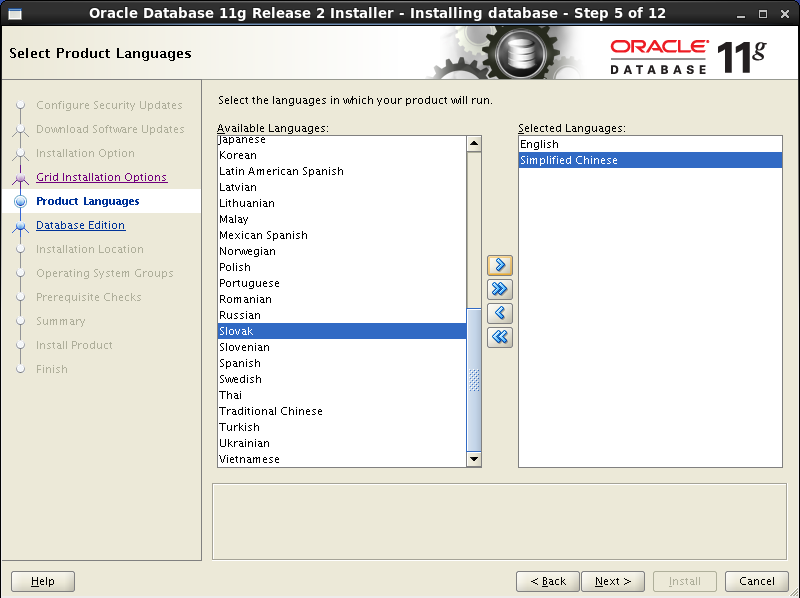
.png)
- 安装版本选择
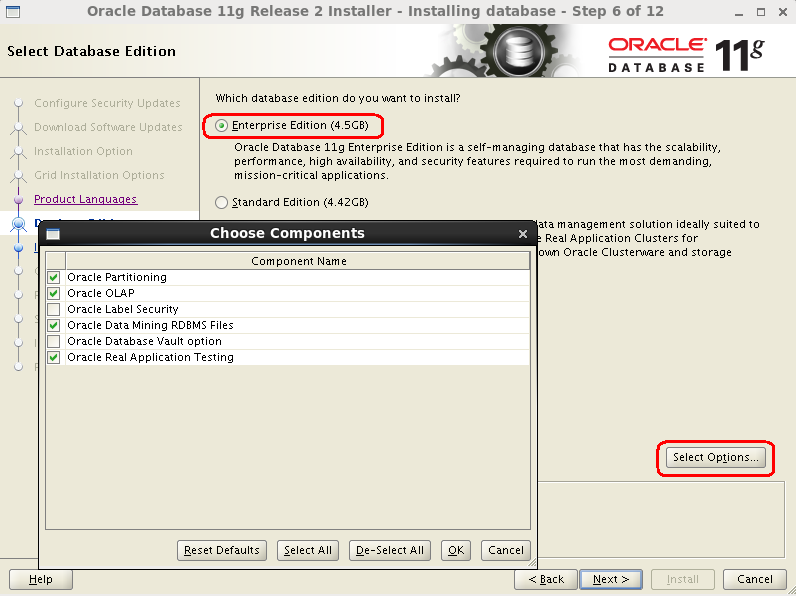
.png)
- 选择安装目录
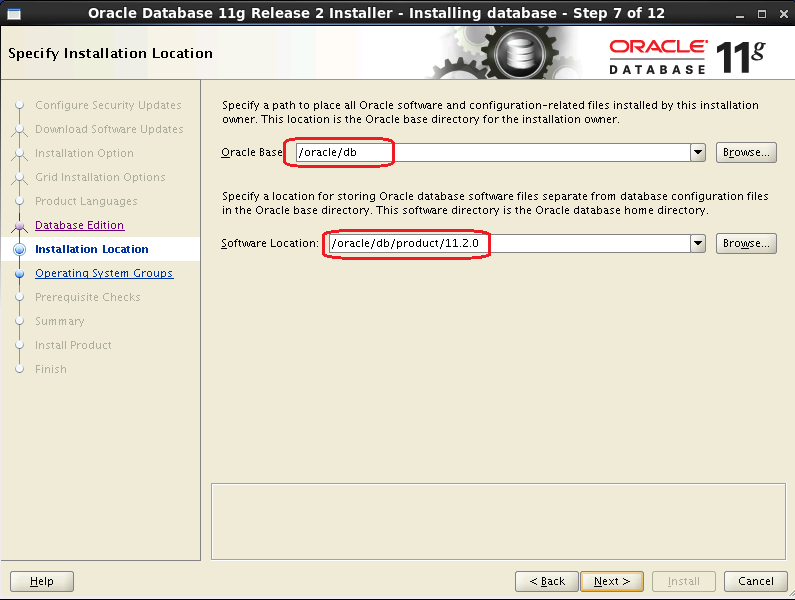
.png)
- 选择组
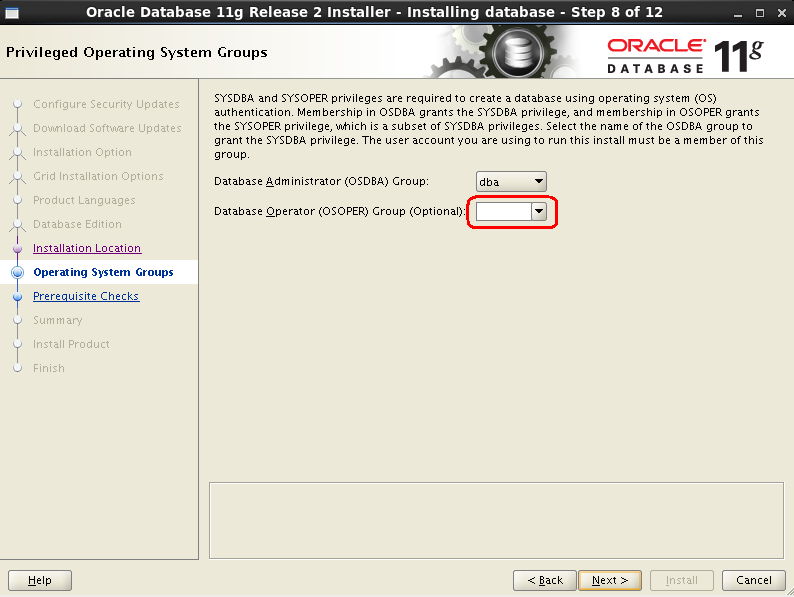
.png)
- 执行安装前检查
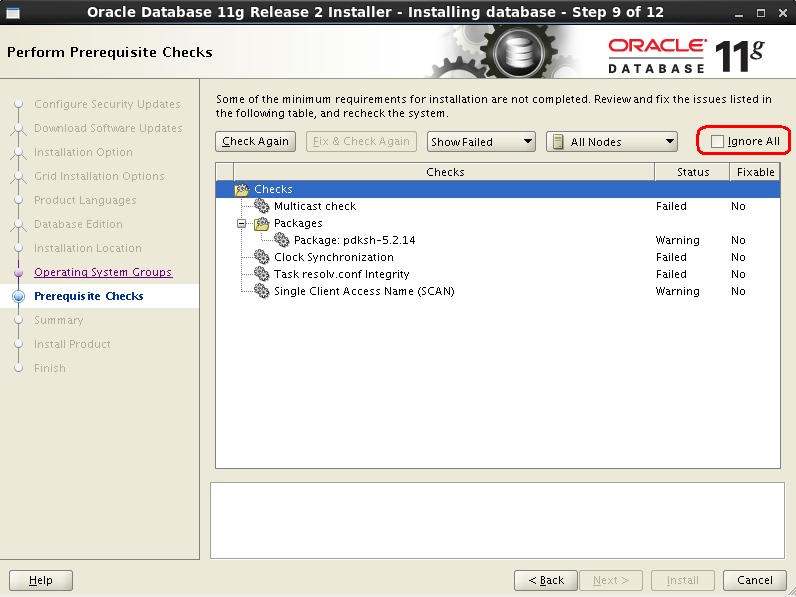
.png)
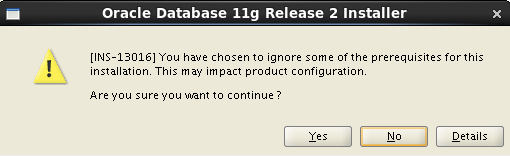
.png)
- 安装信息统计
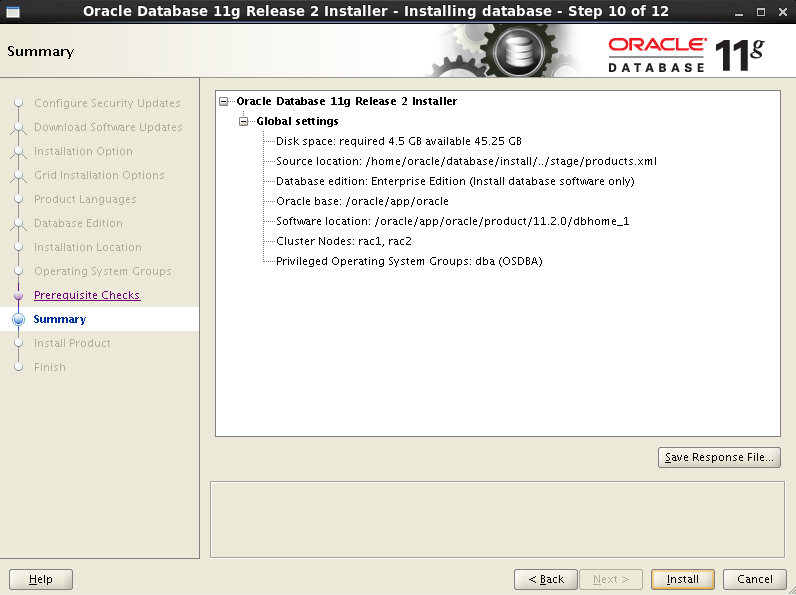
.png)
- 安装结束前,需要执行脚本
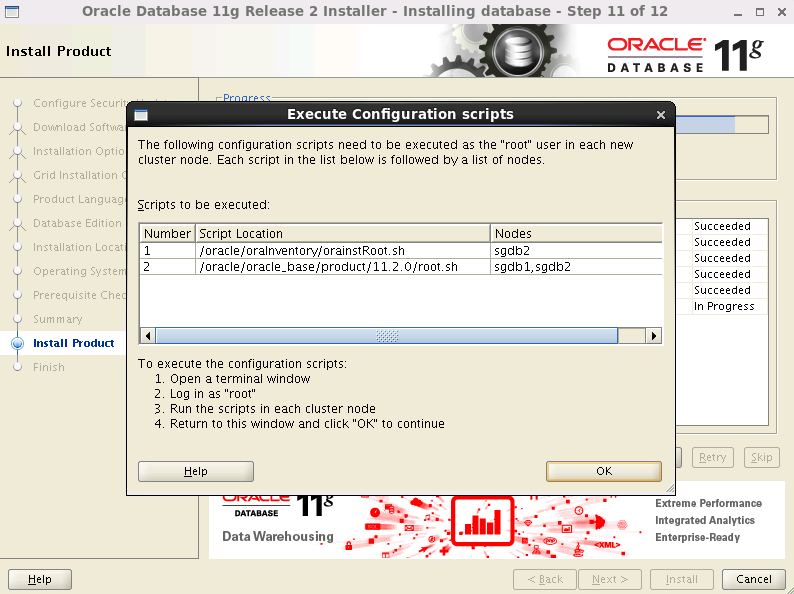
.png)
| [root@sgdb1 ~]# /oracle/oraInventory/orainstRoot.sh
Changing permissions of /oracle/oraInventory.
Adding read,write permissions for group.
Removing read,write,execute permissions for world.
Changing groupname of /oracle/oraInventory to oinstall.
The execution of the script is complete.
|
| [root@sgdb2 ~]# /oracle/oraInventory/orainstRoot.sh
Changing permissions of /oracle/oraInventory.
Adding read,write permissions for group.
Removing read,write,execute permissions for world.
Changing groupname of /oracle/oraInventory to oinstall.
The execution of the script is complete.
|
| [root@sgdb1 ~]# /oracle/db/product/11.2.0/root.sh
Performing root user operation for Oracle 11g
The following environment variables are set as:
ORACLE_OWNER= oracle
ORACLE_HOME= /oracle/db/product/11.2.0
Enter the full pathname of the local bin directory: [/usr/local/bin]:
The contents of "dbhome" have not changed. No need to overwrite.
The contents of "oraenv" have not changed. No need to overwrite.
The contents of "coraenv" have not changed. No need to overwrite.
Entries will be added to the /etc/oratab file as needed by
Database Configuration Assistant when a database is created
Finished running generic part of root script.
Now product-specific root actions will be performed.
Finished product-specific root actions.
|
| [root@sgdb2 ~]# /oracle/db/product/11.2.0/root.sh
Performing root user operation for Oracle 11g
The following environment variables are set as:
ORACLE_OWNER= oracle
ORACLE_HOME= /oracle/db/product/11.2.0
Enter the full pathname of the local bin directory: [/usr/local/bin]:
The contents of "dbhome" have not changed. No need to overwrite.
The contents of "oraenv" have not changed. No need to overwrite.
The contents of "coraenv" have not changed. No need to overwrite.
Entries will be added to the /etc/oratab file as needed by
Database Configuration Assistant when a database is created
Finished running generic part of root script.
Now product-specific root actions will be performed.
Finished product-specific root actions.
|
.png)
第8步:安装Oracle的更多相关文章
- 在Linux上安装Oracle RAC 12 c(12.1) 虚拟机,一步一步向导
Oracle RAC 12 c(12.1)在Linux上安装虚拟机,一步一步向导 今天我们将看到如何安装 12 c版本1 RAC(真正的应用程序集群)数据库2 Linux 64位的虚拟机 使用VMWa ...
- 一步一步搭建 oracle 11gR2 rac+dg之grid安装(四)【转】
一步一步在RHEL6.5+VMware Workstation 10上搭建 oracle 11gR2 rac + dg 之grid安装 (四) 转自 一步一步搭建 oracle 11gR2 rac+d ...
- 一步一步搭建oracle 11gR2 rac+dg之database安装(五)【转】
一步一步在RHEL6.5+VMware Workstation 10上搭建 oracle 11gR2 rac + dg 之database安装 (五) 转自 一步一步搭建oracle 11gR2 ...
- DBArtist之Oracle入门第3步: 安装配置PL/SQL Developer
操作系统: WINDOWS 7 (64位) 数据库: Oracle 11gR2 (64位) PL/SQL Developer : PL/SQL ...
- DBArtist之Oracle入门第1步: 如何安装Oracle 11g
操作系统: Windows 7 数据库 : Oracle 11gR2 第一步: 下载Oracle安装包 Oracle官网: https://www.oracle.com/index.html ...
- 安装oracle
1.安装vnc yum install tigervnc tigervnc-server 2.vncserver启动 3.安装依赖库 yum install -y compat-libstdc* ...
- CentOS7安装Oracle 11gR2 安装
概述 Oracle 在Linux和window上的安装不太一样,公司又是Linux系统上的Oracle,实在没辙,研究下Linux下Oracle的使用,oracle默认不支持CentOS系统安装,所以 ...
- Linux CentOS下安装Oracle
1 .在安装oracle之前首先安装以下组件包,直接输入下列语句安装. yum install binutils* -y yum install compat-lib* -y yum install ...
- linux下一步一步安装禅道项目管理工具
linux下一步一步安装禅道项目管理工具 因为禅道官网的安装教程实在是太简陋了,所以记录在此. 1.安装apache服务 archlinux下直接 sudo pacman -S apache ubun ...
随机推荐
- 算法笔记_056:蓝桥杯练习 未名湖边的烦恼(Java)
目录 1 问题描述 2 解决方案 2.1 递归法 2.2 递推法 1 问题描述 问题描述 每年冬天,北大未名湖上都是滑冰的好地方.北大体育组准备了许多冰鞋,可是人太多了,每天下午收工后,常常一双冰 ...
- RelativeLayout与LinearLayout的比较
转自:http://blog.csdn.net/onepiece2/article/details/26396287 RelativeLayout 是相对布局在页面上相对于页面坐标进行布局设置.比如可 ...
- Nunit2.5.10快速上手(笔记)
1.下载Nunit:http://www.nunit.org/index.php?p=download,下载MSI格式的安装包: 2.安装Nunit,根据提示安装即可,没有什么需要配置的,直接下一步就 ...
- Coreseek-带中文分词的Sphinx
Sphinx并不支持中文分词, 也就不支持中文搜索, Coreseek = Sphinx + MMSEG(中文分词算法) 1.下载 1).到官网下载 2).解压后有三个文件夹 csft-3.2.14: ...
- Linux-查看进程的完整路径
通过ps及top命令查看进程信息时,只能查到相对路径,查不到的进程的详细信息,如绝对路径等.这时,我们需要通过以下的方法来查看进程的详细信息:Linux在启动一个进程时,系统会在/proc下创建一个以 ...
- CSS-常用媒体查询
width:视口宽度.height:视口高度.device-width:渲染表面的宽度(对我们来说,就是设备屏幕的宽度).device-height:渲染表面的高度(对我们来说,就是设备屏幕的高度). ...
- gitlab8.0 一键安装 经过自己测试 发送邮件部分最难搞 国内没有说明白的
邮件发送部分,弄了一天终于弄好啦,FQ过去查的资料,奶奶的无语 Gitlab搭建步骤 一:操作系统环境 CentOS: 6.5 –x86-64 二:安装方式 一种是自定义安装,一种是一键安装 三:自定 ...
- Xcode中利用git源代码版本号控制
git是一个版本号控制系统,能够通过命令行来调用,也有专门的桌面软件.这里主要介绍在Xcode中怎样利用git来进行版本号的控制. 一.创建git源 从Xcode5開始引入了使用git的一些新特性.将 ...
- 静态资源打包:一个javescript 的src引用多个文件,一个link引用多个CSS文件
疑惑描述: 查看了淘宝网的首页源文件,看到这样的一个特殊的 <script src="http://a.tbcdn.cn/??s/kissy/1.1.6/kissy-min.js,p/ ...
- Limu:JavaScript的那些书
博主说:本博客文章来源包括转载,翻译,原创,且在文章内均有标明.鼓励原创,支持创作共享,请勿用于商业用途,转载请注明文章链接.本文链接:http://www.kein.pw/?p=50 去年(2012 ...