
Cisco、HUAWEI、H3c、Firewall等设备配置snmp
配置HUAWEI交换机S1720、S2700、S5700、S6720等型号设备的snmp v3配置
注:此配置来源自官方配置文档
操作步骤
- 配置交换机的接口IP地址,使其和网管站之间路由可达
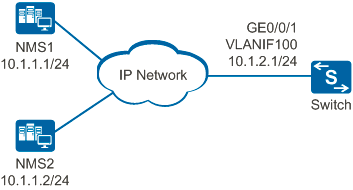 (图1)
(图1) # 按图1所示,配置交换机的接口IP地址。
<HUAWEI> system-view

[HUAWEI] sysname Switch

[Switch] vlan 100

[Switch-vlan100] quit

[Switch] interface gigabitethernet 0/0/1

[Switch-GigabitEthernet0/0/1] port link-type hybrid

[Switch-GigabitEthernet0/0/1] port hybrid pvid vlan 100

[Switch-GigabitEthernet0/0/1] port hybrid untagged vlan 100

[Switch-GigabitEthernet0/0/1] quit

[Switch] interface vlanif 100

[Switch-Vlanif100] ip address 10.1.2.1 24

[Switch-Vlanif100] quit- 配置交换机的SNMP版本为SNMPv3
[Switch] snmp-agent sys-info version v3
- 配置访问权限
# 配置ACL,使NMS2可以管理交换机,NMS1不允许管理交换机。
[Switch] acl 2001

[Switch-acl-basic-2001] rule 5 permit source 10.1.1.2 0.0.0.0

[Switch-acl-basic-2001] rule 6 deny source 10.1.1.1 0.0.0.0

[Switch-acl-basic-2001] quit
# 配置MIB视图。
[Switch] snmp-agent mib-view included isoview iso
# 配置用户组。
[Switch] snmp-agent group v3 admin privacy write-view isoview acl 2001
# 配置用户。
[Switch] snmp-agent usm-user v3 nms2-admin group admin
# 对用户的数据进行认证,认证密码为Authe@1234。
[Switch] snmp-agent usm-user v3 nms2-admin authentication-mode sha

Please configure the authentication password (8-64)

Enter Password:                  //输入认证密码,本例的认证密码为:Authe@1234。

Confirm Password:                //输入认证密码,本例的认证密码为:Authe@1234。
# 对用户的数据进行加密,加密密码为Priva@1234。
[Switch] snmp-agent usm-user v3 nms2-admin privacy-mode aes128

Please configure the privacy password (8-64)

Enter Password:                  //输入加密密码,本例的加密密码为:Priva@1234。

Confirm Password: //输入加密密码,本例的加密密码为:Priva@1234。 - 配置告警主机
[Switch] snmp-agent target-host trap address udp-domain 10.1.1.2 params securityname nms2-admin v3 privacy
- 配置设备管理员联系方式
[Switch] snmp-agent sys-info contact call Operator at 010-12345678
- 配置网管站
在使用SNMPv3版本的NMS上需要设置用户名,选择安全级别。根据不同的安全级别,需要分别设置认证方式、认证密码、加密方式、加密密码等。网管的配置请根据采用的网管产品参考对应的网管配置手册。配置网管站
验证配置结果
配置完成后,可以执行下面的命令,检查配置内容是否生效。
# 查看SNMP版本。

[Switch] display snmp-agent sys-info version

   SNMP version running in the system:

           SNMPv3

# 查看用户组信息。

[Switch] display snmp-agent group admin

   Group name: admin

       Security model: v3 AuthPriv

       Readview: ViewDefault

       Writeview: isoview

       Notifyview :<no specified>

       Storage-type: nonVolatile

       Acl:2001

# 查看MIB视图。

[Switch] display snmp-agent mib-view viewname isoview

   View name:isoview

       MIB Subtree:iso

       Subtree mask:FC(Hex)

       Storage-type: nonVolatile

       View Type:included

       View status:active

# 查看告警的目标主机。

[Switch] display snmp-agent target-host

Target-host NO. 1

-----------------------------------------------------------

  IP-address    : 10.1.1.2

  Source interface : -

  VPN instance  : -

  Security name : nms2-admin

  Port          : 162

  Type          : trap

  Version       : v3

  Level         : Privacy

  NMS type      : NMS

  With ext-vb   : No

-----------------------------------------------------------

# 配置设备管理员联系方式。

[Switch] display snmp-agent sys-info contact

   The contact person for this managed node:

           call Operator at 010-12345678
配置文件
Switch的配置文件
#

sysname Switch

#

vlan batch 100

#

acl number 2001

 rule 5 permit source 10.1.1.2 0

 rule 6 deny source 10.1.1.1 0

#

interface Vlanif100

 ip address 10.1.2.1 255.255.255.0

#

interface GigabitEthernet0/0/1

 port link-type hybrid

 port hybrid pvid vlan 100

 port hybrid untagged vlan 100

#

snmp-agent

snmp-agent local-engineid800007DB0300259E0370C3

snmp-agent sys-info contact call Operator at 010-12345678

snmp-agent sys-info version v3

snmp-agent group v3 admin privacy write-view isoview acl 2001

snmp-agent target-host trap address udp-domain 10.1.1.2 params securityname nms2-admin v3 privacy

snmp-agent mib-view included isoview iso

snmp-agent usm-user v3 nms2-admin

snmp-agent usm-user v3 nms2-admin group admin

snmp-agent usm-user v3 nms2-admin authentication-mode sha cipher %^%#odaJ7R)/O7k$pwQx0qfD0\`u*'GI1(|;ZQXHtzrN%^%#

snmp-agent usm-user v3 nms2-admin privacy-mode aes128 cipher %^%#f*K3/|E6d"SJes9)5naXPIqCTpR"}BUC=yW;!(f9%^%#

#

return
Cisco、HUAWEI、H3c、Firewall等设备配置snmp的更多相关文章
- CISCO、H3C、华为三层交换机端口二三层切换命令对比
很多人都在问H3C是否有像CISCO三层端口切换类似的命令 switchport . 答案是肯定的.有.很多人都不知道. 其实无论是思科还是H3C还是华为他们都有这样的命令.但是在H3C和华为中不经常 ...
- cisco和h3c网络设备中一次性打印全部配置信息
cisco的是全页打印配置信息的命令: #terminal length 0 #show run 华为和h3c的是: >screen-length 0 temporary >display ...
- HUAWEI,H3C 三层交换机 常用命令
<HUAWEI> display ip interface brief,命令全局模式下可以查看所有端口下的ip地址及物理状态display this interface,命令用来显示当前接 ...
- H3C SNMP配置解析
华为交换机snmp配置 snmp-agent /使能snmp服务/snmp-agent local-engineid ...
- PatentTips - SNMP firewall
BACKGROUND OF THE INVENTION [0001] The present invention relates to communications and, more particu ...
- snmp默认团体名/弱口令漏洞及安全加固
0x00基础知识 简单网络管理协议(SNMP)被广泛用于计算机操作系统设备.网络设备等领域监测连接到网络上的设备是否有任何引起管理上关注的情况.在运行SNMP服务的设备上,若管理员配置不当运行默认团体 ...
- cisco和华为的设备如何设置命令不分页显示
作者:邓聪聪 为了登陆设备查看信息没有分页,cisco和华为的设备上可以设置不分页显示 Cisco: > terminal length HUAWEI / H3C: > user-inte ...
- 关于cisco日志的配置
实例: en conf t clock timezone GMT+8 #设置北京时间 exit clock set HH:MM:SS DAY MONTH YEAR #设置当前时间 service ...
- Cisco interview
A. 1. Self-introduction I am Yanlin He . I am a master degree candidate of school of infomation sci ...
随机推荐
- Date类、DateFormat类和Calendar类
1.Date类 常用方法:long getTime():返回1970年1月1日00:00:00以来的毫秒值,把日期对象转换成毫秒值 2.DateFormat类 DateFormat类是日期/时间格式化 ...
- 《转》适用于开发人员的10个最佳ASP.NET的CMS系统
1) mojoportal mojoPortal 是一个开源的.用 C# 编写的站点框架和内容管理系统,可以运行在 Windows 中的 ASP.NET 和 Linux/Mac OS X 中的 Mon ...
- [LintCode] 二叉树的中序遍历
The recursive solution is trivial and I omit it here. Iterative Solution using Stack (O(n) time and ...
- mongodb3.0+ 版本内置数据压缩
mongodb3+版本之后支持zlib和snappy. 创建压缩的集合 db.createCollection( "email", {storageEngine:{wiredTig ...
- Vulkan Tutorial 06 逻辑设备与队列
操作系统:Windows8.1 显卡:Nivida GTX965M 开发工具:Visual Studio 2017 Introduction 在选择要使用的物理设备之后,我们需要设置一个逻辑设备用于交 ...
- 【转】Startssl SSL 证书申请图解
一.什么是 SSL 证书,什么是 HTTPS 网站? SSL证书是数字证书的一种,类似于驾驶证.护照和营业执照的电子副本.SSL证书通过在客户端浏览器和Web服务器之间建立一条SSL安全通道(Secu ...
- IIS网站部署解决报错
入坑2次,这次还是得马上总结起来== 部署网站报以上错 检查方法 步骤一:检查部署的网站路径是否正确 步骤二: 检查Internet信息管理器中,应用程序池的.net Framework版本,选择v4 ...
- Spring 的IOC容器之XML方式
1. Spring 入门 1.1 概述 Spring 是一个分层的 JavaEE 轻量级开源框架; Spring 的核心是控制反转(IOC)和面向切面(AOP); 1.2 特点 方便解耦,简化开发; ...
- 解决:JQuery "Uncaught ReferenceError: $ is not defined"错误
重登了一下emo项目,发现新建朋友功能出了问题:MultiValueDictKeyError.查看了一下报错提示,发现ajax中发送的数据包中少了两个参数. 于是调试js前端,发现console报错: ...
- caffe使用(1)
caffe使用 caffe是一个卓越的CNN框架 caffe源码是Cpp语言的,基于一些外部的库,包括BLAS(矩阵计算),CUDA(GPU驱动),gflags,glog,boost,protobuf ...