
JavaMail实现邮件的发送
1,拷贝mail.jar 和activation.jar到项目中
2,开启邮箱的 POP3/SMTP服务,以QQ邮箱为例
进去QQ邮箱-->设置-->账号-->进行设置如下图
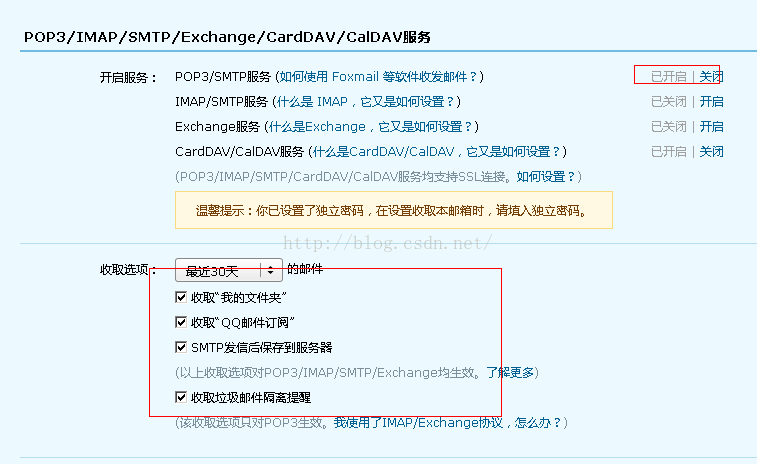
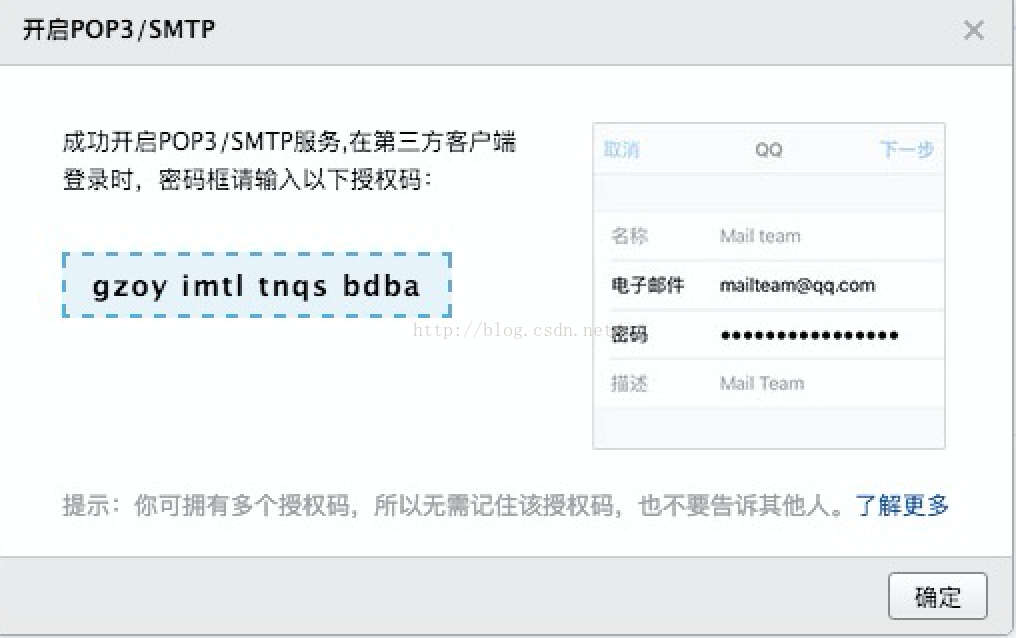
注意:开启完之后,QQ 邮箱会生成一个授权码,在代码里连接邮箱使用这个授权码而不是原始的邮箱密码,这样可以避免使用明文密码。
完整代码示例
public class MailTool {

  public static void main(String[] args) throws MessagingException, GeneralSecurityException {

    Properties props = new Properties();

    // 开启debug调试

    props.setProperty("mail.debug", "true");

    // 发送服务器需要身份验证

    props.setProperty("mail.smtp.auth", "true");

    // 设置邮件服务器主机名

    props.setProperty("mail.host", "smtp.qq.com");

    // 发送邮件协议名称

    props.setProperty("mail.transport.protocol", "smtp");

    MailSSLSocketFactory sf = new MailSSLSocketFactory();

    sf.setTrustAllHosts(true);

    props.put("mail.smtp.ssl.enable", "true");

    props.put("mail.smtp.ssl.socketFactory", sf);

    Session session = Session.getInstance(props);

    Message msg = new MimeMessage(session);

    msg.setSubject("seenews 错误");

    StringBuilder builder = new StringBuilder();

    builder.append("url = " + "http://blog.csdn.net/never_cxb/article/details/50524571");

    builder.append("\n页面爬虫错误");

    builder.append("\n时间 " + TimeTool.getCurrentTime());

    msg.setText(builder.toString());

    msg.setFrom(new InternetAddress("**发送人的邮箱地址**"));

    Transport transport = session.getTransport();

    transport.connect("smtp.qq.com", "**发送人的邮箱地址**", "**你的邮箱密码或者授权码**");

    transport.sendMessage(msg, new Address[] { new InternetAddress("**接收人的邮箱地址**") });

    transport.close();

  }

}
开启 SSL 加密
网上搜了一下,其他比如163、新浪邮箱不需要 SSL 加密,可以放弃 QQ 邮箱。
网上还有种说法,把 smtp.qq.com 换成 smtp.exmail.qq.com也不需要 SSL加密,但是笔者没有run成功。所以还是老老实实加上 SSL 加密吧。
下面的代码开启了 SSL 加密
MailSSLSocketFactory sf = new MailSSLSocketFactory();

sf.setTrustAllHosts(true);

props.put("mail.smtp.ssl.enable", "true");

props.put("mail.smtp.ssl.socketFactory", sf);
注意:如果发送内容有敏感词汇,QQ会自动把邮件放入垃圾箱。
下面是使用163邮箱发送邮件的代码示例:
public static void sendEmail(User user)

			throws MessagingException, GeneralSecurityException {

		Properties prop = new Properties();

        prop.setProperty("mail.transport.protocol", "smtp");

        prop.setProperty("mail.smtp.host", "smtp.163.com");

        prop.setProperty("mail.smtp.auth", "true");

        prop.setProperty("mail.debug", "true");

        Authenticator authenticator = new PopAuthenticator("邮箱登录用户名", "授权码");

        //创建会话

        Session session = Session.getInstance(prop,authenticator);

        //填写信封写信

        Message msg = new MimeMessage(session);

        msg.setFrom(new InternetAddress("********@163.com"));   //发件人

        msg.setRecipient(RecipientType.TO, new InternetAddress(user.getEmail()));   //收件人,可以是任意的邮箱账号,可以不是163邮箱

        msg.setSubject("时尚轻纺");

        msg.setText("尊敬的"+user.getUsername()+"用户,您好,********");

        //验证用户名密码发送邮件

        Transport transport = session.getTransport();

        transport.send(msg);

	}
注意:当项目发布到云服务器的时候,我是发布到腾讯云,不能使用域名 "smtp.163.com" 连接到163邮箱服务器,这时候要使用IP地址连接
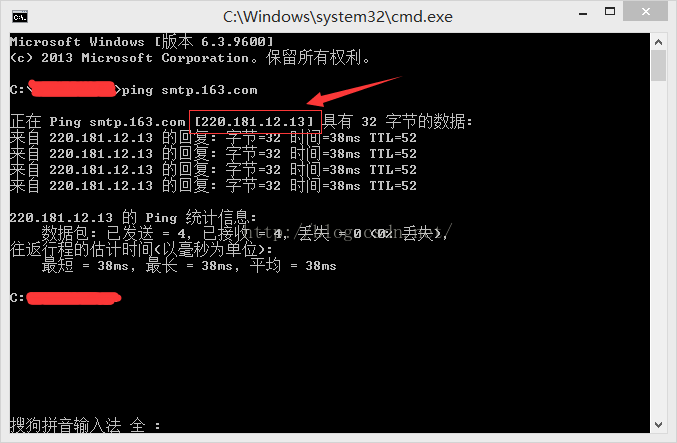
修改为 prop.setProperty("mail.smtp.host", "220.181.12.13");
这样云服务器就可以连上邮箱服务器了。
参考文章:http://blog.csdn.net/lcy_dandan/article/details/46380933
关注公众号,分享干货,讨论技术

JavaMail实现邮件的发送的更多相关文章
- 使用JavaMail发送邮件-从FTP读取图片并添加到邮件正文发送
业务分析: 最近工作需要,需要从FTP读取图片内容,添加到邮件正文发送.发送邮件正文,添加附件采用Spring的MimeMessageHelper对象来完成,添加图片也将采用MimeMessageHe ...
- Java 基于JavaMail的邮件发送
http://blog.csdn.net/xietansheng/article/details/51673073 http://blog.csdn.net/xietansheng/article/d ...
- Spring MVC+javamail实现邮件发送
Spring MVC+javamail实现邮件发送 开启邮箱的POP3/SMTP服务(这里以QQ邮箱举例) 设置 --> 账户 -- > 开启POP3/STMP服务,然后得到一个授权码. ...
- Springboot+Javamail实现邮件发送
Springboot+Javamail实现邮件发送 使用的是spring-context-support-5.2.6.RELEASE.jar里的javamail javamail 官方文档:javam ...
- 使用JavaMail创建邮件发送邮件
一.RFC882文档简单说明 RFC882文档规定了如何编写一封简单的邮件(纯文本邮件),一封简单的邮件包含邮件头和邮件体两个部分,邮件头和邮件体之间使用空行分隔. 邮件头包含的内容有: from字段 ...
- JavaWeb学习总结(五十二)——使用JavaMail创建邮件和发送邮件
一.RFC882文档简单说明 RFC882文档规定了如何编写一封简单的邮件(纯文本邮件),一封简单的邮件包含邮件头和邮件体两个部分,邮件头和邮件体之间使用空行分隔. 邮件头包含的内容有: from字段 ...
- (转载)JavaWeb学习总结(五十二)——使用JavaMail创建邮件和发送邮件
博客源地址:http://www.cnblogs.com/xdp-gacl/p/4216311.html 一.RFC882文档简单说明 RFC882文档规定了如何编写一封简单的邮件(纯文本邮件),一封 ...
- (转载)JavaWeb学习总结(五十一)——邮件的发送与接收原理
博客源地址:http://www.cnblogs.com/xdp-gacl/p/4209586.html 一. 邮件开发涉及到的一些基本概念 1.1.邮件服务器和电子邮箱 要在Internet上提供电 ...
- JavaWeb学习总结(五十一)——邮件的发送与接收原理
一. 邮件开发涉及到的一些基本概念 1.1.邮件服务器和电子邮箱 要在Internet上提供电子邮件功能,必须有专门的电子邮件服务器.例如现在Internet很多提供邮件服务的厂商:sina.sohu ...
随机推荐
- metamask注记词
leaf orbit poet zebra toy day put dinosaur review cool pluck throw(m) 一个钱包地址 里面有多个账号 菲苾代表了不同网络
- HADOOP docker(四):安装hive
1.hive简介2.安装hive2.1 环境准备2.1.1 下载安装包2.1.2 设置hive用户的环境变量2.1.3 hive服务端配置文件2.1.4 hive客户端配置文件2.1.4 分发hive ...
- js经典试题之数组与函数
js经典试题之数组与函数 1:列举js的全局函数? 答案:JavaScript 中包含以下 7 个全局函数escape( ).eval( ).isFinite( ).isNaN( ).parseFlo ...
- 详解实现Android中实现View滑动的几种方式
注: 本文提到的所有三种滑动方式的完整demo:ScrollDemo 1. 关于View我们需要知道的 (1)什么是View? Android中的View类是所有UI控件的基类(Base class) ...
- iOS- 网络访问两种常用方式【GET & POST】实现的几个主要步骤
1.前言 上次,在博客里谈谈了[GET & POST]的区别,这次准备主要是分享一下自己对[GET & POST]的理解和实现的主要步骤. 在这就不多废话了,直接进主题,有什么不足的欢 ...
- Python实现FTP服务功能
本文从以下三个方面, 阐述Python如何搭建FTP服务器 一. Python搭建FTP服务器 二. FTP函数释义 三. 查看目录结构 四. 上传下载程序 一. Python搭建FTP服务器 1. ...
- scala中的模式匹配
基本语法 变量 match { case 值1 => 代码 case 值2 => 代码 ... case 值N if (...) => 代码 case _ => 代码 } 常量 ...
- 高性能python
参考来源:Python金融大数据分析第八章 提高性能有如下方法 1.Cython,用于合并python和c语言静态编译泛型 2.IPython.parallel,用于在本地或者集群上并行执行代码 3. ...
- JavaScript中setInterval常见的问题(setInterval第一个参数加引号与不加引号区别)
- 如何在存储过程中执行set命令 我来答
1.EXEC使用EXEC命令两种用种执行存储程另种执行态批处理所讲都第二种用 面先使用EXEC演示例,代码1DECLARE @TableName VARCHAR(50),@Sql NVARCHAR ( ...