
kindEditor富文本编辑器
用法参考:http://kindeditor.net/docs/usage.html
一、使用
. 修改HTML页面
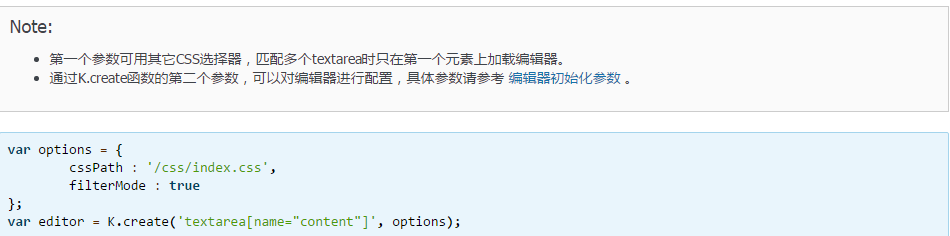
- 在需要显示编辑器的位置添加textarea输入框。
<textarea id="editor_id" name="content" style="width:700px;height:300px;">
<strong>HTML内容</strong>
</textarea>

- 在该HTML页面添加以下脚本。
<script charset="utf-8" src="/editor/kindeditor.js"></script>

<script charset="utf-8" src="/editor/lang/zh-CN.js"></script>

<script>

        KindEditor.ready(function(K) {

                window.editor = K.create('#editor_id');

        });

</script>
. 获取HTML数据
// 取得HTML内容

html = editor.html();

// 同步数据后可以直接取得textarea的value

editor.sync();

html = document.getElementById('editor_id').value; // 原生API

html = K('#editor_id').val(); // KindEditor Node API

html = $('#editor_id').val(); // jQuery

// 设置HTML内容

editor.html('HTML内容');
5.配置项
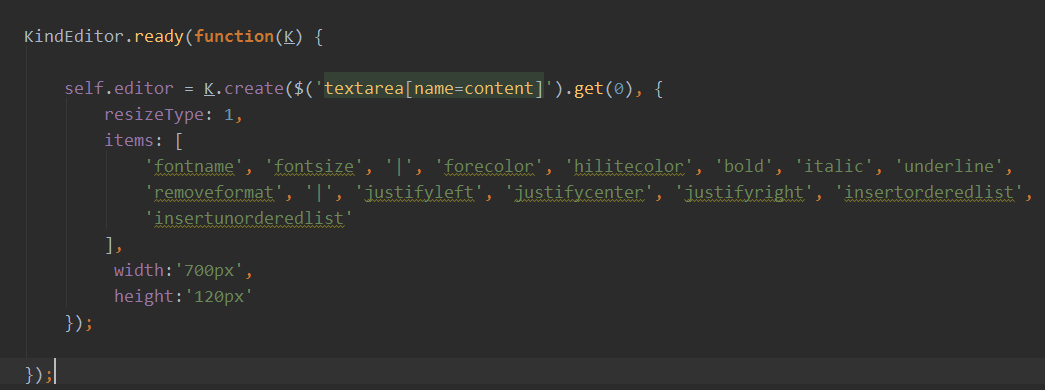
items
配置编辑器的工具栏,其中”/”表示换行,”|”表示分隔符。
- 数据类型: Array
- 默认值:
[

        'source', '|', 'undo', 'redo', '|', 'preview', 'print', 'template', 'code', 'cut', 'copy', 'paste',

        'plainpaste', 'wordpaste', '|', 'justifyleft', 'justifycenter', 'justifyright',

        'justifyfull', 'insertorderedlist', 'insertunorderedlist', 'indent', 'outdent', 'subscript',

        'superscript', 'clearhtml', 'quickformat', 'selectall', '|', 'fullscreen', '/',

        'formatblock', 'fontname', 'fontsize', '|', 'forecolor', 'hilitecolor', 'bold',

        'italic', 'underline', 'strikethrough', 'lineheight', 'removeformat', '|', 'image', 'multiimage',

        'flash', 'media', 'insertfile', 'table', 'hr', 'emoticons', 'baidumap', 'pagebreak',

        'anchor', 'link', 'unlink', '|', 'about'

]

二、常见问题
1.kindeditor配合requirejs使用时,ready失效
2.kindeditor异步渲染dom才出现富文本,ready失效
解析:
KindEditor.ready(function(K)) {

        K.create('#editor_id');

}
他自己提供的ready方法一般情况下都不会有问题。
首先,kindeditor.ready()方法想要在dom加载完成后创建富文本框,调用的是dom load.但并不支持异步。
问题1,使用requirejs引入的,在执行KindEditor.ready代码的时候dom结构早就完成了,动态插入的script代码不会再次触发DOMContentLoaded事件,因此KindEditor.ready注册的回调永远不会被执行,富文本框当然不会出现啦。解决方案很简单,不要使用KinkEditor.ready,直接KindEditor.create(...就好啦。
问题2,富文本编辑应是在异步请求之后渲染的,
三 、常用方法
afterfocus,self.editor.text(),self.editor.html()
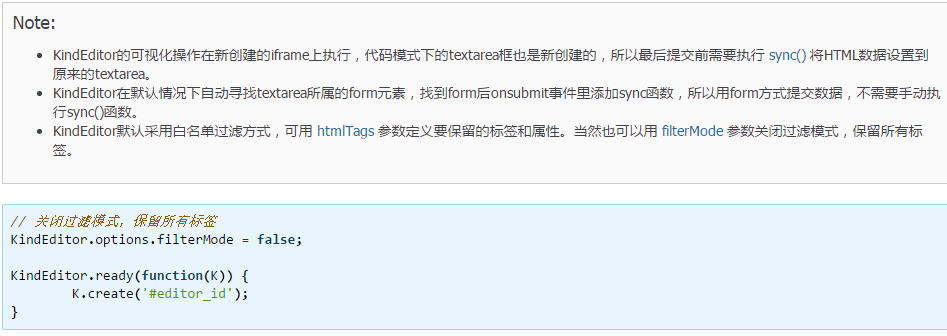
KindEditor.ready(function(K) {
self.editor = K.create('textarea[name="intro"]', {
resizeType : 1,
items : [
'fontname', 'fontsize', '|', 'forecolor', 'hilitecolor', 'bold', 'italic', 'underline',
'removeformat', '|', 'justifyleft', 'justifycenter', 'justifyright', 'insertorderedlist',
'insertunorderedlist'
],
afterfocus: function(){
},
afterCreate: function(){this.sync();},
afterBlur : function(){
this.sync();
self.isEditorEmpty();
}
});
});
isEditorEmpty: function(){
var self = this;
var _intro = self.editor.text();//获取编辑器内容
if(!$.trim(_intro)){
$('.intro-error').text('请输入公司简介');
return false;
}else{
$('.intro-error').text('');
return true;
}
},
kindEditor富文本编辑器的更多相关文章
- django的admin或者应用中使用KindEditor富文本编辑器
由于django后台管理没有富文本编辑器,看着好丑,展示出来的页面不美观,无法做到所见即所得的编辑方式,所以我们需要引入第三方富文本编辑器. 之前找了好多文档已经博客才把这个功能做出来,有些博客虽然写 ...
- KindEditor富文本编辑器使用
我的博客本来打算使用layui的富文本编辑器,但是出了一个问题,无法获取编辑器内容,我参考官方文档,获取内容也就那几个方法而已,但是引入进去后始终获取的值为空,百度和bing都试过了,但是始终还是获取 ...
- kindeditor富文本编辑器初步使用教程
下载kindeditor 可以选择去官网下载(http://kindeditor.net/down.php),不过要FQ:或者直接CSDNhttp://download.csdn.net/downlo ...
- (转)淘淘商城系列——KindEditor富文本编辑器的使用
http://blog.csdn.net/yerenyuan_pku/article/details/72809794 通过上文的学习,我们知道了怎样解决KindEditor富文本编辑器上传图片时的浏 ...
- (转)学习淘淘商城第二十二课(KindEditor富文本编辑器的使用)
http://blog.csdn.net/u012453843/article/details/70184155 上节课我们一起学习了怎样解决KindEditor富文本编辑器上传图片的浏览器兼容性问题 ...
- coding++:快速构建 kindeditor 富文本编辑器(一)
此案例 demo 为 SpringBoot 开发 1.官网下载相关资源包:http://kindeditor.net/down.php 2.编写页面(引入相关JS) <!DOCTYPE html ...
- springboot中使用kindeditor富文本编辑器实现博客功能
kindeditor在之前已经用过,现在在springboot项目中使用.并且也在里面使用了图片上传以及回显等功能. 其实主要的功能是图片的处理:kindeditor对输入的内容会作为html标签处理 ...
- kindEditor 富文本编辑器 使用介绍
第一版:存放位置: ---->把该创建的文件包放到javaWeb 过程的 WEB_INF 下:如图所示. 第二步:< kindEditor 插件的引用> :JS引用 <scr ...
- 20180310 KindEditor 富文本编辑器
问题: 如何判断富文本编辑器文本内容非空 错误的办法,采用js 对控件本身的txt ID 号抓取获取值,由于加载富文本编辑器时,界面的ID 已经经过了修改或者可以用转换来说,所以抓取是无效果的. 需要 ...
- ASP.NET网站使用Kindeditor富文本编辑器配置步骤
1. 下载编辑器 下载 KindEditor 最新版本,下载页面: http://www.kindsoft.net/down.php 2. 部署编辑器 解压 kindeditor-x.x.x.zip ...
随机推荐
- mysql 删除表
删除表 DROP TABLE 表名;
- SAP GUI常用快捷键
F1:帮助 F2:双击.比如TC行的双击,LIST行的双击等 F3:后退(Back),后退按钮 Shift+F3:退出(Exit),退出按钮 F4:搜索帮助 F8:执行 F10:菜单 F12:取消(C ...
- unittest框架(一)用例管理
在unittest框架的自动化接口测试中,可以用yaml文件来管理用例,这样一方面,不会像excel管理用例那么死板:另一方面,数据读取出来就是一个字典,便于取值,用起来更灵活. 首先,需要安装一个模 ...
- 朴素贝叶斯算法原理及Spark MLlib实例(Scala/Java/Python)
朴素贝叶斯 算法介绍: 朴素贝叶斯法是基于贝叶斯定理与特征条件独立假设的分类方法. 朴素贝叶斯的思想基础是这样的:对于给出的待分类项,求解在此项出现的条件下各个类别出现的概率,在没有其它可用信息下,我 ...
- java序列化与反序列化(转)
Java序列化与反序列化是什么?为什么需要序列化与反序列化?如何实现Java序列化与反序列化?本文围绕这些问题进行了探讨. 1.Java序列化与反序列化 Java序列化是指把Java对象转换为字节序列 ...
- VS2010/MFC编程入门之十七(对话框:文件对话框)
上一讲鸡啄米介绍的是消息对话框,本节讲解文件对话框.文件对话框也是很常用的一类对话框. 文件对话框的分类 文件对话框分为打开文件对话框和保存文件对话框,相信大家在Windows系统中经常见 ...
- nodejs+express工程 在npm install之后或使用npm install bootstrap命令安装bootstrap之后
nodejs+express工程 在npm install之后或使用npm install bootstrap命令安装bootstrap之后引入bootstrap文件 如果你的静态资源存放在多个目录下 ...
- RESTful源码学习笔记之RPC和Restful深入理解
以下资料搜集自网络 0x00 RPC RPC 即远程过程调用(Remote Procedure Call Protocol,简称RPC),像调用本地服务(方法)一样调用服务器的服务(方法).通常的实现 ...
- bzoj2456 / P2397 yyy loves Maths VI (mode)
P2397 yyy loves Maths VI (mode) 神奇的摩尔投票法(大雾) 保证众数个数大于一半. 两两相消,剩下的那个必定是众数. 我们只要开2个变量,一个存个数,一个存值即可. (l ...
- Ubuntu下dlib库编译安装
安装libboost 按照dlib的说明安装始终不成功,参考machine learning is fun作者的指导installing_dlib_on_macos_for_python.md,需要首 ...