
演示-JQuery属性选择器
 <!DOCTYPE html PUBLIC "-//W3C//DTD XHTML 1.0 Transitional//EN" "http://www.w3.org/TR/xhtml1/DTD/xhtml1-transitional.dtd">

 <html xmlns="http://www.w3.org/1999/xhtml">

 <head>

 <meta http-equiv="Content-Type" content="text/html; charset=utf-8" />

 <title>index</title>

 <script type="text/javascript" src="jquery-3.1.1.min.js">

 </script>

 <script type="text/javascript">

     $(function(){

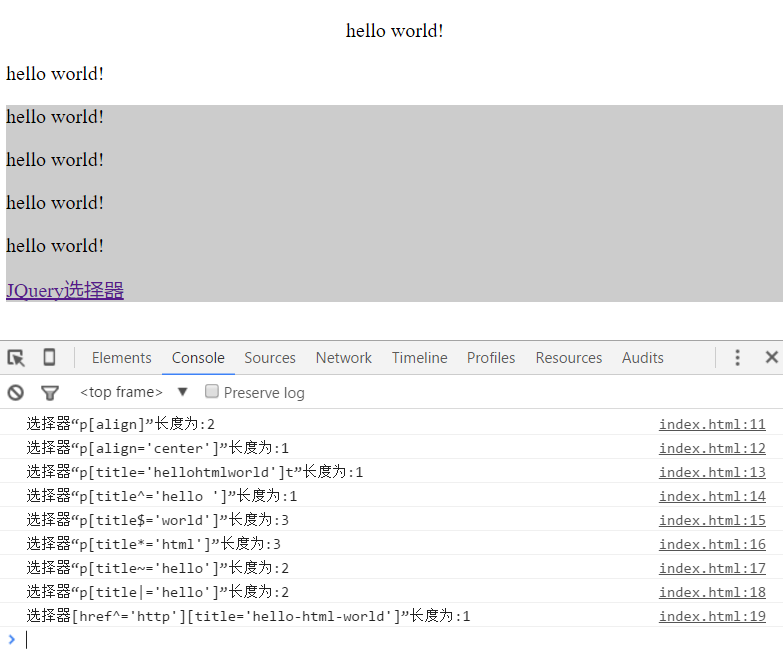
             console.log("选择器“p[align]”长度为:"+$("p[align]").length);

             console.log("选择器“p[align='center']”长度为:"+$("p[align='center']").length);

             console.log("选择器“p[title='hellohtmlworld']t”长度为:"+$("p[title='hellohtmlworld']").length);

             console.log("选择器“p[title^='hello ']”长度为:"+$("p[title^='hello ']").length);

             console.log("选择器“p[title$='world']”长度为:"+$("p[title$='world']").length);

             console.log("选择器“p[title*='html']”长度为:"+$("p[title*='html']").length);

             console.log("选择器“p[title~='hello']”长度为:"+$("p[title~='hello']").length);

             console.log("选择器“p[title|='hello']”长度为:"+$("p[title|='hello']").length);

             console.log("选择器[href^='http'][title='hello-html-world']”长度为:"+$("[href^='http'][title='hello-html-world']").length);

         }

     );

 </script>

 </head>

 <body>

 <div>

     <p align="center">hello world!</p>

     <p align="">hello world!</p>

 </div>

 <div class="test" id="test" align="" style="background-color:#CCCCCC">

     <p class="test" title="hello">hello world!</p>

     <p class="test" title="hello html world">hello world!</p>

     <p class="test1" title="hellohtmlworld">hello world!</p>

     <p class="test1" title="hello-html-world">hello world!</p>

     <a class="test1" title="hello-html-world" href="http://www.cnblogs.com/yw0219/p/5928955.html">JQuery选择器</a>

 </div>

 </body>

 </html>
结果:
演示-JQuery属性选择器的更多相关文章
- jquery 属性选择器
jquery 属性选择器 第一种根据属性选择E[attr] $("[title]").click().......... 即选择所有元素内 属性带有title的元素即<l ...
- jquery-6 jquery属性选择器
jquery-6 jquery属性选择器 一.总结 一句话总结:jquery操作就是选择器加jquery对象的各种方法. 1.大量操作样式用什么方式? 大批量样式通过加类和减类完成 2.jquery中 ...
- jquery属性选择器(同时匹配多个条件)
<!DOCTYPE html PUBLIC "-//W3C//DTD XHTML 1.0 Transitional//EN" "http://www.w3.org/ ...
- jquery属性选择器
<!DOCTYPE html PUBLIC "-//W3C//DTD XHTML 1.0 Transitional//EN" "http://www.w3.org/ ...
- jquery属性选择器(匹配具有指定属性的元素)
<!DOCTYPE html PUBLIC "-//W3C//DTD XHTML 1.0 Transitional//EN" "http://www.w3.org/ ...
- jQuery属性选择器.attr()和.prop()两种方法
在判断表单单选框是否被选中时,通常会想到使用$('#checkbox').attr('checked')来判断,但在一些情况下,你会发现这种方法并不管用,得到的是undefined. 原来jQuery ...
- Jquery 属性选择器&设置元素属性
什么是属性选择器呢?感觉理解起来有点难,举个例子就很容易明白了,<div id="ajaxa"></div>这里的id就是属性,这下就很容易理解了, jqu ...
- jquery属性选择器中|value和^value的区别
jquery的属性选择中有两个比较混淆:一个是[attribute^value], 另一个是[attribute|value]. 先看解释: [attribute^value]:选取属性的值以valu ...
- Jquery属性选择器(同时匹配多个条件,与或非)(附样例)
1. 前言 为了处理除了两项不符合条件外的选择,需要用到jquery选择器的多个条件匹配来处理,然后整理了一下相关的与或非的条件及其组合. 作为笔记记录. 2. 代码 <!DOCTYPE htm ...
随机推荐
- 微信公众号支付安卓和WP支付成功,苹果不能支付!
花了几天时间,终于搞好了,代码是从官网上下的.NET DEMO的代码改的,测试的时候发现安卓和WP手机都能进行支付,但是苹果的怎么支付都支付不了,主要是在下面这个界面 点支付按钮就是苹果支付不了,其他 ...
- Azure Redis
https://azure.microsoft.com/en-us/blog/mvc-movie-app-with-azure-redis-cache-in-15-minutes/ https://a ...
- codeblocks主题修改(vim)
codeblocks的配置文件是default.conf,在Windows系统下,该文件在C:\Documents and Settings\Administrator\Application Dat ...
- 去除img、video之间默认间隔的几种方法
img,video{ /*第1种方式*/ border: ; vertical-align: bottom; /*第2种方式*/ outline-width:0px; vertical-align:t ...
- pssh安装和使用
前提,安装了python.pssh安装下载pssh-2.2.2.tar.gztar zxvf pssh-2.2.2.tar.gzcd pssh-2.2.2python setup.py buildpy ...
- svn 版本导致
Malformed network data svn: Unable to parse URL '/svn/PROJECT/13.深大出版社/trunk/sdcbs/' svn 版本导致 1 ...
- FreeRTOS 任务栈大小确定及其溢出检测
以下转载自安富莱电子: http://forum.armfly.com/forum.php FreeRTOS 的任务栈设置不管是裸机编程还是 RTOS 编程,栈的分配大小都非常重要. 局部变量,函数调 ...
- 访问控制列表-基于IP
[总结] 在交换机1上划分vlan然后把fa0/1接口设置为trunk周围几个接口都设置为access.在RA上划分四个逻辑口(就是小数点的那些接口).然后RA和RB都做ospf就可以ping同. 最 ...
- MySQL基本命令和操作
开启和关闭mysql服务 Windows下开启和关闭mysql服务 net start mysql # 开启mysql服务 net stop mysql # 关闭mysql服务 没有重启mysql服务 ...
- java的static块执行时机<转>
一.误区:简单认为JAVA静态代码块在类被加载时就会自动执行.证错如下: class MyClass1 { static {//静态块 System.out.println("static ...